
Launch on Meteora DBC, on your own curve or a launchpad
How do I launch a token on Meteora DBC with Solz.app?
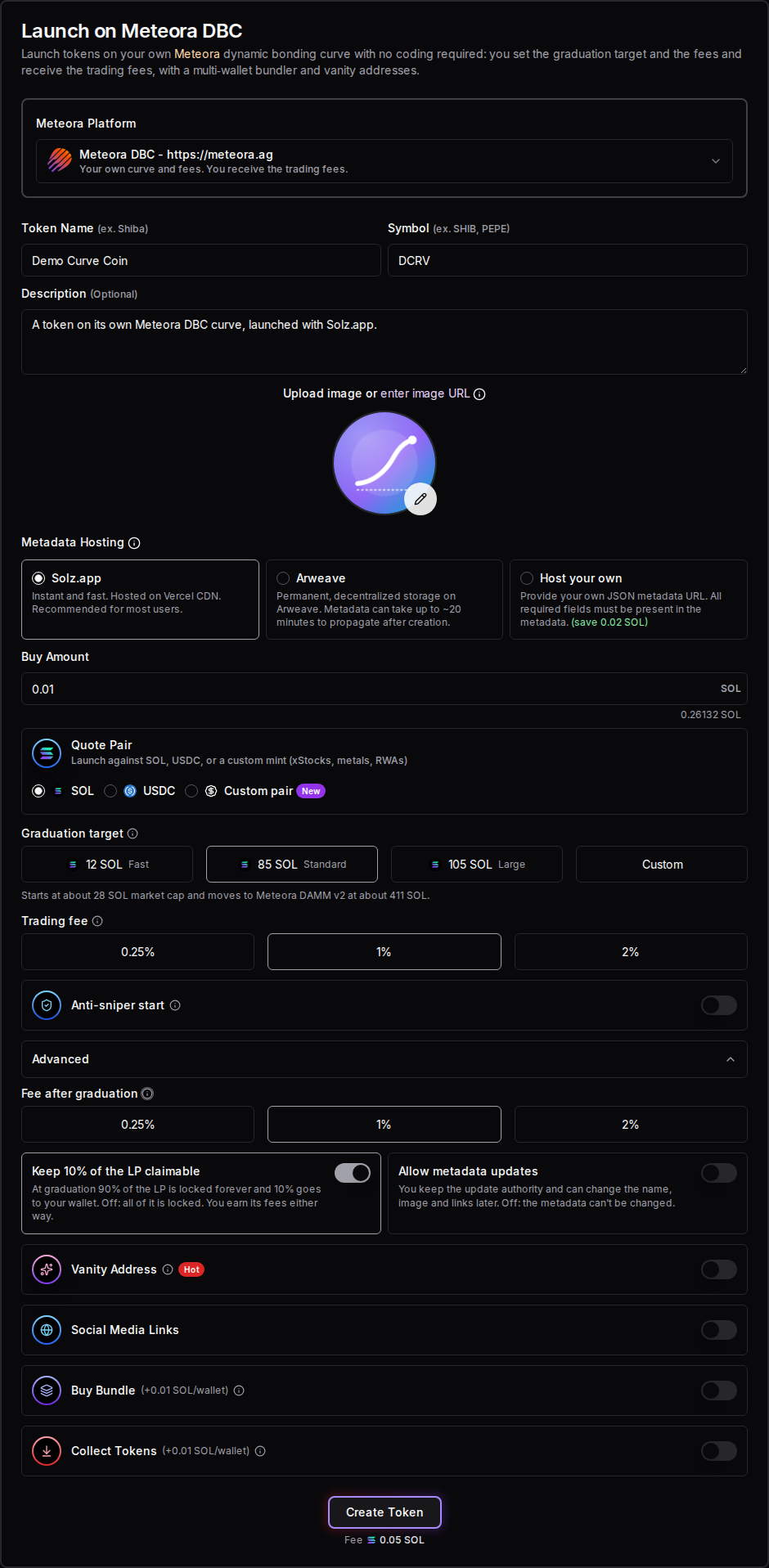
Open Launch on Meteora DBC on Solz.app and choose where to launch: your own curve, a launchpad, or Bags. Enter a name, symbol and image and your buy, then set the curve and fees if it's your own. Click Create Token and approve. The Solz.app fee is 0.05 SOL, and rent and your buy come on top.
Meteora's Dynamic Bonding Curve (DBC) works like Pump.fun's: a token trades on a curve until it raises its target, then moves to a Meteora DAMM v2 pool. On your own curve, you choose the target and the fees, and you earn the trading fees. On a launchpad, its owner chose them, and you share the fees with them. To run a launchpad yourself, create a Meteora launchpad.
Prerequisites
- A Solana wallet such as Phantom, Solflare or Backpack.
- About 0.105 SOL on your own curve, or 0.095 SOL plus the launch fee on a launchpad, plus your buy and its trading fee. Solz.app checks this before it builds the launch.
- A token name, a symbol and an image.
- For a bundle: wallets in Manage X Wallets, each holding more than its buy.
- For a vanity address: a private key from the Vanity Address Generator.
Steps to launch on Meteora DBC
- Open the tool and connect your wallet. Go to Launch on Meteora DBC, under Meteora in the sidebar.
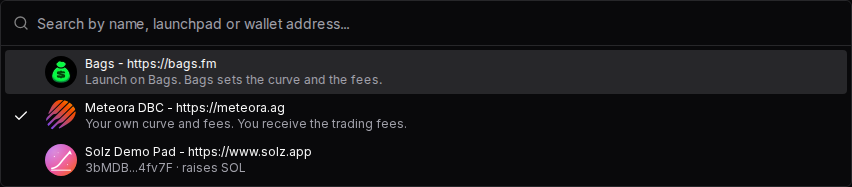
- Choose the Meteora Platform. Meteora DBC is your own curve and fees, and you receive the trading fees. Bags launches on Bags, which sets the curve and the fees. Launchpads are listed by name, and you can search by name, launchpad address or owner wallet.
- Enter the token details. Fill in Token Name, Symbol, an optional Description, an image and any Social Media Links, and choose where the metadata is hosted. The supply is always 1 billion, with 6 decimals.
- Set Buy Amount. This is what your wallet buys in the launch, in the quote token.
- On your own curve, set the curve and fees. Choose the Quote Pair, Graduation target, Trading fee, Anti-sniper start and the Advanced options, all explained below. On a launchpad, its terms show here instead.
- Add a vanity address or Buy Bundle if you want them. They work as on Pump.fun launches.
- Launch the token. Click Create Token and approve. Your own curve takes two transactions: one creates its config and pays the fee, and one creates the token with your buy. A launchpad launch takes one.
Bundle wallets are visible on-chain. Tell your community what your team holds, and check the rules that apply to you. Nothing here is financial advice, and a launch can lose all of the money you put in.
What should I see when a launch succeeds or fails?
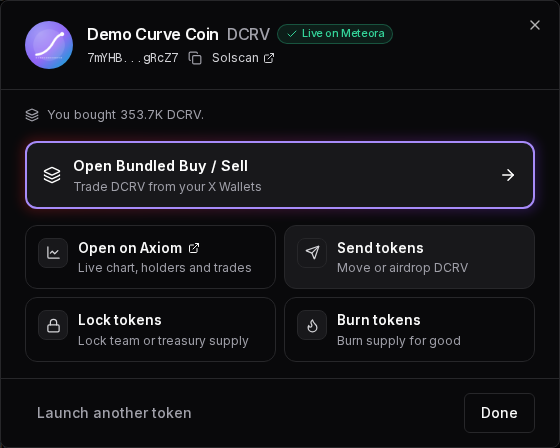
When a launch works, Solz.app says Successfully launched on Meteora DBC and opens a dialog marked Live on Meteora, with your token's address and how much you bought. Your token then appears in My Tokens. If something's wrong before signing, a message says what to fix, and nothing is sent.
We launched Demo Curve Coin (DCRV) on its own curve on Devnet with the settings above. Its 0.01 SOL buy got 353.7 thousand DCRV, and the launch cost 0.088 SOL in total.
| What you see | What it means | What to do |
|---|---|---|
| Successfully launched on Meteora DBC | Your token is live on its curve, with your buy | Check it in My Tokens, then share it |
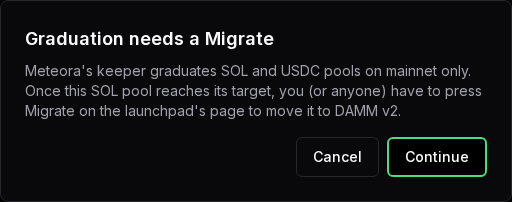
| Graduation needs a Migrate | Meteora's keeper won't graduate this pool, so once it reaches its target, someone has to press Migrate on the launchpad's page | Click Continue to launch anyway, or Cancel |
| A Jito tip is required to launch on Meteora DBC | On mainnet, your own curve's two transactions go out together as a Jito bundle | Set a Jito tip at the top of Solz.app, then try again |
| The anti-sniper start can't be used with Buy Bundle | Your bundle wallets would pay the high starting fee | Turn off Buy Bundle or Anti-sniper start |
| Still loading the quote token. Try again in a moment. | Your custom pair hasn't loaded yet | Wait a moment and click again |
| Not enough balance, you need at least the amount shown (including gas + service fees) | You can't cover the fees and your buy | Add SOL, or lower your buy |
| Your wallet signs one transaction at a time. Approve each of the 2 transactions in your wallet. | Your wallet can't sign both of your own curve's transactions at once | Approve each one as it appears |
| Launchpad not found | The launch link's address isn't a launchpad on this network | Check the link, or launch on your own curve |
| Transaction timeout ! This might be due to you sending invalid transactions / congested network | It didn't confirm in time | Check your wallet history before trying again, because it may have gone through |
What are the launch options on your own curve?
On your own curve, you choose the quote token, how much the curve raises, the trading fee and what happens at graduation. You earn the trading fees, after Meteora's 20% share, and you own the pool's liquidity once it graduates. None of these can be changed after launch, so check them before you click Create Token.
Quote Pair
This is the token buyers pay with, and the token your curve raises. Choose SOL, USDC, or a Custom pair, which takes any SPL token, or a Token-2022 token with no transfer fee.
Graduation target
This is how much of the quote token the curve raises before the token moves to a Meteora DAMM v2 pool. Choose 12, 85 or 105 SOL, or a custom amount from 10 to 1,000 SOL. 79.3% of the supply sells on the curve, and 20.7% goes into the pool.
| Graduation target | Market cap at the start | Market cap at graduation |
|---|---|---|
| 12 SOL, Fast | About 4 SOL | About 58 SOL |
| 85 SOL, Standard | About 28 SOL | About 411 SOL |
| 105 SOL, Large | About 35 SOL | About 507 SOL |
USDC targets are 2,000, 12,000 or 16,000 USDC, or 750 to 150,000 USDC. 85 SOL is what Pump.fun and Bags use.
Trading fee and Anti-sniper start
Every buy and sell on the curve pays 0.25%, 1% or 2%. Meteora's program keeps 20%, and you get the rest. Anti-sniper start makes the fee begin at 90% and fall to yours over 30 seconds, so bots that buy first pay most of it to you. Your own buy pays the normal fee.
Advanced
- Fee after graduation: the DAMM v2 pool's fee, 0.25%, 1% or 2%. You earn it through the pool's liquidity.
- Keep 10% of the LP claimable: at graduation, 90% of the LP is locked forever and 10% goes to your wallet. Off, all of it is locked. You earn its fees either way.
- Allow metadata updates: you keep the update authority, so you can change the name, image and links later. Off, the metadata can't be changed.
How does a launch on a launchpad work?
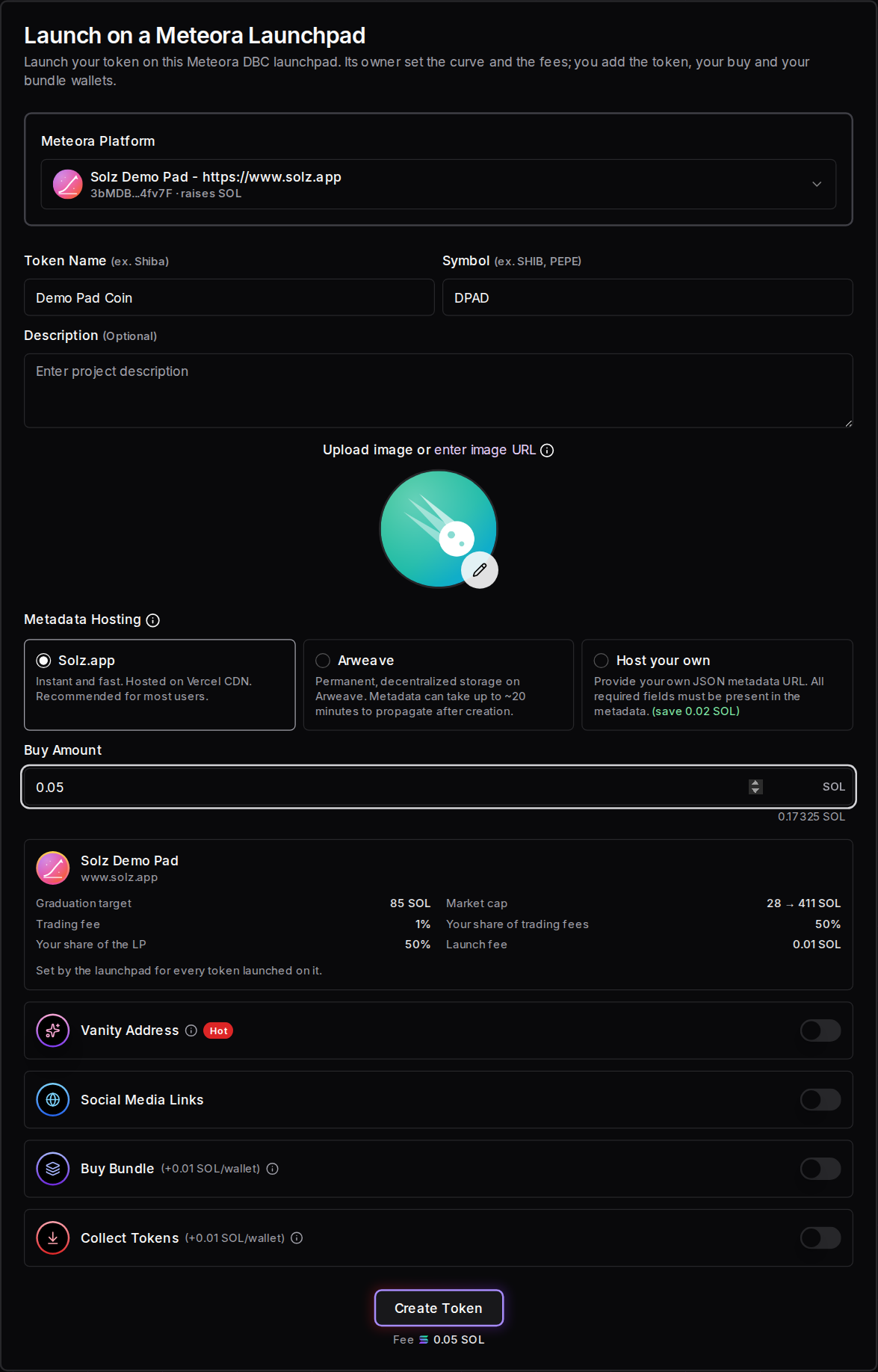
On a launchpad, its owner has already set the quote token, the curve, the fees and the split, so you only add your token, your buy and any bundle. The form shows those terms before you launch, including your share of the trading fees and the LP. Many launchpads also charge a launch fee, which goes to their owner.
A launchpad's launch link opens the form with it already chosen. Meteora Launchpads lists active ones, each with its target and trading fee, and its Create Token button does the same.
Here's a launch on Solz Demo Pad, with its terms under Buy Amount: an 85 SOL target, a 1% trading fee, half of the trading fees and LP for you, and a 0.01 SOL launch fee. This launch, with a 0.05 SOL buy, cost 0.132 SOL in total.
If a launchpad's trading fee starts high and then falls, it says so. Your own first buy pays the normal fee, but bundle wallets pay the high one.
What happens after the bonding curve?
When the curve raises its target, trading on it stops, and the token moves to a Meteora DAMM v2 pool with the remaining 20.7% of the supply and the raised tokens. On mainnet, Meteora's keeper does this by itself for SOL and USDC pools. Otherwise, anyone can press Migrate on the launchpad's page once the target is reached.
- The LP is split and locked. On your own curve, all of it is yours, locked forever, unless you kept 10% claimable. On a launchpad, the creator and the launchpad share it.
- Trading continues in the pool, at the fee after graduation, and the token can appear on sites like Jupiter and DexScreener.
- Before you launch, Solz.app warns you with Graduation needs a Migrate when the keeper won't move your pool, such as one raising another token, or any pool on Devnet.
The launchpad's page is solz.app/meteora/launchpads/ followed by the config address. Once the pool reaches its target, its card there has a Migrate to DAMM v2 button, and Claim Launchpad Fees marks it Ready to migrate, linking to that page. Anyone can press it, and it costs only network rent.
Not every token gets this far. If the curve never fills, the token stays on it, and no pool is created.
How much does a Meteora DBC launch cost on Solz.app?
The Solz.app fee is 0.05 SOL for a launch, with your buy on top. Your own curve also pays about 0.006 SOL of rent for its config, and every launch about 0.022 SOL for the pool, metadata and token accounts. A launchpad may add its launch fee. Claiming creator rewards costs 5% of the amount claimed.
| Item | Cost |
|---|---|
| Solz.app service fee to launch | 0.05 SOL |
| Your own curve's config | About 0.006 SOL of rent |
| Pool, metadata and token accounts | About 0.022 SOL of rent |
| A launchpad's launch fee | Whatever it sets, from 0 to 100 SOL |
| Your Buy Amount | What you choose, plus the trading fee |
| Buy Bundle | +0.01 SOL per wallet |
| Collect Tokens | +0.01 SOL per wallet |
| Jito tip on mainnet | What you set at the top of Solz.app |
| Claim creator rewards | 5% of the amount claimed |
Solz.app's balance check allows 0.02 SOL for network costs, plus 0.035 SOL on your own curve, or 0.025 SOL and the launch fee on a launchpad. Our two Devnet launches show what they really cost. Demo Curve Coin, on its own curve with a 0.01 SOL buy, cost 0.088 SOL. Demo Pad Coin, on Solz Demo Pad with a 0.05 SOL buy and its 0.01 SOL launch fee, cost 0.132 SOL.
How do I claim my trading fees?
Your share of the curve's trading fees builds up in the Creator rewards panel, at the bottom of the Solz.app sidebar. Open it with the wallet that launched the token, and claim. Solz.app keeps 5% of what you claim, and the panel shows the amount after that fee and a small network cost.
Tokens on your own curve also show on Claim Launchpad Fees, listed as one of your launchpads, because your wallet owns their config. Anything left after graduation is claimed there. To migrate one that reached its target, open the launchpad's page from its Ready to migrate badge and click Migrate to DAMM v2. On Devnet, Demo Curve Coin is listed on its launchpad's page, under our wallet's launchpad name, Solz Demo Pad.
FAQ
Should I use my own curve or a launchpad?
Use your own curve to keep all of the trading fees and choose the curve yourself. Use a launchpad if you want its audience and its page, and you're happy to share the fees with its owner.
Can I change the curve or fees after launch?
No. They're fixed in the curve's config when you launch. With Allow metadata updates on, you can still change the token's name, image and links.
Why can't I use a vanity address on Bags?
Bags gives every token an address ending in BAGS. Vanity addresses work on your own Meteora DBC curve and on launchpads.
How is this different from LaunchLab?
Both are bonding curves. LaunchLab graduates to Raydium, and a platform sets its fees. The LaunchLab guide covers it.
Sources
Solz.app's fees and form options come from the app. Demo Curve Coin and Demo Pad Coin were launched on Devnet, and their costs were read from their transactions. The rest comes from: