
How to airdrop Solana tokens to a wallet list
How do I airdrop a token to a list of wallets?
Open Solz Airdrop, pick your token and choose Upload a list. Upload a CSV or Excel file of wallets, alone or with a number for each, and say whether the numbers are amounts to send or balances to split by. Set the claim window, click Create airdrop and approve once. Each wallet claims its tokens on the claim page.
This is the simple way to use Solz Airdrop: you already know the wallets, so there's no snapshot and no review. To reward everyone holding a token at a time you announce, see the guide to airdropping to holders with a snapshot. To send tokens straight into wallets, so nobody has to claim, see the Multi Token Sender guide.
Solz Airdrop runs on Solana mainnet. To try it first with tokens that have no value, switch the network at the bottom of the app to Devnet, where the fee is 0.2 SOL and you can get SOL from the Solana faucet.
Prerequisites
- A Solana wallet such as Phantom, Solflare or Backpack.
- The tokens you want to airdrop, in that wallet. Solz Airdrop checks the balance before you go on.
- 1 SOL for the Solz.app fee, plus a little for the transaction fee.
- A CSV or Excel file with one wallet per row, and a number column if each wallet gets its own amount or share.
When should I use a list instead of a snapshot?
Use a list when you already know who gets tokens: testers, event guests, contest winners, contributors, a presale, or holders whose balances you already have. Use a snapshot when Solz Airdrop should read who holds a token at a set time. A list launches minutes after you create it, with no snapshot and no review.
| Goal | Your file | Split |
|---|---|---|
| Thank testers, early users or event guests | Addresses only | Same for all: one Amount per wallet |
| Pay quest or allowlist winners the same | Addresses only | Same for all |
| Pay prizes, bounties or contributors | wallet,amount, as Amounts to send | Exact amounts: each wallet gets its amount |
| Presale or migration allocations you've worked out | wallet,amount, as Amounts to send | Exact amounts |
| Reward holders by balances you already have, such as a Token Snapshot | address,balance, as Balances | Proportional or Tiered: a total you set, split by balance |
| Reward holders at a time you announce, with a review | No file | Use a snapshot instead |
A list of balances splits a total the way a snapshot does, but from your file. Solz Airdrop doesn't read the balances on chain, so check them before you upload: the claim page tells holders The balances are the creator's, not read on chain. Nothing can be changed after you create it. A snapshot reads the balances itself at the time you set, leaves out pools and vaults, and gives you a review before the list is final.
For fewer than about 500 wallets, sending with Multi Token Sender costs you less, or up to about 1,800 wallets with compression, and nobody has to claim. The comparison shows the cost at each size.
How do I prepare the CSV file?
Put one wallet per row, in a CSV or Excel file of up to 100 MB. Add a number after each wallet if each one gets its own amount, or to split a total by balance. Leave the numbers out to give everyone the same. A Token Snapshot CSV works as it is, and the upload box offers two templates.
wallet,amount
9m6DzFztdaHGyB2ARo3E9BTc16B2bwMMzLueburKt2fy,500
5Nd3KDcnH12PsukJiVqPjC8g3Mnur6Cp27AABrtR14aQ,250
Write amounts in tokens, such as 12.5, not in base units. Balances are read as written, with as many decimals as your file has, and tier minimums use the same numbers. A Token Snapshot CSV has address,balance,label columns, biggest balance first:
address,balance,label
9w6oHT5dh7fCbPsdsAmoj55gpUUe2DU1xYFG1oAXfawc,700000086.782832607,
4UVZcNe5c2yaQ59QCvMmBWQ9nXFD6NpnwrLkyMgJKRNQ,293458871.205824,
Before you pick a file, the upload box shows the File format, with Template with amounts and Addresses only to download, and the link Take a snapshot with Solz Token Snapshot, for a token's holders and balances. When you upload the file, Solz Airdrop:
- ignores a header row, and merges duplicate wallets into one,
- shows a Wallet column and a Number column to pick, for a file with a header and 3 or more columns, such as a Token Snapshot CSV or an explorer's holder export. It guesses both from the header, and ignores the other columns, such as withheld fees, percentages and labels,
- skips invalid rows and lets you click Download all skipped rows to fix them,
- refuses the template's example rows if you forget to replace them,
- skips burn addresses, and drops program-owned addresses, such as pools and vaults, because they could never sign a claim,
- leaves out your own wallet from a list of balances, as a snapshot does.
It then shows Valid wallets, any Duplicate rows merged, the Number column it found, and the first rows. If the file has numbers, choose what they are under What are the numbers in your file?:
- Amounts to send: each wallet gets exactly its number, in the token. The split is Exact amounts, and the form shows the Total to send.
- Balances: you set a total on the next step, split in proportion or by tiers. The form shows the Balance total.
Nothing is picked until you choose, so balances can't be paid out as amounts by mistake.
When the upload has a problem
Skipped rows show as a red box, such as 3 rows skipped, with the first few lines and their reason. Other problems stop Continue and say what to fix:
| What you see | What it means | What to do |
|---|---|---|
| No valid Solana address | The row has no wallet address, or it's in another column | Fix the row, or pick the Wallet column |
| Burn address: nobody can claim with it | The row is a burn address | Nothing. It's skipped |
| Program-owned address (a pool, vault or multisig): it can't sign a claim | The address belongs to a program, not a person | Nothing, or use the owner's wallet instead |
| Example row from the template: replace it with a real wallet | The template's example rows are still in the file | Replace them with real wallets |
| Your own wallet: left out, as in a snapshot | A list of balances includes the wallet creating the airdrop | Nothing. It's skipped |
| Missing amount | Other rows have a number, and this one doesn't | Add its number, or remove the numbers from every row |
| Not a number, or too many decimals, or too large | The number can't be read, or an amount has more decimals than the token | Write a plain number, such as 1500 or 250.5 |
| These look like token accounts, not wallets | Most addresses in the wallet column are token accounts, and only the owner wallet can claim | Pick the owner column under Wallet column, or use a file with the owner wallets |
| Pick different columns for the wallet and its number. | Wallet column and Number column are the same | Pick the right column for each |
| Say what the numbers in your file are: amounts to send, or balances. | You clicked Continue before choosing | Choose Amounts to send or Balances |
Steps to airdrop to a list
- Open Solz Airdrop. Go to Solz Airdrop and click Create Airdrop in the sidebar. The network switch at the bottom says Mainnet. You can fill in the form first and connect your wallet at the end.
- Fill in the basics. Enter an Airdrop name, which holders see, and pick the Token to airdrop from your wallet, or paste its mint address. Solz Airdrop shows the supply, any transfer fee, and Supported, or the reason it can't pay the token out.
- Upload the list. Choose Upload a list and drop your file in the box. If it has numbers, choose Amounts to send or Balances.
- Set the amounts. Amounts to send gives Exact amounts, and each wallet gets its amount. Balances gives How is the total split?: enter the Total to airdrop and choose Proportional or Tiered. A file of addresses only gives Same for all: enter the Amount per wallet. Below the step, Solz Airdrop checks your wallet holds the tokens.
- Add the final details. Type the Page link, at least 4 letters or numbers, and Solz.app adds 5 digits after it. Pick a Banner: Airdrop shower, Coin orbit, Drop ripple, or Upload your own, cropped to 3:1. Add a Description, Website and X (Twitter) if you want them.
- Choose the timing. The Claim window is 7, 14, 30, 60, 90 or 180 days, and starts at 30. Claims open Now, a few minutes after you create it, or Later, at any time you pick.
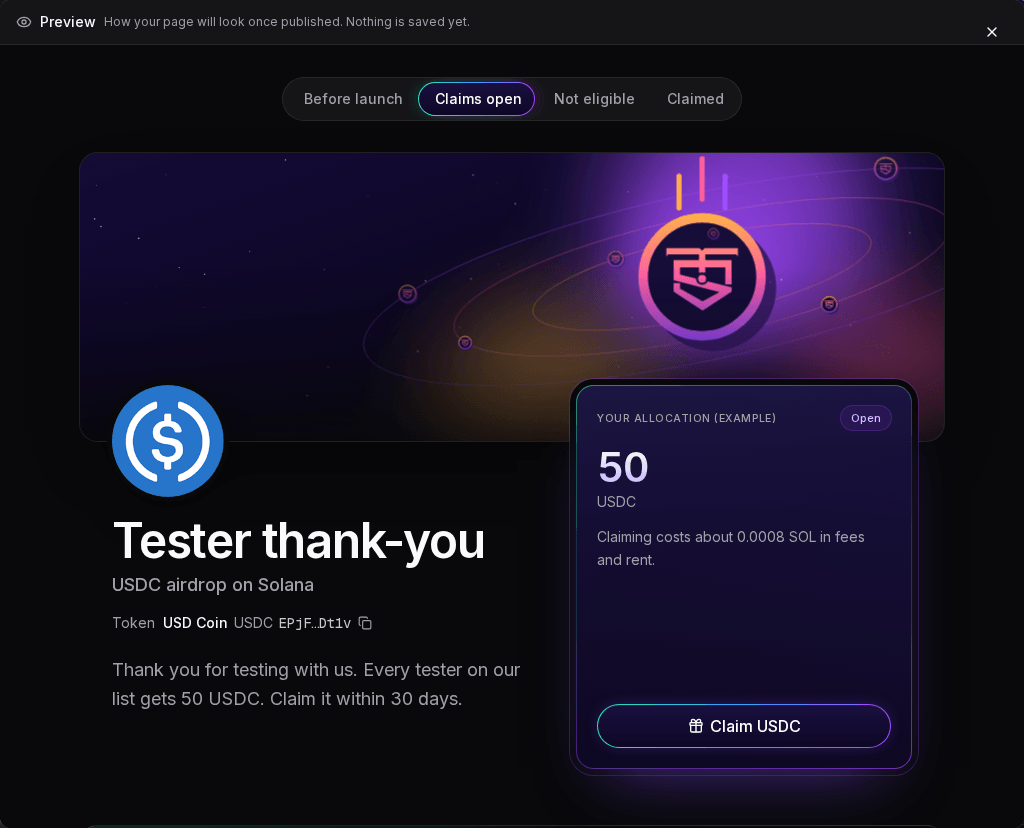
- Preview your page. Click Preview to see the page your wallets will get: Before launch, Claims open, Not eligible and Claimed.
- Create the airdrop. Click Create airdrop. If your wallet isn't connected, connect it, and sign the free message that proves the wallet is yours. The dialog shows the Tokens to lock and the Solz.app fee. Check them, click Create airdrop again and approve once in your wallet.
When it works, Solz Airdrop says Airdrop created: tokens locked, claims open on time. Your list is posted on chain with that transaction and released into the claim vaults within minutes. There's nothing more for you to do.
If you close the wallet prompt, nothing is locked. Your airdrop waits under Not created yet in My Airdrops for 24 hours, and Finish creating reopens the form.
A list airdrop can't be edited or cancelled once it's created. The locked tokens can only go to the wallets on your list, and unclaimed tokens come back to you after the claim window. Check the preview before you approve.
Example: 50 USDC each to 250 testers
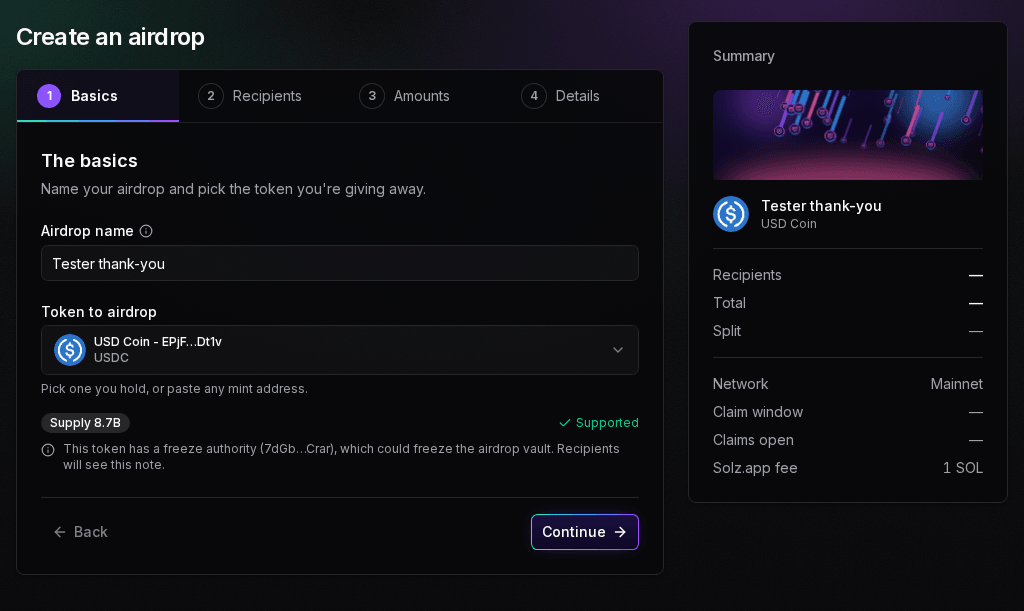
Say you're thanking 250 testers with 50 USDC each, on mainnet. USDC is a classic SPL token with 6 decimals and no transfer fee. The file has a wallet header and 250 addresses, and no amounts.
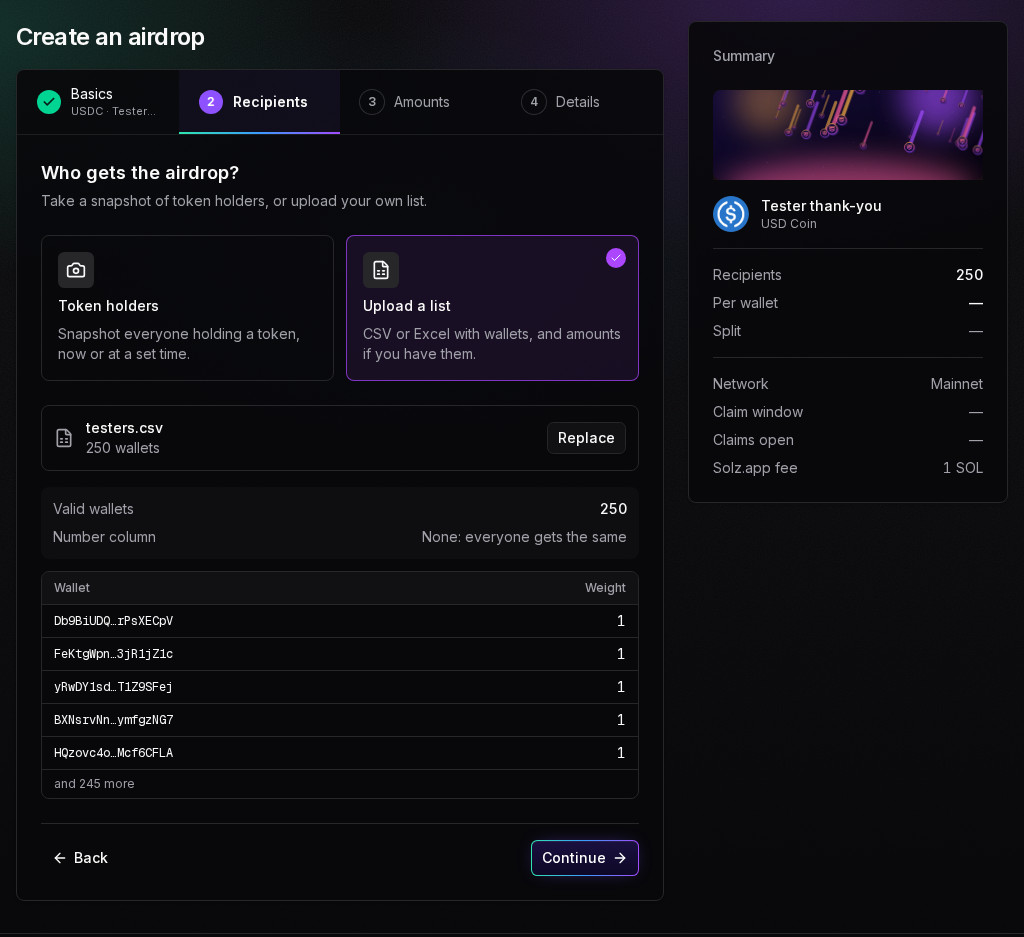
Upload a list shows 250 valid wallets, and Number column None: everyone gets the same:
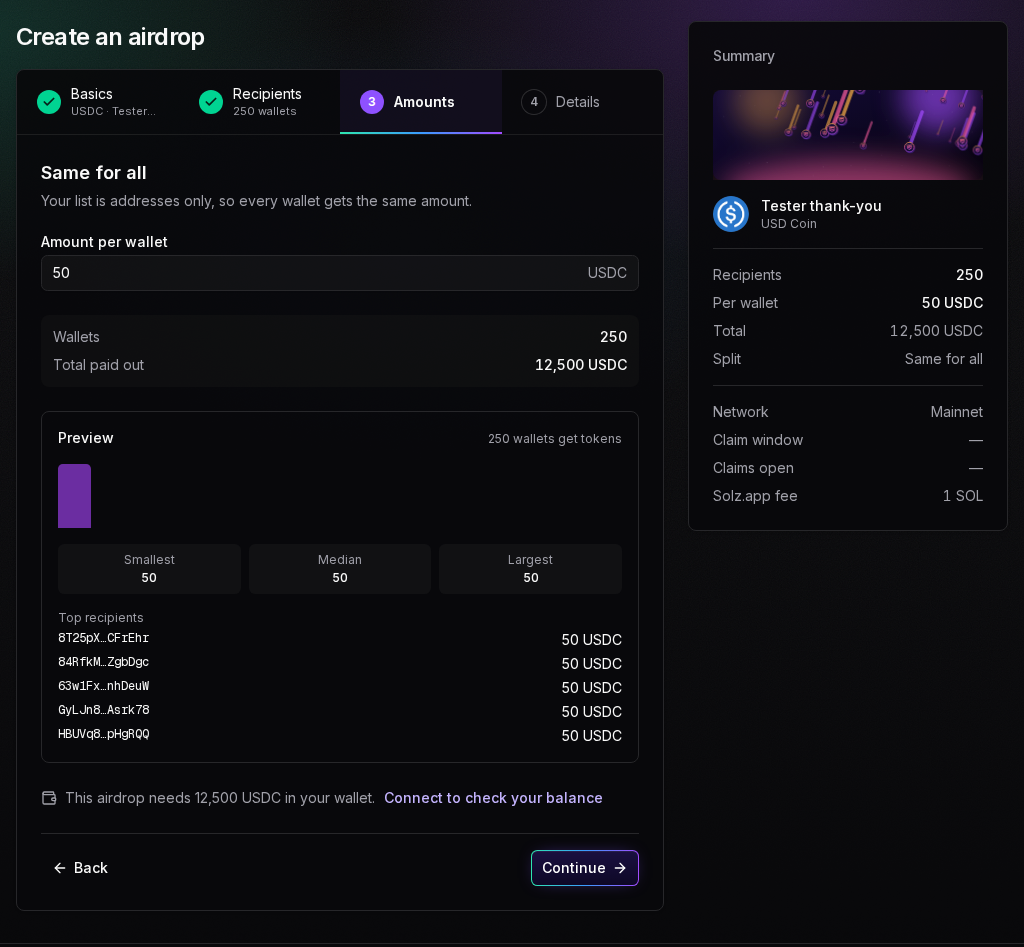
The file has no amounts, so the split is Same for all. With 50 per wallet, the form shows 250 wallets and a Total paid out of 12,500 USDC. Below it, with no wallet connected yet, it says This airdrop needs 12,500 USDC in your wallet:
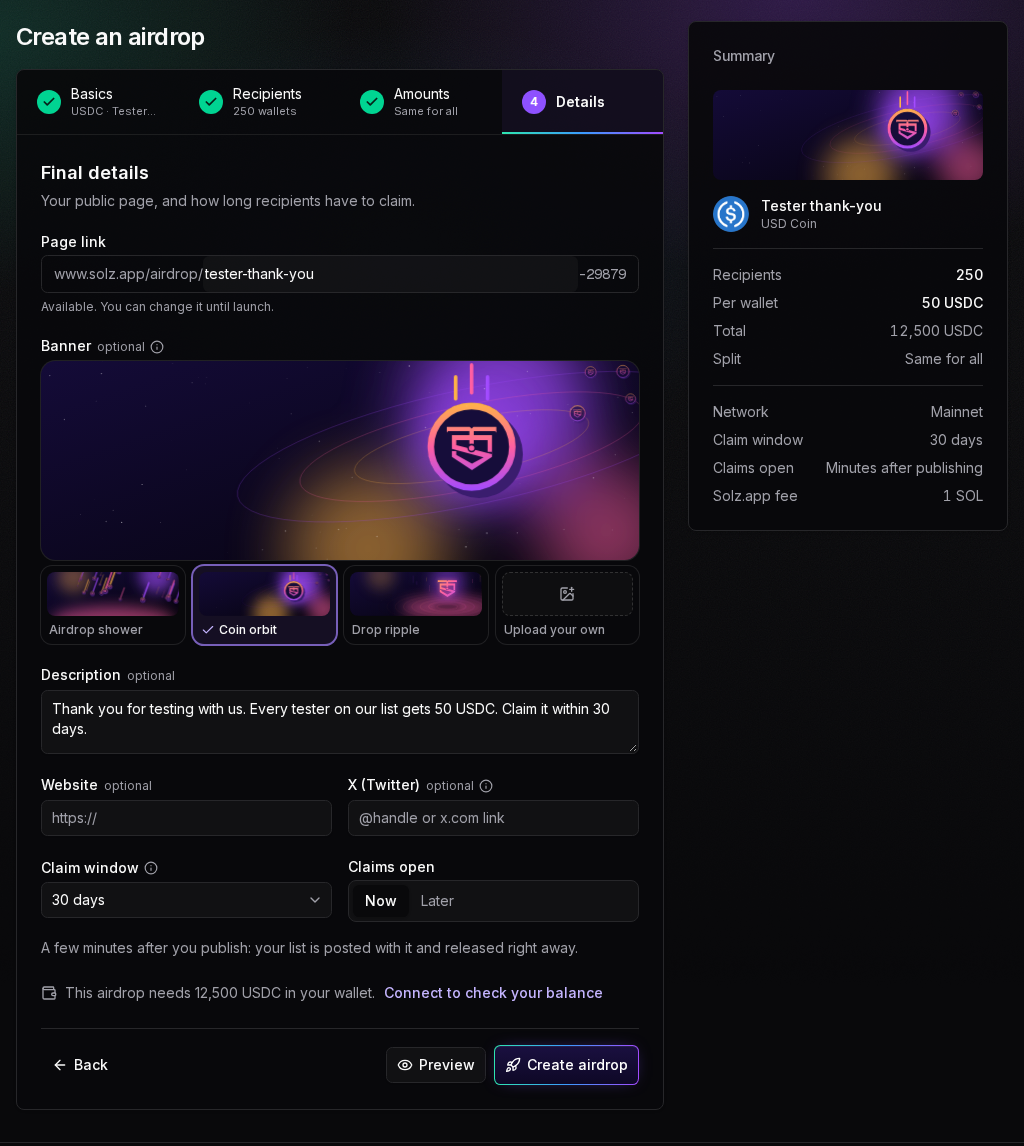
On the Details step, the page link is tester-thank-you with 5 digits after it, the banner is Coin orbit, the Claim window is 30 days, and claims open Now:
| Step | What you enter or see |
|---|---|
| Basics | Airdrop name Tester thank-you, Token to airdrop USDC |
| Recipients | Upload a list, with Valid wallets 250 and Number column None: everyone gets the same |
| Amounts | Same for all, Amount per wallet 50, Total paid out 12,500 USDC |
| Details | Page link tester-thank-you plus 5 digits, Banner Coin orbit, a description, Claim window 30 days, Claims open Now |
| Summary | Recipients 250, Per wallet 50 USDC, Total 12,500 USDC, Network Mainnet, Claims open Minutes after publishing, Solz.app fee 1 SOL |
| Create airdrop dialog | Tokens to lock 12,500 USDC, Solz.app fee 1 SOL |
Preview shows the page testers will see. Before launch, it counts down to the opening:
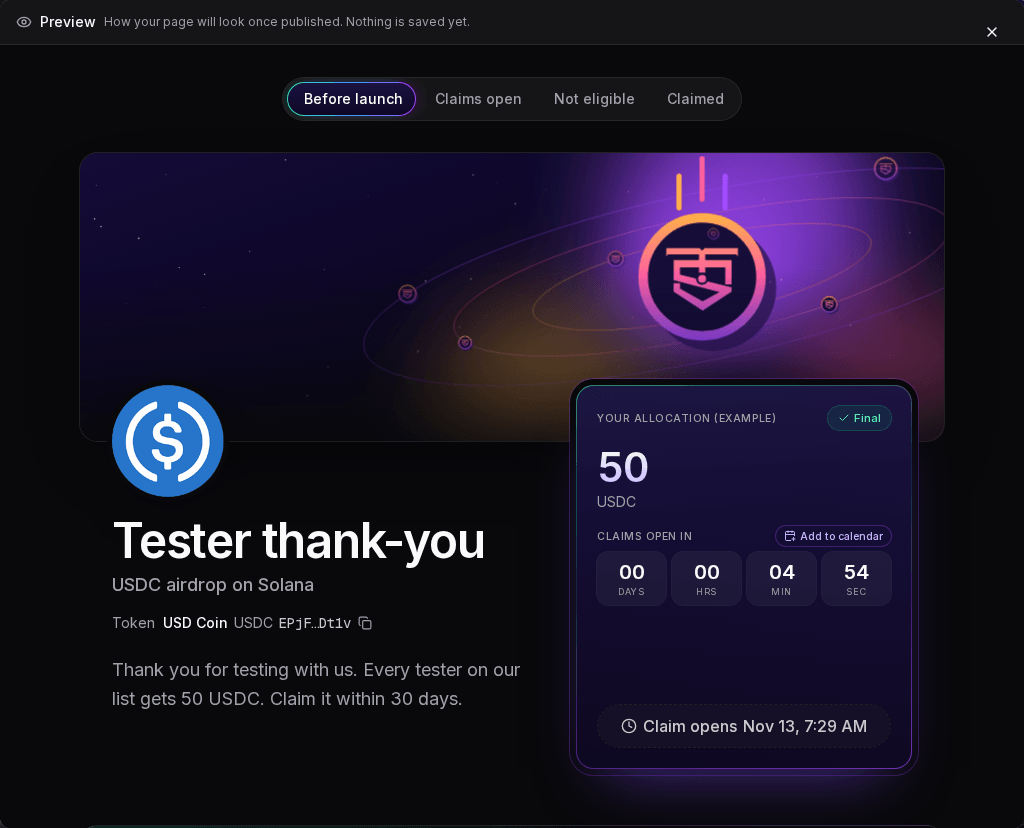
You approve once in your wallet, and the dialog closes with Airdrop created: tokens locked, claims open on time. Claims open about 5 minutes later, and close 30 days after that. Share the claim page, your airdrop's address with /claim on the end, and each tester claims 50 USDC.
Example: contest prizes with exact amounts
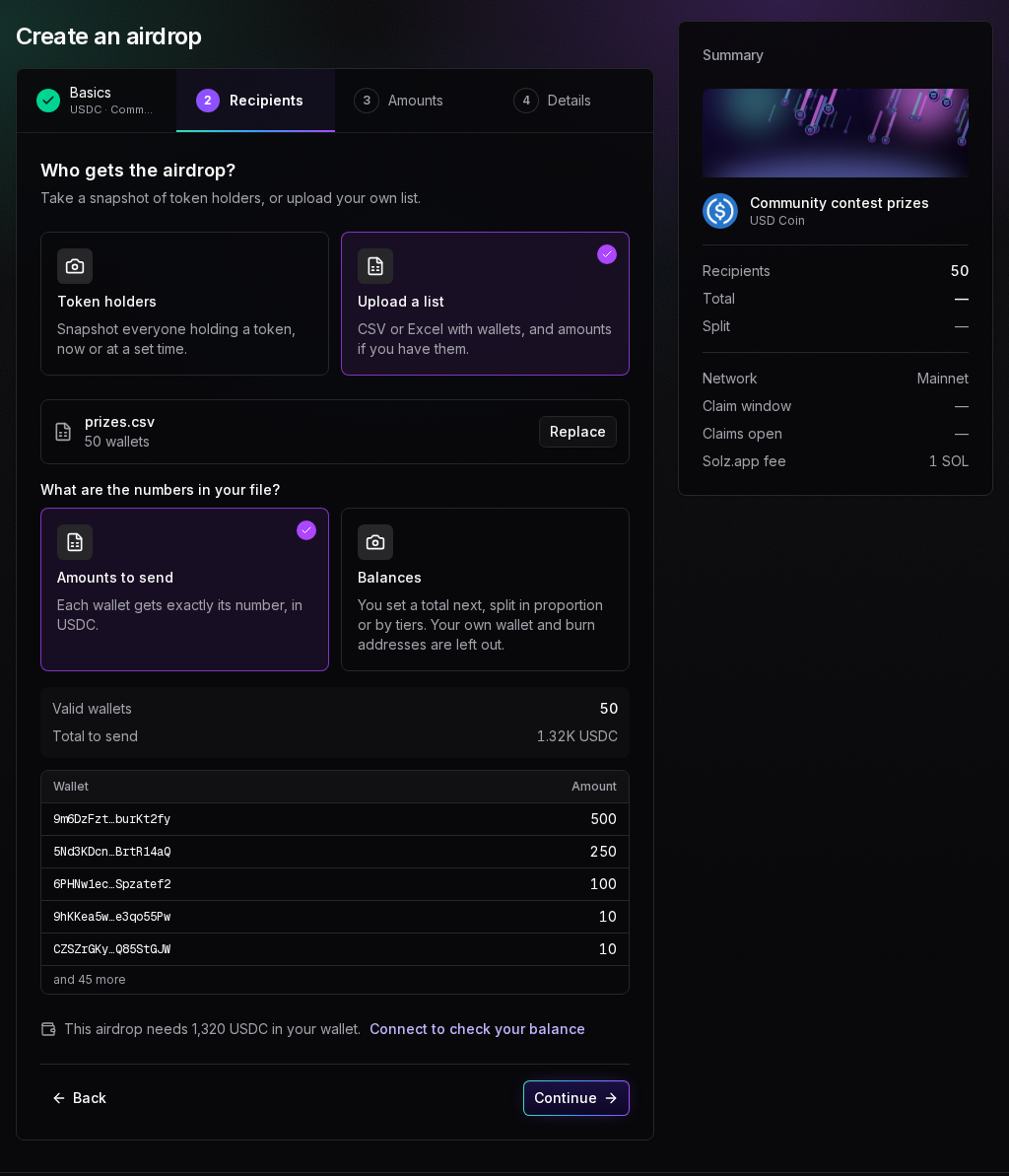
A contest pays USDC: the winners get 500, 250 and 100, and 47 other entrants get 10 each. The file has a wallet,amount header and 50 rows. Under What are the numbers in your file?, Amounts to send is chosen, so the form shows Total to send 1.32K USDC, and the balance check appears straight away, on the Recipients step:
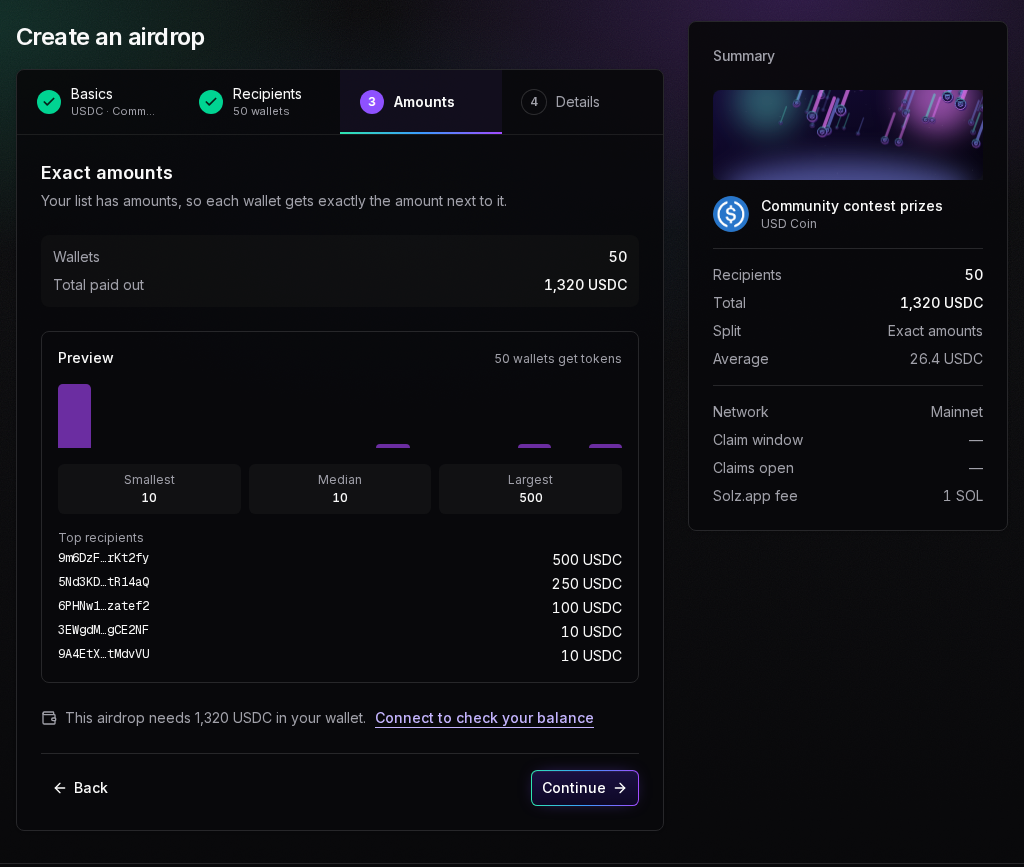
The split is Exact amounts, with 50 wallets and a Total paid out of 1,320 USDC:
Example: 1,000,000 SAMO by balance, from a Token Snapshot
Say you announced a reward for SAMO holders and took the snapshot with Token Snapshot, with a Minimum balance of 10,000 SAMO and pools, locks and the burn address left out. Now you want claims to open right away. Samoyed Coin (SAMO) has 9 decimals, and the CSV has 9,369 holders.
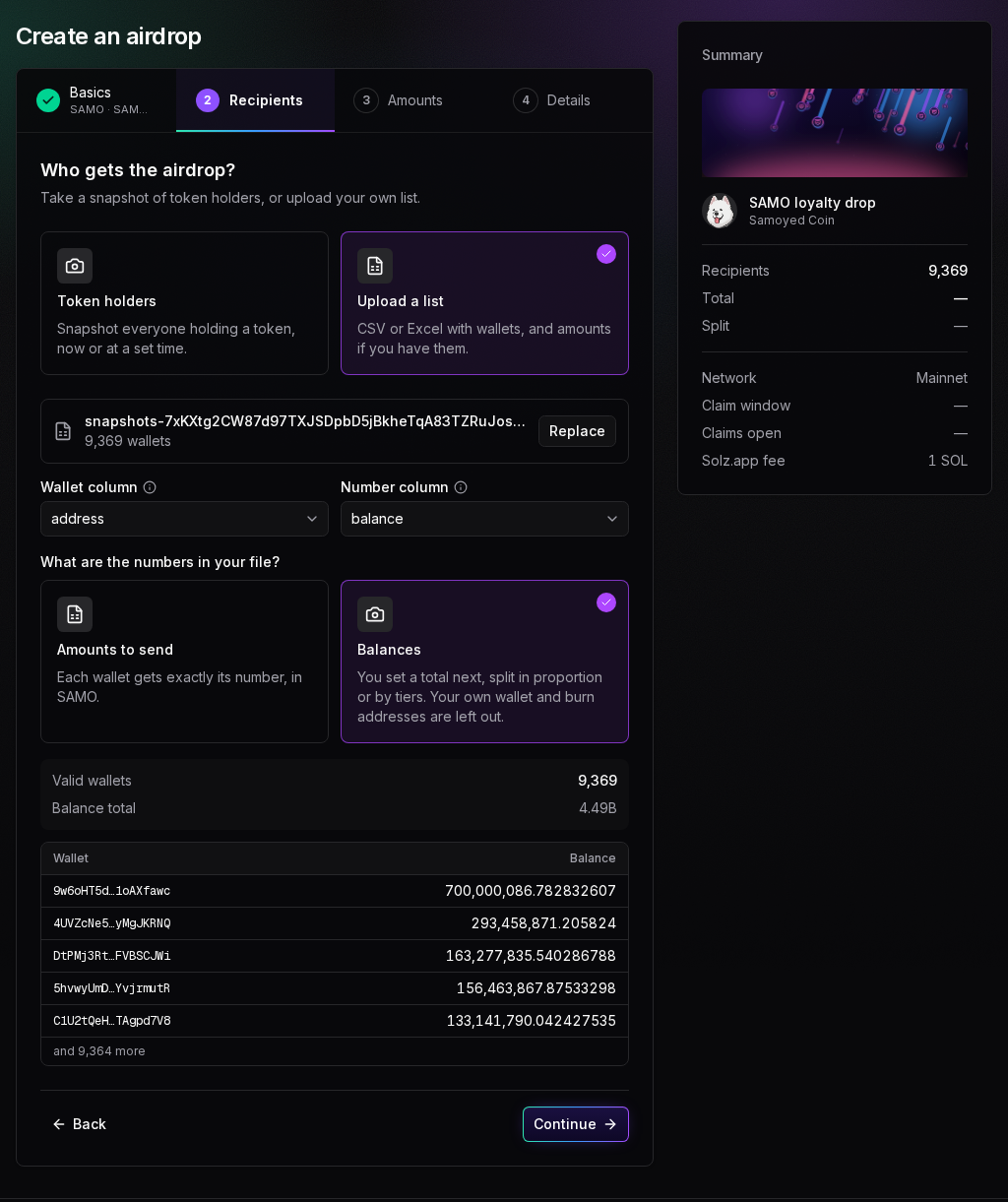
The file has a header and three columns, so Wallet column and Number column appear, set to address and balance. Choose Balances, and the form shows a Balance total of 4.49B and each wallet's balance:
On the Amounts step, choose Tiered, enter 1,000,000 as the Total to airdrop, and set three tiers with the Balanced multipliers: Balance at least 1000000 for 4×, 100000 for 2× and 10000 for 1×. A list gives exact counts, so the table shows Wallets, not Wallets today:
| Tier | Balance at least | Gets | Wallets | Portions | Each wallet gets | Of the total |
|---|---|---|---|---|---|---|
| 1 | 1,000,000 | 4× | 462 | 1,848 | 314.66 SAMO | 14.5% |
| 2 | 100,000 | 2× | 1,957 | 3,914 | 157.33 SAMO | 30.7% |
| 3 | 10,000 | 1× | 6,950 | 6,950 | 78.67 SAMO | 54.6% |
| All | 9,369 | 12,712 | 1,000,000 SAMO in all |
The base amount is 1,000,000 SAMO ÷ 12,712 portions = 78.6658 SAMO, the same sum as for a snapshot's tiers. Rounding leaves 0.000003551 SAMO unpaid, and the form notes it stays in your wallet:
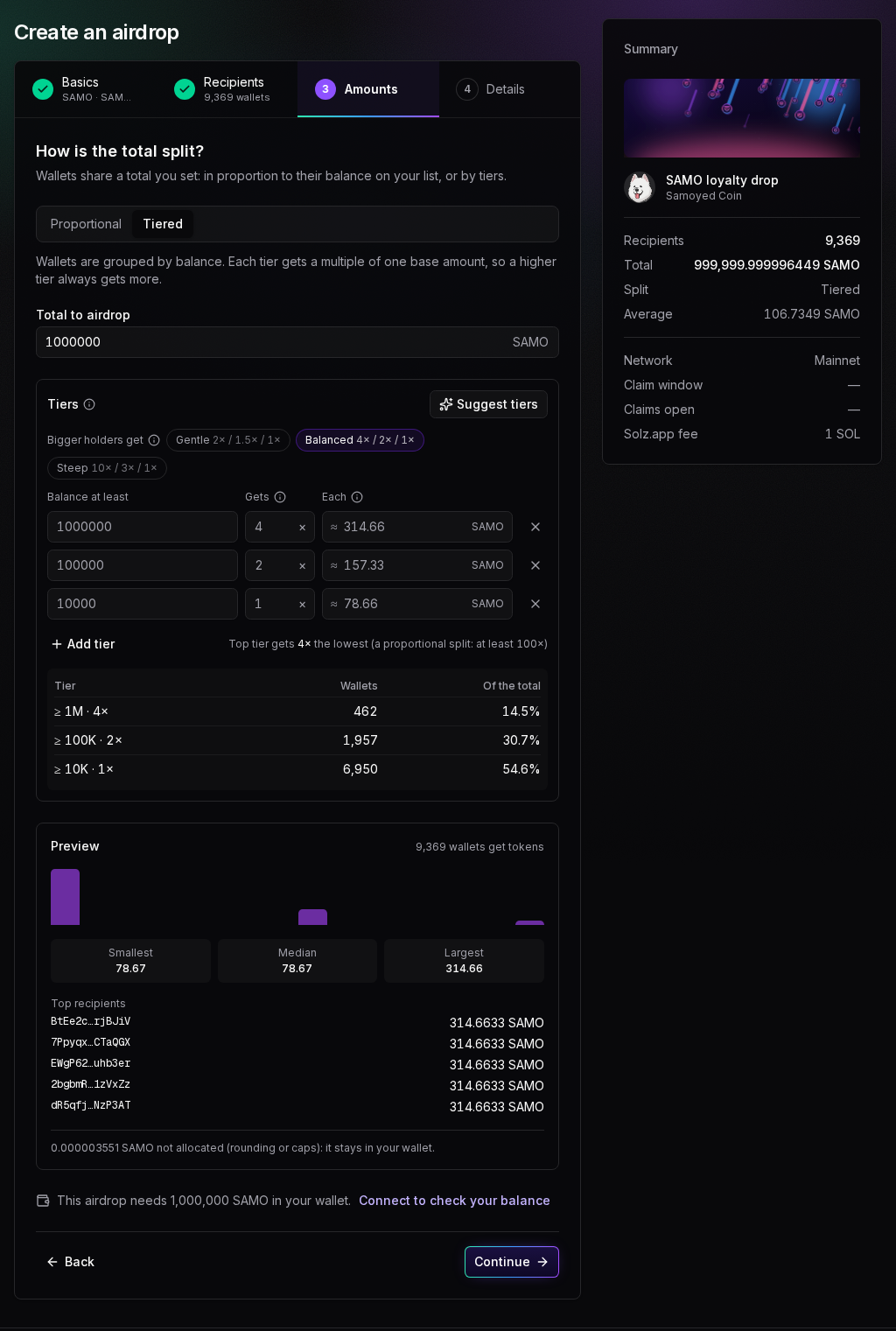
Proportional works too: a wallet with 2% of the balance total gets 2% of the airdrop, and Minimum and cap work as in the snapshot guide. Suggest tiers picks tiers from your list: the top 1%, the next 9% and the next 40%. For this list, it suggests 5,000,000, 200,000 and 20,000, which leaves out the 2,902 wallets under 20,000.
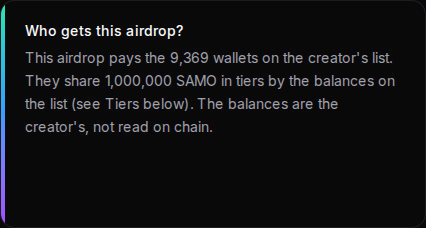
Holders get the same claim page as for a snapshot airdrop. In About this airdrop, Who gets this airdrop? says the balances came from you, and the Tiers section lists the minimums under Balance on the list at least:
Does my wallet need to hold the tokens first?
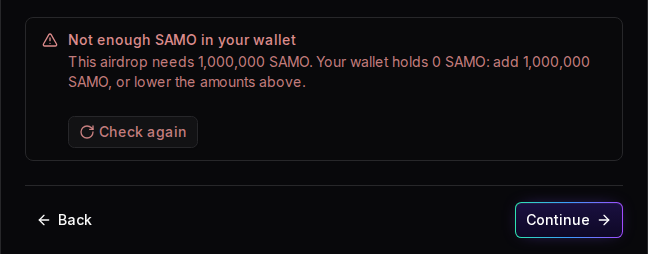
Yes. Creating the airdrop locks the tokens from your wallet, so Solz Airdrop checks your balance as soon as it knows the total: on the Recipients step for amounts to send, and on the Amounts step for the other splits. If your wallet holds too little, Continue and Create airdrop stay blocked until you add tokens or lower the amounts.
The check sits under the step, above Back and Continue:
| What you see | What it means | What to do |
|---|---|---|
| This airdrop needs 12,500 USDC in your wallet. Connect to check your balance | No wallet is connected yet | Click Connect to check your balance, or carry on and connect at the end |
| Checking your USDC balance… | Solz Airdrop is reading your wallet | Wait a moment |
| Your wallet holds 20,000 USDC, enough for the 12,500 USDC this airdrop needs. | The wallet has enough | Carry on |
| Not enough USDC in your wallet | The wallet holds less than the airdrop needs | Add the difference, or lower the amounts, then click Check again |
| Couldn't read your balance. Try again. | Solz Airdrop couldn't reach Solana | Click Check again |
Here, the wallet connected for the SAMO example holds no SAMO. The check says This airdrop needs 1,000,000 SAMO. Your wallet holds 0 SAMO: add 1,000,000 SAMO, or lower the amounts above. Clicking Continue only repeats it, as Your wallet holds 0 SAMO; this airdrop needs 1,000,000.
It reads the balance again when you come back to the tab, so a top-up made in your wallet app shows without a reload. For a token with a transfer fee, the amount it needs includes the same margin as Tokens to lock. See how transfer-fee tokens work in an airdrop.
What happens after I create it?
Your list is posted on chain with the create transaction and released into the claim vaults within minutes, so there's no snapshot and no review. Claims open at the time you chose, about 5 minutes after creating for Now. When the claim window closes, unclaimed tokens come back to your wallet by themselves.
| Stage | When |
|---|---|
| Tokens locked and list posted | When you create it |
| Released to claim vaults | Within minutes |
| Claims open | Now, about 5 minutes after creating, or your time |
| Unclaimed returned | After the claim window, within minutes |
Open your airdrop's page with the wallet that created it, and sign in if it asks, to see the Manage panel, marked Only you see this. Its badge shows Launching, then Opens soon, Live once claims open, Window closed while unclaimed tokens come back, and Ended. Copy link in the panel gives out the claim page. My Airdrops, in the sidebar, lists all your airdrops.
If the automatic launch ever fails, the panel says Needs you and shows a Launch now button. If unclaimed tokens haven't come back within an hour of the window closing, it shows a button to return them yourself, with one wallet approval.
How do the wallets on my list claim?
Send them the claim page: your airdrop's address with /claim on the end. They connect their wallet, check their amount, and click Claim, followed by the token's symbol, once claims open. Each wallet pays for its own claim, about 0.0008 SOL in fees and rent, or about 0.0023 SOL if it has no account for the token yet.
The claim page has no sidebar or Manage panel, just the wallet button at the top right and a Solz.app footer. Copy link, Share on X and the calendar invite all give out this address. Anyone can check any address on it without connecting, but only the wallet's owner can claim.
- Open the claim page and connect. Click Connect wallet.
- Check the amount. The card shows Your allocation, and what claiming costs: Claiming costs about 0.0008 SOL in fees and rent.
- Wait for claims to open. The card counts down with Claims open in. Add to calendar sets a reminder, and the Claim button turns on by itself.
- Claim. Click Claim, followed by the symbol, and approve in your wallet.
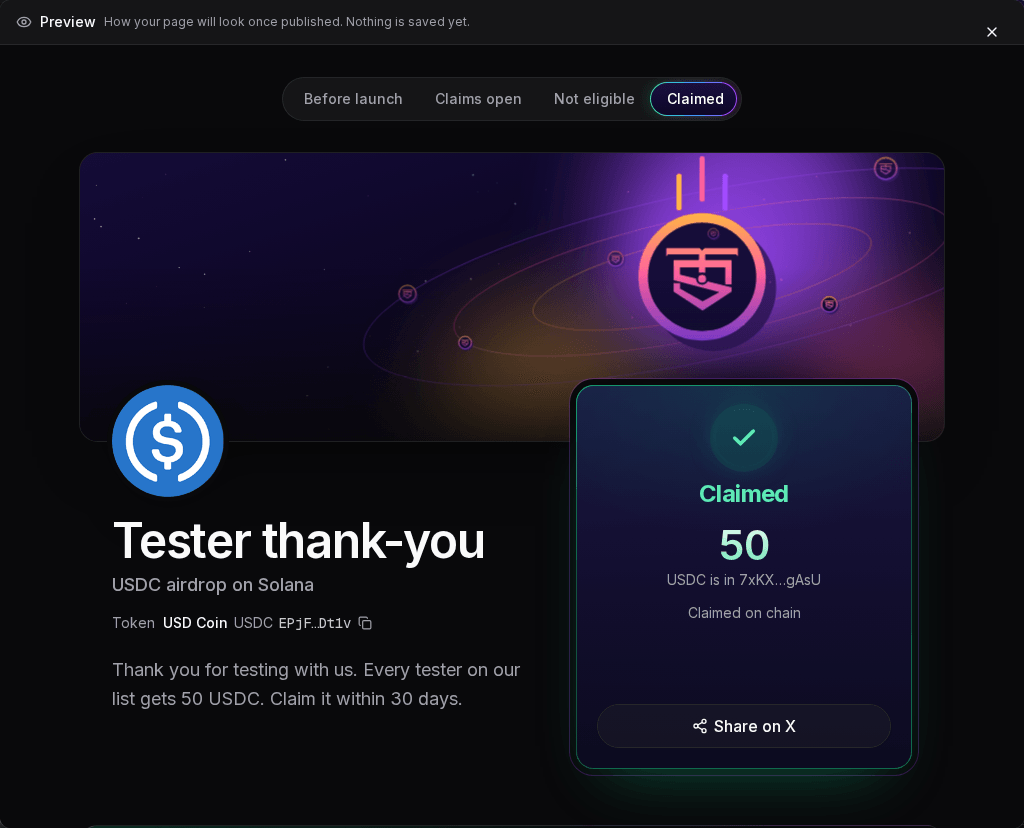
After a claim, the card turns green and says Claimed:
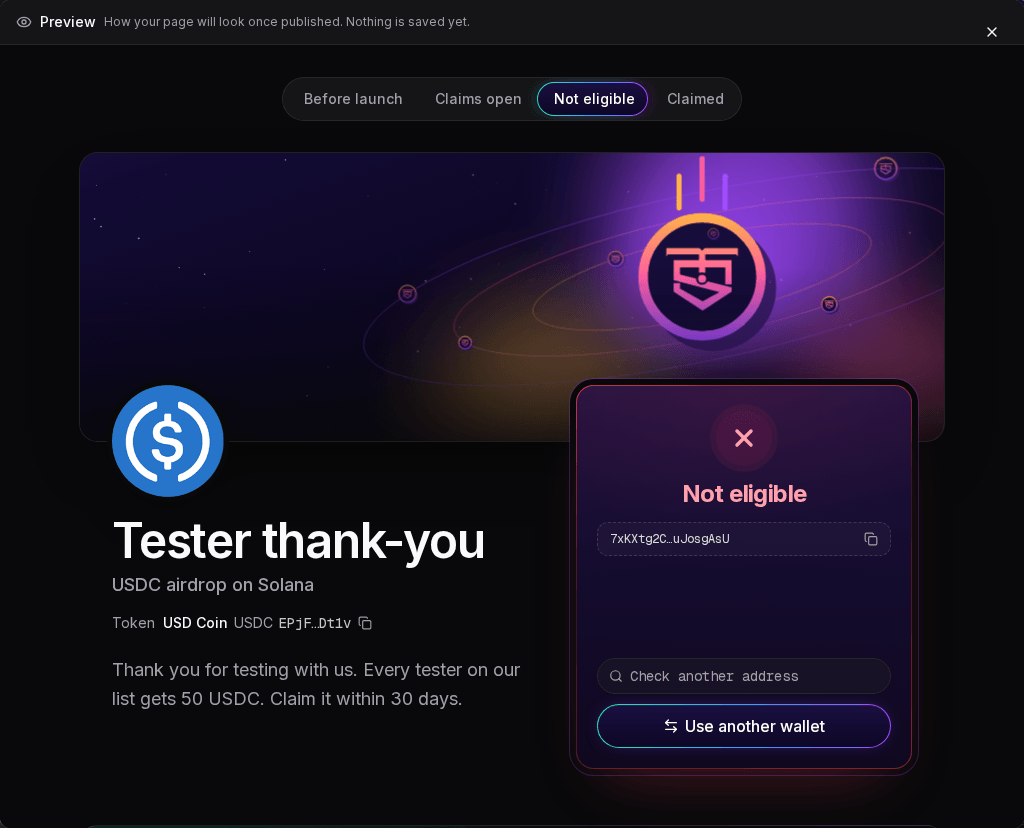
Once claims are open, a wallet that isn't on the list sees Not eligible, with no reason:
What holders might see
| What you see | What it means | What to do |
|---|---|---|
| Your allocation, with an amount | This wallet is on the list and gets that amount | Wait for the countdown, then click Claim |
| Claimed | The tokens are in the wallet shown | Nothing. View transaction shows the claim on chain |
| Claim window closed | This wallet's tokens weren't claimed in time and go back to the creator | Nothing |
| Your wallet or This address, with the countdown | Claims aren't open yet, and this wallet gets nothing | Check again when claims open |
| Not eligible | Claims are open, and this wallet isn't on the list, its balance on a list of balances is below the lowest tier or the minimum, or the address isn't a valid wallet | Click Use another wallet, or check another address |
| Didn't go through | The claim failed, or you declined it in your wallet. Nothing was taken | Click Try again |
| The network didn't confirm it in time | The claim may still land. Nothing was taken if it didn't | Refresh in a minute before trying again |
| Couldn't load, Couldn't read this wallet | Solz Airdrop couldn't reach Solana to read the wallet | Click Retry |
| Airdrop ended or Cancelled | There's nothing left to claim | Nothing |
Anyone can check the list against the chain on the airdrop's Verify page. The holder guide explains it.
How much does a list airdrop cost?
You pay a flat Solz.app fee of 1 SOL per airdrop on mainnet, plus the transaction fee, however many wallets are on the list. The fee covers every network deposit, including the claim vaults. Each wallet pays its own claim, about 0.0008 SOL in fees and rent. The fee isn't refundable.
| Item | Cost |
|---|---|
| Solz.app fee, paid by you | 1 SOL per airdrop on mainnet, or 0.2 SOL on devnet |
| Escrow and claim vault deposits | Included in the Solz.app fee |
| Your transaction fee | About 0.000005 SOL |
| Claim, paid by each wallet | About 0.0008 SOL in fees and rent |
| A wallet's token account, if it doesn't have one | About 0.0015 SOL |
The Create airdrop dialog shows the current fee before you approve. For a token with a transfer fee, Tokens to lock includes a margin for the fee. See how transfer-fee tokens work in an airdrop.
FAQ
How many wallets can a list have?
Up to 1.5 million. The file can be up to 100 MB, which is about 2 million rows before duplicates and invalid rows are removed.
Can I change the list after creating the airdrop?
No. A list is posted on chain when you create the airdrop. To change who gets tokens after the snapshot instead, use a snapshot airdrop, which has a review.
Do the amounts in my file include the token's decimals?
No. Write amounts in tokens, such as 12.5, not in base units. Balances are read as written too.
Can I upload a CSV from Token Snapshot?
Yes. Upload it as it is and choose Balances. Solz Airdrop reads the address and balance columns, ignores withheld_balance and label, and splits the total you set in proportion or by tiers. The SAMO example shows it.
Can I airdrop a stablecoin to a list?
Yes. Any supported token can go to a list, as in the USDC example above. Only a snapshot refuses a stablecoin as the token whose holders get the airdrop.
What happens to tokens nobody claims?
They come back to your wallet by themselves when the claim window closes.
Can I test a list airdrop first?
Yes. Switch the network at the bottom of the app to Devnet and run it with devnet tokens, for a 0.2 SOL fee.
Sources
Solz Airdrop's fee, timings, limits and messages come from the app on www.solz.app. The fee, rent, token figures and SAMO balances were read from Solana mainnet.