
Airdrop Solana tokens to holders with a snapshot
How do I airdrop a token to its holders on Solana?
Open Solz Airdrop, pick the token to give away, and choose Token holders. Set when the snapshot is taken, how the total is split, and how long you'll review the list. Click Create airdrop and approve once. After the snapshot, you review and approve the list, and holders claim their share.
This is the advanced guide, for airdrops worked out from a snapshot of a token's holders. If you already have the wallets in a CSV or Excel file, the guide to airdropping to a list is shorter. To send tokens straight into wallets instead, see the Multi Token Sender guide.
Solz Airdrop runs on Solana mainnet. To try it first with tokens that have no value, switch the network at the bottom of the app to Devnet, where the fee is 0.2 SOL and you can get SOL from the Solana faucet.
Prerequisites
- A Solana wallet such as Phantom, Solflare or Backpack.
- The tokens you want to airdrop, in that wallet.
- 1 SOL for the Solz.app fee, plus a little for the transaction fee.
- A plan: whose holders get tokens, how much in total, how it's split, and when the snapshot is taken.
- Time after the snapshot to review the list, if you want to check or change it. On mainnet, 18 hours is recommended.
Should I send tokens or let holders claim them?
Send tokens with Multi Token Sender when you have a few hundred wallets or fewer, or when recipients shouldn't have to do anything. Use a claimable airdrop with Solz Airdrop for thousands of holders, for a split by balance or tier, or when holders should be able to verify it.
| Multi Token Sender, sends | Solz Airdrop, holders claim | |
|---|---|---|
| Recipients do | Nothing. The tokens arrive | Open the claim page, connect and claim |
| Creator pays | 0.0005 SOL per wallet, plus about 0.0015 SOL for each new token account | 1 SOL per airdrop on mainnet, however many wallets |
| Holders pay | Nothing | About 0.0008 SOL in fees and rent to claim, or about 0.0023 SOL with a new token account |
| Most wallets | 10,000 per send | 1.5 million per airdrop |
| Who's included | Your list, or a Token Snapshot of holders today, which can leave out pools, locks and the burn address | A snapshot now or at a time you announce, which leaves out pools, curves, vaults and your wallet, then your review, or your own list |
| Splits | Same amount, or amounts you work out yourself | Proportional or Tiered, worked out for you, or a list's exact amounts or one amount for everyone |
| Tokens nobody uses | Already sent, so they stay in those wallets | Unclaimed tokens come back to you after the claim window |
| Can holders check it? | Each transfer is on chain | The whole list can be rebuilt and checked against the chain |
The creator's cost decides most small airdrops. These figures are worked out from the Multi Token Sender costs at the Normal speed, for wallets that don't hold the token yet:
| Wallets | Multi Token Sender | Multi Token Sender, compressed | Solz Airdrop, for the creator |
|---|---|---|---|
| 100 | About 0.20 SOL | About 0.10 SOL | 1 SOL |
| 500 | About 1.00 SOL | About 0.31 SOL | 1 SOL |
| 1,000 | About 1.99 SOL | About 0.57 SOL | 1 SOL |
| 2,000 | About 3.99 SOL | About 1.08 SOL | 1 SOL |
| 10,000 | About 19.93 SOL | About 5.21 SOL | 1 SOL |
| 100,000 | About 199.27 SOL | About 51.67 SOL | 1 SOL |
So below about 500 wallets, sending costs you less, and with compression it costs less up to about 1,800 wallets. Above that, a claimable airdrop costs you less, because each holder pays for their own claim. Not everyone claims, so you only pay out to holders who collect, and the rest comes back to you.
Which split should I use?
Choose by what you want to reward. Proportional gives each holder a share that matches their balance. Tiered groups holders by balance and pays each tier a fixed multiple of one base amount, so small holders get more than in proportion. Both split a total you set. To pay exact amounts or the same to everyone, use a list instead.
| Proportional | Tiered | |
|---|---|---|
| How it splits | In step with balance: a wallet with 2% of the eligible balance gets 2% of the total | By rank: wallets are sorted into tiers by balance, and each tier has a multiplier, such as 4×, 2× and 1× |
| Each wallet gets | Total × its balance ÷ all eligible balances | Its tier's multiplier × the base amount |
| Large holders | Get the most. A Max per wallet limits them | Get the biggest multiple, in the top tier |
| Small holders | Get very little, and dust wallets can get nothing. A Minimum balance to qualify leaves them out on purpose | Get the base amount if they reach the lowest tier, and nothing below it |
| Use it for | Rewarding holders by stake, sharing revenue or fees, a migration that keeps balances in step | Community rewards where every holder should get something worthwhile, and whales shouldn't take most of it |
If you already have the wallets in a file, see the guide to airdropping to a list. A list pays exact amounts or one amount for everyone, or splits a total by balances you upload, such as a Token Snapshot CSV, in these same two ways.
Example: 2,000,000 SAMO split three ways
Here's what each split does with 2,000,000 SAMO shared among SAMO holders. Samoyed Coin (SAMO) has 9 decimals, a supply of about 5.74 billion, and no mint or freeze authority. Of its 89,181 holders, the 200 program-owned ones, such as pools and vaults, are left out. That leaves 88,981 wallets holding about 4.55 billion SAMO. The figures come from Solz Airdrop's own maths, and the three columns are:
- Proportional: the plain split, with no minimum or cap.
- Proportional, minimum and cap: the same, with a Minimum balance to qualify of 10,000 SAMO and a Max per wallet of 50,000 SAMO.
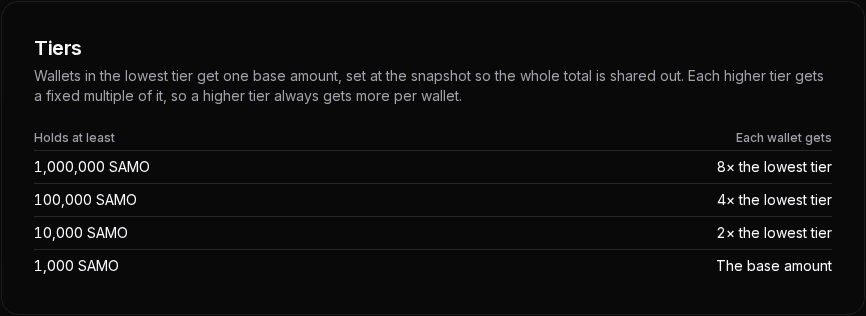
- Tiered: the four tiers below, for wallets holding at least 1,000,000 SAMO at 8×, 100,000 at 4×, 10,000 at 2× and 1,000 at 1×.
First, what one wallet gets, depending on how much SAMO it holds at the snapshot. Each row holds 10 times the row above, and with the tiers, each row is one tier higher:
| A wallet holding | Proportional | Proportional, minimum and cap | Tiered |
|---|---|---|---|
| 500 SAMO | 0.22 SAMO | Nothing, under 10,000 SAMO | Nothing, under 1,000 SAMO |
| 5,000 SAMO | 2.20 SAMO | Nothing, under 10,000 SAMO | 48.80 SAMO, in tier 4 |
| 50,000 SAMO | 21.98 SAMO | 29.25 SAMO | 97.60 SAMO, in tier 3 |
| 500,000 SAMO | 219.82 SAMO | 292.47 SAMO | 195.19 SAMO, in tier 2 |
| 5,000,000 SAMO | 2,198.23 SAMO | 2,924.66 SAMO | 390.39 SAMO, in tier 1 |
Proportional pays in step with the balance, so each row gets 10 times the row above. The minimum and cap cut off both ends and give what they free up to the wallets in between, so they get about a third more than in the plain split. Tiered pays by rank: each tier gets twice the tier below, so each row gets twice the row above. That lifts small holders and holds back large ones: a 5,000 SAMO wallet gets 48.80 SAMO instead of 2.20, and a 5,000,000 SAMO wallet gets 390.39 instead of 2,198.23.
And across the whole airdrop:
| Proportional | Proportional, minimum and cap | Tiered | |
|---|---|---|---|
| Wallets paid | 80,224 | 9,369 | 24,930 |
| Wallets that get nothing | 8,757, whose share is too small to pay | 79,612, holding less than 10,000 SAMO | 64,051, holding less than 1,000 SAMO |
| Most one wallet gets | 307,751.56 SAMO | 50,000 SAMO, to 7 wallets | 390.39 SAMO, to 462 wallets |
| What the median wallet gets | 0.0232 SAMO | 20.39 SAMO | 48.80 SAMO |
| Least a paid wallet gets | Less than 0.0001 SAMO | 5.85 SAMO | 48.80 SAMO |
| Share taken by the largest 10 wallets | 40.9% | 23.1% | 0.2% |
One wallet holds 15.4% of the eligible SAMO, and the largest 10 hold 40.9%, so a plain proportional split gives most of the airdrop to a few wallets and dust to the rest. The minimum and cap bring the largest 10 down to 23.1%, but pay only 9,369 wallets. The tiers pay 24,930 wallets at least 48.80 SAMO each, and the largest 10 get 0.2%.
Proportional: reward holders by how much they hold
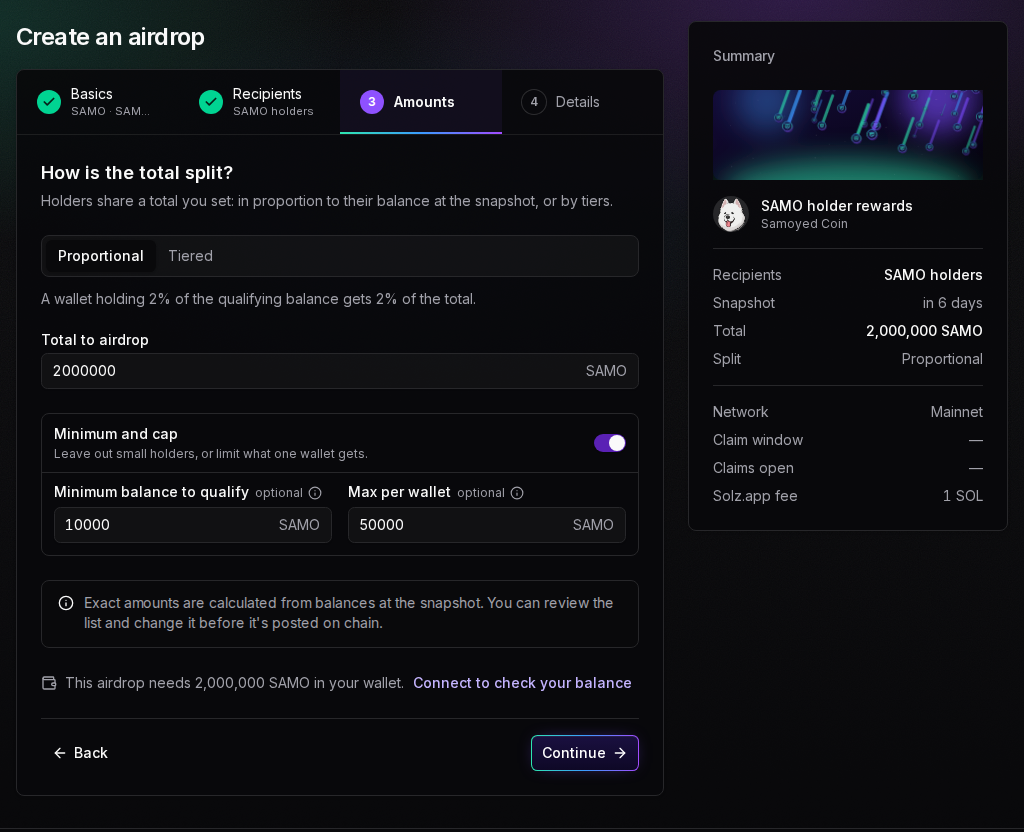
Each holder's share matches their share of the eligible balance: a wallet with 2% of it gets 2% of the total. This is the fairest split when the airdrop should follow stake, such as sharing revenue, or giving holders of an old token the new one in the same proportions.
Turn on Minimum and cap to deal with the two ends:
- Minimum balance to qualify leaves out dust wallets. With 10,000 SAMO, the 79,612 wallets holding less get nothing, and their share goes to everyone else.
- Max per wallet limits the largest holders. With 50,000 SAMO, seven wallets are capped, and the rest of their share is spread over everyone else.
The cap is a soft limit, because a holder can split their tokens across more wallets before the snapshot. The exact amounts come from balances at the snapshot, and you can review the list and change it before it's posted on chain.
Tiered: reward ranks rather than size
Tiered pays by rank, like the bronze, silver and gold levels of a rewards scheme. Use it when every serious holder should get a worthwhile amount, bigger holders should get more, and the largest holders shouldn't take most of the airdrop.
What a tier is
A tier is a band of balances. You give each tier a minimum, under Holds at least, and a wallet goes in the highest tier its balance reaches at the snapshot. A tier has no upper limit, so the top tier takes in every wallet above its minimum. Wallets below the lowest tier get nothing. You can have 2 to 10 tiers: Add tier adds one, and × removes one.
What the multiplier means
Each tier also has a multiplier, under Gets. Every wallet in the lowest tier gets one base amount, so the lowest tier is usually 1×. A wallet in a 2× tier gets 2 base amounts, and a wallet in an 8× tier gets 8. With 8× / 4× / 2× / 1×, a top-tier wallet always gets 8 times what a lowest-tier wallet gets, and twice what a 4× wallet gets. The multipliers must go down from the top tier, so a higher tier always gets more.
How the base amount is worked out
Think of each multiplier as a number of portions: a 1× wallet has 1 portion, a 2× wallet has 2, and an 8× wallet has 8. At the snapshot, Solz.app adds up every paid wallet's portions and divides the total by that number. The result is the base amount, what one portion is worth. Each wallet then gets its portions times the base amount, and together they share out the whole total.
Here's 2,000,000 SAMO across four tiers, each 10 times the one below, with the Balanced multipliers. Counting every holder today, the way the snapshot will, gives:
| Tier | Holds at least | Gets | Wallets | Portions in the tier | Each wallet gets |
|---|---|---|---|---|---|
| 1 | 1,000,000 SAMO | 8× | 462 | 462 × 8 = 3,696 | 8 × 48.7983 = 390.39 SAMO |
| 2 | 100,000 SAMO | 4× | 1,957 | 1,957 × 4 = 7,828 | 4 × 48.7983 = 195.19 SAMO |
| 3 | 10,000 SAMO | 2× | 6,950 | 6,950 × 2 = 13,900 | 2 × 48.7983 = 97.60 SAMO |
| 4 | 1,000 SAMO | 1× | 15,561 | 15,561 × 1 = 15,561 | 1 × 48.7983 = 48.80 SAMO |
| All | 24,930 | 40,985 | 2,000,000 SAMO in all |
- Add up the portions: 3,696 + 7,828 + 13,900 + 15,561 = 40,985.
- Divide the airdrop by them: 2,000,000 SAMO ÷ 40,985 = 48.7983 SAMO per portion. That's the base amount, shown as 48.80.
- Multiply each wallet's portions by it: a tier 3 wallet has 2 portions and gets 97.60 SAMO, and a tier 1 wallet has 8 and gets 390.39.
You don't set the base amount. The snapshot does, from how many wallets reach each tier.
Set the tiers in the form
Type each minimum under Holds at least, then pick how much more bigger holders get, under Bigger holders get:
- Gentle, 2× / 1.5× / 1×: close to equal for everyone, good for rewarding a whole community.
- Balanced, 4× / 2× / 1×: clearly more for bigger holders. It's the default.
- Steep, 10× / 3× / 1×: strongly rewards the biggest holders.
With more tiers, a preset carries on its pattern, so Balanced with four tiers is 8× / 4× / 2× / 1×. You can also type your own multipliers under Gets, such as 3 or 1.5, as long as each tier gets more than the tier below it.
Here are the three presets on the same four tiers and 2,000,000 SAMO, counted from every holder today. With four tiers, Gentle is 3× / 2× / 1.5× / 1×, Balanced 8× / 4× / 2× / 1×, and Steep 30× / 10× / 3× / 1×:
| Each wallet gets | Gentle | Balanced | Steep |
|---|---|---|---|
| Tier 1, 1,000,000 SAMO or more, 462 wallets | 191.78 SAMO | 390.39 SAMO | 859.09 SAMO |
| Tier 2, 100,000 SAMO or more, 1,957 wallets | 127.85 SAMO | 195.19 SAMO | 286.36 SAMO |
| Tier 3, 10,000 SAMO or more, 6,950 wallets | 95.89 SAMO | 97.60 SAMO | 85.91 SAMO |
| Tier 4, 1,000 SAMO or more, 15,561 wallets | 63.93 SAMO | 48.80 SAMO | 28.64 SAMO |
| Tier 1 gets, compared with tier 4 | 3 times as much | 8 times as much | 30 times as much |
| Tiers 1 and 2 get, of the total | 16.9% | 28.1% | 47.9% |
| Tiers 3 and 4 get, of the total | 83.1% | 71.9% | 52.1% |
Gentle spreads the airdrop most evenly: the 22,511 wallets in tiers 3 and 4 get 83.1% of it. Steep follows the balances most closely: the 2,419 wallets in tiers 1 and 2 get nearly half. Balanced sits between them. Pick Gentle to thank a whole community, Balanced to give bigger holders clearly more, and Steep when the airdrop should reward balances strongly but still lift small holders more than a proportional split would. Whichever you pick, a higher tier always gets more, and the whole total is shared out.
Beside each tier, ≈ each, if now shows what each of its wallets would get if the snapshot were taken now. Under the rows, a line compares the tiers with a proportional split, and a table shows the Wallets today in each tier and its share Of the total:
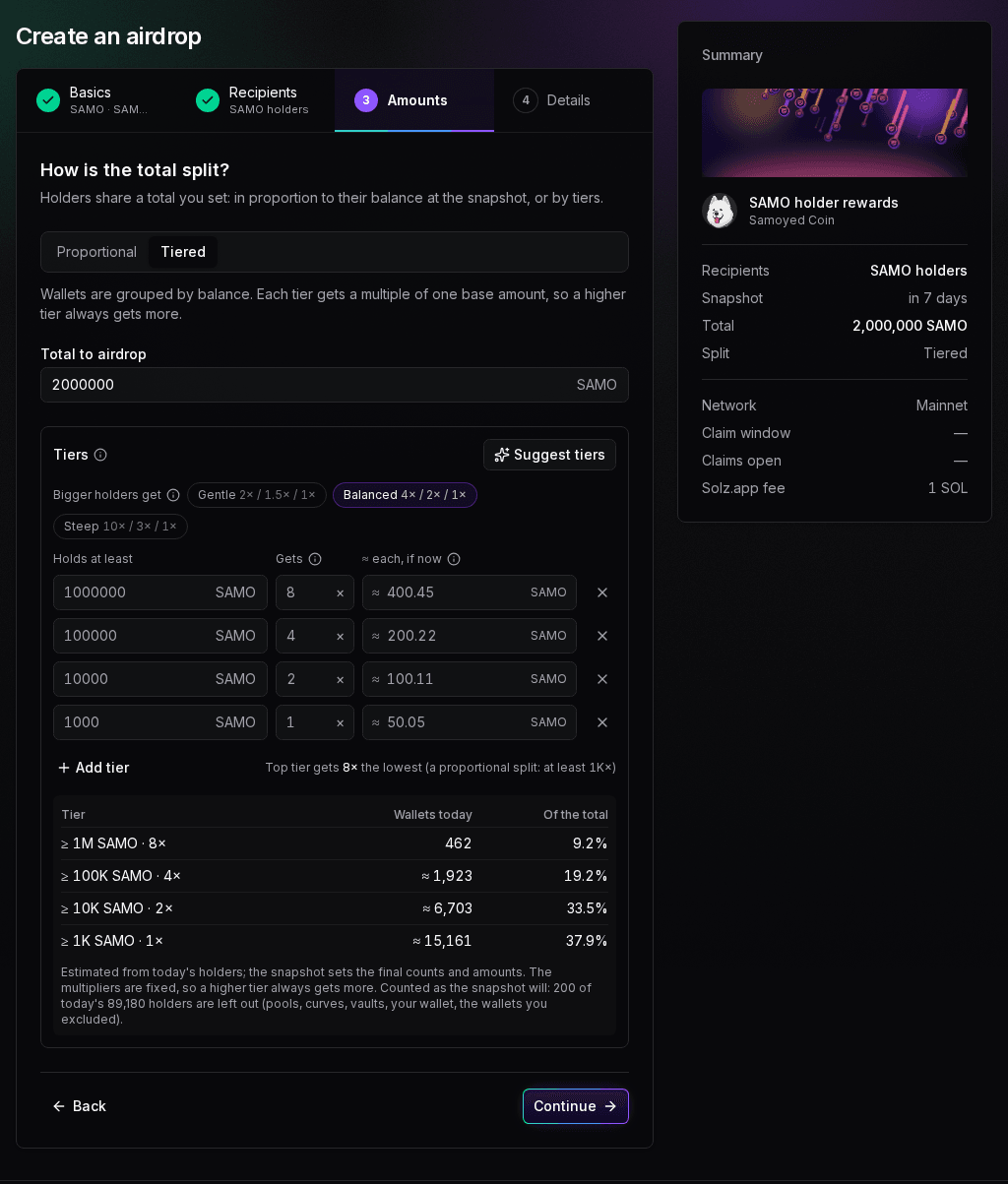
Top tier gets 8× the lowest (a proportional split: at least 1K×) means a tier 1 wallet gets 8 times what a tier 4 wallet gets. A proportional split would give it at least 1,000 times as much, because 1,000,000 SAMO is 1,000 times 1,000 SAMO. Of the total shows where the airdrop goes: tier 4 gets the least per wallet, but it has the most wallets, so it gets 37.9% of the total.
Or type the amount you want
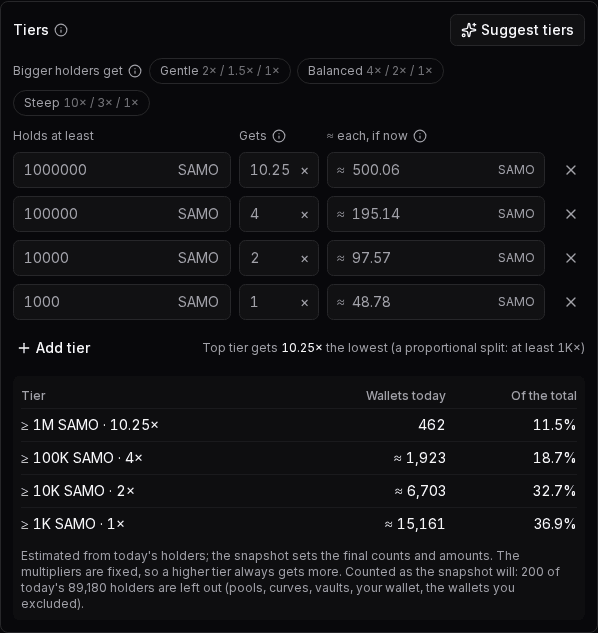
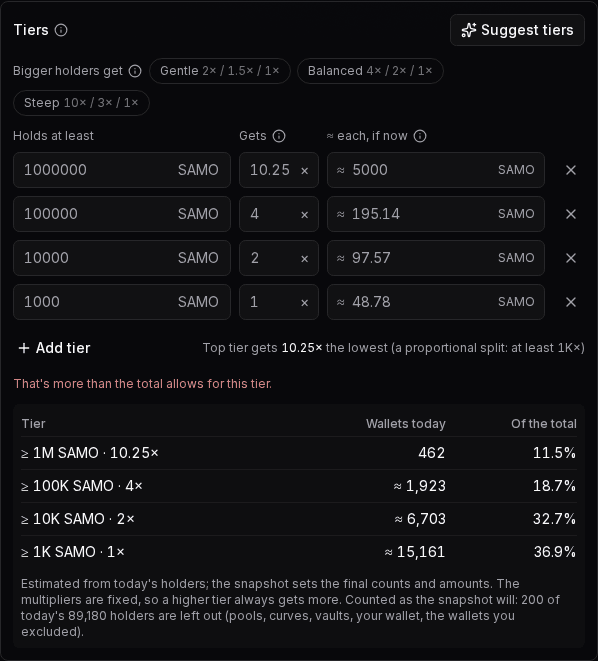
If you'd rather think in amounts, type one under ≈ each, if now. The form sets that tier's multiplier to pay about that much, and the other tiers' amounts adjust. Here, 500 typed for tier 1 sets its multiplier to 10.25×, and the other tiers drop slightly, to about 195.14, 97.57 and 48.78 SAMO:
Why the amounts are estimates, but the ratios are fixed
The amounts under ≈ each, if now come from today's holders, and past the first 1,000 holders the counts are close estimates, marked ≈. For SAMO, the form estimated about 400.45, 200.22, 100.11 and 50.05 SAMO each. Counted from every holder, the lower tiers have a few more wallets, so the base amount is 48.80 and the amounts are 390.39, 195.19, 97.60 and 48.80. Balances also change before the snapshot, and the snapshot sets the final counts and amounts.
The multipliers don't change. Whatever the counts, a tier 1 wallet gets 8 times a tier 4 wallet, and a higher tier always gets more. If nobody reaches a tier, it's left out of the count, and everyone else gets a little more.
Let Solz.app suggest tiers
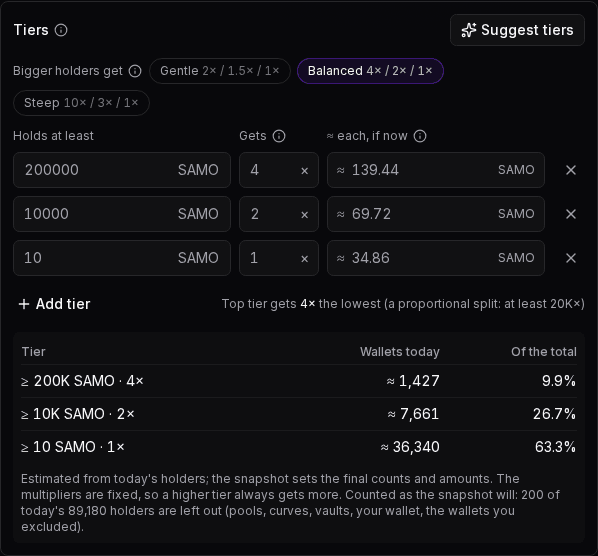
Click Suggest tiers to get tiers from today's holders: the top 1%, the next 9% and the next 40%, with round minimums and the Balanced 4× / 2× / 1×. For SAMO, it gave 200,000, 10,000 and 10 SAMO, at about 139.44, 69.72 and 34.86 SAMO each. A 10 SAMO minimum takes in almost every small holder, so the lowest tier gets 63.3% of the total. Change the minimums or the multipliers to suit your airdrop:
When Proportional with a cap suits you better
Tiers stop at the top tier: past its minimum, holding more doesn't earn more. That's what keeps the largest holders from taking most of the airdrop. If you want amounts that keep growing with balance, use Proportional, with a Minimum balance to qualify for dust wallets and a Max per wallet for the largest holders. In the example above, a 5,000,000 SAMO wallet gets 2,924.66 SAMO that way, against 390.39 with the Balanced tiers, and no wallet gets more than the 50,000 SAMO cap.
Tiers limit buying just before the snapshot, because a buyer only moves up to the tier their balance reaches. But they reward splitting a balance across wallets. A holder who moves 1,000,000 SAMO into ten wallets of 100,000 gets ten tier 2 amounts, about 1,950 SAMO, instead of one tier 1 amount of 390.39. A proportional split pays the same however a balance is spread.
When the tiers don't work
The form checks the tiers as you type and says what to fix:
| Message | Cause | What to do |
|---|---|---|
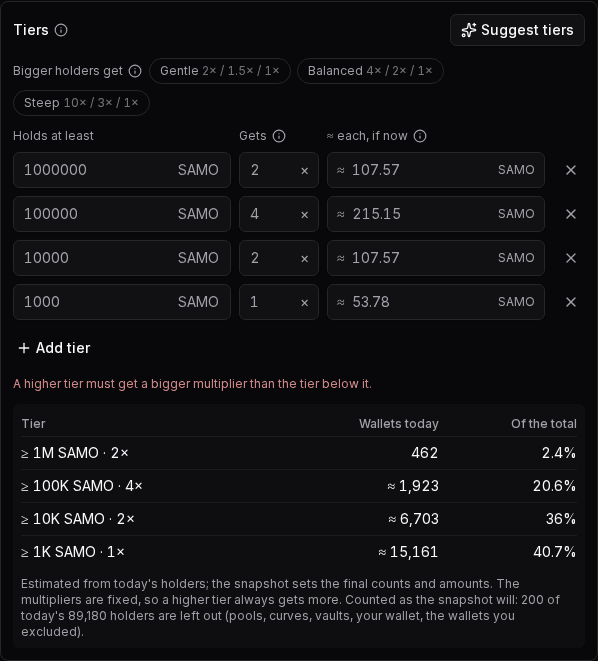
| A higher tier must get a bigger multiplier than the tier below it. | The multipliers don't go down from the top tier | Give each tier a smaller multiplier than the one above it, or pick a preset |
| That's more than the total allows for this tier. | The amount you typed, times the tier's wallets, is the whole total or more | Type a smaller amount |
| Can't set an amount for this tier: it needs wallets in it and in another tier. | Nobody reaches that tier today, or no other tier has wallets | Change the minimums, or type the multiplier instead |
| Two tiers have the same minimum. | Two rows have the same Holds at least | Give each tier its own minimum, or remove one |
| Give every tier a minimum above 0. | A Holds at least is empty or 0 | Type a minimum in every row |
| Give every tier a multiplier, like 4 or 1.5 (×). | A Gets is empty or 0 | Type a multiplier, or pick a preset |
| Use at least 2 tiers. | Only one tier is left | Click Add tier |
Here, tier 1 was given 2×, less than tier 2's 4×:
And here, 5,000 SAMO was typed for tier 1. Its 462 wallets would need 2,310,000 SAMO, more than the 2,000,000 total, so the multiplier stays as it was:
Steps to create a snapshot airdrop
- Open Solz Airdrop. Go to Solz Airdrop and click Create Airdrop in the sidebar. The network switch at the bottom says Mainnet. You can fill in the form first and connect your wallet at the end.
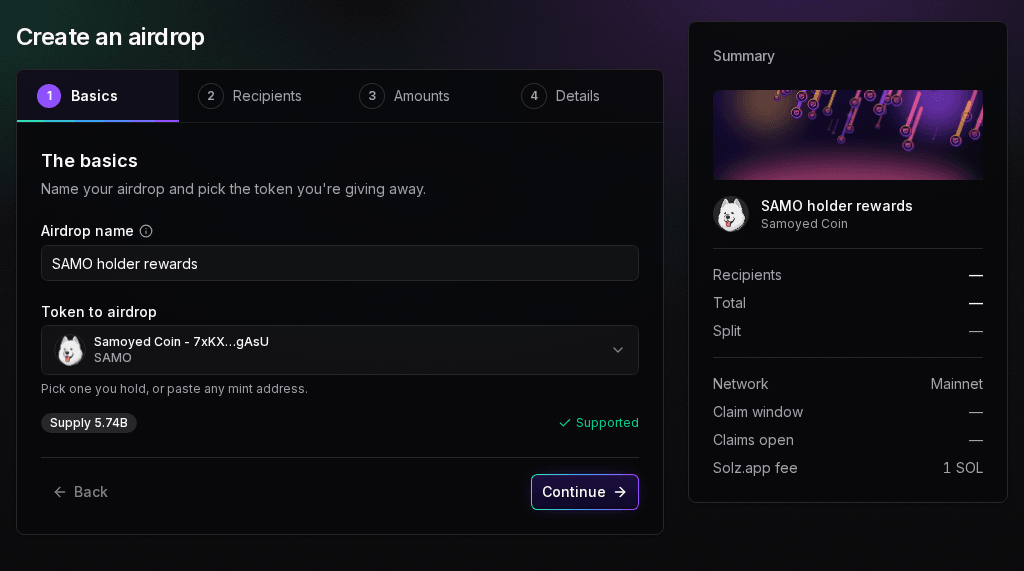
- Fill in the basics. Enter an Airdrop name, which holders see on the page, and pick the Token to airdrop from your wallet, or paste its mint address. Solz Airdrop shows the supply, any transfer fee, and Supported, or the reason it can't pay the token out.
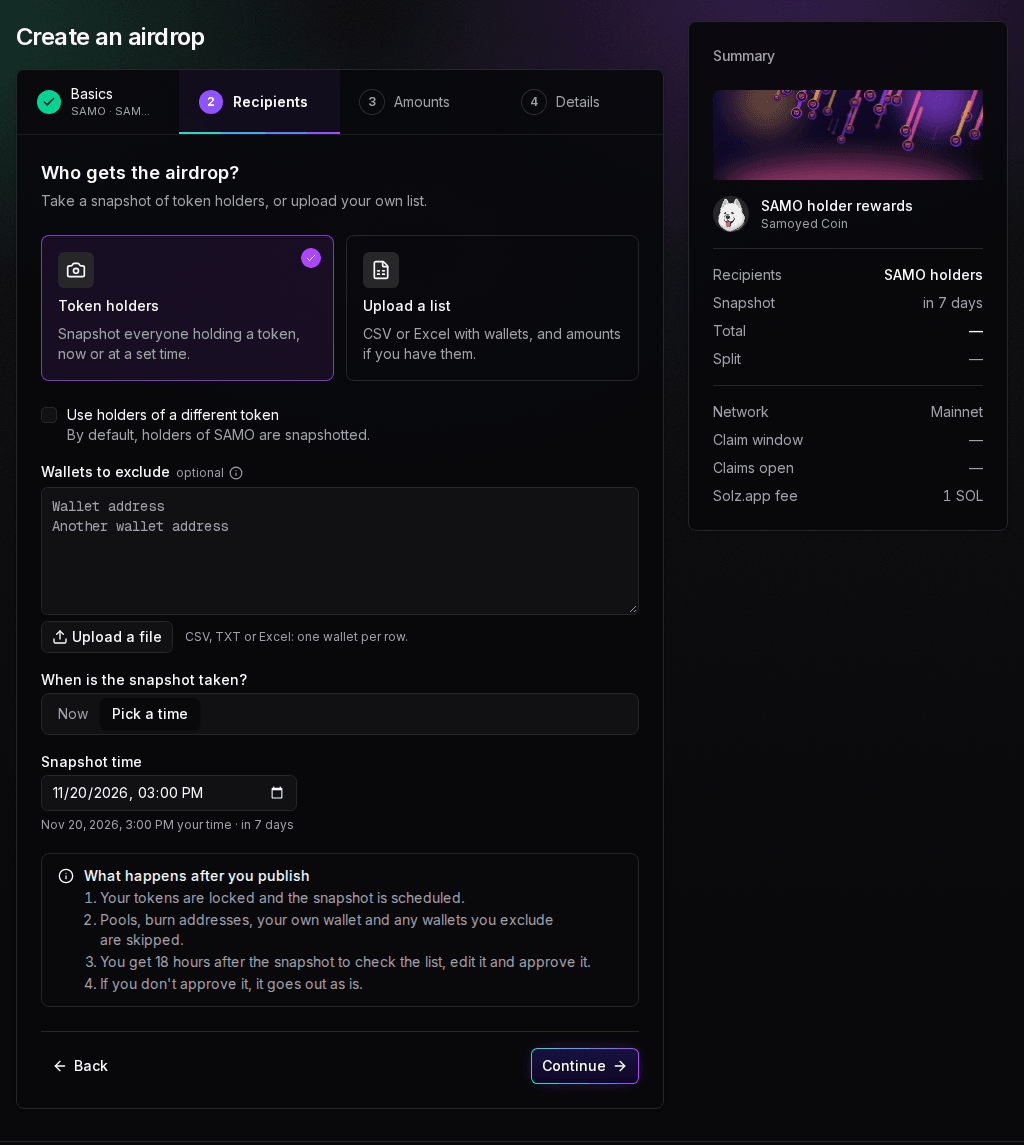
- Choose Token holders. By default, holders of the token you're airdropping are snapshotted. Tick Use holders of a different token to reward another community. Add any Wallets to exclude, by typing them or with Upload a file, and choose when the snapshot is taken. Who's left out is explained below.
- Set the split. Choose Proportional or Tiered, and the Total to airdrop. See which split to use. Below the step, Solz Airdrop checks that your wallet holds the total, and Continue stays blocked if it doesn't. See what the check says.
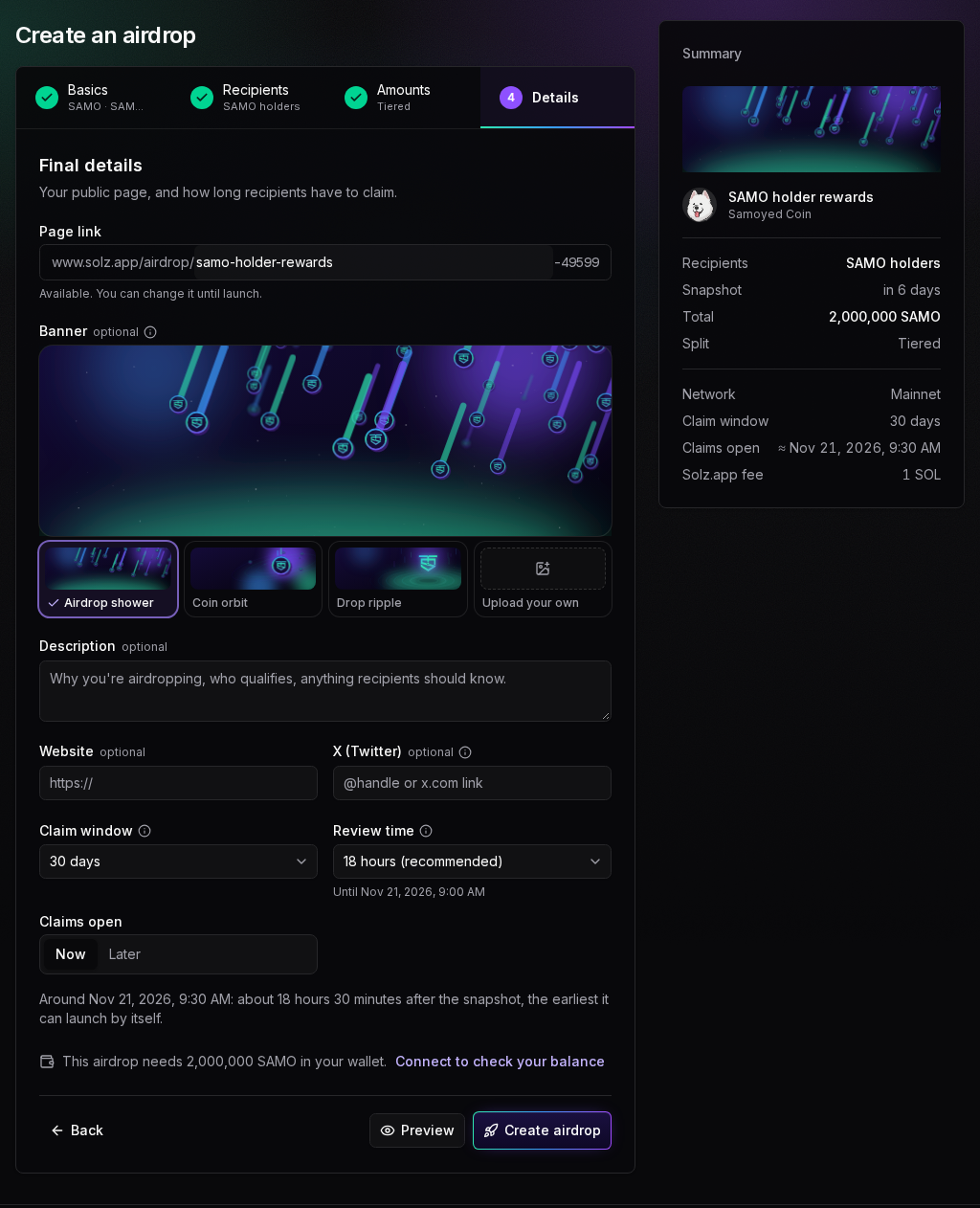
- Add the final details. Type the Page link, at least 4 letters or numbers. Solz.app adds 5 digits after it, such as samo-holder-rewards-49599, and you can change it until launch. Pick a Banner: Airdrop shower, Coin orbit, Drop ripple, or Upload your own, cropped to 3:1, with 1500 × 500 working best. Add a Description, Website and X (Twitter) if you want them.
- Choose the timing. The Claim window is 7, 14, 30, 60, 90 or 180 days, and starts at 30. Review time sets how long you have after the snapshot to review the list, from 30 minutes to 3 days, and shows when it ends. Claims open Now, meaning as soon as it can launch, or Later, at a time you pick.
- Preview your page. Click Preview to see the page holders will get: Before launch, Claims open, Not eligible and Claimed. The Summary beside the form fills in as you reach each step, and the steps along the top show your answers.
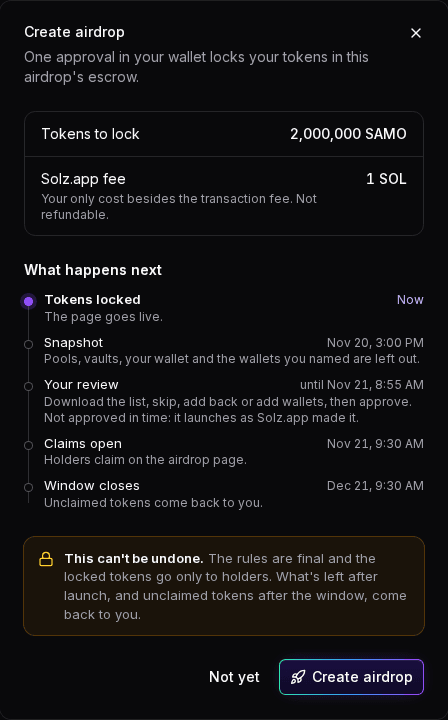
- Create the airdrop. Click Create airdrop. If your wallet isn't connected, connect it, and sign the free message that proves the wallet is yours. The dialog shows the Tokens to lock, the Solz.app fee, and What happens next. Check them, click Create airdrop again and approve once in your wallet.
When it works, Solz Airdrop says Airdrop created: tokens locked and the snapshot is scheduled. Your page is public from then on. If you close the wallet prompt, nothing is locked. Your airdrop waits under Not created yet in My Airdrops for 24 hours, and Finish creating reopens the form. After that, it's deleted.
An airdrop's settings can't be edited, and it can't be cancelled, once it's created. The locked tokens can only go to holders, and what's left after launch comes back to you. The review after the snapshot lets you switch wallets off, set amounts or add wallets, within the tokens you locked. Check the preview before you approve.
Example: 2,000,000 SAMO for SAMO holders
These screens set up a tiered airdrop of 2,000,000 SAMO to SAMO holders on mainnet, with a snapshot on November 20, 2026 at 3:00 PM. First, the name and the token. The form shows SAMO's supply of 5.74B and that it's Supported:
Then the recipients. Token holders is selected, the snapshot token is SAMO itself, no extra wallets are excluded, and Pick a time sets the snapshot for November 20, in your own time zone. The box What happens after you publish sums up the rest: your tokens are locked and the snapshot is scheduled; pools, burn addresses, your own wallet and any wallets you exclude are skipped; you get 18 hours after the snapshot to check the list, edit it and approve it; and if you don't approve it, it goes out as is.
The split is Tiered, with the four tiers above and the Balanced multipliers, 8× / 4× / 2× / 1×. On the Details step, Review time starts at 18 hours (recommended) on mainnet, until November 21 at 9:00 AM. With claims set to Now, the form says claims open around 9:30 AM, about 18 hours 30 minutes after the snapshot, the earliest it can launch by itself:
Create airdrop opens the dialog. It shows 2,000,000 SAMO to lock, the 1 SOL Solz.app fee, and the timeline: the snapshot on November 20 at 3:00 PM, your review until 8:55 AM the next day, claims open at 9:30 AM, and the window closes on December 21:
Who gets the airdrop, and who is left out?
Everyone holding the snapshot token when the snapshot is taken, minus the wallets that can't or shouldn't claim. Pools, bonding curves, vaults, multisigs, burn addresses, your own wallet and any other program-owned address are left out automatically. You can also name up to 1,000 wallets to exclude, such as team or treasury wallets.
The snapshot. By default, holders of the token you're airdropping are snapshotted. Tick Use holders of a different token to reward another token's community. Choose Now, which takes the snapshot within 10 minutes of creating it, or Pick a time to announce it in advance.
What's left out, and why. Excluded wallets get nothing, and their share goes to everyone else. In your review, you can switch more wallets off, or add back any wallet Solz Airdrop left out, except burn addresses.
| Left out | Why |
|---|---|
| Pools, curves, locks and vaults | They're owned by programs, so they may not be able to sign a claim. You can add one back in the review, with a warning |
| Your wallet | Left out by default. You can add it back in the review |
| Burn addresses | Nobody can claim with them |
| Wallets to exclude | You named them, such as team, treasury, vesting or market-maker wallets |
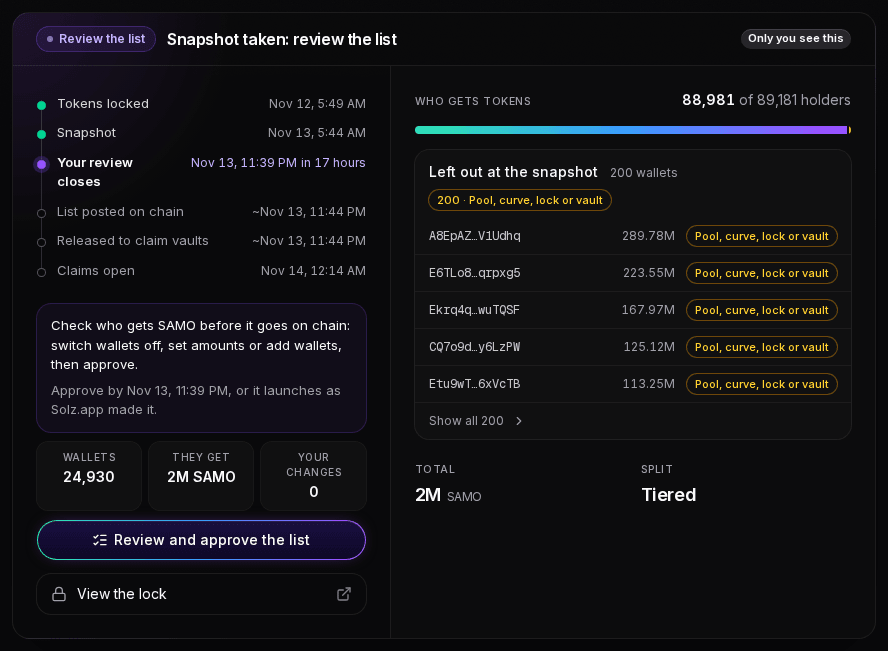
For SAMO, 200 of the 89,181 holders are program-owned, so they're left out before the split. They include the five largest pool and vault accounts, each holding more than 100 million SAMO.
Tokens that are refused. A stablecoin can't be the snapshot token, because its holders are mostly exchanges and protocols. You can still airdrop a stablecoin to another token's holders. Here, SAMO is going to holders of USDC, which is refused:
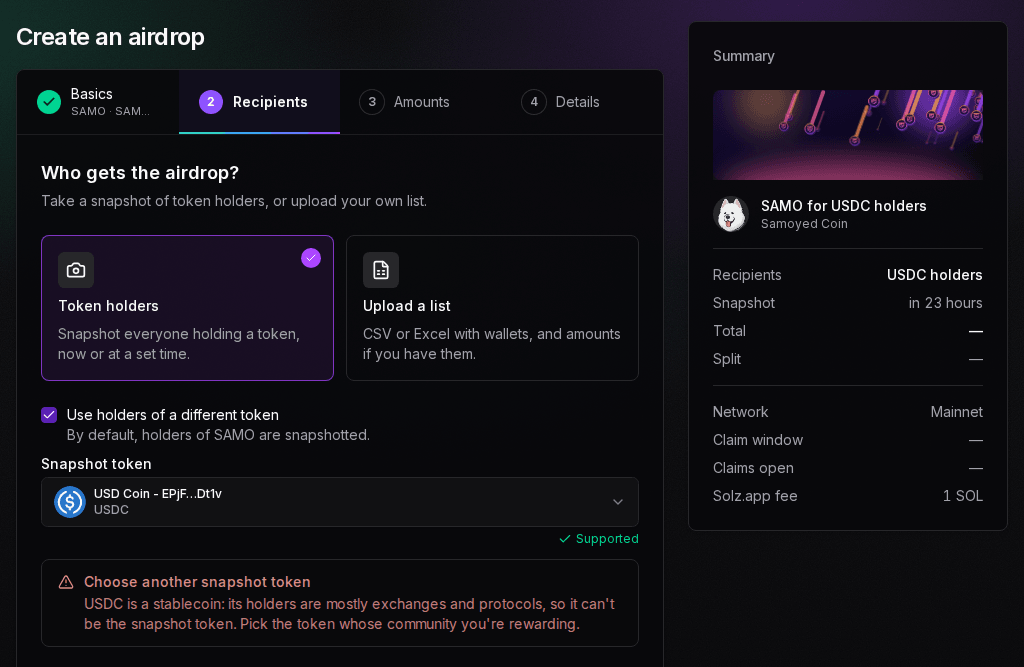
Tokens with a transfer hook, non-transferable tokens, tokens whose new accounts start frozen and tokens with a permanent delegate can't be airdropped, and the form says why. A token with a freeze authority can be, but holders see a note about it.
When do claims open, and what happens after I create it?
It launches by itself. The snapshot is taken at its time, then you review the list for the time you chose. When you approve it, or when the review ends, the list is posted on chain and released into the claim vaults. On mainnet, Now means the snapshot, plus your review, plus about 30 minutes.
| Stage | When, on mainnet |
|---|---|
| Tokens locked | When you create it |
| Snapshot | Now, within 10 minutes of creating it, or your time |
| Your review | From the snapshot, for the time you chose. Approvals close 5 minutes before it ends |
| List posted on chain | When you approve it, or by Solz.app when the review ends |
| Released to claim vaults | Within minutes of being posted |
| Claims open | Now, the snapshot plus your review plus about 30 minutes, or your time |
| Unclaimed returned | After the claim window |
With the recommended 18-hour review, Now is about 18 hours 30 minutes after the snapshot. Review time offers 30 minutes, 1, 2, 6, 12 or 18 hours, or 1, 2 or 3 days. The form shows the exact time, and an error if a Later time is too early. On devnet, the review starts at 1 hour and the margin is about 20 minutes.
If the automatic launch ever fails, the Manage panel shows The automatic launch is stuck, with what went wrong and a Launch now button. You only see this button when it's needed.
How does the review work?
After the snapshot, open your airdrop's page with the wallet that created it and click Review and approve the list. Switch wallets off, set amounts or add wallets, then click Approve and post and approve once in your wallet. The list is posted and released within minutes. Without your approval, it launches as Solz.app made it.
1. The Manage panel says it's time
Open your airdrop's page with the wallet that created it. If you haven't signed in on this device, a card says This is your airdrop: Sign in to manage it, and asks you to sign the free message. After the snapshot, the Manage panel shows Review the list and Snapshot taken: review the list. Its timeline shows when Your review closes, then List posted on chain, Released to claim vaults and Claims open. The note says Approve by, followed by the deadline, or it launches as Solz.app made it, and the panel counts the Wallets that get tokens, what They get, and Your changes. Beside it, Who gets tokens counts the holders, and Left out at the snapshot lists the wallets that were excluded, with what they held and why.
2. Check and change the list
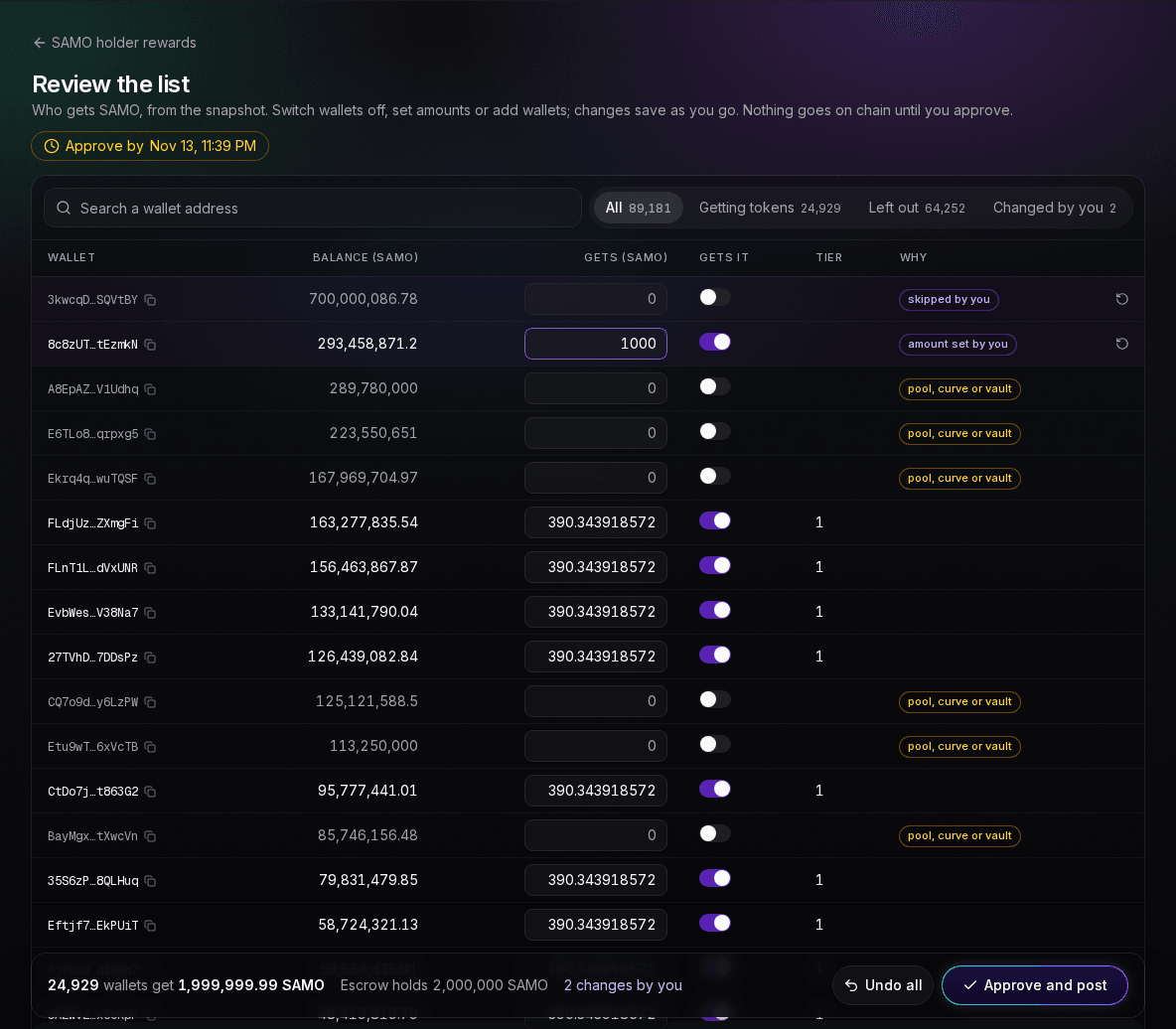
Review and approve the list opens the review page. It lists every holder, largest balance first, with its balance of the snapshot token, what it gets, a switch for whether it gets anything, its tier for a tiered airdrop, and why it's in or out. Every change saves at once, and everyone else's amounts update. Nothing goes on chain until you approve.
- Find wallets. Search a wallet address, or filter by All, Getting tokens, Left out or Changed by you. Each filter shows its count.
- Switch a wallet off. Its share goes to the others, and the row says skipped by you.
- Set an amount. Type it in the row. That wallet gets exactly that, and the row says amount set by you.
- Add a wallet back. Switch on any wallet Solz.app left out: one you named when creating, your own wallet, or a program-owned one, which shows a warning because it may not be able to claim. Burn addresses can't be added.
- Add a new wallet. Add a wallet takes any address with an amount, even one that isn't in the snapshot.
- Undo. ↺ puts one wallet back to the rules, and Undo all goes back to Solz.app's whole list.
Here, the largest SAMO holder that qualifies, with 700,000,086.78 SAMO, is switched off, and the next one, with 293,458,871.2 SAMO, is set to 1,000 SAMO. The other tier 1 wallets now get 390.343918572 SAMO each, a little less than before, because the 1,000 SAMO comes off the total first. The bar at the bottom shows 24,929 wallets get 1,999,999.99 SAMO, the Escrow holds 2,000,000 SAMO, and there are 2 changes by you:
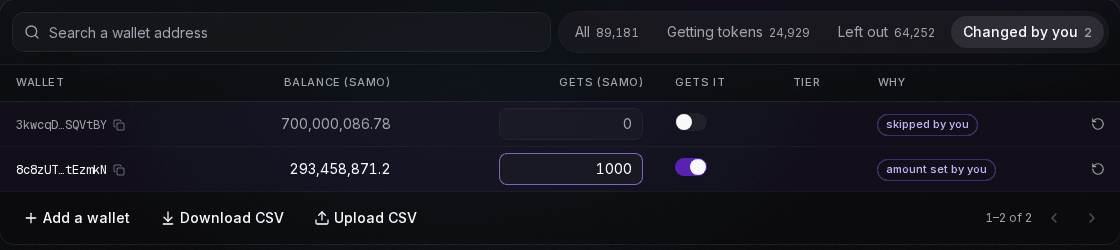
Changed by you shows just your edits, each with ↺ to put it back. Add a wallet, Download CSV and Upload CSV are under the table:
3. Approve and post: Solz.app checks first
Click Approve and post. Before your wallet opens, Solz.app checks the list. If no wallet gets anything, or the claim vaults need more than the escrow holds, it says Not ready to approve and how much is missing, and your changes stay saved. Otherwise it shows Approve and post this list?, with the totals and any notes.
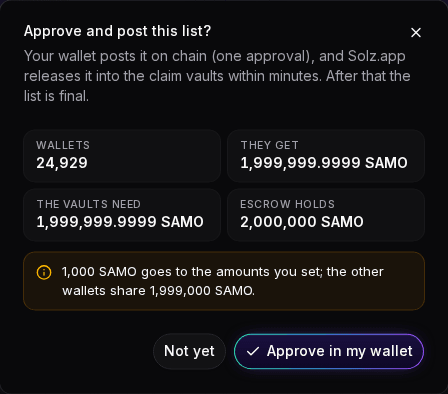
The vaults need more than the wallets get when the token has a transfer fee. SAMO has none, so the two are the same.
| What you see | What it means | What to do |
|---|---|---|
| Not ready to approve, No wallet gets anything yet | Every wallet is switched off, or nobody qualified | Switch some wallets on, or add one with an amount |
| Not ready to approve, The list needs an amount but the escrow holds an amount, followed by how much is short | Your amounts need more than you locked, transfer fee included | Lower the amounts you set, or switch some wallets off |
| An amount goes to the amounts you set; the other wallets share an amount | You set some amounts | Nothing. It's a note |
| Program-owned wallets included | You added back a program-owned wallet. If it can't sign a claim, its tokens return to you after the window | Check you meant to |
| The escrow doesn't hold enough for your changes yet | Shown in the Manage panel while your edits need more than you locked | Open the review and lower the amounts |
4. Your wallet posts it, and Solz.app releases it
Click Approve in my wallet. It says Building the list…, Approve in your wallet… and Checking it on chain…, then List approved and posted. Solz.app releases it into the claim vaults within minutes. The list is final from then on. The Manage panel shows Launching and You approved the list, then Opens soon once the vaults are funded, and Live when claims open.
If you don't approve, or nobody qualifies
- You don't approve in time. Approvals close 5 minutes before the review ends. When it ends, Solz.app posts the list as Solz.app made it, without your changes, and releases it within minutes. The Manage panel shows Launches by itself, then Launching. You don't need to do anything.
- Nobody qualifies by your rules, for example because no holder reaches your minimum. Nothing launches by itself. The Manage panel says Needs wallets, and the review stays open with no deadline until you add wallets and approve. Claims open once it's released.
How are amounts worked out after my changes?
Amounts you set come off the total first, and everyone else shares what's left by the rules. In a tiered airdrop, the base amount is worked out again: what's left, divided by the portions of the wallets still paid. Each wallet then gets its tier's multiplier times it. The multipliers don't change, so a higher tier still gets more.
In the example above, the rules alone give tier 1 wallets 390.387 SAMO each, from a base amount of 48.798 SAMO. After the two changes:
| Wallets | Portions | Each gets | |
|---|---|---|---|
| Set by you | 1 | Not counted | 1,000 SAMO, taken off first |
| Tier 1, 8×, 1,000,000 SAMO or more | 460, after one is switched off and one is set by you | 3,680 | 390.344 SAMO |
| Tier 2, 4×, 100,000 SAMO or more | 1,957 | 7,828 | 195.172 SAMO |
| Tier 3, 2×, 10,000 SAMO or more | 6,950 | 13,900 | 97.586 SAMO |
| Tier 4, 1×, 1,000 SAMO or more | 15,561 | 15,561 | 48.793 SAMO |
| Added up | 24,929 | 40,969 | 1,999,999.99 SAMO in all |
What's left is 1,999,000 SAMO, so the base amount is 1,999,000 ÷ 40,969 = 48.793 SAMO, a little lower than before. The wallet set to 1,000 SAMO now gets more than its 390.387 SAMO by the rules, so everyone else gets slightly less. Switching the largest wallet off without setting any amount would do the opposite: the base amount would rise to 48.808 SAMO, and tier 1 wallets would get 390.463 SAMO each.
Bulk changes with a CSV file
For many changes at once, click Download CSV. The file has every holder, largest first, with the columns wallet, balance, amount, status and label, plus tier for a tiered airdrop. Wallets you added come after the holders. Set status to eligible or skip, or change amount, then Upload CSV with the file as CSV or Excel.
Keep the header row. Rows you delete from the file stay as they are, and a new row with an address and an amount adds that wallet. Solz.app shows what changed and lists the rows it ignored, with the reason, such as appears twice, not a Solana address, a burn address can't claim, or not in the snapshot: give it an amount to add it. An upload that would need more than the escrow holds is refused, and nothing changes.
The labels in the file say why each wallet is in or out:
| Label | What it means |
|---|---|
| program-owned (pool or curve or vault or multisig) | Owned by a program, so it may not be able to claim |
| your wallet | The wallet that created the airdrop |
| burn address | Nobody can claim with it |
| named by you when creating | One of your Wallets to exclude |
| below the minimum balance | It held less than your Minimum balance to qualify |
| below the lowest tier | It held less than your lowest tier |
| share rounds to zero | Its share is too small to pay |
| skipped by you | You switched it off |
| amount set by you | You gave it an amount |
| added by you (not in the snapshot) | You added a wallet that didn't hold the token |
| named when creating - added back by you, your wallet - added back by you, program-owned - added back by you (it may not be able to claim) | You switched a left-out wallet back on |
| nothing left - the amounts you set use the whole airdrop | The amounts you set use the whole total |
Holders can check the posted list on the Verify page, whoever posted it.
What does the Manage panel show?
When you open your airdrop's page with the wallet that created it and sign in, a Manage panel appears, marked Only you see this. It shows where the airdrop stands on a timeline, what to do now, who gets tokens and who was left out, the total and the split, plus claim progress once claims open.
| Badge | What it means | What to do |
|---|---|---|
| Waiting for snapshot | Tokens are locked, and the snapshot is scheduled | Share the claim page so holders can check it |
| Snapshot running | Solz Airdrop is reading the holders | Wait. The panel counts the token accounts read |
| Review the list | The snapshot is taken, and your review is open | Review the list, and approve it before the time shown if you changed it |
| Needs wallets | Nobody qualifies by your rules, so it waits for you, with no deadline | Add wallets on the review page, then approve |
| Launches by itself | Your review is over, and Solz.app posts the list as Solz.app made it | Nothing |
| Launching | The list is posted and being released into claim vaults | Nothing. It takes minutes |
| Needs you | The automatic launch is stuck | Click Launch now |
| Opens soon | Launched, and claims open at the time shown | Share the claim page so holders are ready |
| Live | Claims are open | Share the claim page, and watch claims come in |
| Window closed | The claim window has ended, and unclaimed tokens are returning to you | Nothing, unless it hasn't happened within the hour |
| Ended | Unclaimed tokens are back in your wallet | Nothing |
After the snapshot, Left out at the snapshot lists each wallet that was excluded, with what it held and why: Your wallet, Pool, curve, lock or vault, Named by you, Burn address, or This airdrop's escrow. Only you can see this list. View the lock opens the escrow in Solana Explorer.
Copy link in the panel gives out the claim page, which ends in /claim. My Airdrops, in the sidebar, lists all your airdrops, with their status, network, amounts and what happens next.
What happens to unclaimed tokens?
When the claim window closes, Solz Airdrop sends the unclaimed tokens back to your wallet by itself, within minutes, and pays the fees. They can only go to you. If it hasn't happened within the hour, the Manage panel shows a button to return them yourself, which needs one wallet approval.
The panel says Returning your unclaimed tokens while it waits, and All done once they're back. If the return is late, it says Return your unclaimed tokens, and the button sends them with one approval.
Tokens left in the escrow after launch are different. Rounding, or the margin locked for a transfer fee, can leave some behind. These stay until you withdraw them: the Manage panel says how many are left in the escrow and offers a Withdraw button, and My Airdrops marks the airdrop To withdraw. Solz Airdrop says The escrow's leftovers are back in your wallet when it's done.
How do holders check and claim an airdrop?
Holders open the airdrop's claim page, connect their wallet and click Claim, followed by the token's symbol, then approve one transaction. They pay for their own claim, about 0.0008 SOL in fees and rent, or about 0.0023 SOL if their wallet has no account for the token yet. Anyone can check any address, without connecting.
Share the claim page. Each airdrop has a page just for holders, at its address with /claim on the end, such as www.solz.app/airdrop/samo-holder-rewards-49599/claim. It has no sidebar or Manage panel, just the wallet button at the top right and a Solz.app footer. Copy link, Share on X and the calendar invite all give out this address.
- Open the claim page. The claim card sits beside the banner, the token, the creator and the description. Below, About this airdrop shows the recipients, the total, the tokens and when claims open, then answers who gets it, how to claim, what it costs, when claims are open, what happens to unclaimed tokens and how to check it. A tiered airdrop also shows its Tiers.
- Check eligibility. Click Connect wallet, or type any address in Check any address. Before the snapshot, a wallet on track sees an estimate based on today's balances. After the snapshot, the amount is final.
- Wait for claims to open. The card counts down with Snapshot in, then Claims open in. Click Add to calendar to get a reminder. The Claim button turns on by itself when claims open, without a reload.
- Claim. With the wallet connected, the card shows Your allocation and what claiming costs this wallet: Claiming costs about 0.0008 SOL in fees and rent. A wallet with no account for the token sees Claiming costs about 0.0023 SOL in fees and rent, including opening your SAMO account. Click Claim, followed by the symbol, and approve in your wallet. It says Approve in your wallet…, then Confirming….
- Check the result. The card turns green and says Claimed, with the amount, the wallet it's in, and View transaction or Share on X.
This is the claim page for the SAMO airdrop during the review, for a holder with 15,000,000 SAMO, in tier 1. The amount, 390.386726851 SAMO, is Final, and the card counts down to the opening:
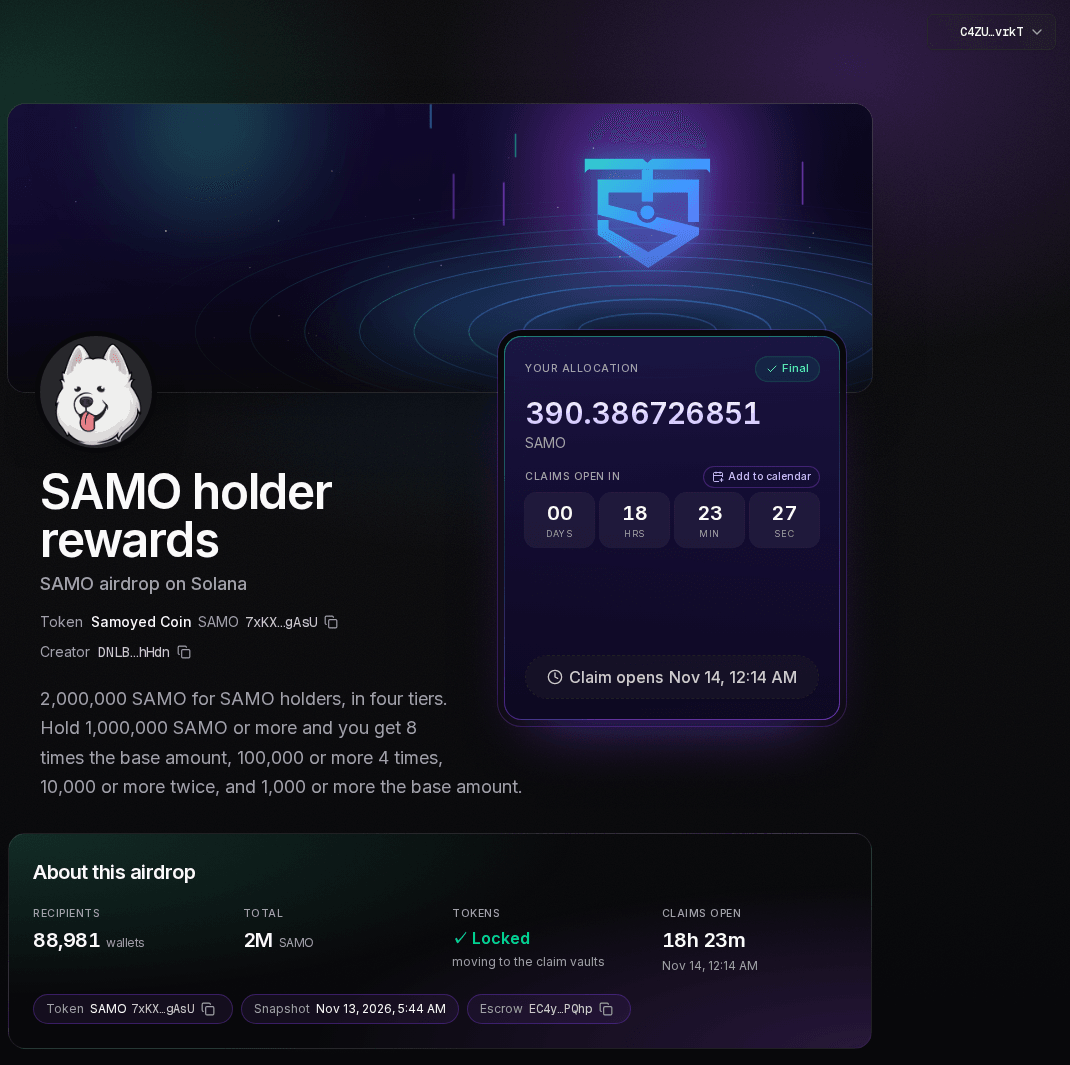
Further down, Tiers shows what each tier gets as a multiple of the lowest, which gets The base amount:
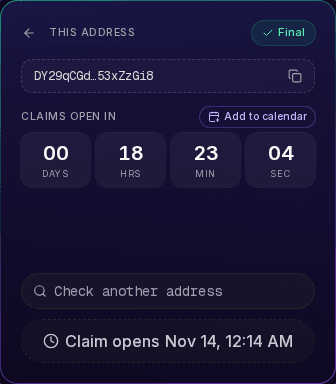
Before claims open, a wallet that isn't on the list sees its address and the countdown instead of a verdict, because the review can still change the list:
What holders might see
The claim card only says whether a wallet gets tokens, never why not. A wallet on the list sees its amount, then Claim, then Claimed. A wallet that isn't on the list sees the countdown until claims open, then Not eligible. An address that isn't a valid wallet gets the same Not eligible.
| What you see | What it means | What to do |
|---|---|---|
| Your allocation, with an amount | This wallet gets that amount, after any transfer fee. Estimate before the snapshot, Final after it | Wait for the countdown, then click Claim, followed by the token's symbol |
| Claimed | The tokens are in the wallet shown | Nothing. View transaction shows the claim on chain |
| Claim window closed | This wallet's tokens weren't claimed in time and go back to the creator | Nothing |
| Your wallet or This address, with the countdown | Claims aren't open yet, and this wallet isn't on the list. The review can still change the list | Check again when claims open |
| Not eligible | Claims are open, and this wallet isn't on the list, or the address isn't a valid wallet | Click Use another wallet, or check another address |
| Didn't go through | The claim failed, or you declined it in your wallet. Nothing was taken | Click Try again |
| The network didn't confirm it in time | The claim may still land. Nothing was taken if it didn't | Refresh in a minute before trying again |
| Couldn't load, Couldn't read this wallet | Solz Airdrop couldn't reach Solana to read the wallet. Nothing is lost | Click Retry |
| Airdrop ended | The claim window has closed, and unclaimed tokens were returned to the creator | Nothing |
| Cancelled | The creator cancelled the airdrop before launch, so no tokens were sent | Nothing |
How do I verify an airdrop?
Open the airdrop's Verify page. Your browser downloads the published list, checks its sha256 fingerprint, rebuilds every merkle tree and compares each root with the claim vaults on Solana, and with the list posted to the escrow. Everything matches means the claims match the list. It runs in your browser, so you don't have to trust Solz.app's server.
Each claim vault, called a distributor, holds the fingerprint of up to 12,000 wallets and their amounts. The Verify page shows a row for each one, with its wallets, how many have claimed, and a check on its root, total, mint and key. If anything differs, it says Something doesn't match, and shows which check failed.
The claim page links to it too. Once the list is released and before claims open, its In claim vaults tile shows the amount with checked on chain. That opens the claim vault in Solana Explorer, or the Verify page when the airdrop has several vaults.
Everything else is on chain too. The escrow holds the locked tokens, with no private key, and can only pay this airdrop's claim vaults, or the creator for leftovers after launch and for unclaimed tokens. Nobody, Solz.app included, can redirect them or change when claims open. In the Manage panel, View the lock opens the escrow in Solana Explorer. These rules are enforced by the Solz Airdrop program, at SoLZnxKBZoq9cZFdGScjyKQJs6D5CZc5age8HV6HRYR on mainnet and devnet, which Solz.app can still upgrade and which hasn't been audited yet.
How do transfer-fee tokens work in an airdrop?
For a Token-2022 token with a transfer fee, the amounts you set are what leaves the claim vault, or the gross amount. Each holder receives that minus the token's fee, or the net amount. The form shows an example as you type, and the claim card shows holders the net amount, after the token's fee.
Take Nullmask (MASK), which charges 3% with a Max Fee of 1,000,000,000 MASK:
| Allocation, gross | Fee at 3% | Holder receives, net |
|---|---|---|
| 1,000 MASK | 30 MASK | 970 MASK |
| 10,000 MASK | 300 MASK | 9,700 MASK |
| 100,000 MASK | 3,000 MASK | 97,000 MASK |
The form warns This token charges a 3% transfer fee. Moving tokens into the escrow and then into the claim vaults pays the fee too, so Tokens to lock in the Create airdrop dialog is more than your total, marked Includes a margin for the transfer fee. Anything the margin doesn't use stays in the escrow after launch, for you to withdraw. In your review, the claim vaults must be fundable from the escrow, transfer fee included: Approve and post won't continue while they need more than it holds.
For more on these tokens, see how transfer fees work.
How do I plan and announce a holder airdrop safely?
Decide whose holders, the split and the total before you start, and preview the page before you create it. Announce the claim page and the snapshot time from your own channels, and tell holders that claiming never needs a seed phrase. Fake claim sites copy real airdrops, so give people one official link.
- Try it on devnet first. Switch the network at the bottom of the app to Devnet and run the whole flow with test tokens, for a 0.2 SOL fee.
- Set the snapshot time on purpose. A time announced in advance gives people a reason to buy and hold, but also invites buying just before it and selling after. Snapshot Now, or use tiers and a minimum, if that worries you.
- Exclude what isn't community. Pools, vaults and your own wallet are left out for you. Add team, treasury, vesting and market-maker wallets under Wallets to exclude.
- Limit farming. Many small wallets can farm an airdrop. A Minimum balance to qualify or a lowest tier stops dust wallets, and the review lets you switch off wallets you don't trust.
- Give yourself time to review. Pick a Review time you can be around for. If you miss it, the airdrop launches as Solz.app made it.
- Pick a claim window people can meet. 30 days is the default. Longer windows suit holders who rarely check, and shorter ones return unclaimed tokens sooner.
- Share the Verify page. Holders can rebuild the list themselves, which answers most questions about fairness.
- Warn about scams. Share one link, the claim page ending in
/claim. A claim only asks for one transaction, and nobody from your team will DM a claim link.
How much does a snapshot airdrop cost?
The creator pays a flat Solz.app fee of 1 SOL per airdrop on mainnet, plus the transaction fee. That fee also covers every network deposit the airdrop needs, including the claim vaults, one for every 12,000 wallets. Holders pay their own claims, about 0.0008 SOL each in fees and rent. The fee isn't refundable.
| Item | Cost |
|---|---|
| Solz.app fee, paid by the creator | 1 SOL per airdrop on mainnet, or 0.2 SOL on devnet |
| Escrow and claim vault deposits | Included in the Solz.app fee |
| Creator's transaction fee | About 0.000005 SOL |
| Claim, paid by each holder | About 0.0008 SOL in fees and rent |
| Holder's token account, if they don't have one | About 0.0015 SOL |
The Create airdrop dialog shows the current fee before you approve, so check it there. The fee stays the same however many wallets you pay:
| Wallets | Claim vaults | Solz.app fee |
|---|---|---|
| 250 | 1 | 1 SOL |
| 10,000 | 1 | 1 SOL |
| 100,000 | 9 | 1 SOL |
| 1,000,000 | 84 | 1 SOL |
A holder's claim costs about 0.0008 SOL in fees and rent. A wallet with no account for the token also pays about 0.0015 SOL of rent to open one, a little more for Token-2022, and gets it back if it later closes that account.
FAQ
Is Solz Airdrop live on mainnet?
Yes, at www.solz.app/airdrop. Devnet is still there for tests: switch the network at the bottom of the app. The Solz Airdrop program hasn't been audited yet, and Solz.app can still upgrade it.
How many wallets can one airdrop pay?
Up to 1.5 million.
Can I change or cancel an airdrop after creating it?
You can't cancel it or change its settings. During your review, you can switch wallets off, set amounts, add back wallets that were left out, or add new ones, within the tokens you locked. Unclaimed tokens come back to you after the claim window.
Do I need to come back to launch it?
No. It launches by itself and claims open on time. Come back only if you want to change the list during your review, if the Manage panel says Needs wallets because nobody qualified, or if it says The automatic launch is stuck.
Can I airdrop to holders of someone else's token?
Yes. On the Recipients step, tick Use holders of a different token and pick it. The token you airdrop stays your own. A stablecoin can't be the snapshot token.
Can I split a total by balances from my own file?
Yes. Choose Upload a list instead of Token holders, upload a file of wallets and balances, such as a Token Snapshot CSV, and choose Balances. It's split in proportion or by tiers, like a snapshot, but from your numbers and with no review. See the guide to airdropping to a list.
Can I add a wallet that didn't hold the token?
Yes, during the review. Click Add a wallet on the review page and enter any address with an amount. That amount comes off the total before everyone else's share.
Can holders claim after the window closes?
No. The unclaimed tokens go back to you, and the card says Claim window closed.
Do I pay for each holder's claim?
No. Each holder pays for their own claim, about 0.0008 SOL in fees and rent. Your only costs are the Solz.app fee and your transaction fee. If you'd rather pay for them, send the tokens with Multi Token Sender instead.
Does buying just before the snapshot count?
Yes. There's one snapshot, at the time set. With Proportional, a buy just before it counts in full. With tiers, it only moves the buyer up to the tier their balance reaches.
Sources
Solz Airdrop's fee, timings, limits, splits and messages come from the app. The SAMO results come from Solz Airdrop's own split maths, run on SAMO's holders read from Solana mainnet. The rest comes from:
- Jupiter merkle distributor, which the Solz Airdrop program is built on, with Token-2022 support added
- Solana: Token-2022 transfer fees
- The fee pool, rent and token figures, read from Solana mainnet and devnet