
How to launch a token on Pump.fun with bundles and a vanity address
Launch on Pump.fun from Solz with a dev buy, a multi-wallet buy bundle and a custom vanity address. Includes bonding curve maths and every fee.
How do I launch a token on Pump.fun with Solz?
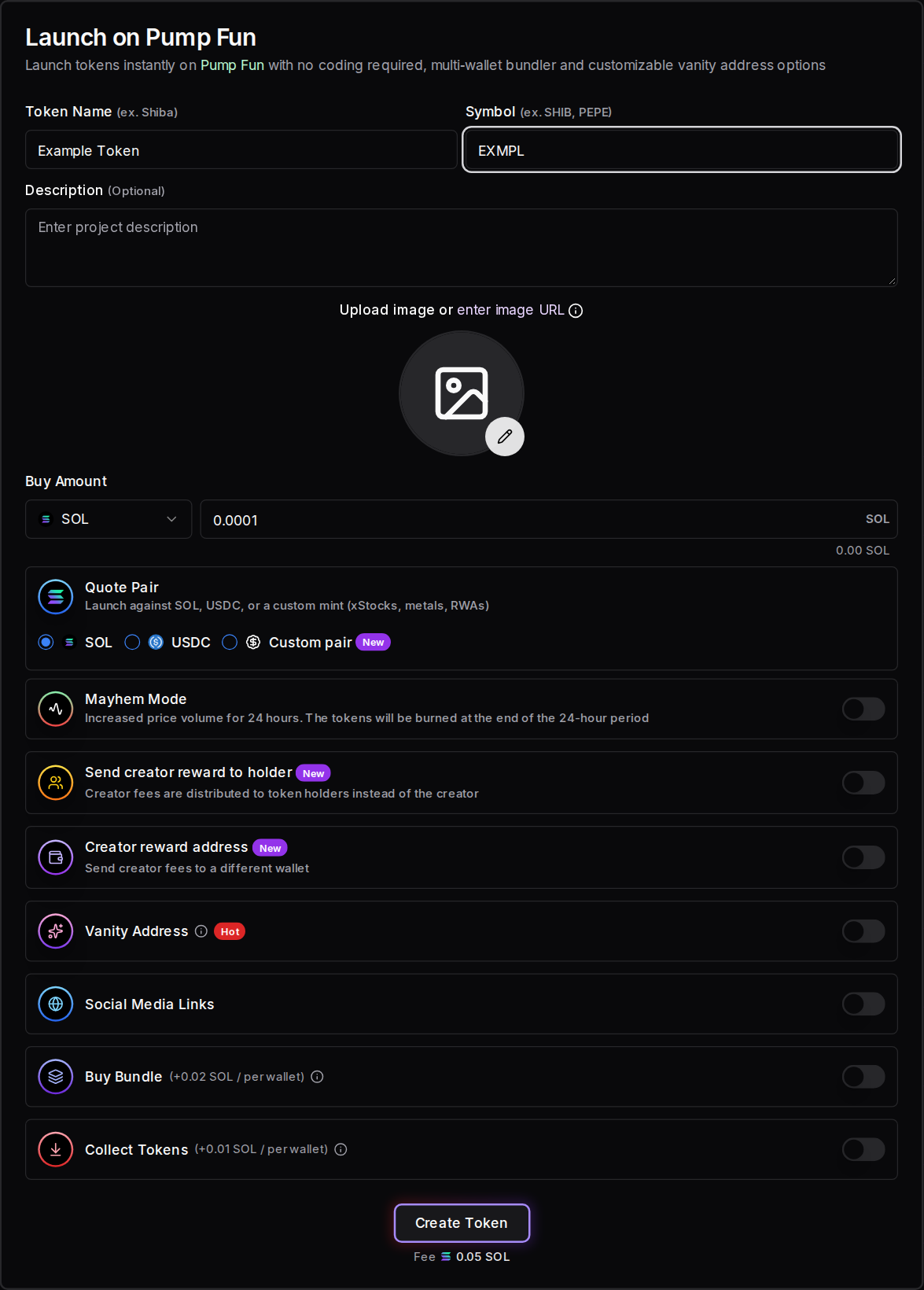
Open Launch on Pump Fun on Solz, connect your wallet, and enter a name, symbol and image. Set your Buy Amount, then optionally add a vanity address and a Buy Bundle. Click Create Token and sign. The Solz service fee is 0.05 SOL, and your buy and any bundle cost extra.
Prerequisites
- A Solana wallet such as Phantom, Solflare or Backpack.
- At least about 0.075 SOL, plus your Buy Amount and 1%. Solz checks this before it builds the launch.
- A token name, a symbol and an image.
- For a bundle: wallets in Manage X Wallets, each funded with the SOL it will spend.
- For a vanity address: a private key from the Vanity Address Generator.
Steps to launch on Pump.fun
- Open the tool and connect your wallet. Go to Launch on Pump Fun and connect the wallet that will create the token.
- Enter the token details. Fill in Token Name, Symbol, an optional Description, an image and any Social Media Links. Pump.fun sets the supply and decimals, so those fields don't appear.
- Set Buy Amount and Quote Pair. Buy Amount is what your connected wallet buys in the launch. Choose SOL, USDC or a custom pair.
- Choose the optional settings. These are Mayhem Mode, Send creator reward to holder, and Creator reward address. Leave them off if you just want a standard launch.
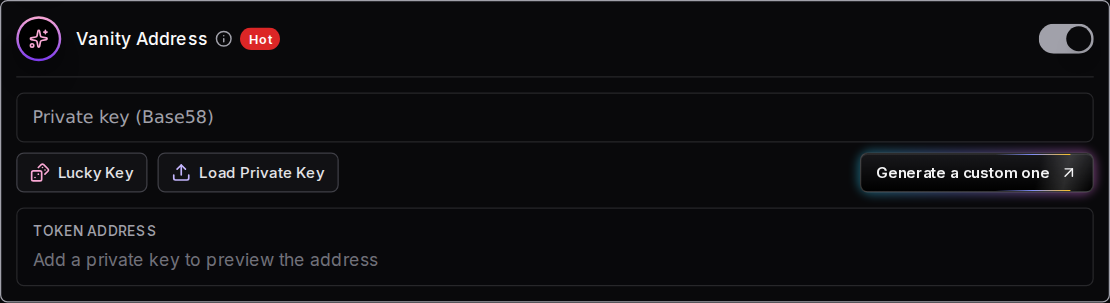
- Add a vanity address if you want one. Turn on Vanity Address and paste your key with Load Private Key. Lucky Key only fills in a random key, so it won't give you chosen letters. The preview shows the resulting token address.
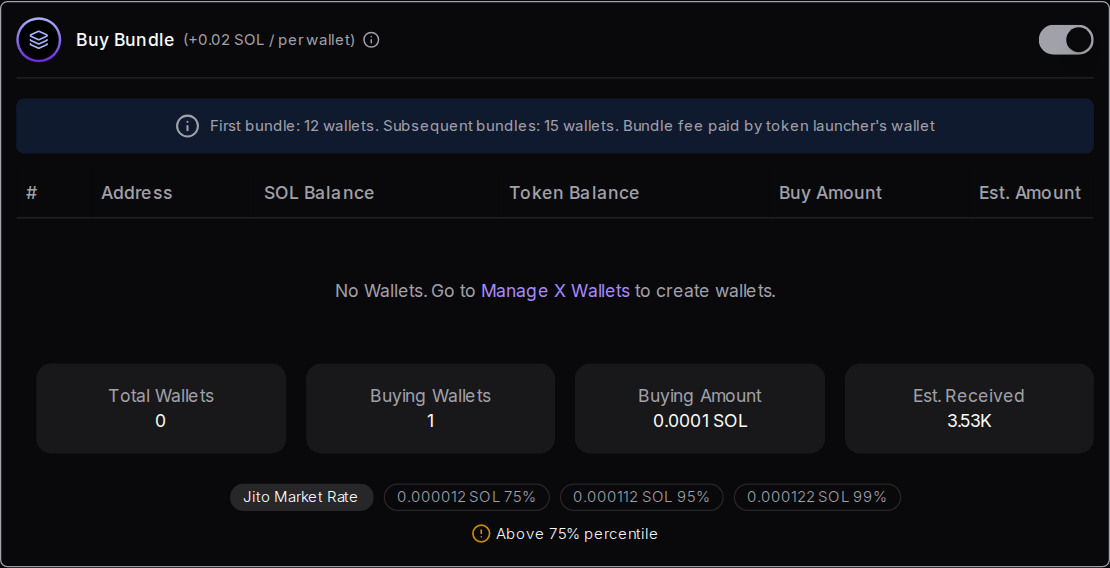
- Add a Buy Bundle if you want one. Turn on Buy Bundle and enter a buy amount for each wallet. Check Est. Amount and the Jito tip, and turn on Collect Tokens if you want the tokens moved to one wallet afterwards.
- Launch the token. Check the total on the button, click Create Token, and approve in your wallet.
Bundle wallets are visible on-chain. Tell your community what your team holds, and check the rules that apply to you. Nothing here is financial advice, and a launch can lose all of the money you put in.
What are the launch options?
Only the name, symbol and image are required. Everything else changes who pays, who earns or how the launch runs. Some choices can't be undone, including where creator fees go on a holder rewards coin. Read each option below before you turn it on, because a launch can't be edited afterwards.
Name, symbol, description, image and socials
Token Name can be up to 32 characters, Symbol up to 10, and Description up to 700. Social Media Links are optional. Unlike other Solz tokens, Pump.fun launches have no metadata hosting choice and no large image surcharge.
Buy Amount
This is your connected wallet's own buy, made in the same launch so nobody can buy before you. It starts at 0.0001 SOL. A bigger buy gets you more of the supply at the lowest prices, but buyers can see it on-chain. The table under the bonding curve section shows what each amount buys.
Quote Pair
This is what traders pay with, and it can't be changed after launch.
- SOL is the standard choice, and the numbers in this guide are for SOL.
- USDC prices the curve in dollars. It starts from 4,292 virtual USDC and sells out at about 12,161 USDC.
- Custom pair launches against another supported mint, such as an xStock, metal or real-world asset token. Solz checks it against the mints Pump.fun supports. You need that token to make your buy.
Mayhem Mode
This is an experimental, opt-in Pump.fun mode. According to Pump.fun's documentation, an AI agent mints an extra 1 billion tokens, taking the supply to 2 billion. It then trades for the first 24 hours, and burns the tokens it hasn't sold when that time ends. The agent isn't guaranteed to trade every coin.
- It isn't available with some custom pairs, and Solz switches it off for them.
- It's reported to be excluded from BOOST, described below.
- Graduation can look very different. In 6 recent graduations we traced on 2026-11-01, the new pools received between about 0.09 and 6.9 SOL rather than 85 SOL, and the 3 coins we checked had the 2 billion supply of a Mayhem coin. That's a small sample, but don't assume a Mayhem coin graduates with deep liquidity.
Send creator reward to holder
This creates a holder rewards coin: the creator fee on every trade goes to the people holding the coin, and Pump.fun pays them directly, with nothing for them to claim. There's nothing for you to claim either. Pump.fun's docs say this choice is made at creation and a holder rewards coin can never go back to being a regular coin. You also can't use Creator reward address or fee sharing with it.
Creator reward address
This sends creator fees to a different wallet or Pump.fun username instead of the wallet launching the token. Use it if a team wallet should earn the fees. Check the address carefully, because that account is the one that can claim them. It can't be combined with Send creator reward to holder.
Vanity Address and Buy Bundle
These are covered in their own sections below. Vanity Address changes the token's address, and Buy Bundle adds more wallets to the launch.
Transaction speed
The speed button at the top of the app sets two things. The Priority Fee runs from Eco to Max and starts on Normal. The Jito tip is used for bundles, and a bundle needs at least 0.0001 SOL. If a launch expires before it confirms, it wasn't processed, so you can safely raise these and try again.
What you can't choose
Pump.fun fixes these, so the form doesn't offer them:
- Supply and decimals: 1 billion tokens with 6 decimals, or 2 billion with Mayhem Mode.
- Mint and freeze authority: these were already revoked on the graduated coins we checked, so there's nothing to revoke afterwards.
- Token standard: the launches we checked are Token-2022 mints.
- The curve: see the bonding curve section.
How does a buy bundle work?
A Buy Bundle uses Jito MEV bundles so that several wallets can buy in the same Solana block as the launch. The first bundle holds up to 12 wallets, and later bundles hold up to 15. Your launching wallet pays the bundle fee of 0.02 SOL per wallet, and each wallet pays for its own buy.
Each transaction carries 3 wallets, and a Jito bundle holds 5 transactions. The first bundle also has to carry the launch itself, which is why it has room for fewer wallets.
- Total limit: your Buy Amount and all bundle buys together can't exceed what's left on the bonding curve. Solz shows an error if they do.
- Jito tip: a bundle needs a tip of at least 0.0001 SOL. Solz shows the current market rate next to it.
- Collect Tokens: this moves the tokens from the bundle wallets to one address after the launch, for +0.01 SOL per wallet.
- Keys: X Wallet keys stay in this browser only, so back them up in Manage X Wallets.
How does a vanity address work?
A vanity address is a token address that starts or ends with letters you choose, which makes it easier to recognise. Generate its private key first, then load that key in the launch form. Matches of 1 or 2 letters are free and run in your browser, and longer matches run on a paid GPU service.
| Letters in total | Generator fee |
|---|---|
| 1 to 2 | Free |
| 3 | 0.1 SOL |
| 4 | 0.3 SOL |
| 5 | 0.5 SOL |
| 6 | 1.2 SOL |
| 7 | 2.5 SOL |
From 6 letters up, results ignore upper and lower case unless you turn on Case sensitive match, which adds 50% to the fee. Loading the key into the launch form adds no fee, but each address can only be used once.
Treat the private key like any other secret, and never share it. Solana addresses can't contain the characters 0, O, I or l.
How does the Pump.fun bonding curve work?
The bonding curve sets the price automatically: each buy raises the price, and each sell lowers it. Every SOL-paired Pump.fun token starts with the same numbers, so you don't choose a bonding amount. Tokens sell from the curve until about 85 SOL has gone in, and then the token graduates to PumpSwap.
The curve uses a constant product formula, where virtual SOL × virtual tokens stays the same on each trade. These values were read from Pump.fun's on-chain config on 2026-11-01:
| Curve value | Amount |
|---|---|
| Total supply | 1,000,000,000 tokens (6 decimals), or 2 billion with Mayhem Mode |
| Sold on the curve | 793,100,000 tokens (79.31%) |
| Kept for the PumpSwap pool | 206,900,000 tokens (20.69%) |
| Starting virtual reserves | 30 SOL and 1,073,000,000 tokens |
| SOL needed to sell the curve out | About 85.01 SOL, before fees |
| Market cap at the start | About 28 SOL |
| Market cap at graduation | About 411 SOL |
The virtual 30 SOL only sets the starting price, and nobody can withdraw it. Because the price climbs as tokens sell, each extra SOL buys fewer tokens. If you're the first buyer on a new SOL-paired token, this is roughly what you'd get after the 1.25% trading fee:
| You spend | Tokens you get | Share of supply |
|---|---|---|
| 0.1 SOL | 3.5 million | 0.35% |
| 0.5 SOL | 17.4 million | 1.74% |
| 1 SOL | 34.2 million | 3.42% |
| 2 SOL | 66.3 million | 6.63% |
| 5 SOL | 151.7 million | 15.17% |
| 10 SOL | 265.8 million | 26.58% |
| 30 SOL | 533.2 million | 53.32% |
Bundle wallets buy in sequence, so each wallet pays a slightly higher price than the one before. That's why the form shows an estimated amount for each wallet.
A USDC pair works the same way, but starts from 4,292 virtual USDC and sells out at about 12,161 USDC. Custom pairs can differ, so check the estimate in the form.
What happens after the bonding curve?
When the last curve token sells, the curve closes and the token graduates. Its liquidity moves to a new PumpSwap pool, the pool's LP tokens are burned so nobody can withdraw that liquidity, and trading carries on there. It happens automatically, with no action or extra payment from you as the creator.
Here's the sequence for a standard SOL-paired coin:
- The curve completes. All 793.1 million curve tokens have sold, and about 85 SOL has gone in. From this point, every trade on the curve fails until the migration happens.
- The last buy can overflow. On newer trade instructions, the buy that empties the curve can be larger than what's left. It buys the rest from the tokens meant for the pool, at the price the pool would have charged.
- The token migrates. Anyone can trigger this, and it's safe to run twice, so it doesn't depend on you. The remaining 206.9 million tokens and the raised SOL go into a new PumpSwap pool. A 0.015 SOL migration fee pays for the accounts it creates.
- The LP tokens are burned. We confirmed this on-chain: the pool's LP tokens are minted and burned in the same transaction. So neither you nor anyone else can pull this liquidity out.
- BOOST runs, if it applies. See below.
- Trading continues on PumpSwap. Fees switch to PumpSwap's tiers, shown in the trading fees section. The token can then appear on aggregators and sites like Jupiter and DexScreener. Those sites decide how and when to list it.
What is BOOST?
News outlets report that BOOST became Pump.fun's default on 2026-07-21. KuCoin News says Pump.fun holds back about 20% of the funds that would go into the pool, which is 17.6 SOL on a SOL pair or about $2,516 on a USDC pair. For the first 5 minutes after migration, it spends that on buys of the token and burns what it buys. The Block reports the same design. Mayhem coins are reported to be excluded.
The PumpSwap program does include a boost buy-and-burn instruction, but we haven't watched one run. Pump.fun's developer docs, last updated in October 2026, still describe all raised SOL except the migration fee going into the pool, and we couldn't trace a standard graduation to settle it. Check the pool on an explorer if the exact amount matters to you.
What changes for you as the creator?
- Your fees continue. You keep earning the creator share on PumpSwap, and early on it's higher than on the curve. Claim it from the Creator reward panel in the Solz sidebar.
- Fee sharing still works. You can set it up after graduation, but the split can only be set once, so check it before you save.
- You can't remove the launch liquidity. It's permanent, because the LP tokens are gone.
- The pool starts small. At around 85 SOL or less, even modest trades can move the price a lot.
- Bundle wallets hold ordinary tokens. They can still sell at any time, which affects your price. Solz has a bundled sell tool for them.
How often do tokens graduate?
Not often. The Block reported a graduation rate of 2.5% in the week before BOOST and a one-day peak of 6.7% after it, so most tokens never reach this stage. Plan on the basis that yours might not, and don't spend more on a launch than you can afford to lose.
How much does a Pump.fun launch cost on Solz?
The Solz service fee is 0.05 SOL, and Pump.fun's on-chain accounts cost about 0.006 SOL more. Your own buy comes on top, including its trading fee. A Buy Bundle adds 0.02 SOL per wallet, and Collect Tokens adds 0.01 SOL per wallet. The button shows the Solz fees before you sign.
| Item | Cost |
|---|---|
| Solz service fee | 0.05 SOL |
| Creating the token on-chain | About 0.006 SOL |
| Your Buy Amount | What you choose, plus the trading fee |
| Buy Bundle | +0.02 SOL per wallet |
| Collect Tokens | +0.01 SOL per wallet |
| Jito tip for a bundle | From 0.0001 SOL per bundle |
| Vanity address | See the generator fees above |
| Set up creator fee sharing | 0.05 SOL |
| Distribute shared creator fees | 0.02 SOL |
| Claim creator rewards on Solz | 10% under 0.1, 7% up to 1.5, and 5% above that |
Solz doesn't add a surcharge for large images on Pump.fun launches. Its balance check allows 0.02 SOL for network costs and 0.005 SOL for the launch, so with default speed settings you need about 0.075 SOL plus your buy.
What are the Pump.fun trading fees?
Every trade on the bonding curve pays about 1.25%: 0.95% goes to Pump.fun and 0.30% goes to the creator. After graduation, PumpSwap fees depend on market cap and fall as a token grows, from 1.25% down to 0.30%. Pump.fun sets these fees on-chain, not Solz, and can change them.
So 100 SOL of trading on the curve pays about 1.25 SOL in fees, and 0.30 SOL of that goes to the creator. These PumpSwap rates are a selection of the 25 tiers on-chain on 2026-11-01:
| Market cap | To liquidity providers | To Pump.fun | To creator | Total |
|---|---|---|---|---|
| Under 420 SOL | 0.02% | 0.93% | 0.30% | 1.25% |
| 420 SOL | 0.20% | 0.05% | 0.95% | 1.20% |
| 1,470 SOL | 0.20% | 0.05% | 0.90% | 1.15% |
| 4,420 SOL | 0.20% | 0.05% | 0.75% | 1.00% |
| 9,820 SOL | 0.20% | 0.05% | 0.70% | 0.95% |
| 49,120 SOL | 0.20% | 0.05% | 0.30% | 0.55% |
| 98,240 SOL and above | 0.20% | 0.05% | 0.05% | 0.30% |
You can choose where the creator's share goes:
- By default, it goes to the creator wallet.
- Creator reward address sends it to a different wallet or Pump.fun username.
- Send creator reward to holder pays it to token holders instead.
- Creator Fee Share splits it between up to 10 wallets or GitHub users.
FAQ
Can I choose the bonding curve amount on Pump.fun?
No. Pump.fun uses the same curve for every SOL-paired token, so the form has no bonding amount field. Bonding Amount is a Raydium LaunchLab setting, with presets of 30, 42 or 85 SOL.
Can my token fail to graduate?
Yes, and most do. It stays on the bonding curve, where people can still trade it, and your creator fees continue. There's no deadline, and no liquidity pool appears until the curve sells out.
What is Bundle Masking?
It sends each wallet's buy as a separate transaction with priority fees, instead of one all-or-nothing Jito bundle. Some buys can then fail or land at different prices.
Why does Solz say my buy exceeds the bonding curve limit?
Your Buy Amount and bundle buys add up to more than the curve can sell. Lower the amounts until the total fits.
Why can't I reuse my vanity address?
Each address can only be created once. If Solz says it has been used, generate a new one. The token address also can't be the same as your wallet address.
How do I claim my creator fees?
Open the Creator reward panel in the Solz sidebar with the creator wallet connected. For a token with fee sharing, use Distribute Fees.
Sources
Curve and fee values come from Pump.fun's on-chain config, read on 2026-11-01. Solz's fees come from the app. The rest comes from:
- Pump.fun public developer docs
- Pump.fun Mayhem Mode docs
- The Block on BOOST and graduation rates
- KuCoin News on BOOST
Open the tool
How to create a Token-2022 token with a transfer fee
Create a Solana tax token that takes a fee on every transfer. Set the fee rate, cap and authorities in your browser. The Solz service fee is 0.05 SOL.
How to launch on Raydium LaunchLab, or create your own launchpad
Launch a token on Raydium LaunchLab from Solz with a bonding curve, bundle and vanity address, or create your own LaunchLab platform and earn trading fees. Includes curve maths and fees.