
How to airdrop Solana tokens with Multi Token Sender and compression
Send SOL or tokens to many wallets with Multi Token Sender, save on rent with ZK compression, airdrop to another token's holders with Token Snapshot, and see costs for up to 100,000 recipients.
How do I airdrop tokens to many wallets on Solana?
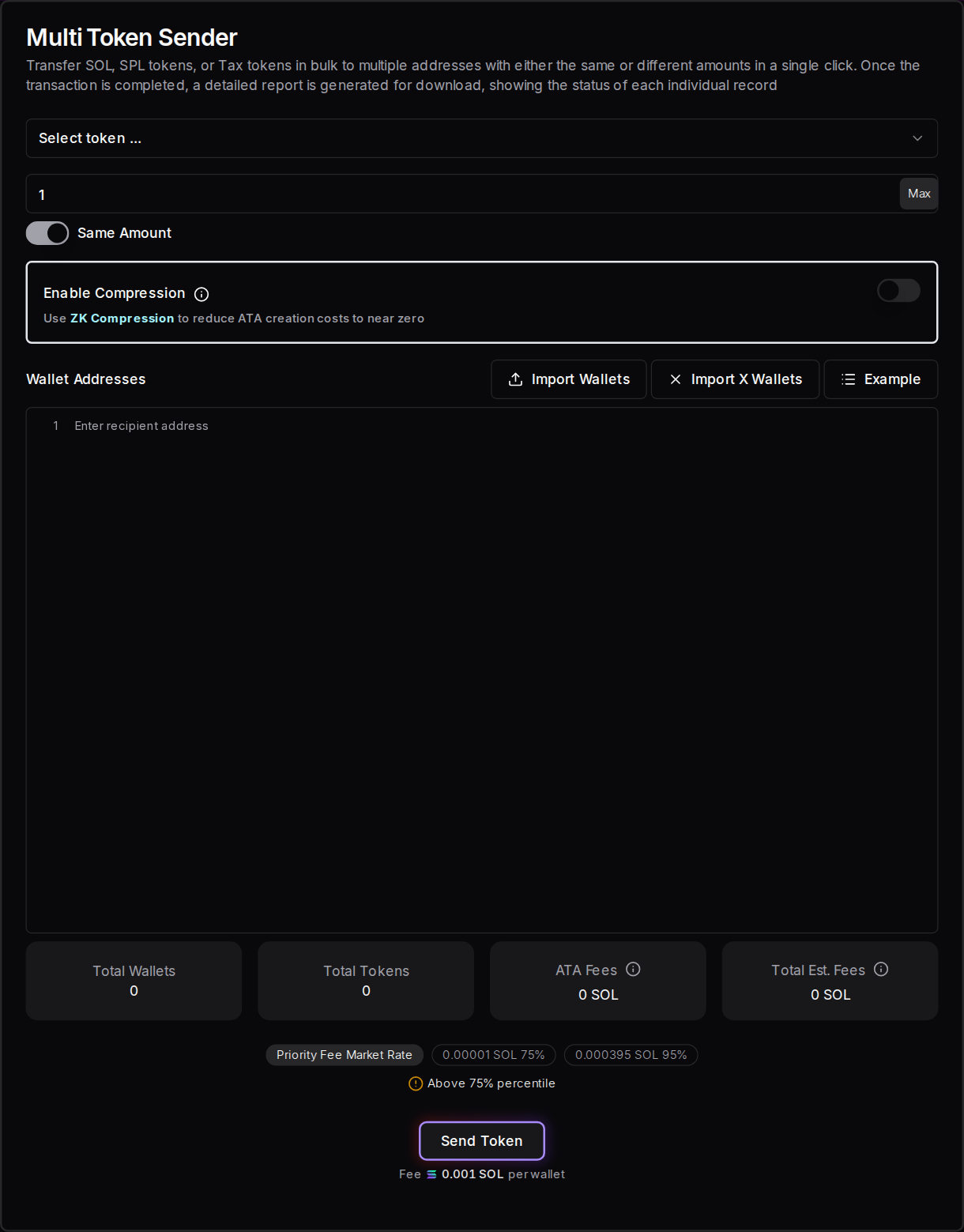
Open Multi Token Sender on Solz, select your token, and paste up to 500 wallet addresses per run, with the same amount or different amounts. Turn on Enable Compression to avoid paying rent for each recipient's token account. Click Send Token and sign. The Solz fee is 0.001 SOL per wallet.
Prerequisites
- A Solana wallet holding the tokens you want to send.
- Enough SOL for the fees. The calculations below show what to expect.
- Your recipients' wallet addresses, in a list or CSV file. To target another token's holders, get them from Token Snapshot.
Steps to send with Multi Token Sender
- Open the tool and connect your wallet. Go to Multi Token Sender.
- Select the token. You can send SOL, SPL tokens or tax tokens.
- Choose the amounts. With Same Amount, enter one amount for every wallet. Switch to Different Amount to give each wallet its own.
- Add the wallets. Paste one address per line. For different amounts, use
address,amounton each line. You can also upload a CSV file, or use Import Wallets or Import X Wallets. Solz flags invalid and duplicate addresses. - Decide on compression. Turn on Enable Compression to skip token account rent. The first time you compress a token, Solz asks you to approve a one-time setup.
- Create token accounts if you aren't compressing. Click Check Missing ATA. For 50 wallets or more, Solz creates the missing accounts first, because this improves the success rate.
- Set your transaction speed. Choose a priority fee at the top of the app. The section below explains when to raise it.
- Send the tokens. Check Total Est. Fees, click Send Token and approve in your wallet.
- Check the report. Token Sender Report lists each recipient, amount, signature and status. Download it, because it's only stored in this browser.
How do I airdrop to another token's holders?
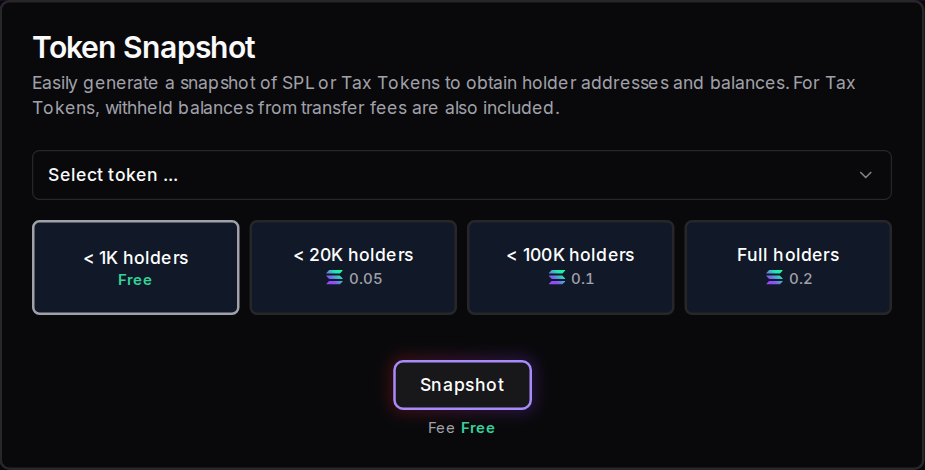
Use Token Snapshot to download a CSV of a token's holders, then paste those addresses into Multi Token Sender. Snapshots under 1,000 holders are free, and larger ones cost 0.05 to 0.2 SOL. This is how you reward your own community, or reach holders of a token whose audience matches yours.
- Open the tool and connect your wallet. Go to Token Snapshot.
- Select the token whose holders you want.
- Choose the holder limit, based on how many holders the token has. The fee is shown below.
- Download the snapshot. Click Snapshot, and pay if there's a fee. You'll get a CSV file with
address,balancecolumns. Tax tokens also get a withheld balance column. - Clean the list. Remove the header row and any wallets you don't want. Snapshots list every holder, which can include liquidity pools, lockers, burn addresses and exchanges.
- Set the amounts. For Same Amount, keep just the addresses. To reward holders in proportion to their balance, work out each amount in a spreadsheet and export it as
address,amount. - Split it into batches of 500 and send each one with Multi Token Sender.
| Holders | Snapshot fee |
|---|---|
| Under 1,000 | Free |
| Under 20,000 | 0.05 SOL |
| Under 100,000 | 0.1 SOL |
| Full holder list | 0.2 SOL |
If you pick a limit that's too low, the snapshot is cut off at that number, so check the holder count first. A snapshot is a picture of one moment, and holders can change right after.
Unexpected airdrops can look like scams, and some wallets hide them. Say publicly what you're sending and why, and never ask recipients to visit a link to claim tokens they've already received.
What is token compression?
Compression records a recipient's balance using ZK Compression instead of creating a regular token account. A regular account costs about 0.0015 SOL in rent, while a compressed one costs about 0.000005 SOL. That makes compression a good fit for airdrops, where most recipients have never held your token and would otherwise need a new account.
The technology comes from Light Protocol, and the tokens are the same tokens. Recipients can hold them in compressed form, or turn them into regular tokens whenever they like.
- Best for: airdrops to wallets that don't hold your token yet.
- Less useful for: recipients who already have an account for the token, because no rent is needed for them anyway.
- Not for tax tokens: Light's list of supported Token-2022 extensions doesn't include transfer fees, so send tax tokens the standard way.
- Not needed for SOL: sending SOL doesn't need a token account.
Light Protocol says Phantom and Backpack support compressed tokens. Other wallets may not show them until they're decompressed.
How do recipients decompress their tokens?
Recipients open My Tokens on Solz, connect their wallet and turn on Include compressed tokens. Then they click Decompress on the token and approve the transaction, which turns it into a regular token in their wallet. They can do this at any time, and they may need to before a wallet shows the token.
- Open My Tokens. Go to My Tokens and connect the wallet that received the tokens.
- Show compressed tokens. Turn on Include compressed tokens.
- Decompress. Compressed tokens have a Compressed label. Hover over it so it changes to Decompress?, click it, and approve in your wallet.
- Repeat if needed. Each decompress handles up to 4 compressed balances of that token, so someone who received several airdrops may need to do this more than once.
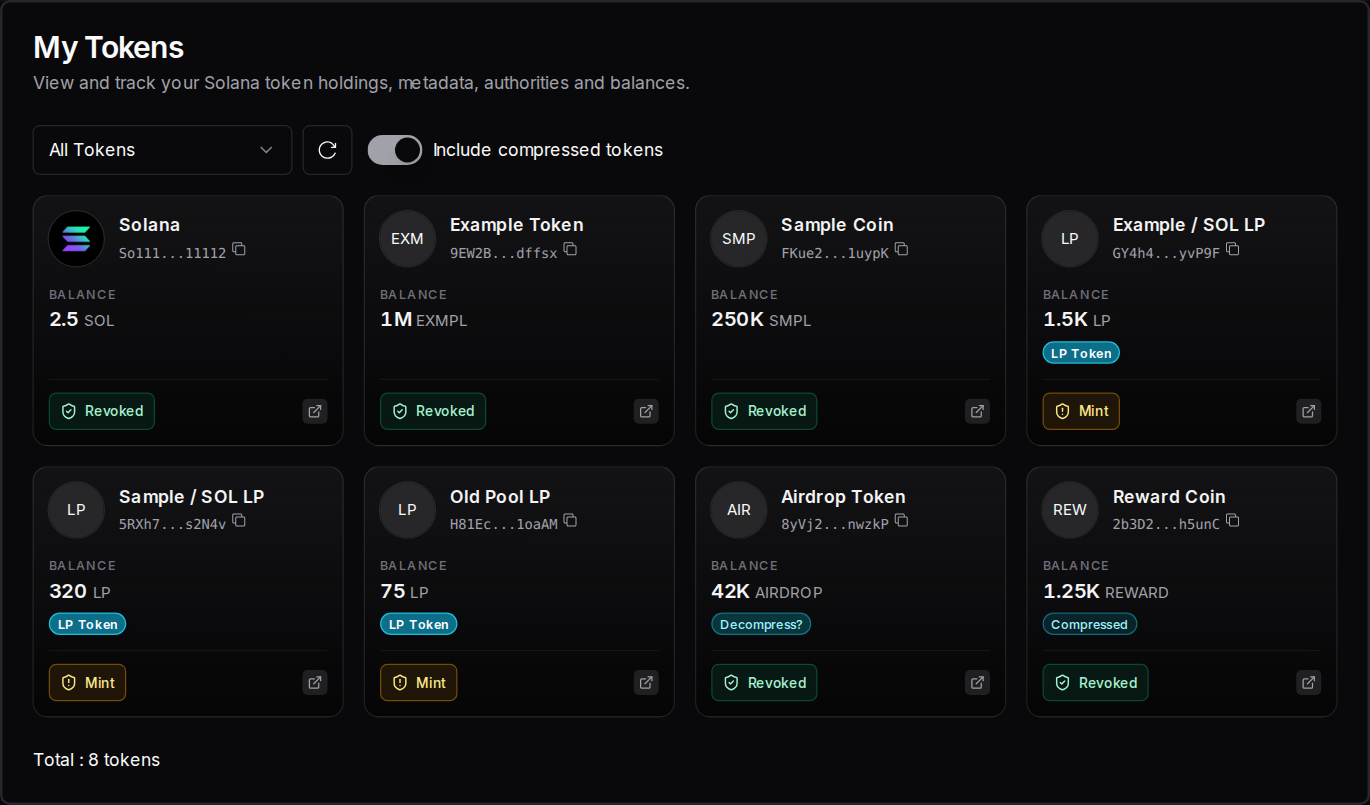
This screenshot uses example tokens, to show where the labels appear.
When you announce a compressed airdrop, include these steps or a link to this guide, so recipients know where to find their tokens.
How do priority fees help if transactions fail?
A priority fee is an extra bid that encourages validators to process your transaction when Solana is busy. If transactions fail or expire during an airdrop, raising it improves your chances. Solz offers Eco, Normal, Fast, Turbo and Max, and starts on Normal. Each step costs more per transaction, so large airdrops add up quickly.
If some transactions fail, try these in order:
- Check the report. See which recipients didn't get a confirmed status.
- Raise the priority fee. Use the speed button at the top of the app. A transaction that expired was never processed, so it's safe to try again.
- Resend only to the failed wallets. Paste just those addresses into a new run, so nobody is paid twice.
- Try a smaller batch, or wait. Fewer wallets and a quieter time on the network both help.
Solz charges its per-wallet fee in the first transaction of each run, so a resend pays the fee again for those wallets. It's better to choose a suitable speed before a big run than after it fails. Solz shows the current Priority Fee Market Rate above the Send Token button.
| Speed | Priority fee per standard transaction | Priority fee per compressed transaction | Network fees for 100,000 wallets, standard | Network fees for 100,000 wallets, compressed |
|---|---|---|---|---|
| Eco | 0.0000024 SOL | 0.000006 SOL | 0.16 SOL | 0.18 SOL |
| Normal | 0.000024 SOL | 0.00006 SOL | 0.61 SOL | 1.09 SOL |
| Fast | 0.00024 SOL | 0.0006 SOL | 5.19 SOL | 10.16 SOL |
| Turbo | 0.0012 SOL | 0.003 SOL | 25.55 SOL | 50.48 SOL |
| Max | 0.0072 SOL | 0.018 SOL | 152.75 SOL | 302.48 SOL |
Priority fees are charged on the compute each transaction requests: 240,000 units for a standard transaction and 600,000 for a compressed one. The network fee columns also include Solana's 0.000005 SOL base fee per transaction.
How much does a large airdrop cost?
Compression saves about 60% when recipients have no token account: sending to 5,000 wallets costs about 5.13 SOL compressed, against 12.47 SOL standard. The saving comes from skipping token account rent. The 0.001 SOL per-wallet Solz fee applies either way, and you also need the tokens you're sending.
These are calculated from the fees and batch sizes in Solz's code at the Normal speed, not from live airdrops of this size. They assume no failed transactions or resends. Network conditions and the speed you choose will change the network fees.
Standard send, when no recipient has a token account:
| Recipients | Solz fee | Token account rent | Transactions | Network fees | Total |
|---|---|---|---|---|---|
| 5,000 | 5.00 SOL | 7.44 SOL | 1,060 | 0.03 SOL | 12.47 SOL |
| 10,000 | 10.00 SOL | 14.88 SOL | 2,120 | 0.06 SOL | 24.95 SOL |
| 50,000 | 50.00 SOL | 74.42 SOL | 10,600 | 0.31 SOL | 124.73 SOL |
| 100,000 | 100.00 SOL | 148.84 SOL | 21,200 | 0.61 SOL | 249.46 SOL |
Compressed send:
| Recipients | Solz fee | Compression setup | Compressed accounts | Transactions | Network fees | Total |
|---|---|---|---|---|---|---|
| 5,000 | 5.00 SOL | 0.05 SOL | 0.03 SOL | 840 | 0.05 SOL | 5.13 SOL |
| 10,000 | 10.00 SOL | 0.05 SOL | 0.05 SOL | 1,680 | 0.11 SOL | 10.21 SOL |
| 50,000 | 50.00 SOL | 0.05 SOL | 0.25 SOL | 8,400 | 0.55 SOL | 50.85 SOL |
| 100,000 | 100.00 SOL | 0.05 SOL | 0.50 SOL | 16,800 | 1.09 SOL | 101.64 SOL |
How they compare:
| Recipients | Standard, nobody has an account | Standard, half have one | Compressed | Saved against nobody having one |
|---|---|---|---|---|
| 5,000 | 12.47 SOL | 8.74 SOL | 5.13 SOL | 7.34 SOL (59%) |
| 10,000 | 24.95 SOL | 17.49 SOL | 10.21 SOL | 14.74 SOL (59%) |
| 50,000 | 124.73 SOL | 87.45 SOL | 50.85 SOL | 73.88 SOL (59%) |
| 100,000 | 249.46 SOL | 174.89 SOL | 101.64 SOL | 147.82 SOL (59%) |
A few things to plan for:
- Rent: these use Solana's current rent of about 0.00149 SOL for a token account, or about 0.00151 to 0.00157 SOL for Token-2022. The form's estimate can show about 0.002 SOL, so the real cost can be a little lower than it says.
- Runs: each run takes up to 500 wallets, so 5,000 recipients means 10 runs and 100,000 means 200.
- Compressed transactions are bigger on fees. Each holds up to 6 wallets and requests more compute, while a standard one holds up to 9. As the table above shows, network fees for compressed sends grow faster at high speeds. At Turbo, compression still saves a lot, but at Max a compressed send to 100,000 wallets costs slightly more than a standard one.
- The other costs: to reach another token's holders, add the snapshot fee of up to 0.2 SOL. The compression setup is only paid once per token.
How much do the airdrop tools cost on Solz?
Multi Token Sender costs 0.001 SOL per wallet, whichever way you send. A standard send also pays about 0.0015 SOL of rent for each new token account, and the first compressed send of a token costs 0.05 SOL to set up. Token Snapshot is free under 1,000 holders, and network fees are extra.
| Item | Cost |
|---|---|
| Multi Token Sender | 0.001 SOL per wallet |
| New token account (standard send) | About 0.0015 SOL per wallet |
| Compression setup | 0.05 SOL, once per token |
| Compressed account | About 0.000005 SOL per wallet |
| Token Snapshot | Free to 0.2 SOL, by holder count |
| Solana base fee | 0.000005 SOL per transaction |
| Priority fee | Depends on your speed setting |
FAQ
What's the maximum number of wallets I can send to?
Each run takes up to 500 wallets. For more, split your list into batches and do several runs.
Should I always use compression?
No. It helps most when recipients don't already have an account for your token. If most of them do, a standard send has no rent to save, and it costs less in network fees.
Can I send different amounts to each wallet?
Yes. Switch to Different Amount and enter address,amount on each line, or upload a CSV file in that format.
Can I send SOL with Multi Token Sender?
Yes. Select SOL as the token. There's no token account to create, so there's no rent to pay.
What does ATA mean?
It stands for Associated Token Account: the regular account a wallet uses to hold a particular token. Each wallet needs one per token, unless it holds the token in compressed form.
Why don't recipients see their compressed tokens?
Some wallets don't show compressed tokens. Recipients can always see them in My Tokens by turning on Include compressed tokens, and can decompress them there.
Do I need Token Snapshot to send an airdrop?
No. It's only for when you want another token's holders. You can use any list of wallets you have.
Sources
Solz's fees, batch sizes and form options come from the app. The rest comes from:
- Light Protocol: compressed tokens overview
- Light Protocol: Token-2022 with compression
- Light Protocol: wallet support
Open the tool
How to burn liquidity pool (LP) tokens on Solana
Burn part or all of your liquidity pool (LP) tokens on Solz, finish a full burn with the SOL Incinerator, get the DexScreener lock, and compare burning with Token Lock.
How to revoke mint and freeze authority on Solana
Revoke your Solana token's mint or freeze authority so the supply is fixed and accounts can't be frozen. Each costs 0.04 SOL on Solz, or nothing extra at creation.