
How to launch on Raydium LaunchLab, or create your own launchpad
Launch a token on Raydium LaunchLab from Solz with a bonding curve, bundle and vanity address, or create your own LaunchLab platform and earn trading fees. Includes curve maths and fees.
How do I launch a token on Raydium LaunchLab with Solz?
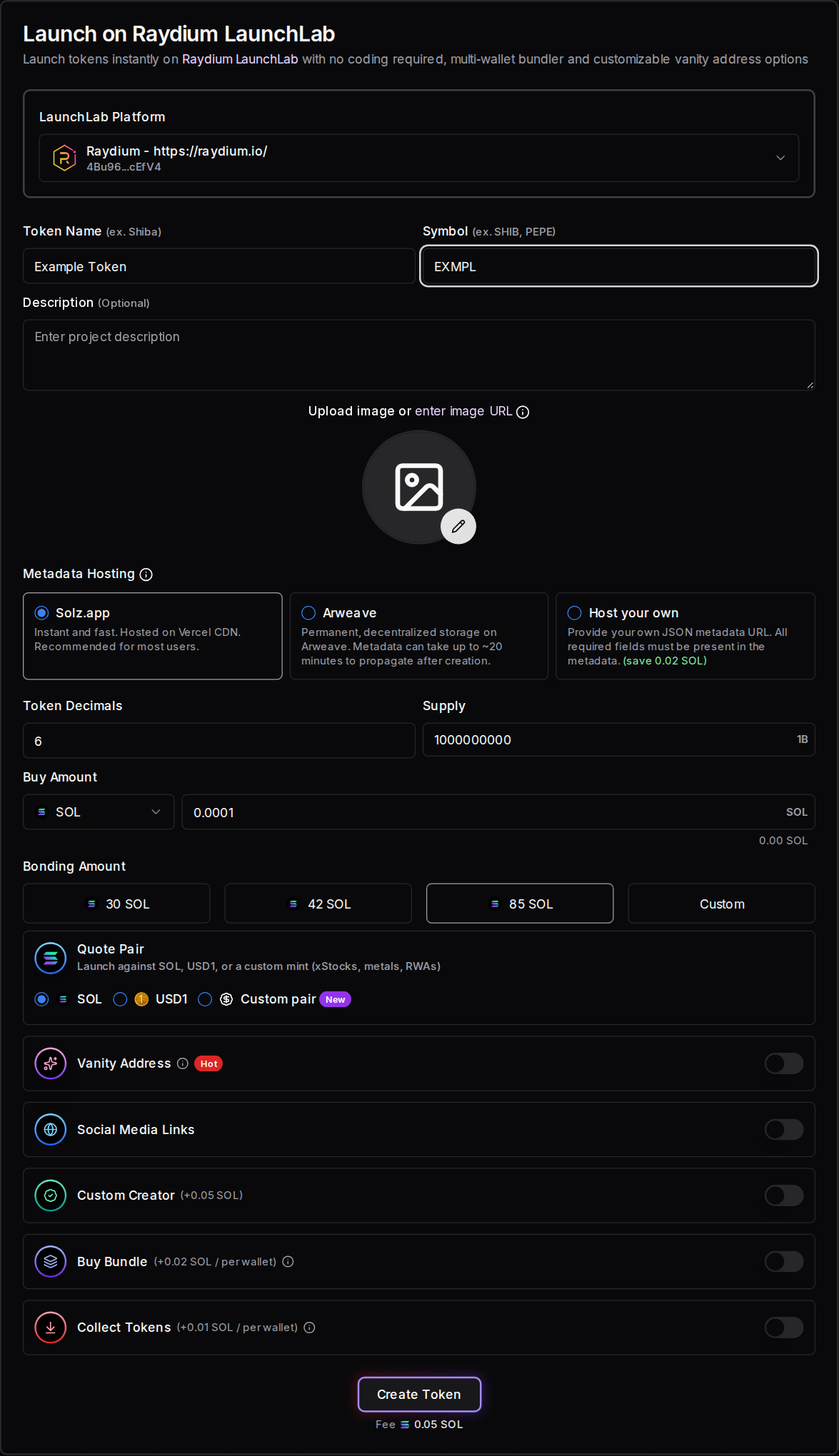
Open Launch on Raydium LaunchLab on Solz, connect your wallet, and enter a name, symbol and image. Choose a platform, Buy Amount, Quote Pair and Bonding Amount, then optionally add a vanity address and Buy Bundle. Click Create Token and sign. The Solz service fee is 0.05 SOL, and your buy costs extra.
LaunchLab is Raydium's token launchpad. A token trades on a bonding curve first, then moves to a Raydium pool once the curve sells out. If you'd rather earn from other people's launches, you can also create your own LaunchLab platform.
Prerequisites
- A Solana wallet such as Phantom, Solflare or Backpack.
- At least about 0.075 SOL, plus your Buy Amount and 1%. Solz checks this before it builds the launch.
- A token name, a symbol and an image.
- For a bundle: wallets in Manage X Wallets, each funded with the SOL it will spend.
- For a vanity address: a private key from the Vanity Address Generator.
Steps to launch on LaunchLab
- Open the tool and connect your wallet. Go to Launch on Raydium LaunchLab and connect the wallet that will create the token.
- Choose the platform. LaunchLab Platform starts on Raydium. The platform decides the fees on your token, so check it before you continue.
- Enter the token details. Fill in Token Name, Symbol, an optional Description, an image and any Social Media Links, and choose where the metadata is hosted.
- Check decimals and supply. Token Decimals and Supply start at 6 and 1 billion. A platform's rules can limit them.
- Set Buy Amount and Quote Pair. Buy Amount is what your connected wallet buys in the launch. Choose SOL, USD1 or a custom pair.
- Choose the Bonding Amount. Pick 30, 42 or 85 SOL, or set a custom amount. This is how much the curve raises before the token moves to a Raydium pool.
- Add a vanity address or Buy Bundle if you want them. Both are explained below.
- Launch the token. Check the total on the button, click Create Token, and approve in your wallet.
Bundle wallets are visible on-chain. Tell your community what your team holds, and check the rules that apply to you. Nothing here is financial advice, and a launch can lose all of the money you put in.
What are the launch options?
Only the name, symbol and image are required. The other options change what your token costs to trade, how much it raises and how it launches. Most of them can't be changed after launch, so check the platform, Quote Pair and Bonding Amount carefully. Each option is explained below, including what it does on-chain.
LaunchLab Platform
Every LaunchLab token launches under a platform, which sets the fees and what happens to the liquidity after graduation. The form starts on Raydium's own platform. Bonk and StonkFun launches on Solz are LaunchLab launches on those platforms, each with its own settings.
Bonding Amount
This is the main choice LaunchLab gives you that Pump.fun doesn't. A lower amount graduates sooner, but it starts at a lower price and moves into a thinner pool. The bonding curve section below shows the numbers. A platform's rules can restrict the amounts you can pick.
Quote Pair
This is what traders pay with, and it can't be changed after launch.
- SOL is the standard choice, and the numbers in this guide are for SOL.
- USD1 prices the curve in dollars. The default target is 12,500 USD1, with lower presets of 5,000 and 6,400.
- Custom pair launches against another supported mint, such as an xStock, metal or real-world asset token.
Metadata Hosting
Solz is instant and recommended for most users. Arweave is permanent, but can take about 20 minutes to appear. Host your own needs a JSON metadata URL, and saves 0.02 SOL.
Custom Creator
This adds your own creator name and website to the token's metadata for +0.05 SOL.
Vanity Address and Buy Bundle
These work the same way as on Pump.fun launches. See the sections below for what's different on LaunchLab.
What you can't choose
- Trading fees. These come from the platform and Raydium, as the trading fees section shows.
- Mint authority. Raydium's program holds it during the curve, and revokes it at graduation.
- Revoke switches. The token creator's Token Permissions switches don't appear on launchpad launches.
How does a buy bundle work on LaunchLab?
A Buy Bundle uses Jito MEV bundles so that several wallets can buy in the same Solana block as the launch. On LaunchLab, the first bundle holds up to 8 wallets and later bundles hold up to 10. Your launching wallet pays the 0.02 SOL per wallet bundle fee, and each wallet pays for its own buy.
- Custom pairs hold fewer. With a custom pair each transaction carries 1 wallet instead of 2, so bundles hold up to 4 wallets, then 5.
- Collect Tokens moves the tokens from the bundle wallets to one address afterwards, for +0.01 SOL per wallet.
- Jito tip: a bundle needs a tip of at least 0.0001 SOL.
- Keys: X Wallet keys stay in this browser only, so back them up in Manage X Wallets.
For a vanity address, turn on Vanity Address and use Load Private Key. The vanity guide explains how to generate one and what it costs.
How does the LaunchLab bonding curve work?
The curve sets the price automatically: each buy raises the price, and each sell lowers it. With the default 1 billion supply, 793.1 million tokens sell on the curve and 206.9 million go to the pool later. Your Bonding Amount decides how much SOL it takes to sell them, and so the starting price.
Raydium's default curve uses a constant product formula, where virtual SOL × virtual tokens stays the same on each trade. These values come from Raydium's live LaunchLab config and SDK, read on 2026-11-01:
| Bonding Amount | Starting virtual SOL | Market cap at the start | Market cap at graduation |
|---|---|---|---|
| 30 SOL | About 10.6 SOL | About 10 SOL | About 145 SOL |
| 42 SOL | About 14.8 SOL | About 14 SOL | About 203 SOL |
| 85 SOL | About 30 SOL | About 28 SOL | About 411 SOL |
All three start from about 1,073 million virtual tokens. The USD1 default of 12,500 starts from about 4,412 virtual USD1, with a market cap of about $4,100 at the start and $60,400 at graduation.
This is what the first buyer would get on Raydium's platform, after its 1.05% in trading fees:
| You spend | 30 SOL curve | 42 SOL curve | 85 SOL curve |
|---|---|---|---|
| 0.1 SOL | 9.9 million (0.99%) | 7.1 million (0.71%) | 3.5 million (0.35%) |
| 0.5 SOL | 47.9 million (4.79%) | 34.7 million (3.47%) | 17.4 million (1.74%) |
| 1 SOL | 91.7 million (9.17%) | 67.1 million (6.71%) | 34.3 million (3.43%) |
| 2 SOL | 169.0 million (16.90%) | 126.4 million (12.64%) | 66.4 million (6.64%) |
| 5 SOL | 341.7 million (34.17%) | 268.5 million (26.85%) | 151.9 million (15.19%) |
| 10 SOL | 518.3 million (51.83%) | 429.5 million (42.95%) | 266.1 million (26.61%) |
So a smaller curve is cheaper to fill, but a small buy takes a much larger share of the supply, and the pool it graduates into is thinner. Bundle wallets buy in sequence, so each pays a slightly higher price than the last. The form shows an estimate for each wallet.
What happens after the bonding curve?
When the curve reaches its target, it graduates. Raydium's migration wallet moves the raised SOL and the remaining tokens into a new Raydium CPMM pool, and the token's mint authority is revoked. Curve trading stops, and trading carries on in the pool. You don't need to do anything or pay anything extra.
- The curve completes. The target amount has gone in, and buys and sells on the curve stop.
- Raydium migrates it. Unlike Pump.fun, only Raydium's configured wallet can do this. The new pool holds the remaining tokens and the raised SOL.
- The liquidity pool (LP) tokens are split. The platform's settings decide how much is burned and how much is locked for the platform. Raydium's platform burns 90%. Neither part can be withdrawn by the token's creator.
- Trading continues in the pool. On pools from Solz's platform settings and Raydium's, traders pay the CPMM 0.25% fee tier and a 0.05% creator fee. The token can then appear on aggregators and sites like Jupiter and DexScreener.
Since Raydium's 2026-08-17 upgrade, the locked share and its fee rights belong to the platform rather than the token creator. On DexScreener, this revenue share appears as "Raydium Burn & Earn".
Not every token gets this far. If the curve never fills, the token stays on it, and no pool is created.
How do I create my own LaunchLab platform?
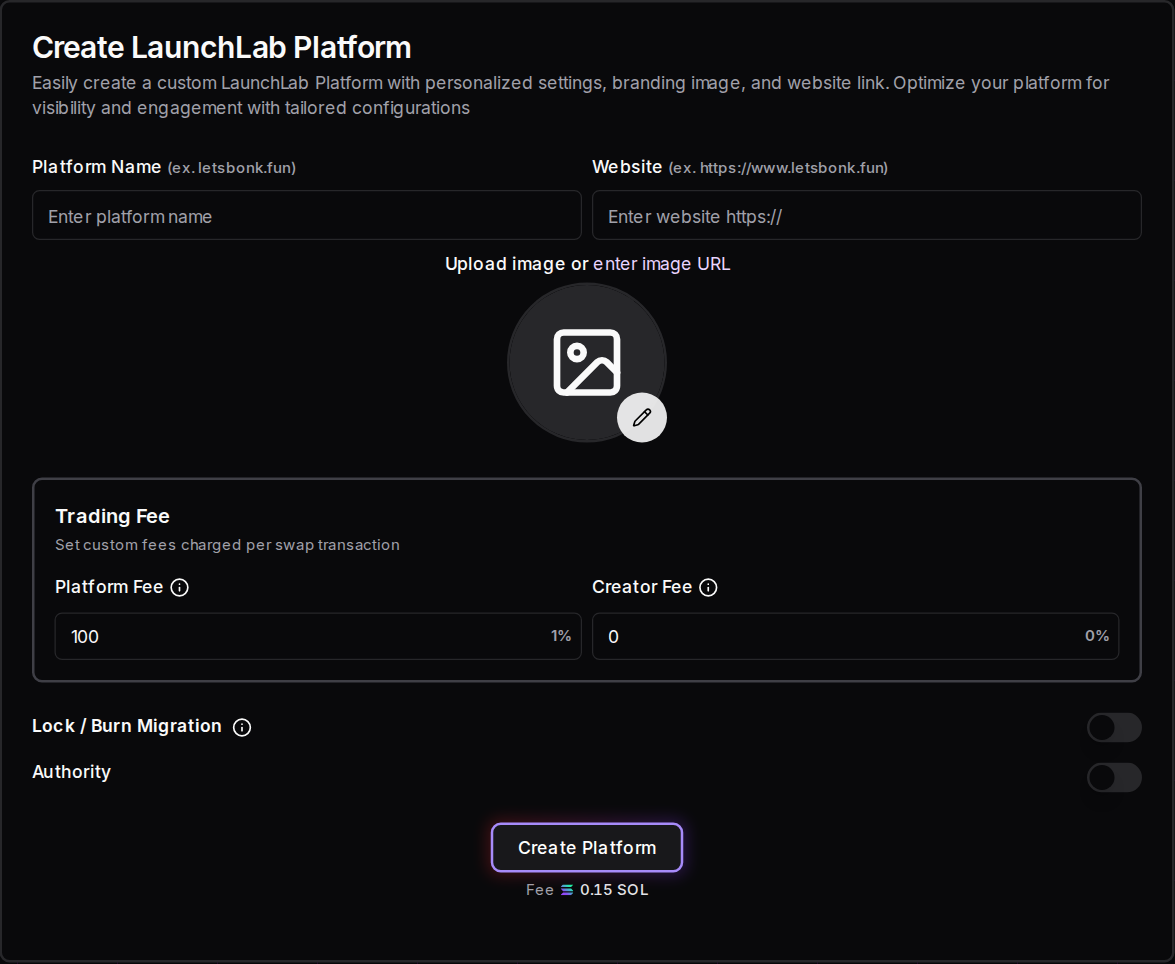
Open Create LaunchLab Platform on Solz, enter a name, website and image, set your Platform Fee and Creator Fee, and sign. It costs 0.15 SOL. You get a Platform ID and a direct link for launching tokens on your platform. Every trade on those tokens' curves then pays your fee.
This is how you own a launchpad without writing a smart contract: Raydium's program handles the curves and pools, and your platform sets the fees and collects its share. It's the same system letsbonk.fun runs on, and its platform account is on Solana for anyone to read.
- Open the tool and connect your wallet. Go to Create LaunchLab Platform. This wallet receives the fees by default.
- Add your branding. Enter Platform Name, Website and an image.
- Set Trading Fee. Platform Fee starts at 100 basis points, which is 1%, and the most you can set is 5%. Creator Fee starts at 0%, and the most is 0.5%.
- Set Lock / Burn Migration if you want to. This splits the pool's LP tokens at graduation between a share locked for your platform and a permanent burn. By default, 100% goes to your platform.
- Set Authority if you want to. This sends claimed fees and the lock NFT to wallets other than your own. Double-check the addresses.
- Create the platform. Click Create Platform and approve in your wallet. Save the Platform ID and the direct link Solz shows you.
- Send people to your link. Tokens launched through it use your platform and pay your fees.
What do you own?
- Your name and branding on the platform, which supporting wallets and sites can show.
- Your fee rate on every curve trade of tokens launched under your platform.
- A share of post-graduation fees, through the LP tokens locked for your platform.
- A launch link that you can share or put on your own site.
Your platform isn't a website. Solz gives you a launch page and link, so if you want a full launchpad site, you'd build that separately and point it at your Platform ID. Treat your settings as final: Solz has no tool for changing a platform's fees or wallets later.
How much can a platform earn?
Your fee applies to the trading volume on your platform's tokens, so earnings depend entirely on how many people launch and trade there. A 1% fee on 1 million dollars of curve volume earns 10,000 dollars before Solz's claim fee. The fee is paid on buys and sells, and it stops when a token graduates.
| Curve volume on your platform | At 0.5% | At 1% | At 2% | At 5% |
|---|---|---|---|---|
| $100,000 | $500 | $1,000 | $2,000 | $5,000 |
| $1,000,000 | $5,000 | $10,000 | $20,000 | $50,000 |
| $10,000,000 | $50,000 | $100,000 | $200,000 | $500,000 |
These are before Solz's 10% claim fee. A higher fee earns more per trade, but traders and creators can compare launchpads, so it can also cost you volume.
What did Bonk.fun earn at its peak?
The best-known example is letsbonk.fun, now Bonk.fun, which charges a 1.25% platform fee on its LaunchLab platform. DefiLlama records about $33.4 million in fees in July 2025, its peak month, of which about $20.1 million was revenue. Cointelegraph reported about $1.04 million in a single day that month.
- Over its whole life: DefiLlama shows about $78.6 million in fees to 2026-11-01, and $45.7 million of revenue.
- It doesn't last by itself: fees fell to about $174,000 in August 2026, then rose to about $8.4 million in September 2026.
- Most of it wasn't profit: DefiLlama says that 58% of fees went to BONK buybacks and related holder programs, and only 2% to marketing.
- It had advantages a new platform won't: Bonk.fun launched with the BONK community behind it, during a surge in memecoin trading.
DefiLlama records Bonk.fun's fees in lumps every few days, so its daily chart isn't reliable for a single day. Treat this as the top of what's been possible, not what to expect. Most platforms won't come close, and you could earn nothing.
How do I claim platform fees?
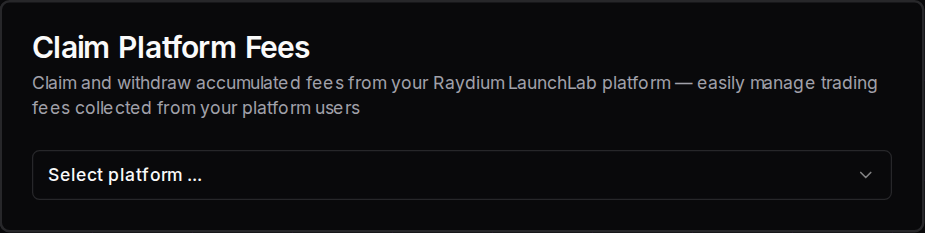
Open Claim Platform Fees, select your platform and check the claimable amount. Then click Claim Platform Fees and approve with the wallet that's set to receive them. SOL and USD1 fees are claimed separately.
How much does a LaunchLab launch cost on Solz?
The Solz service fee is 0.05 SOL for a launch, and your own buy comes on top. A Buy Bundle adds 0.02 SOL per wallet, and Collect Tokens adds 0.01 SOL per wallet. Creating your own platform costs 0.15 SOL, and claiming platform fees costs 10% of the amount you claim.
| Item | Cost |
|---|---|
| Solz service fee to launch | 0.05 SOL |
| Your Buy Amount | What you choose, plus trading fees |
| Uploaded image over 750 KB | +0.075 SOL (not for image URLs or self-hosted metadata) |
| Host your own metadata | -0.02 SOL |
| Custom Creator | +0.05 SOL |
| Buy Bundle | +0.02 SOL per wallet |
| Collect Tokens | +0.01 SOL per wallet |
| Jito tip for a bundle | From 0.0001 SOL per bundle |
| Create a LaunchLab platform | 0.15 SOL |
| Claim platform fees | 10% of the amount claimed, in SOL or USD1 |
| Claim creator rewards | 10% under 0.1, 7% up to 1.5, and 5% above that |
Solz's balance check allows 0.02 SOL for network costs and 0.005 SOL for the launch, so with default speed settings you need about 0.075 SOL plus your buy.
What are the LaunchLab trading fees?
Every curve trade pays a 0.25% Raydium protocol fee, plus whatever the platform sets. On Raydium's own platform, that's a 0.75% platform fee and a 0.05% creator fee, for 1.05% in total. On your own platform, you choose the last two. Referrers can also earn an extra fee on trades they send.
| Curve fee | Set by | Goes to | Raydium's platform | letsbonk.fun's platform | A Solz platform by default |
|---|---|---|---|---|---|
| Protocol fee | Raydium | Raydium | 0.25% | 0.25% | 0.25% |
| Platform fee | The platform, up to 5% | The platform | 0.75% | 1.25% | 1% |
| Creator fee | The platform, up to 0.5% | The token creator | 0.05% | 0% | 0% |
| Total | 1.05% | 1.50% | 1.25% |
These were read from Raydium's live config and each platform's on-chain account on 2026-11-01, and platforms can have settings for different launch modes. After graduation, CPMM's 0.25% tier applies, as the Raydium guide explains, with a further 0.05% creator fee on these configs.
Compared with Pump.fun's 1.25%, LaunchLab's total depends on the platform you launch on, so check it before you launch.
FAQ
Should I use LaunchLab or Pump.fun?
Choose LaunchLab if you want to pick your Bonding Amount, launch on a specific platform or USD1 pair, or graduate to Raydium. Choose Pump.fun if you want its fixed curve and its creator fee tiers on PumpSwap.
What's the difference between Platform Fee and Creator Fee?
Platform Fee goes to the wallet that runs the platform. Creator Fee goes to whoever launched the token on it. As a platform owner, you can give creators a reason to launch with you by setting a Creator Fee.
Can I launch on someone else's platform?
Yes. The form's platform selector lists platforms, or you can use a platform's direct link. Their fees apply to your token.
Do I need my own website to run a platform?
No. Solz gives you a direct link to a launch page for your platform. You'd only need your own site if you want a fully branded launchpad.
How do token creators claim their fees?
They use the Creator rewards panel in the Solz sidebar, which covers bonding curve and pool creator fees.
Does a Solz platform earn from tokens launched elsewhere?
No. It only earns from tokens launched under its own Platform ID.
Sources
Solz's fees and form options come from the app. Curve and platform values come from Raydium's live config and on-chain accounts, read on 2026-11-01. The rest comes from:
- Raydium LaunchLab overview
- Raydium LaunchLab platforms
- Raydium LaunchLab and CPMM fee reference
- DefiLlama: BONK.fun Launchpad
- Cointelegraph on LetsBonk's daily revenue
Open the tool
Open Launch on Raydium LaunchLab on Solz or create your own LaunchLab platform
How to launch a token on Pump.fun with bundles and a vanity address
Launch on Pump.fun from Solz with a dev buy, a multi-wallet buy bundle and a custom vanity address. Includes bonding curve maths and every fee.
How to get a Solana vanity address for a token or wallet
Generate a Solana address with letters you choose, using Solz's hosted GPU generator. Use it for token branding, to market an address before launch, or as a wallet.