
How to use X Wallets on Solz for bundles and trading
Create up to 100 Solana wallets in your browser with Solz X Wallets, back them up, fund them, and use them for bundles, bundled trades and collecting tokens.
What is an X Wallet on Solz?
An X Wallet is a Solana wallet that Solz creates and keeps in your browser, with no app or extension needed. You can have up to 100. Use one to sign in place of a wallet app, or use several to bundle buys, trade together, collect tokens and reclaim rent.
Each X Wallet is a normal Solana wallet with its own address and private key. It can hold SOL and tokens, and you can import its key into another wallet app. Creating one is free, and it doesn't touch the blockchain until you use it.
Prerequisites
- A browser you use regularly and keep secure, because the keys stay in that browser.
- SOL to fund the wallets, from a wallet app or an exchange.
- A safe place outside the browser to keep a backup of your keys.
Steps to set up X Wallets
These steps create 5 wallets, back them up and fund 4 of them with 0.5 SOL each.
- Open the tool. Go to Manage X Wallets. You don't need to connect a wallet to create them.
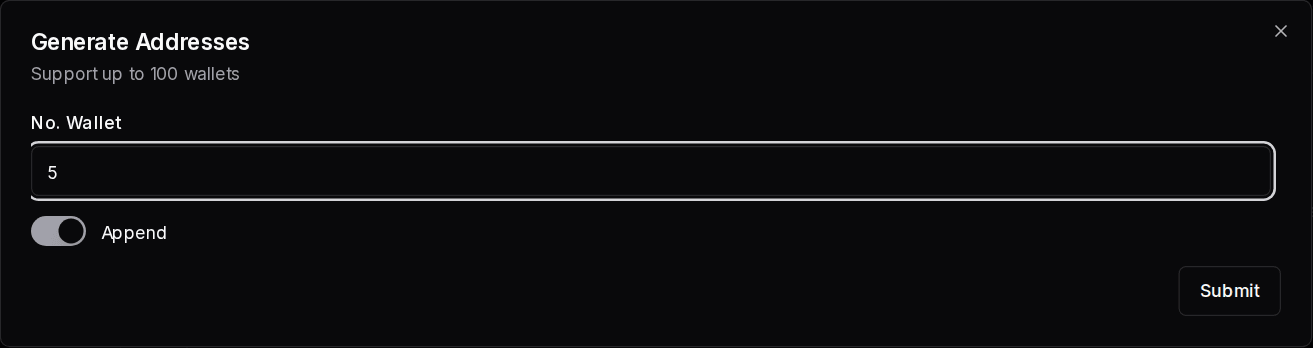
- Create your wallets. Click Generate Wallets, enter 5 under No. Wallet and click Submit. Leave the switch on Append, because turning it to Overwrite existing wallets replaces the ones you already have.
- Check the list. Each row shows the address, a shortened private key, and the SOL balance. Select a token at the top to see each wallet's balance of it.
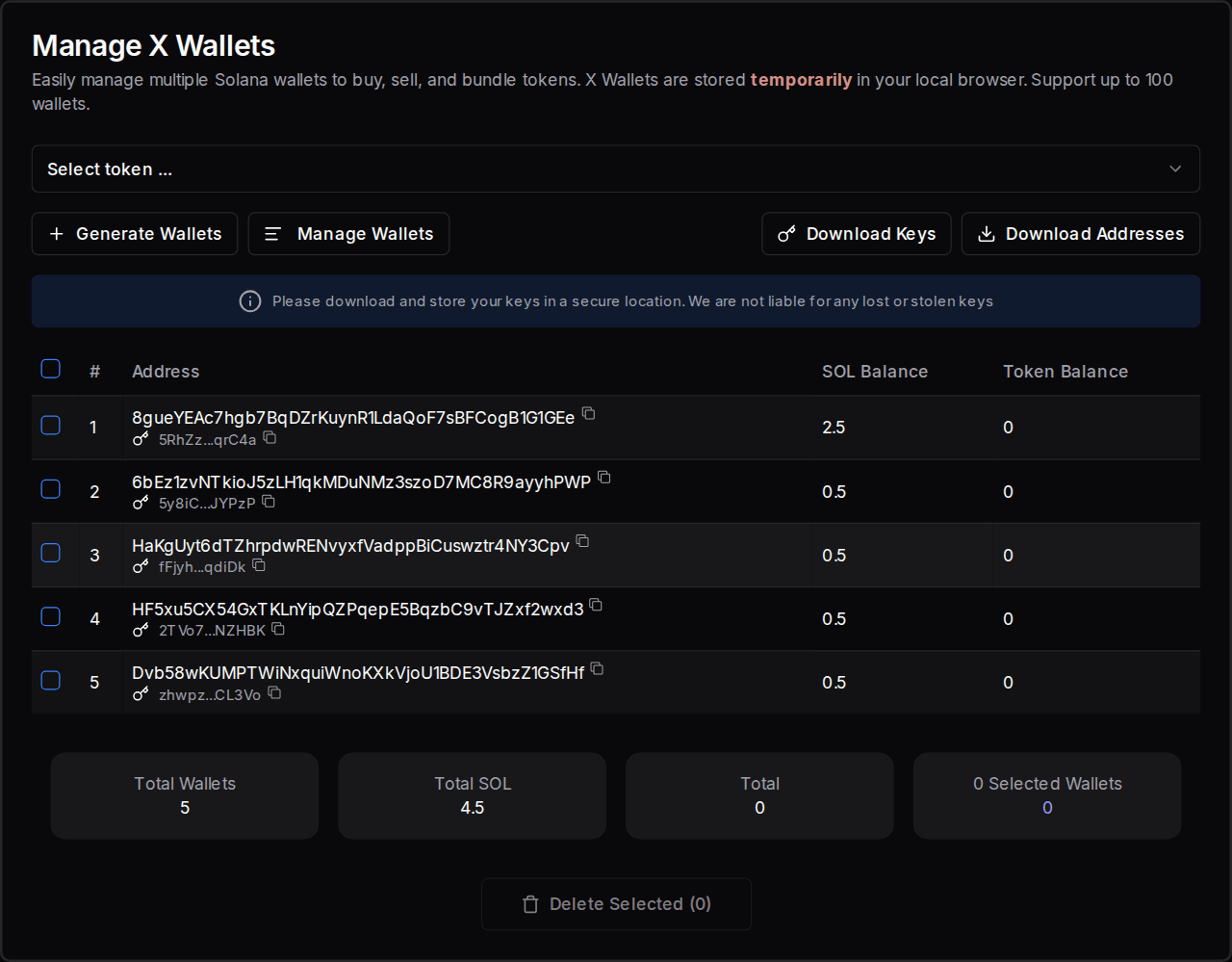
- Back up your keys now. Click Download Keys and move the file somewhere safe. Download Addresses saves only the addresses, which is safe to share.
- Connect a funded wallet. Connect the wallet that holds your SOL.
- Fund the wallets. Open Multi Token Sender and select Solana. Click Import X Wallets, remove any wallet you don't want to fund, enter an amount and click Send to.
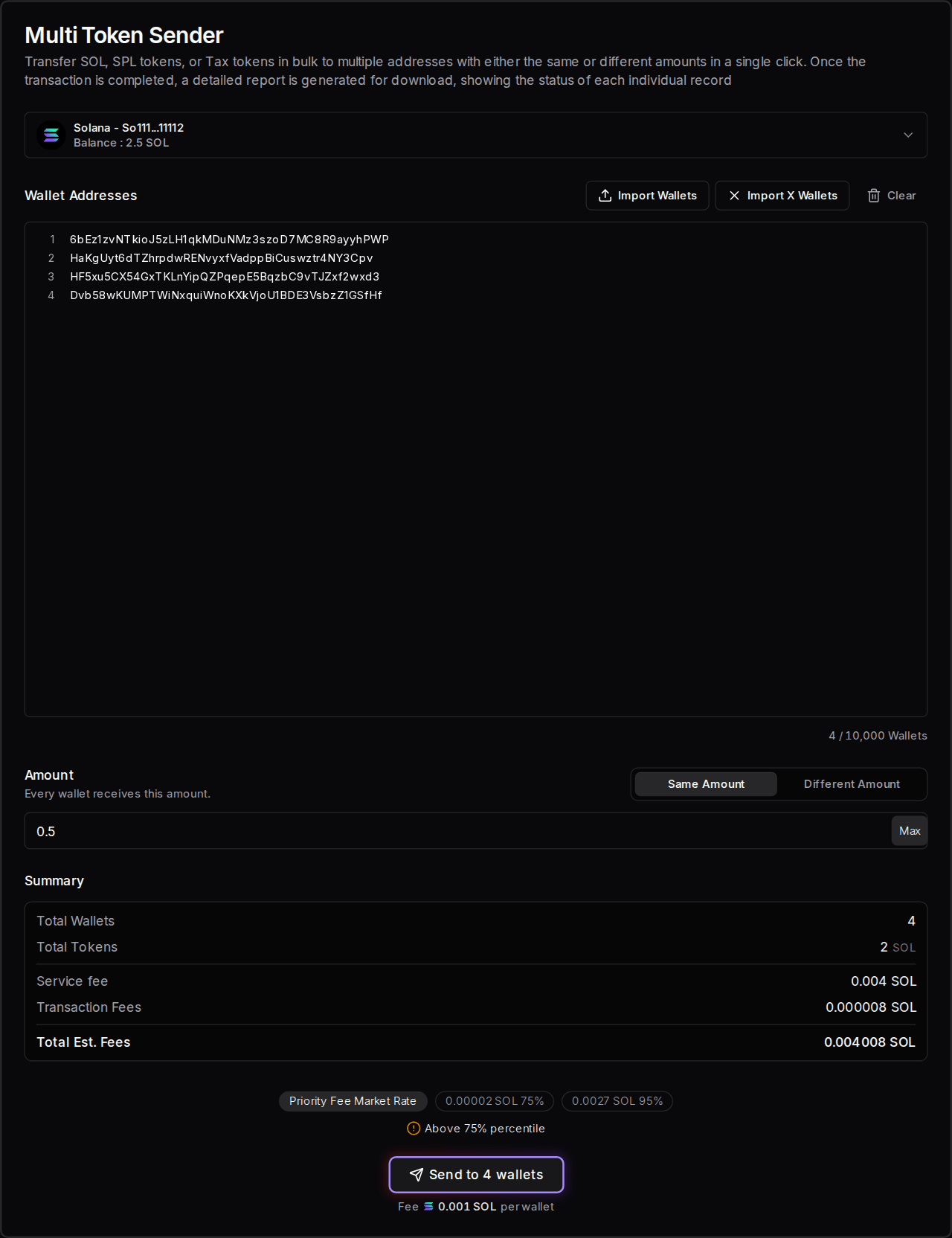
These screens are from the live app. The wallets are throwaway examples, the balances are simulated, and nothing was sent.
How do I add wallets I already have?
Click Manage Wallets on the same page, then paste private keys, one on each line, or use Import Wallets to load a file. Only base58 keys work, which is the format wallet apps usually export. Click Submit to save the list.
Should I use an X Wallet or a wallet app?
Use a wallet app such as Phantom for your main funds, because its keys stay protected in the app. Use X Wallets when you need many wallets working together, or a quick wallet for one job. You can use both: a wallet app holds your funds, and X Wallets do the bundling.
| X Wallet | Wallet app | |
|---|---|---|
| Setup | Built in, nothing to install | Install an app or extension |
| How many | Up to 100, created in one click | Usually added one at a time |
| Where the keys are | This browser only | The app or a hardware device |
| Works in other apps and sites | Only after importing its key elsewhere | Yes |
| Best for | Bundles, bundled trades, small working balances | Long-term holdings and your main funds |
How do I sign with an X Wallet?
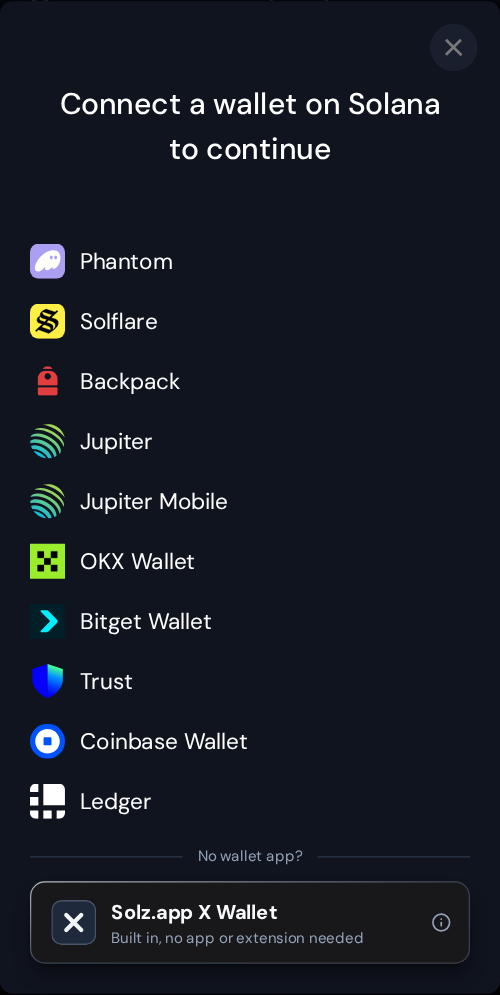
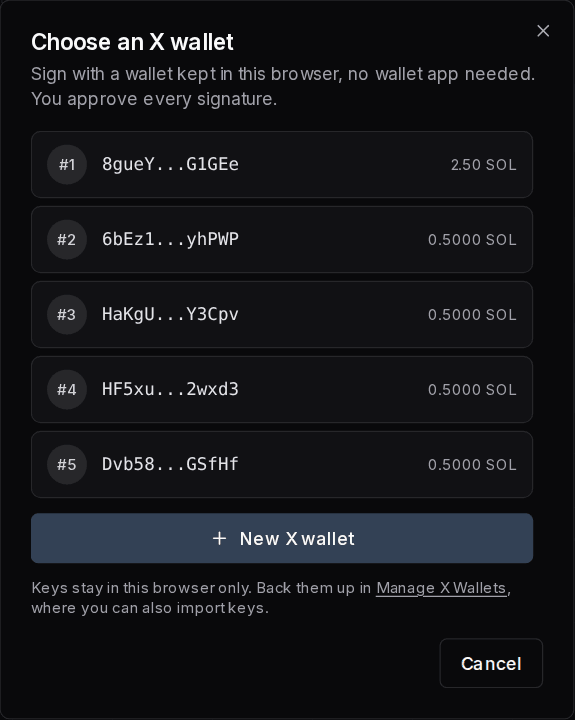
Click Connect Wallet, then choose Solz.app X Wallet under No wallet app, and pick a wallet from your list. It then works like a wallet app across Solz: each transaction opens an approval window, and nothing is signed until you click Approve.
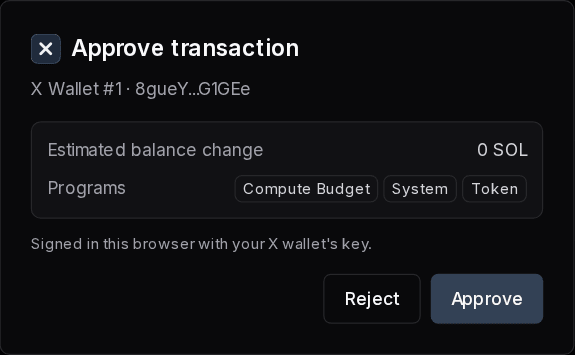
The approval window shows the wallet signing, the estimated change to your SOL balance, and the programs the transaction uses. Click Reject to stop, and nothing is signed or sent.
To change wallet, open the wallet menu at the top right and click Switch X wallet. Multi Token Sender asks once for a whole send. Bundled Buy, Bundled Sell, Collect Tokens and the batch SOL Incinerator don't open this window, because clicking their button is your approval.
What can I do with X Wallets on Solz?
You can buy in the same block as your launch, trade from many wallets together, move tokens back to one wallet, and reclaim rent across all of them. Every tool below reads the same list of X Wallets, so you only set them up once, and each row in a tool is one wallet.
| What you want to do | Tool | Guide |
|---|---|---|
| Buy with several wallets at launch | Buy Bundle in the launch forms | Pump.fun, LaunchLab |
| Buy with several wallets when a pool opens | Buy Bundle in Create Liquidity Pool | Raydium pools |
| Buy or sell together after launch | Bundled Buy, Bundled Sell | Below |
| Move tokens to one wallet | Collect Tokens | Below |
| Reclaim SOL across wallets | Batch SOL Incinerator | Below, and reclaiming SOL |
| Send SOL or tokens to your wallets | Multi Token Sender | Airdrops |
Example: a bundled buy
Say 4 wallets each buy 0.1 SOL of a token. Select the token, choose where it trades, then enter 0.1 under Buy Amount for those wallets, or use Fixed Amount to fill them all. Leave a wallet empty to skip it. Solz marks one wallet as Fee Payer, and that wallet pays the fee.
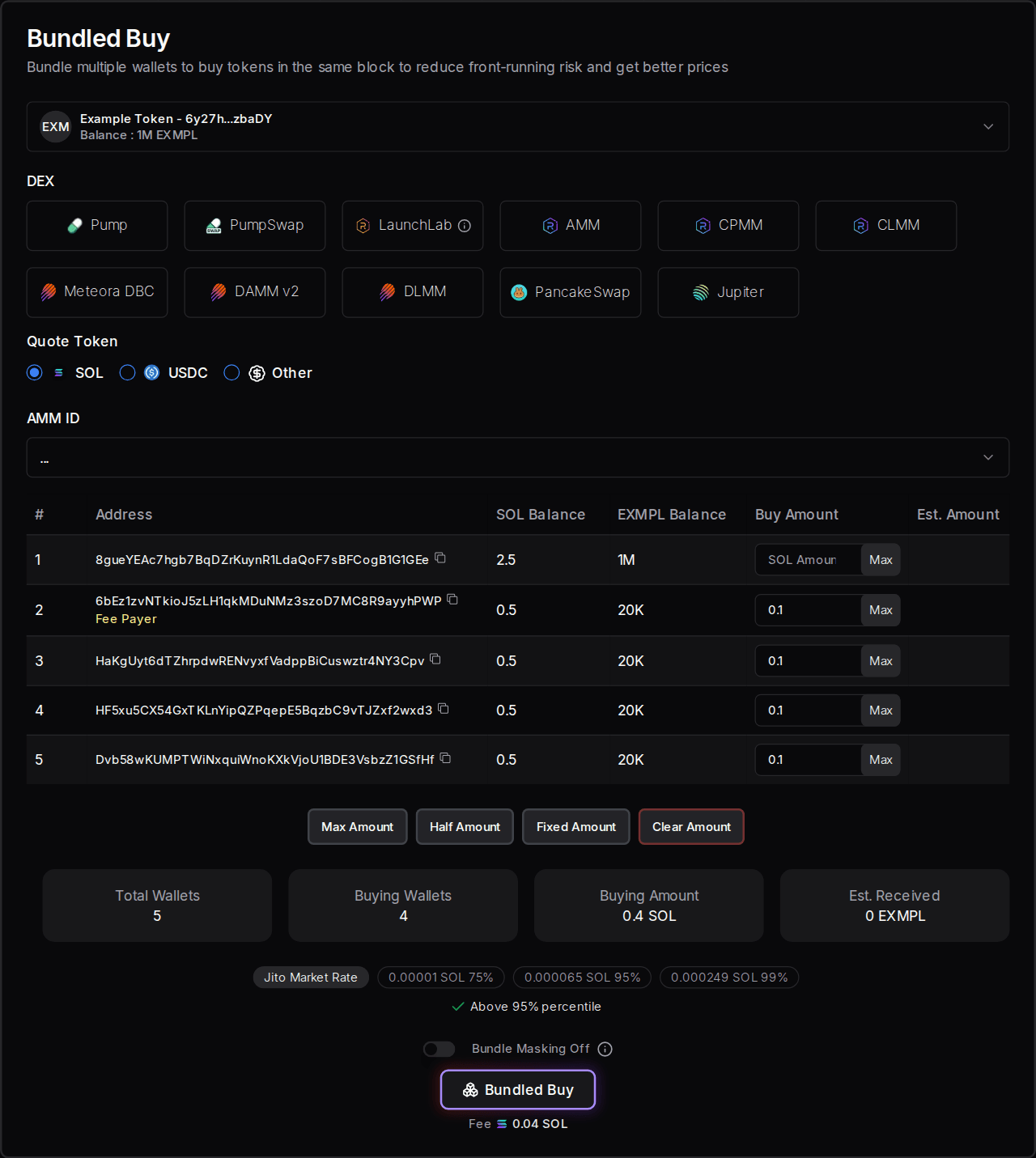
With Bundle Masking off, the trades go together through Jito, all or nothing. With it on, each wallet's trade is sent separately, so some can fail and prices can differ between wallets. Each wallet needs enough SOL for its own buy.
Example: collecting tokens
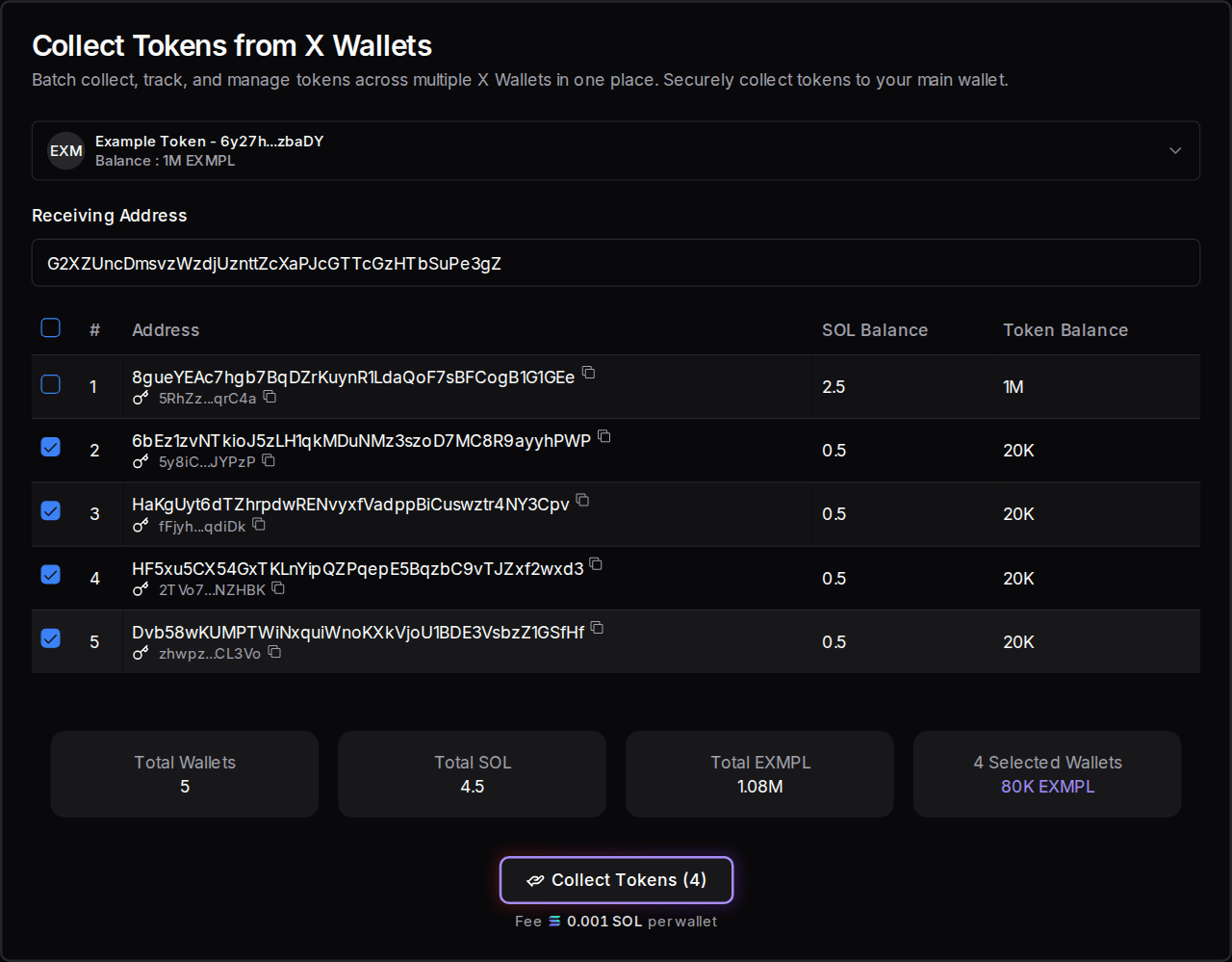
After a launch, your tokens sit in separate wallets. To bring 20,000 EXMPL from each of 4 wallets into one, open Collect Tokens, select the token, enter a Receiving Address, tick the 4 wallets and click Collect Tokens. The fee is 0.001 SOL per wallet, so 0.004 SOL here. Solz then says Successfully collected 4 wallets. To collect leftover SOL, select Solana as the token.
Example: reclaiming rent
Once those wallets are empty, each one still holds about 0.0015 SOL as rent for its token account. Open the batch SOL Incinerator, enter a Receiving Address, tick the wallets and click Claim Empty Accounts. Here that returns 0.005954 SOL for a fee of 0.00008 SOL, and Solz says Successfully collected rent from 4 wallets.
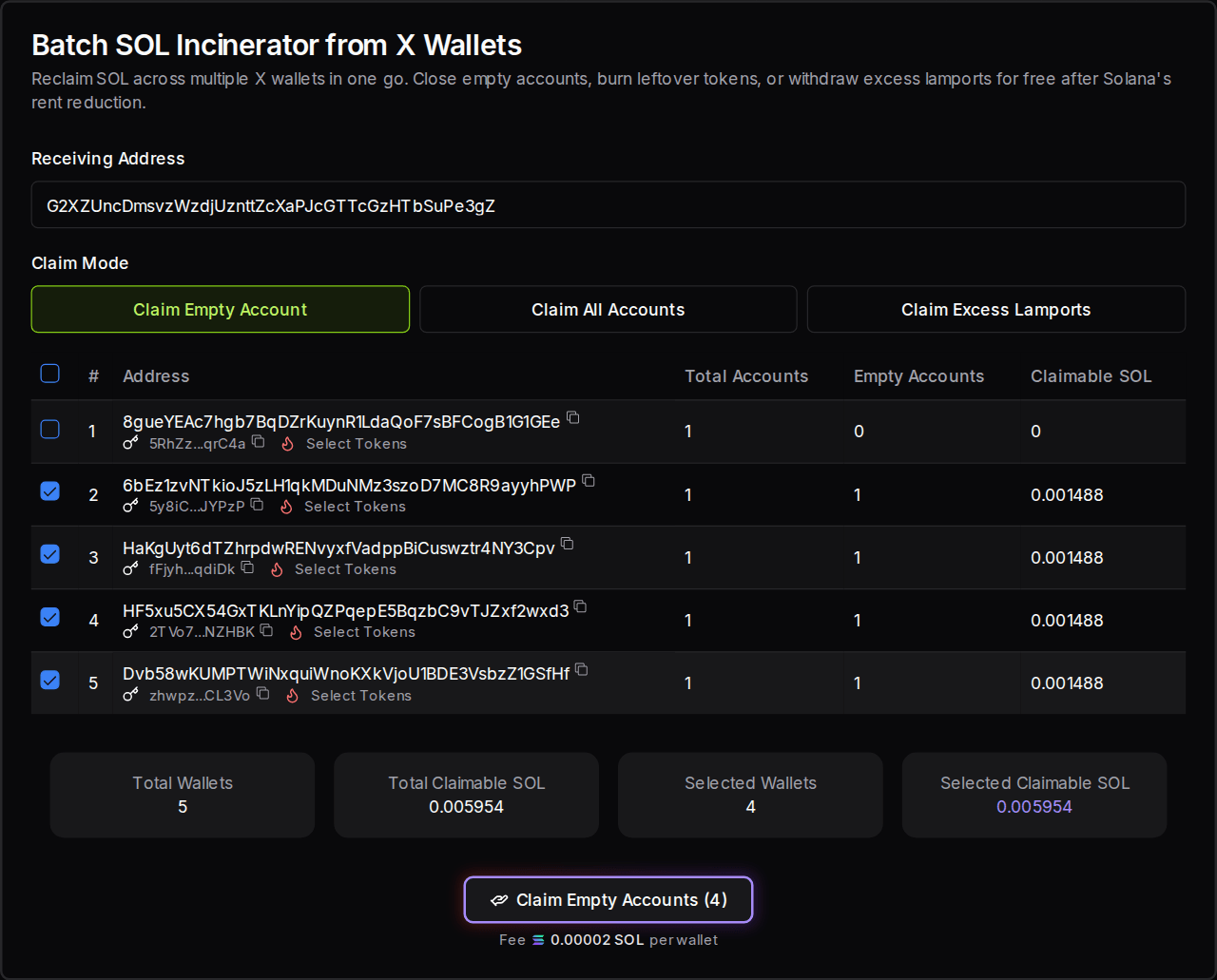
| Claim Mode | What it does |
|---|---|
| Claim Empty Account | Closes accounts with no tokens in them |
| Claim All Accounts | Burns every token in the selected wallets, then closes their accounts. Only use it when nothing in them has value |
| Claim Excess Lamports | Withdraws extra rent left after Solana's rent reduction, and keeps the accounts open |
The tokens and balances in these examples are simulated, and nothing was sent.
How do I keep my X Wallets safe?
Download your keys as soon as you create wallets, store that file somewhere safe outside the browser, and keep only what you need in these wallets. Anyone with a private key controls that wallet for good, and Solz can't recover or reverse anything if a key is lost or stolen.
- Keys stay in this browser only. They aren't on other browsers or devices, and clearing this browser's site data removes them. To use them elsewhere, import your backup.
- Never share Download Keys. That file holds every private key. Never paste a key into a chat or send it to anyone, including someone claiming to be from Solz.
- Back up before you overwrite or delete. Overwrite existing wallets and Delete Selected remove keys from this browser. The funds stay on-chain, but you can't reach them without a backup.
- Keep your main funds elsewhere. Move profits to a wallet app or hardware wallet with Collect Tokens.
- Keep your device secure. Use a browser and computer you trust, and be careful with browser extensions and shared computers.
What should I see if something goes wrong?
Solz stops before anything is signed when a wallet list or balance has a problem, and says what to fix. A red message about SOL means a wallet can't cover its costs, so add SOL or reduce the amount. Rejecting an approval window signs nothing, so you can try again.
| What you see | What it means | What to do |
|---|---|---|
| No Wallets. Go to Manage X Wallets to create wallets. | This browser has no X Wallets | Generate wallets, or import your backup |
| Wallet size exceeded 100 | Your list would go over the limit | Delete some, or turn off Append to replace them |
| Maximum 100 wallet addresses, with the number detected | You're importing too many | Import up to 100 |
| Fix the marked lines to import, with invalid key format or same wallet as line | A key isn't in base58, or appears twice | Fix or remove those lines |
| Select token ! | No token is selected | Select one at the top of the form |
| Not enough balance, you need at least the amount shown | A wallet can't cover the fee and network costs | Add SOL, or reduce the amount |
| Simulation failed. The transaction may fail. | The approval window expects it to fail | Click Reject, then check your balances and amounts |
| Transaction timeout ! This might be due to you sending invalid transactions / congested network | It didn't confirm in time | Check the wallet's history before trying again, because it may have gone through. Then raise your priority fee |
How much do X Wallets cost on Solz?
Creating, importing and backing up X Wallets is free. You pay when you use them on-chain: for example, 0.001 SOL per wallet to send or collect, and from 0.01 SOL per wallet for a bundled buy. Network fees come on top, and each wallet needs SOL for its own transactions.
| Item | Cost |
|---|---|
| Generate, import or download wallets | Free |
| Fund wallets with Multi Token Sender | 0.001 SOL per wallet |
| Buy Bundle at launch or when a pool opens | 0.01 SOL per wallet |
| Bundled Buy | From 0.01 SOL per wallet |
| Bundled Sell | From 0.005 SOL per wallet |
| Collect Tokens | 0.001 SOL per wallet |
| Batch SOL Incinerator | 0.00002 SOL per wallet, and free for Claim Excess Lamports |
FAQ
Are X Wallets real Solana wallets?
Yes. Each one has its own address and private key, and it can hold SOL and tokens like any other wallet. Anyone can see its balance and transactions on-chain.
Can I use an X Wallet in Phantom?
Yes. Click the copy button beside its key in Manage X Wallets, or use your Download Keys file, then import the key into Phantom or another wallet app.
What happens if I clear my browser?
The keys are removed from that browser, but the wallets and their funds stay on-chain. Import your backup with Manage Wallets to use them again. Without a backup, those funds can't be reached.
Can I use X Wallets on my phone?
Yes, in your phone's browser, but they're separate from the ones on your computer. Import your backup there if you want the same wallets.
Does Solz keep a copy of my keys?
No. Keys stay in your browser, so Solz can't restore them for you. That's why the backup matters.
How many wallets should I use for a bundle?
Only as many as you need. A launch's first bundle holds up to 12 wallets, and each later one holds up to 15. Bundle wallets are visible on-chain, so tell your community what your team holds.
Open the tool
How to airdrop Solana tokens with Multi Token Sender
Send SOL or tokens to many wallets with Multi Token Sender, save on rent with ZK compression, use Token Snapshot, and see costs for up to 100,000 recipients.
How to revoke mint, freeze and metadata authority
Decide when to keep or revoke your Solana token's mint, freeze and metadata authority, including freezing bad actors. Each revoke costs 0.04 SOL on Solz.