
How to reclaim SOL from empty Solana token accounts
Get back the SOL locked as rent in your Solana wallet. Close empty token accounts, withdraw excess rent from open ones, and see what you'd really receive.
How do I reclaim SOL from my Solana wallet?
Open the SOL Incinerator on Solz and connect your wallet. Claim empty accounts closes token accounts with no balance and returns their rent, for 0.00002 SOL each. Withdraw excess rent takes the extra SOL out of open accounts for free, and they stay open. Your tokens aren't touched by either one.
Prerequisites
- A Solana wallet such as Phantom, Solflare or Backpack.
- A little SOL for the 0.00002 SOL per account fee and network fees. Solz tells you if you don't have enough.
Why is SOL locked in my wallet?
Each token your wallet holds, or has held, has its own token account, and every account holds a SOL deposit called rent. Selling a token to zero leaves the empty account and its deposit behind. Solana has also lowered its rent, so accounts opened before the change now hold more than they need.
| Token account | Rent it holds | Extra you can withdraw |
|---|---|---|
| Opened before Solana's rent reduction | 0.00203928 SOL | 0.00055084 SOL |
| Opened during its first step | About 0.00185557 SOL | About 0.00036713 SOL |
| Opened at today's rate | 0.00148844 SOL | None |
We read today's minimum of 0.00148844 SOL from the network on November 2, 2026. Solana plans further reductions, so these figures can change. The app reads the real amounts for your wallet.
Steps to reclaim your SOL
- Open the tool and connect your wallet. Go to the SOL Incinerator. Solz scans your token accounts and shows what you can reclaim.
- Claim empty accounts. Check the amount and the fee, click Claim and approve in your wallet. Only accounts with no balance are closed.
- Withdraw excess rent. Check the amount, click Withdraw and approve. Your accounts stay open and your balances don't change. Solz handles up to 20 accounts per transaction.
- Check the result. A green message confirms it, with a link to the transaction, and both cards update.
- Burn tokens you don't want, if you like. Select a token's card and click Confirm Burn. This destroys your whole balance of it and closes the account, so check each one carefully.
What should I expect to see?
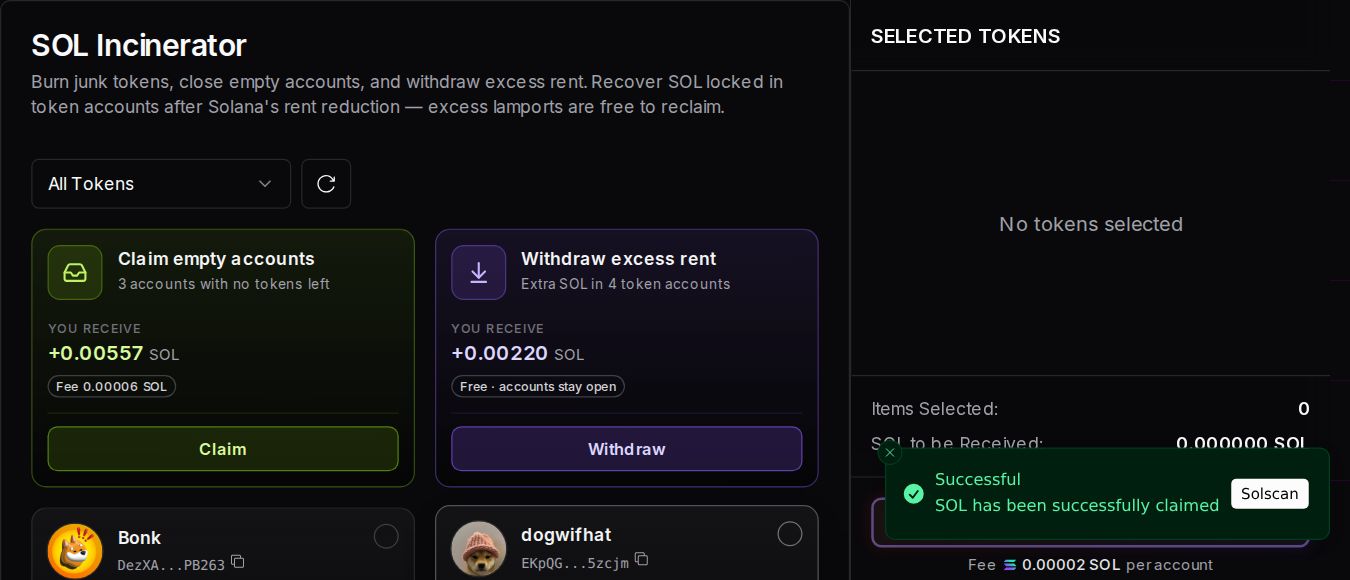
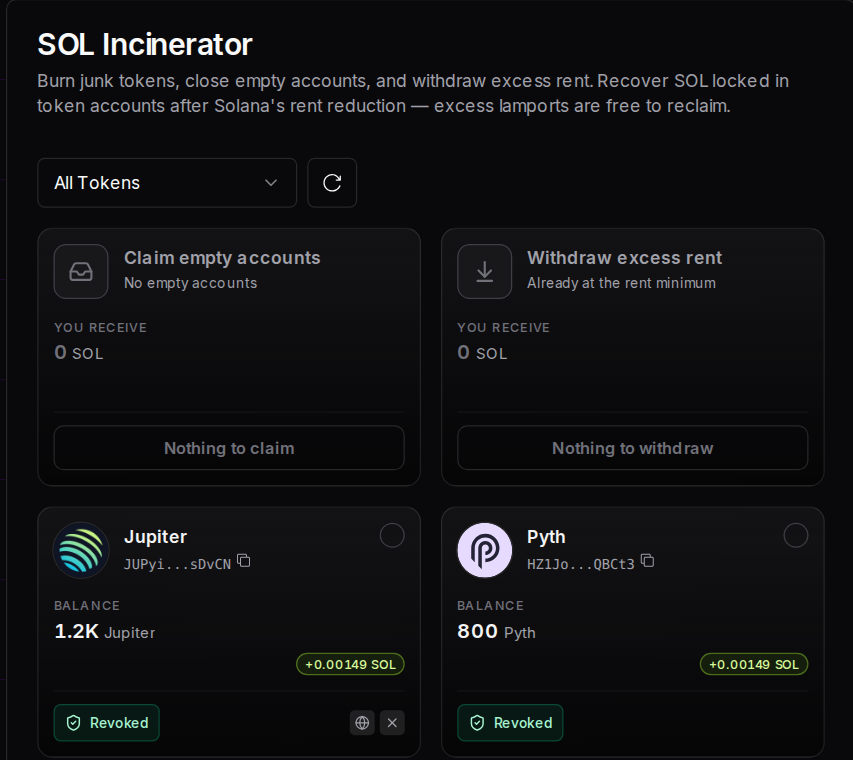
If there's SOL to reclaim, each card shows how much you'd receive. After you approve, a green Successful message appears with a link to the transaction, and the cards update to Nothing to claim and Nothing to withdraw. If something's wrong, a red message says why, and accounts that can't be closed are skipped or left out.
Example: a wallet with old and empty accounts
This wallet holds six real tokens. Bonk, dogwifhat and JTO have a zero balance, and Jupiter, Pyth and mSOL still have tokens. The balances and each account's rent are example data, using the real rent amounts above:
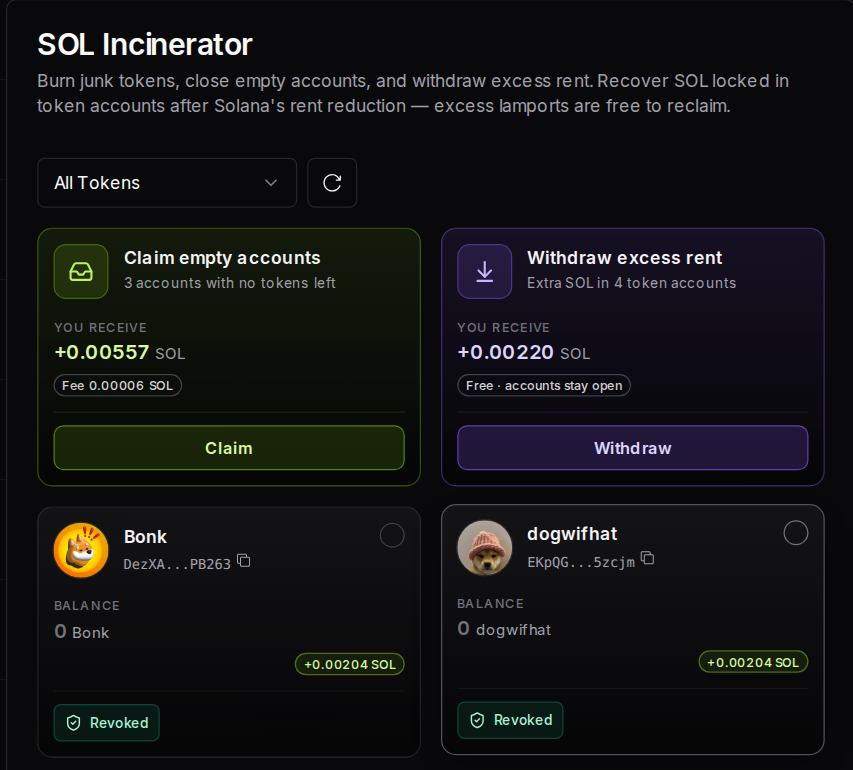
Claim empty accounts adds up the rent in the three empty accounts:
| Empty account | Rent returned |
|---|---|
| Bonk, opened before the reduction | 0.00203928 SOL |
| dogwifhat, opened before the reduction | 0.00203928 SOL |
| JTO, opened at today's rate | 0.00148844 SOL |
| You receive | 0.005567 SOL |
| Solz fee, 3 × 0.00002 SOL | -0.00006 SOL |
| After the fee | 0.005507 SOL |
Withdraw excess rent shows 0.00220 SOL from 4 accounts, or 4 × 0.00055084 SOL. Two of those are the empty Bonk and dogwifhat accounts, so claiming them already returns that extra. If you claim first, the withdrawal covers Jupiter and Pyth, for about 0.0011 SOL. You don't get the same SOL twice.
So this wallet gets back about 0.0066 SOL in total, before network fees. Clicking Claim shows this message once it's done:
Afterwards, both cards show there's nothing left to reclaim, and Jupiter, Pyth and mSOL are still there with their balances:
The screens are from the live app using a test wallet that can't sign, so no real claim was made, and we triggered the success message directly.
All the messages you might see
| What you see | What it means | What to do |
|---|---|---|
| SOL has been successfully claimed | Your empty accounts were closed | Nothing else |
| Withdrawn, followed by an amount, of excess rent | The extra SOL is back in your wallet | Nothing else |
| Nothing to claim, or No empty token accounts to claim | You have no empty accounts | Nothing else |
| Nothing to withdraw, or No excess lamports to withdraw | Your accounts are already at the minimum | Nothing else |
| Not enough balance, you need at least the amount shown | You can't cover the fee and network costs | Add a little SOL |
| Not enough SOL for network fees | You can't cover the network fee to withdraw | Add a little SOL |
| A number of accounts skipped because a delegated close authority holds the rent | Another address controls closing those accounts | Those accounts can't be closed here |
| Frozen token lives eternal with your wallet! | A frozen account can't be burned or closed | Only the token's freeze authority can unfreeze it |
| Could not scan token accounts for excess rent | The scan didn't complete | Refresh and try again |
Is it safe to close token accounts?
Closing an empty account is safe, because Claim only closes accounts with no balance. If you receive that token again, a new account is created, and whoever sends it usually pays the rent. Withdraw excess rent leaves accounts open. Burning is different: it destroys tokens for good, so only burn what you're sure about.
- You always sign. Each action is a transaction you review and approve in your wallet.
- Watch for fake sites. Tools that reclaim rent are often copied by scammers. Check you're on
www.solz.app, and never enter your seed phrase. - Liquidity pool (LP) tokens: read this first before burning any, because that gives up your liquidity.
How much does reclaiming SOL cost?
Claiming empty accounts costs 0.00002 SOL per account, and you get each account's rent back. Withdrawing excess rent has no Solz fee, so you only pay network fees. Burning a token and closing its account costs 0.00002 SOL per account too. Network fees depend on your priority fee setting.
| Item | Cost |
|---|---|
| Claim empty accounts | 0.00002 SOL per account |
| Withdraw excess rent | No Solz fee |
| Burn a token and close its account | 0.00002 SOL per account |
| Solana base fee | 0.000005 SOL per transaction |
| Priority fee | Depends on your speed setting |
FAQ
How much SOL will I get back?
It depends on how many accounts you have and when they were opened. An empty account opened before the rent reduction returns 0.00203928 SOL, and one opened today returns 0.00148844 SOL. Solz shows your real total before you approve.
Does this affect my tokens?
Claim and Withdraw don't change any token balance. Only burning does, and you have to select those tokens yourself.
Can I do this for several wallets?
Yes. Reclaim rent across wallets works with wallets in X Wallet.
Why does Withdraw count my empty accounts too?
Empty accounts opened before the reduction also hold extra rent. Claiming them returns all of their rent, including that extra, so it isn't paid twice.
Why can't I close one of my accounts?
Either it still has a balance, it's frozen, or another address holds its close authority. Solz tells you when it's the last two.
Sources
Open the tool
Why isn't my Solana token showing up? How to fix it
Token missing or Unknown on Phantom, Jupiter, DexScreener or Solscan? Find the cause for each app, fix your metadata on Solz, and see what each message means.
Solz vs other Solana token tools
Honest, dated comparisons of Solz and other Solana token tools. See features, fees and where each tool wins, one tool at a time.