
Why isn't my Solana token showing up? How to fix it
Token missing or Unknown on Phantom, Jupiter, DexScreener or Solscan? Find the cause for each app, fix your metadata on Solz, and see what each message means.
Why isn't my Solana token showing up?
It depends on where it's missing. Phantom shows Unknown when it can't find metadata, and can hide tokens it flags as spam. DexScreener lists a token once it has a liquidity pool and a transaction. Jupiter's Verified badge needs a review. Find your app in the table below, then follow its fix.
| Where | What you see | Likely cause | Fix |
|---|---|---|---|
| Phantom | Token shows as Unknown | Missing or incomplete metadata | Check your metadata |
| Phantom | Token is missing or marked as spam | Trust and safety checks | Appeal the flag |
| DexScreener | No page for your token | No liquidity pool, or no trades yet | Add liquidity and check for a trade |
| DexScreener | No logo or social links | Token info isn't on a list it reads | Add your token info |
| Jupiter | No Verified badge | Not reviewed, or below its criteria | Apply for verification |
| Solana Explorer | Search can't find it by name | No verification source lists it | Get listed by a source |
| Solscan | No token price | Not listed on CoinGecko | Apply to CoinGecko |
Prerequisites
- Your token's full address. Copy it from where you created it, not from a chat or a search result.
- For metadata fixes: the wallet that holds the token's update authority.
- For a Jupiter or CoinGecko application: your project's website and social accounts.
Steps to find the problem
- Check that the token exists. Paste its address into Solscan. If nothing is found, check the address and whether the creation transaction went through.
- Check its metadata. Open My Tokens on Solz with a wallet that holds the token. A token with metadata shows its name and symbol.
- Check for a liquidity pool. If you launched on a bonding curve, it may not have a pool yet. If you created the token yourself, it won't have one until you create it.
- Check for a trade. DexScreener needs at least one transaction, and it may drop tokens with none in the past 24 hours.
- Go to the section for your app. Use the table above, because each app has its own rules.
How do I check and fix my token's metadata?
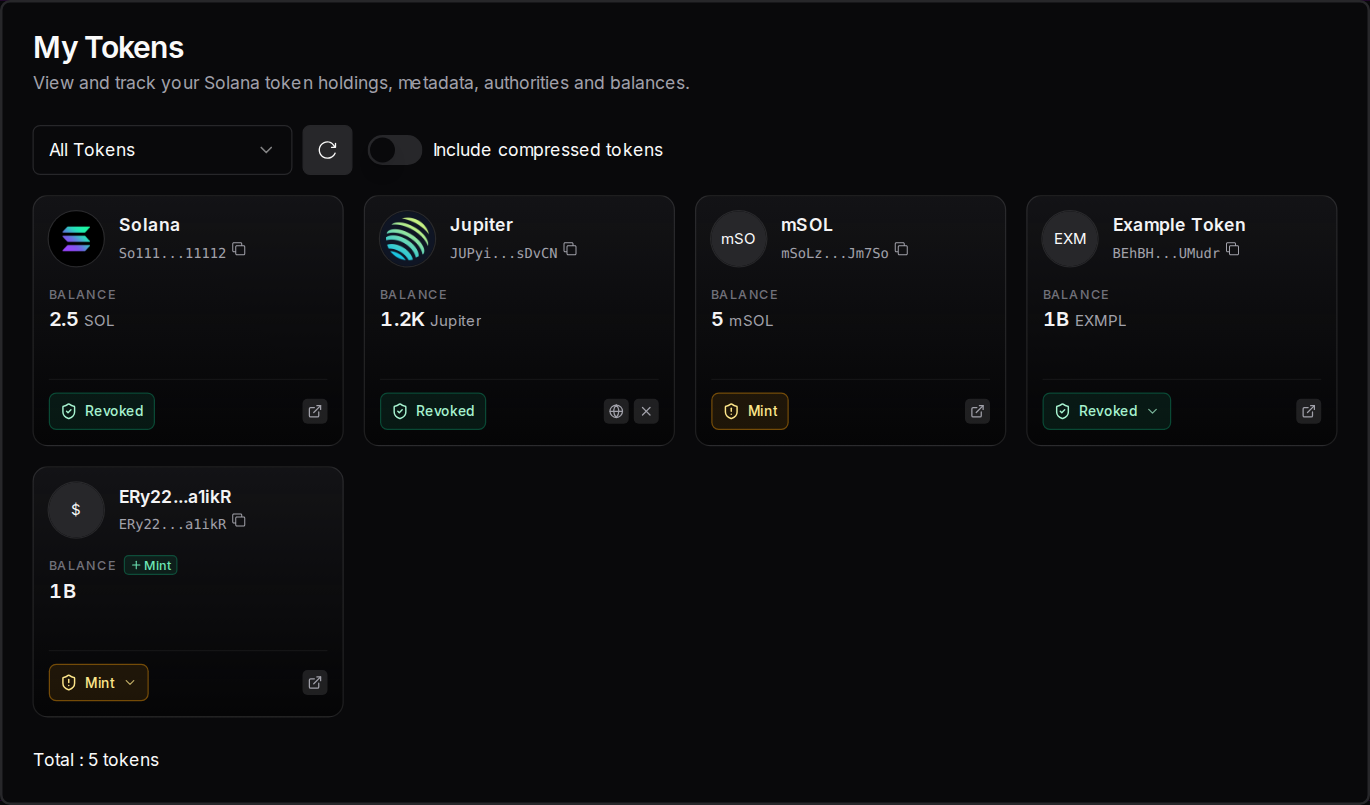
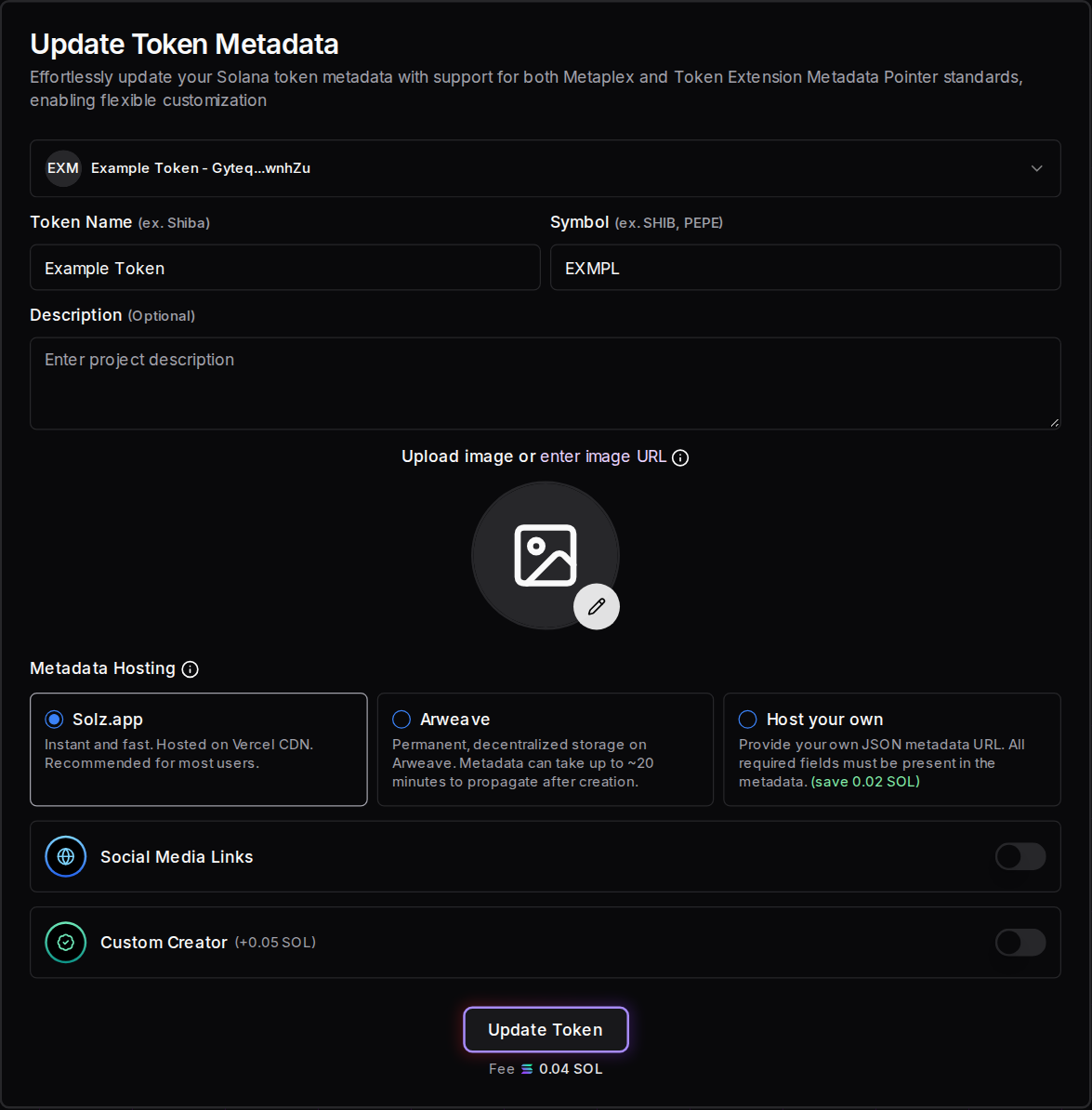
Open My Tokens and find your token. If its card shows only its address, the token has no metadata, and the wallet holding its mint authority can add some. If the name or image is wrong, open Update Token Metadata, select the token, change the details and approve the 0.04 SOL fee from the update authority's wallet.
Here, Jupiter and mSOL are real tokens, and their names come from their real on-chain metadata. The last card is an example token with no metadata, so its address appears where the name should be, and its balance has no symbol:
To change a token's details, open Update Token Metadata, select the token, edit the name, symbol, image or links, and click Update Token:
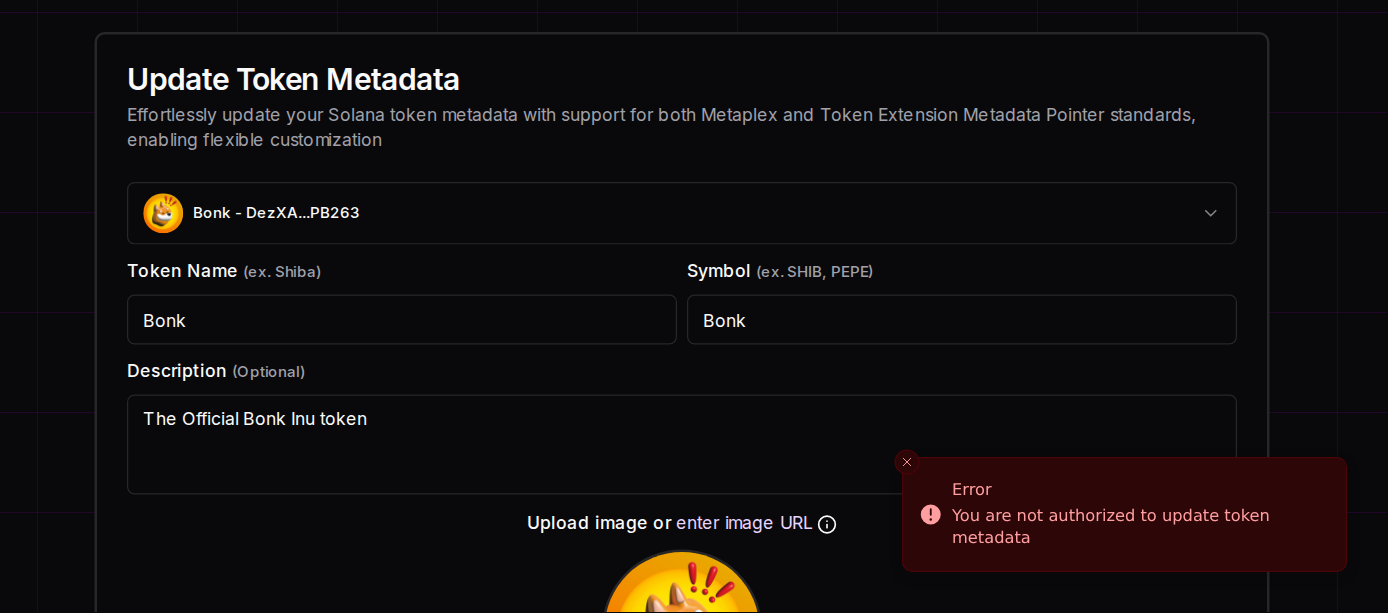
If your wallet doesn't hold the update authority, the form tells you straight away, before you sign anything. This is what you'd see trying to update Bonk, a real token:
| What you see | What it means | What to do |
|---|---|---|
| Successful, with a link to the transaction | The update went through | Wait for apps to refresh, as each one has its own timing |
| You are not authorized to update token metadata | Your wallet doesn't hold the update authority | Connect the wallet that does |
| This token has no metadata, and only its mint authority can add it | Your wallet doesn't hold the mint authority | Connect the wallet that does |
| This token has no metadata, and its mint authority is revoked, so metadata can't be added | Nobody can add metadata to this token now | Nothing, because this can't be changed |
| Metadata can't be added to this token, because Metaplex doesn't accept tokens with a close authority | Metaplex won't accept this token | Solz can't add metadata to it |
| This token keeps its metadata in a separate account, which Solz.app can't update | The token's metadata is stored in a way the form doesn't support | Update it with the tool that manages that account |
| This address isn't a token mint. Use the token's mint address, not a token account | You entered a token account's address | Use the token's mint address |
| This address isn't a token, so it has no metadata to update | The address isn't a token at all | Check the address |
| The metadata URL is too long. It can be at most the number of bytes shown | Your own metadata link is too long | Use a shorter link, up to 200 bytes for Metaplex metadata, or 600 for Token-2022's own metadata |
| This token has no metadata, so there's nothing to update | You used Immutable Token on a token with no metadata | Add metadata first, if you can |
| The metadata is already immutable, no metadata update is allowed | The token's update authority was revoked | Nothing, because nobody can change this metadata |
| Unable to fetch token image, but you may proceed to update the metadata | Your current image couldn't be loaded | Add a working image while you update |
Adding metadata to a token that has none: if your connected wallet holds the mint authority, the form shows a notice and the button reads Add Metadata. Fill in the details, click it and approve in your wallet:
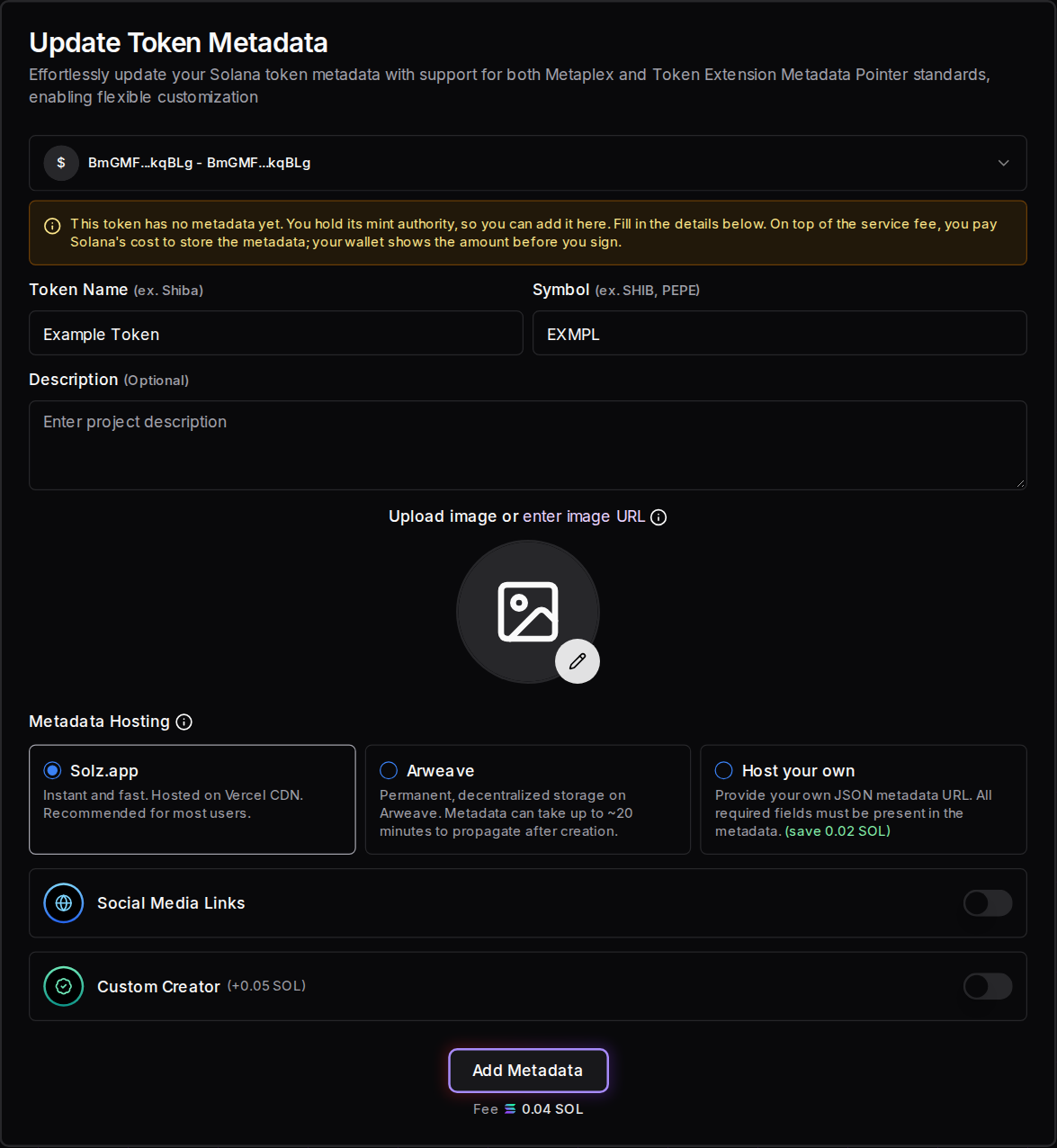
On top of the 0.04 SOL fee, you pay Solana's cost to store the metadata. It varies, so check the amount in your wallet before you sign.
If nobody holds the mint authority any more, metadata can't be added at all, and the form says so without opening your wallet:
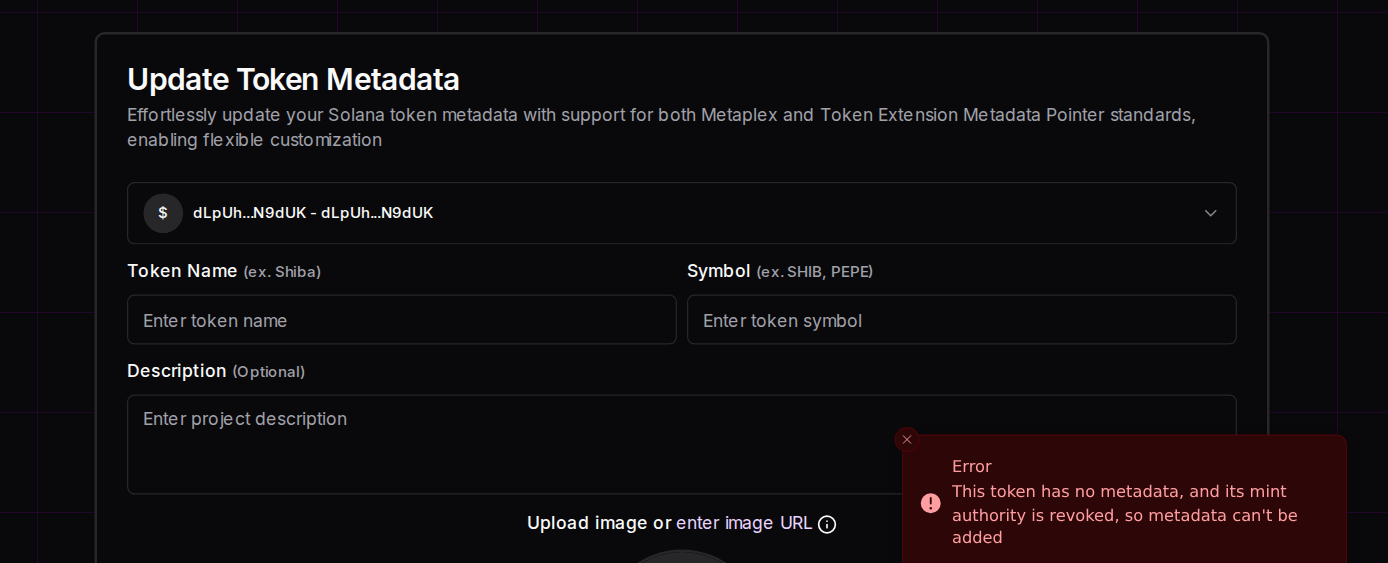
A few limits still apply. Names can be up to 32 bytes and symbols up to 10 bytes, so non-Latin names fit fewer characters. If a token's metadata file can't be reached, you'll need to upload the image again.
Example Token and the address-only token are example data. Jupiter's, mSOL's and Bonk's names and authorities are real, and the balances shown are examples.
Why is my token missing or flagged in Phantom?
Phantom reads a token's name and symbol from its Metaplex metadata, and shows Unknown if it can't find more. Having a balance doesn't guarantee a token appears, because trust and safety checks can hide it or add a warning. To appeal a spam flag, Phantom's help center points to Blockaid's appeal portal.
- Unknown: fix the metadata, and make sure the image link works. Phantom's token display guide also recommends being recognised by registries such as CoinGecko and Jupiter.
- Flagged as spam: follow Phantom's help article to appeal.
- Missing but visible on an explorer: contact Phantom Support from its help center.
Don't send people to a site that asks for their seed phrase to "fix" a token. A real fix never needs it.
Why isn't my token on DexScreener?
DexScreener lists tokens automatically once they're in a liquidity pool and have at least one transaction. You don't apply for this. If your token has neither, create a pool or complete your launch, then wait for a trade. A token with no transactions in the past 24 hours may drop off the screener.
The logo, description and social links are separate. DexScreener reads them from external lists such as CoinGecko's, so they appear once your token is on one. To show them sooner, it offers a paid Enhanced Token Info service. Check its marketplace for the current price.
How do I get the Verified badge on Jupiter?
Apply on Jupiter's verification site. Standard Review is free with no set timeline, and Express Review costs 1,000 JUP, which is non-refundable and doesn't guarantee a pass. Jupiter weighs market cap, organic trading, holder distribution, ticker uniqueness, liquidity and social support, and doesn't publish exact thresholds for any of them.
- Apply. Submit your token for review. Anyone can apply for any token.
- Check the result. "Below Thresholds" means the token fell short overall. Most often that's market cap, organic score, holders, liquidity or social support.
- Improve and reapply. There's no single number to reach, so Jupiter advises working on those areas first.
Locked liquidity counts toward its liquidity criteria, so locking or burning your liquidity pool (LP) tokens can help, though it doesn't guarantee a pass.
Why can't I find my token in Solana Explorer?
Solana Explorer search draws on several verification sources: RugCheck, which is automatic, plus Jupiter, CoinGecko, Solflare and Bluprynt. Being listed by any one of them makes a token findable in its search. Until then, you can still open your token directly by pasting its full address. See Solana's verification guide.
Why doesn't Solscan show my token's price?
Solscan shows a token's price only once it's listed on CoinGecko, so a new token can appear with no price even when trading works normally. Apply through CoinGecko's own listing form, because Solz can't add it for you. Meanwhile, check your token's trading price on the DexScreener page for its pool.
Solscan explains this on its token details page guide.
How much do these fixes cost?
Updating metadata on Solz costs 0.04 SOL plus network costs. Applying for Jupiter's Standard Review is free, and Express Review costs 1,000 JUP. DexScreener lists tokens for free, and charges for Enhanced Token Info and advertising. Be wary of anyone selling guaranteed listings, because no one here promises one.
| Item | Cost |
|---|---|
| Update metadata on Solz | 0.04 SOL, plus network costs |
| Add metadata to a token with none | 0.04 SOL, plus Solana's storage cost, which your wallet shows before you sign |
| Custom Creator on Solz | +0.05 SOL |
| Host your own metadata on Solz | Saves 0.02 SOL |
| DexScreener automatic listing | Free |
| DexScreener Enhanced Token Info | Paid, see its marketplace |
| Jupiter Standard Review | Free |
| Jupiter Express Review | 1,000 JUP, non-refundable |
FAQ
How long does it take for a token to appear?
Each app has its own timing, and none of them promises a time. DexScreener's listing depends on your pool and first trade, and a Jupiter Standard Review has no set timeline.
Can Solz get my token verified?
No. Jupiter, CoinGecko and the others run their own reviews. Solz helps with what they look at, such as revoking authorities, correct metadata and locked liquidity.
Will fixing my metadata fix Phantom straight away?
Not always. It fixes what Phantom reads, but Phantom may need time to refresh, and a spam flag is handled separately.
My token has no pool. Is something wrong?
Not if it's still on a bonding curve, or you haven't created a pool yet. This guide explains when each launch gets a pool.
Can I update an NFT's metadata on Solz?
Yes, with the wallet that holds its update authority. That includes programmable NFTs, with or without a rule set. An NFT with an empty symbol needs one before you can update it. Make Immutable and Transfer Authority also work on programmable NFTs and older NFTs.
Can I add metadata to a token that has none?
Yes, if your connected wallet holds its mint authority. If someone else holds it, they need to add it, and if it's revoked, nobody can. Tokens created on Solz get metadata when they're created, so this mostly affects tokens made elsewhere.
Sources
Checked on November 2, 2026:
- Phantom: token display
- Phantom: missing or flagged tokens
- DexScreener: updating token information
- Jupiter: token verification
- Solana: how to verify a token
- Solscan: token details page
Open the tool
How to revoke mint, freeze and metadata authority
Decide when to keep or revoke your Solana token's mint, freeze and metadata authority, including freezing bad actors. Each revoke costs 0.04 SOL on Solz.
How to reclaim SOL from empty Solana token accounts
Get back the SOL locked as rent in your Solana wallet. Close empty token accounts, withdraw excess rent from open ones, and see what you'd really receive.