
Standard vs concentrated liquidity pools on Solana
What is the difference between standard and concentrated pools?
A standard pool spreads your liquidity across every price, so there's nothing to manage. A concentrated pool puts it in a price range you choose. The same amount earns more fees while the price stays inside that range, and nothing while it's outside. Solz.app creates both from one form.
| Standard | Concentrated | |
|---|---|---|
| Liquidity | Covers every price | Sits in a range you choose |
| Fees | Earned at every price | More per SOL in range, none outside |
| If the price moves | Nothing to do | Out of range, it earns nothing and can end up all in one token |
| Burn or lock LP | Yes, except Meteora DAMM v2 | Lock only, on full-range Raydium CLMM |
| Suits | New tokens, and leaving it alone | Earning more around a price you expect to hold |
Prerequisites
- A Solana wallet that holds your token and some SOL.
- The amounts you plan to deposit.
- For a concentrated pool: a price range you're willing to watch.
Steps to create a standard or concentrated pool
- Open the tool and connect your wallet. Go to Create Liquidity Pool.
- Choose the kind of pool. Click Standard pools or Concentrated pools, then pick a DEX.
- Choose the pair. Select your token, and the token it's priced in, such as SOL.
- Choose the fee. On a concentrated pool, Stable, Major, Most tokens and Volatile or new each pick a fee for you. See all fee tiers lists the rest.
- Set the price. Enter a price, or click Use market price if your token already trades.
- Choose a range, for a concentrated pool. Click a preset such as ±5%, or enter Min price and Max price.
- Enter your deposit. Enter one amount and the other follows the price.
- Check Review, and approve. Click Create pool and add liquidity, or Create Liquidity Pool on a standard pool. Your wallet asks once on mainnet, because the pool and first position go out together in a Jito bundle, so either both land or neither does. On Devnet, it asks twice.
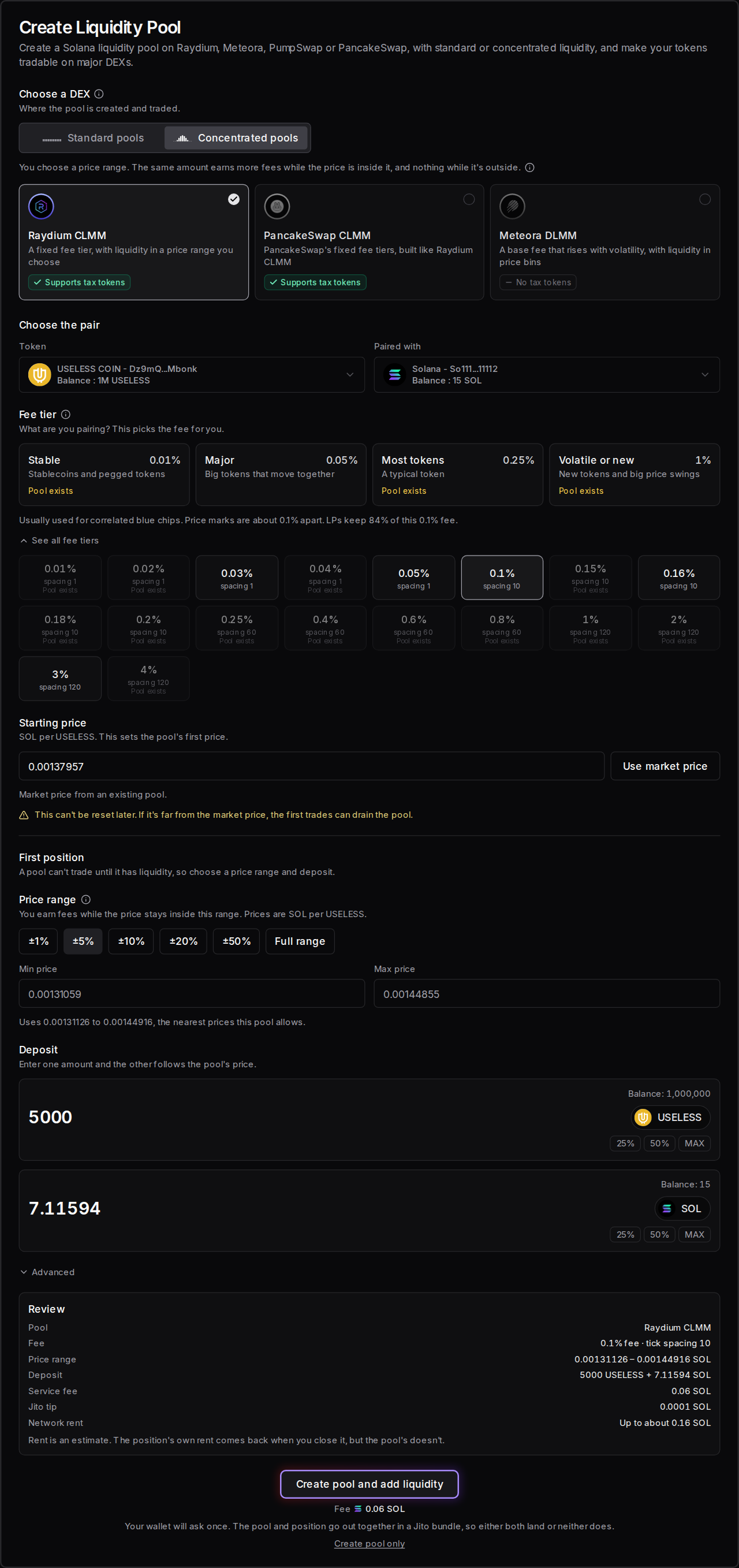
Here's USELESS COIN paired with SOL on Raydium CLMM, on the 0.1% tier at the market price on November 3, 2026. With a ±5% range and 5,000 USELESS, the form asks for about 7.12 SOL:
What should I see when a pool succeeds or fails?
When a concentrated pool works, Solz.app says Pool created and first position opened, and the position appears in My Liquidity Pools. If your deposit is too large or the range isn't valid, the form tells you before anything is sent. A standard pool says its pool has been successfully created.
| What you see | What it means | What to do |
|---|---|---|
| Pool created and first position opened | Your pool and position are live | Check them in My Liquidity Pools |
| Position opened | A new position is live in an existing pool | Check it in My Liquidity Pools |
| A pool already exists at this fee. Add to it instead. | This pair already has a pool with these settings | Follow the link to add to it, or choose another fee |
| You don't have enough SOL. | Your balance can't cover the deposit | Lower the amount, or add SOL |
| Enter an amount and a valid price range | An amount or the range is missing or wrong | Fix the range and the amount |
| Meteora DLMM doesn't accept, followed by the token, because of its transfer fee. Choose Raydium CLMM or PancakeSwap instead. | Meteora DLMM doesn't take this tax token, so Create is off | Choose Raydium CLMM or PancakeSwap |
| This range is all on one side of the price, so it only takes, followed by a token | The price is outside your range | Deposit that token, or move the range |
| Your pool is created, but the first position wasn't opened. Try again here, or use Add Liquidity. | On Devnet, the first approval landed and the second didn't | Try again, or open it with Add Liquidity |
| Transaction timeout ! This might be due to you sending invalid transactions / congested network | It didn't confirm in time | Check your wallet history before trying again, because it may have gone through. If not, raise your priority fee |
Which pools can I create on Solz.app?
Solz.app creates four standard pools and three concentrated pools. Raydium CPMM is the default standard pool. Raydium CLMM and PancakeSwap work alike, with a fixed fee tier and a range made of ticks. Meteora DLMM uses bins, a base fee that rises with volatility and a choice of liquidity shapes.
| Standard pool | Fee | What you hold | Tax tokens |
|---|---|---|---|
| Raydium CPMM | One of 8 tiers on Solz.app | Liquidity pool (LP) tokens | Yes |
| Raydium AMM | 0.25% | LP tokens | No |
| Pump.fun PumpSwap | Set by Pump | LP tokens | No |
| Meteora DAMM v2 | A base fee you choose | A position NFT | Yes |
| Concentrated pool | Swap fee | Price steps | Liquidity shape | Widest range | Position | Liquidity providers keep | Tax tokens | Lock for good |
|---|---|---|---|---|---|---|---|---|
| Raydium CLMM | Fixed tier, with an optional dynamic fee | Ticks | Even | Any | An NFT in your wallet | 84% | Yes | Full range only |
| PancakeSwap CLMM | Fixed tier | Ticks | Even | Any | An NFT in your wallet | 84% | Yes | Not on Solz.app |
| Meteora DLMM | Base fee, plus more when volatile | Bins | Spot, Curve or Bid-Ask | 69 bins per position | An account, no NFT | 90% | No | Not on Solz.app |
We read the shares from Solana on November 3, 2026.
How does a price range work?
You choose the lowest and highest price your liquidity works at. All your deposit then sits inside that range, so it's deeper there than the same amount spread over every price. A narrower range earns more per SOL, but the price leaves it sooner, and then it earns nothing until the price returns.
This is how much deeper the same deposit is than a full range, at the middle of the range, before counting other liquidity providers:
| Range | Deeper than full range by about |
|---|---|
| ±1% | 200 times |
| ±5% | 40 times |
| ±20% | 11 times |
| ±50% | 5 times |
Ticks and bins
- Ticks, on Raydium CLMM and PancakeSwap. Think of ticks as the marks on a price ruler. Your range starts and ends on a mark, and your liquidity spreads evenly between them. Tick spacing is the gap between marks.
- Bins, on Meteora DLMM. Think of bins as a row of buckets, each holding tokens at one set price. Swaps use up one bucket, then move to the next. Bin step is the gap between them, so 50 means 0.5%.
Solz.app moves your prices to the nearest ones the pool allows, and shows them under Min price and Max price.
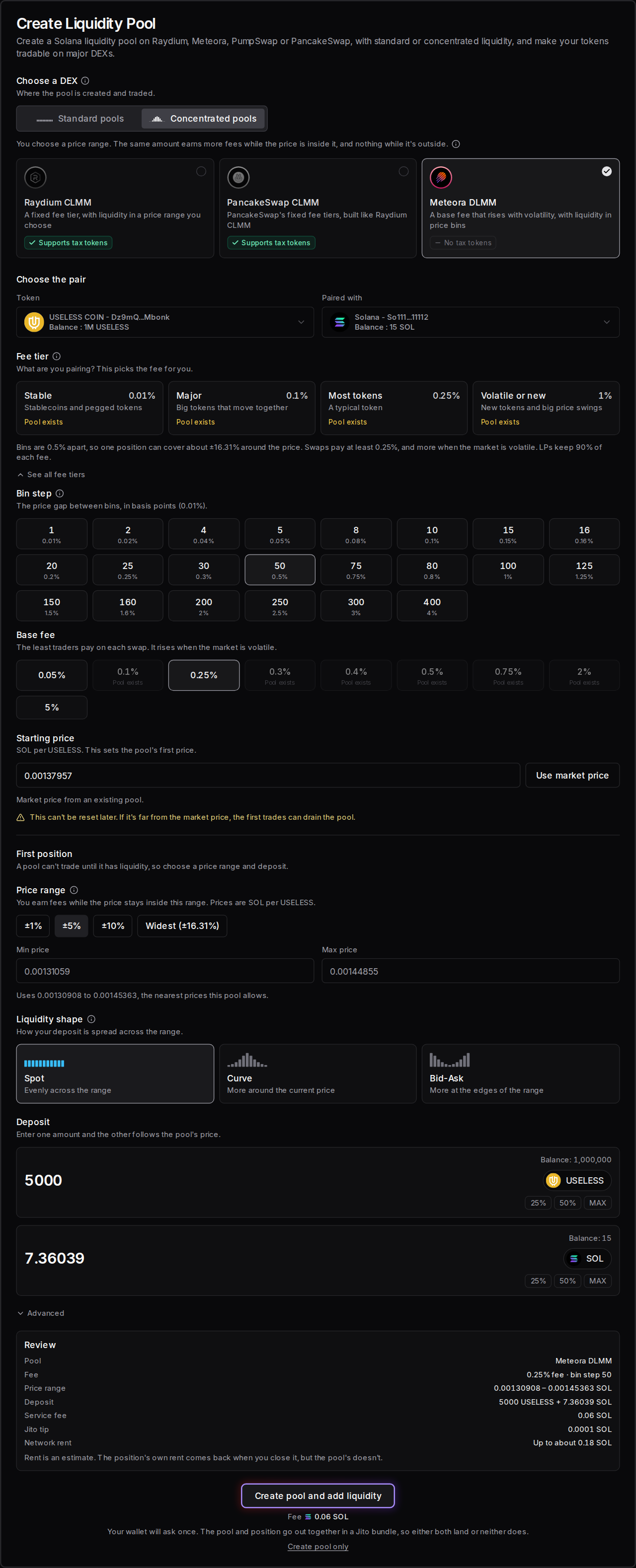
On DLMM, one position holds up to 69 bins, so the bin step sets how wide it can go. A bin step of 25 reaches about ±8.22%, and 50 reaches about ±16.31%. Here's the same pair on Meteora DLMM, with a bin step of 50 and a 0.25% base fee:
Liquidity shapes on DLMM
| Shape | How your deposit is spread |
|---|---|
| Spot | Evenly across the range |
| Curve | More around the current price |
| Bid-Ask | More at the edges of the range |
What happens when the price leaves my range?
Your position stops earning fees, and you hold only one token. Below your range, buyers have left you with your token and no SOL. Above it, sellers have left you with SOL and none of your token. It starts earning again if the price comes back, or you can remove it and open a new range.
Take the Raydium CLMM position above, with 5,000 USELESS and about 7.12 SOL between 0.00131126 and 0.00144916 SOL:
| Price | What the position holds | Earning fees? |
|---|---|---|
| Inside the range | Some of both | Yes |
| Below 0.00131126 SOL | Only USELESS | No |
| Above 0.00144916 SOL | Only SOL | No |
Traders can still swap while you're out of range only if other liquidity covers that price. If yours is the only position in the pool, the pool has nothing to trade at that price, which is why a new token usually suits a standard pool or a Full range position.
Which pool should I choose?
Choose a standard pool for a new token, or if you won't watch the price. Raydium CPMM is the usual choice. Choose a concentrated pool if your token already trades, you expect the price to hold around a level, and you'll move the range when it doesn't. Stable pairs suit narrow ranges best.
- A new token: Raydium CPMM, because the price can move a long way and the liquidity keeps working.
- Buyers who want proof the liquidity stays: a standard pool, so you can burn or lock the LP tokens, or DAMM v2 with Permanently lock liquidity. On a concentrated pool, you can lock a full-range Raydium CLMM position.
- A tax token: Raydium CPMM or Meteora DAMM v2, or Raydium CLMM or PancakeSwap for a concentrated pool. Meteora DLMM doesn't take them. See tax token pools.
- A stablecoin or pegged pair: a concentrated pool with the Stable choice, because the price barely moves.
- An established token you actively manage: Raydium CLMM or PancakeSwap for a fixed fee, or Meteora DLMM for a fee that rises with volatility.
Raydium CLMM's Full range option covers every price, like a standard pool, so it earns the least per SOL.
Meteora DAMM v2 options
DAMM v2 is a standard pool with extra settings:
- Collect fees in: which token swap fees are collected in.
- Dynamic fees: adds a fee on top when the price is volatile.
- Permanently lock liquidity: your deposit stays in the pool forever. You keep the position and can still claim its swap fees. This can't be undone.
- Fee schedule, under Advanced: Fixed keeps your fee from the start. Linear and Exponential start at 50% and fall to your fee over 120 minutes, so early snipers pay more. Buy Bundle turns this off, because your own launch buys would pay the highest fee.
How do I manage a concentrated position?
Click the pools tile under Your wallet in the sidebar to open My Liquidity Pools, or open the pool's page, to see each position's range, liquidity and unclaimed fees. Use Add, Remove or Claim on the position. Removing all of it also collects your fees and closes the position, which returns its own rent.
Each position has its own range, so you can hold several in one pool. To move a range, remove the old position and open a new one. That means paying the service fee on both, so a very narrow range can cost more to keep up than it earns.
If a token has a transfer fee, you'll receive a little less of it than the position shows, and the form says so.
You can't burn a concentrated position on Solz.app, and only a full-range Raydium CLMM position can be locked. Check that you're happy with this before you promise buyers anything about your liquidity.
How do I lock a Raydium CLMM position for good?
- Open the position. In Remove Liquidity, find the pool and click Lock on your position. My Liquidity Pools links there for positions that can be locked.
- Read the panel, and tick the box. Your liquidity stays in the pool for good. Nobody can ever withdraw it, including you.
- Click Lock forever and approve. Solz.app says Position locked. Your Fee Key NFT is in your wallet.
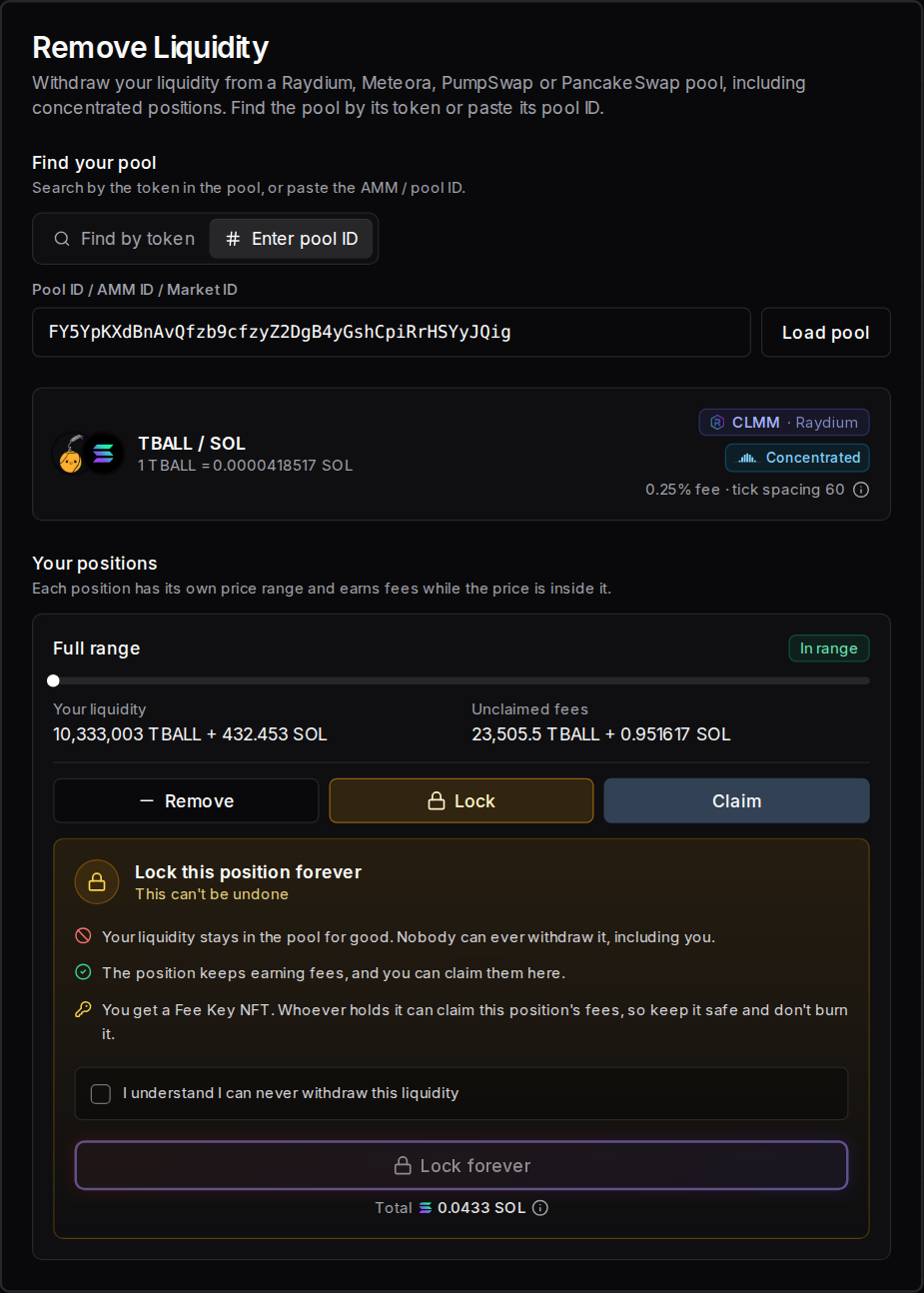
Whoever holds the Fee Key can claim the position's fees, so keep it safe and don't burn it. Solz.app marks the position Locked, shows only Claim on it, and keeps the Fee Key out of the SOL Incinerator.
The lock uses Raydium's Burn & Earn. If a position isn't full range, Solz.app says Only full-range positions can be locked, because a narrower one stops earning once the price leaves its range, and a locked one can never be moved. PancakeSwap and Meteora DLMM positions have no lock on Solz.app.
How do I add liquidity to an existing pool?
Open Add Liquidity, find the pool by its token or paste its pool ID, and enter either amount. The other follows the pool's price. Raydium AMM, CPMM and CLMM, PumpSwap, Meteora DAMM v2 and DLMM, and PancakeSwap all work. Each deposit costs a 0.06 SOL service fee, plus network costs.
- Find the pool. In Add Liquidity, search by token or paste the pool ID. Or click Add on the pool in My Liquidity Pools.
- Enter an amount. The form fills in the other side, and shows the most each side can take if the price moves 5%.
- Check the summary, and approve. Click Add Liquidity and approve in your wallet.
Example: 1,000 MET into a Meteora DAMM v2 pool
On November 4, 2026, entering 1,000 MET in the MET and SOL pool filled in about 2.48 SOL. The deposit could take up to 1,050 MET and 2.60 SOL if the price moved 5%, and it came to 2.7% of the pool.
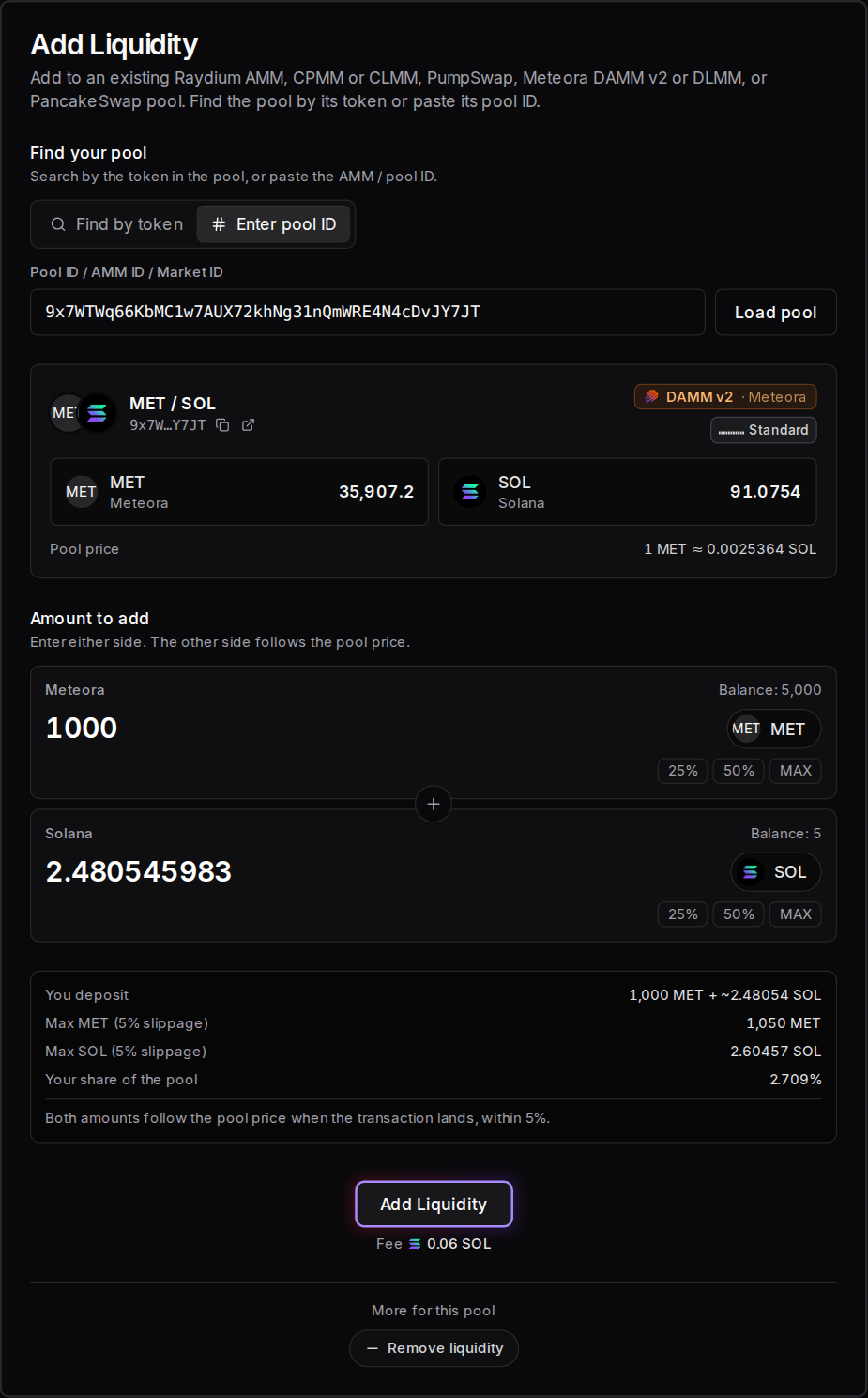
When it works, Solz.app says Successfully added liquidity into LP, and the deposit shows in My Liquidity Pools. If you're short, the form tells you before anything is sent.
| What you see | What it means | What to do |
|---|---|---|
| Successfully added liquidity into LP | Your deposit is in the pool | Check it in My Liquidity Pools |
| Not enough MET: up to 1,050 may be needed if the price moves 5%, you have 900. | You could be short of that token if the price moves | Lower the amount, or add more of the token |
| You need about 2.68 SOL (deposit, 5% slippage allowance, fees), you have 2. | You're short of SOL | Lower the amount, or add SOL |
Three things depend on the pool:
- Meteora DAMM v2: a wallet with no position in the pool opens one with its first deposit. That costs rent, about 0.0073 SOL on November 4, 2026, which comes back when you close the position. The form holds back an extra 0.01 SOL for it.
- PumpSwap: if you only earn a pool's creator fees and hold none of its liquidity pool tokens, My Liquidity Pools doesn't show Add for it. PumpSwap pools don't take tax tokens.
- Locked positions: they can't take more liquidity, so they don't show Add.
How much does each pool cost on Solz.app?
The Solz.app service fee is 0.06 SOL on every pool, and the total under the button includes estimated network rent. Raydium CPMM and AMM come to about 0.25 SOL, including Raydium's 0.15 SOL fee, DAMM v2 about 0.08 SOL and PumpSwap about 0.07 SOL. A new concentrated pool can need up to about 0.18 SOL in rent.
| Item | Cost |
|---|---|
| Raydium CPMM or AMM pool, total under the button | About 0.25 SOL, plus an OpenBook market for AMM |
| Meteora DAMM v2 pool, total under the button | About 0.08 SOL |
| PumpSwap pool, total under the button | About 0.07 SOL |
| Add to an existing pool | 0.06 SOL service fee |
| First deposit to a Meteora DAMM v2 pool, position rent | About 0.0073 SOL, returned when you close the position |
| Open or remove a concentrated position | 0.06 SOL service fee |
| Lock a full-range Raydium CLMM position | 0.025 SOL service fee, plus rent that doesn't come back. The total was 0.0433 SOL on the form |
| Create a concentrated pool | No extra Solz.app fee |
| Concentrated pool and first position, rent | Up to about 0.16 to 0.18 SOL |
| Jito tip for a concentrated pool and first position | 0.0001 SOL |
| Your deposit | The amounts you enter |
These are the form's estimates on November 3, 2026, and the DAMM v2 position rent is from November 4, 2026. Solana is lowering rent in steps, so check Review for your pool. A position's rent comes back when you close it, but a pool's doesn't.
FAQ
Do I earn more with a concentrated pool?
Per SOL, while the price stays in your range, yes. You earn nothing while it's out of range, and other liquidity providers in the same range share the fees.
Can I change my range?
Not on an existing position. Remove it and open a new one with the range you want.
Can I change the fee later?
No. A concentrated pool's tier, or a DLMM pool's bin step and base fee, can't be changed after the pool is created. A pair can have one pool per tier, or per combination on DLMM.
Why does the starting price matter so much?
It can't be reset later. If it's far from the market price, the first trades can drain the pool, so use Use market price if your token already trades.
Can I burn my concentrated position to get the DexScreener lock?
Not on Solz.app. To burn liquidity, use Raydium AMM, Raydium CPMM or PumpSwap. You can lock a full-range Raydium CLMM position for good, but only a burn is reported to earn DexScreener's padlock.
Sources
Solz.app's fees and form options come from the app, and the fee shares and rent come from Solana. The depth table uses the standard formula for a range around the current price.