
Create your own LaunchLab platform and earn trading fees
How do I create my own LaunchLab platform?
Open Create LaunchLab Platform on Solz, enter a name, website and image, set your Platform Fee and Creator Fee, and sign. It costs about 0.16 SOL in total. You get a Platform ID and a direct link for launching tokens on your platform. Every trade on those tokens' curves then pays your fee.
This is how you own a launchpad without writing a smart contract: Raydium's program handles the curves and pools, and your platform sets the fees and collects its share. It's the same system letsbonk.fun runs on, and its platform account is on Solana for anyone to read.
What do you own?
- Your name and branding on the platform, which supporting wallets and sites can show.
- Your fee rate on every curve trade of tokens launched under your platform.
- A share of post-graduation fees, through the LP tokens locked for your platform.
- A launch link that you can share or put on your own site.
Your platform isn't a website. Solz gives you a launch page and link, so if you want a full launchpad site, you'd build that separately and point it at your Platform ID. Treat your settings as final: Solz has no tool for changing a platform's fees or wallets later.
Prerequisites
- A Solana wallet such as Phantom, Solflare or Backpack.
- About 0.16 SOL.
- A platform name, a website and an image.
Steps to create your platform
- Open the tool and connect your wallet. Go to Create LaunchLab Platform. This wallet receives the fees by default.
- Add your branding. Enter a Platform Name of 3 to 40 characters, a Website of 10 to 100 characters starting with https:// or http://, and an image.
- Set Trading Fee. Platform Fee starts at 100 basis points, which is 1%, and the most you can set is 5%. Creator Fee starts at 0%, and the most is 0.5%.
- Set Lock / Burn Migration if you want to. This splits the pool's LP tokens at graduation between a share locked for your platform and a permanent burn. Enter both in basis points, and make them total 10,000. By default, 100% goes to your platform.
- Set Authority if you want to. This sends claimed fees and the lock NFT to wallets other than your own. Double-check the addresses.
- Create the platform. Click Create Platform and approve in your wallet. You need about 0.16 SOL: the 0.15 SOL fee, plus about 0.0085 SOL for the platform's account and network costs. Save the Platform ID and the direct link Solz shows you.
- Send people to your link. Tokens launched through it use your platform and pay your fees.
A real example: letsbonk.fun
letsbonk.fun, now Bonk.fun, is a real LaunchLab platform, so its settings show what each field does. We read them from its platform account on November 2, 2026, and entered them in the form. We stopped before signing, because clicking Create Platform would make a new platform.
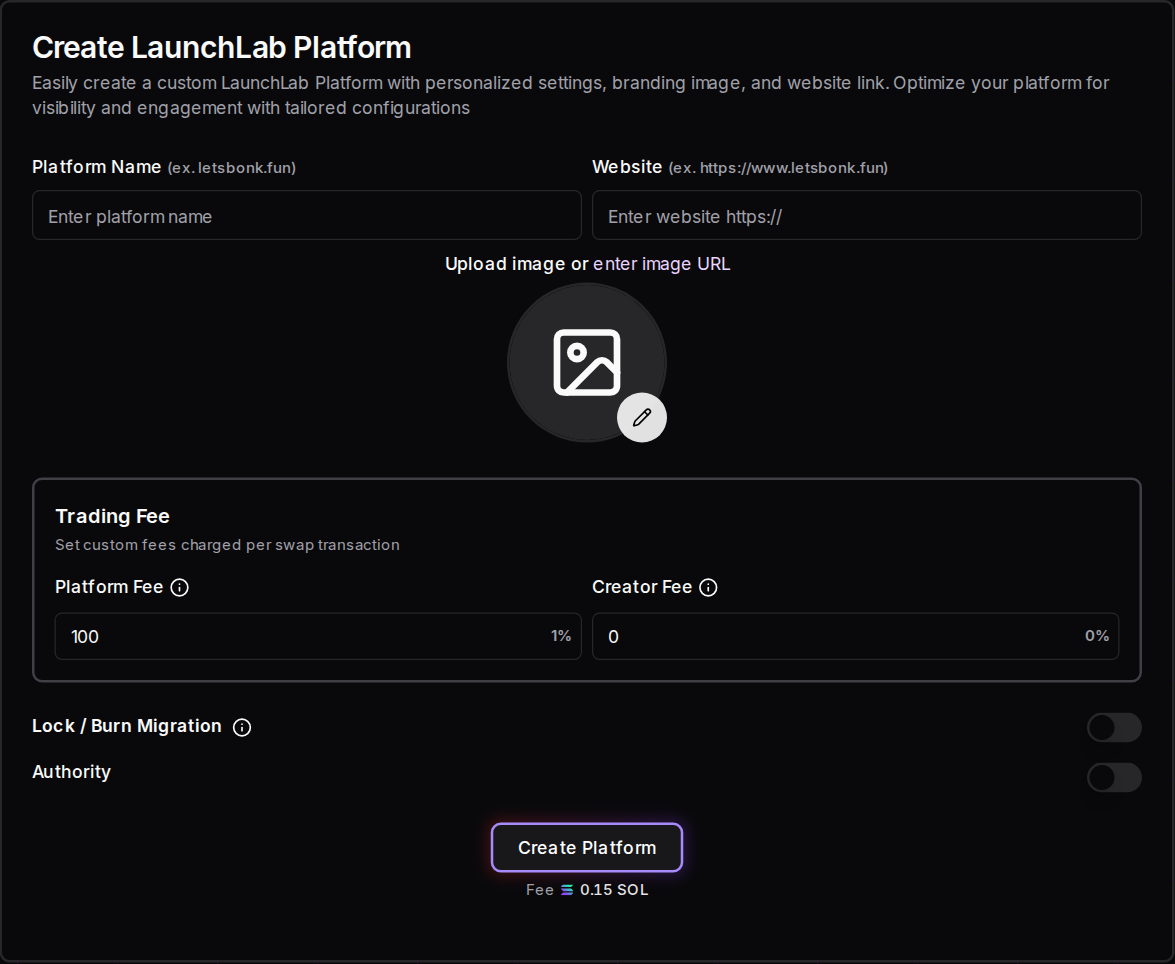
| Field | letsbonk.fun's setting | What it does |
|---|---|---|
| Platform Fee | 125 basis points, or 1.25% | Every curve trade pays this to the platform |
| Creator Fee | 0% | Token creators earn nothing from curve trades |
| Lock / Burn Migration | 0.0001% locked, 99.9999% burned | Nearly all of the pool's LP tokens are burned at graduation, which leaves almost nothing for the platform to claim from the pool |
| Claim Fee, under Authority | YvWXo...wuE3 | This wallet claims the platform's curve fees |
| Lock NFT, under Authority | 5jFLV...ZKQu | This wallet receives the locked share of the LP tokens |
Authority is off in the screenshot. With it off, your own wallet fills both of those roles.
What should you see after creating a platform?
When the transaction confirms, Solz says Successfully created custom platform, then shows a dialog with your full Platform ID and a direct link for launching tokens. Copy the ID before you close the dialog. Your platform also joins Your LaunchLab Platforms, lower on the same page.
That list has buttons to launch on your platform and claim its fees. This is how letsbonk.fun's real details look there. We added them to this browser's list ourselves to show the layout.
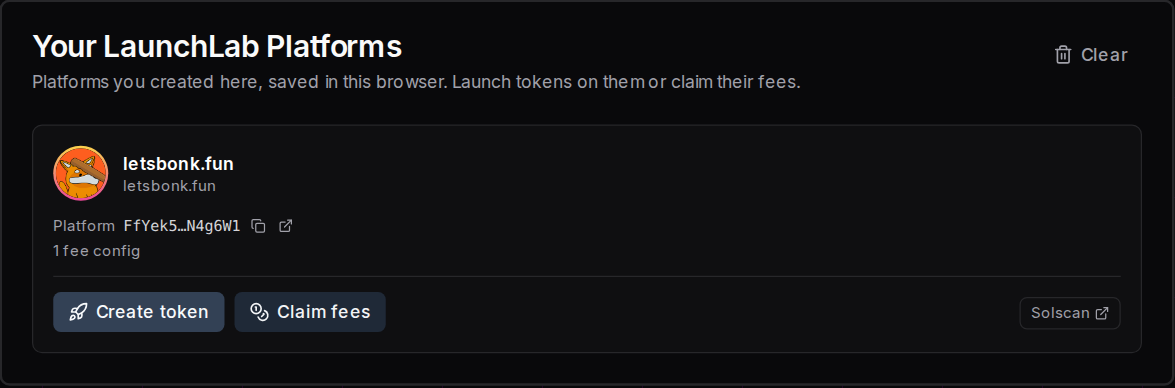
The list is saved only in that browser. Clear empties the list, but your platform stays on Solana. On another device, connect a wallet and search for your Platform ID in the platform selector.
| What you see | What it means | What to do |
|---|---|---|
| Successfully created custom platform, then The Platform ID has been successfully created | Your platform is on Solana and ready to use | Save the Platform ID and the link |
| Wallet is not connected! | Solz has no wallet to sign with | Connect your wallet and click again |
| Image is required. | You haven't added an image | Upload one, or enter an image URL |
| Start with https:// or http://., or String must contain at least 10 character(s), under Website | The Website is empty, too short or missing its start | Enter the full address, starting with https:// |
| String must contain at least 3 character(s), or String must contain at most 40 character(s), under Platform Name | The name is too short or too long | Use 3 to 40 characters |
| Number must be less than or equal to 500, under Platform Fee | The fee is over 5% | Enter 500 or less |
| Number must be less than or equal to 50, under Creator Fee | The fee is over 0.5% | Enter 50 or less |
| The total should be 100% | Platform % and Burn % don't add up | Make them total 10,000 basis points |
| A warning in your wallet, or a failed transaction | You may not have enough SOL | Check that you hold about 0.16 SOL, then try again |
| Transaction timeout ! This might be due to you sending invalid transactions / congested network | It didn't confirm in time | Check your wallet history before trying again, because it may have gone through. If not, raise your priority fee |
How do you use your platform?
Share your direct link or Platform ID so people can launch on your platform. Anyone launching there uses their own wallet and pays the normal launch costs. Traders then pay your Platform Fee on every curve trade until the token graduates, and you claim it on Claim Platform Fees.
Here's each step, with letsbonk.fun's real platform as the example.
- Share your direct link. It's
https://www.solz.app/launchlab/mint/followed by your Platform ID. letsbonk.fun's link opens a page titled Create letsbonk.fun Token, with the platform locked. Anyone can launch from it with their own wallet, and they pay the normal launch costs. - Or give people your Platform ID. On Launch on Raydium LaunchLab, anyone with a connected wallet can paste it into the LaunchLab Platform search box.
- Earn on every curve trade. Each buy and sell pays your Platform Fee until the token graduates.
- Claim your curve fees. Use Claim Platform Fees with your claim wallet.
- Claim pool fees after graduation. If you kept a locked share of the LP tokens, your Lock NFT wallet receives a Fee Key. Claim its fees from that wallet on Raydium's Portfolio page, not on Solz. A 100% burn leaves no Fee Key.
Test your link before you share it. A wrong Platform ID still opens a launch page, but it's titled Launch on Raydium LaunchLab and isn't on your platform, so tokens launched there won't pay you.
What did a real token pay its platform?
USELESS COIN (USELESS) launched on letsbonk.fun's platform on May 10, 2025. Here are its real launch details, entered on that platform's direct link: 6 decimals, a supply of 1 billion, a 3 SOL first buy, an 85 SOL Bonding Amount and SOL as the quote pair. Solz would check for about 3.105 SOL: about 0.075 SOL for fees and network costs, the 3 SOL buy, and 1% of it. We stopped before signing, because this token already exists.
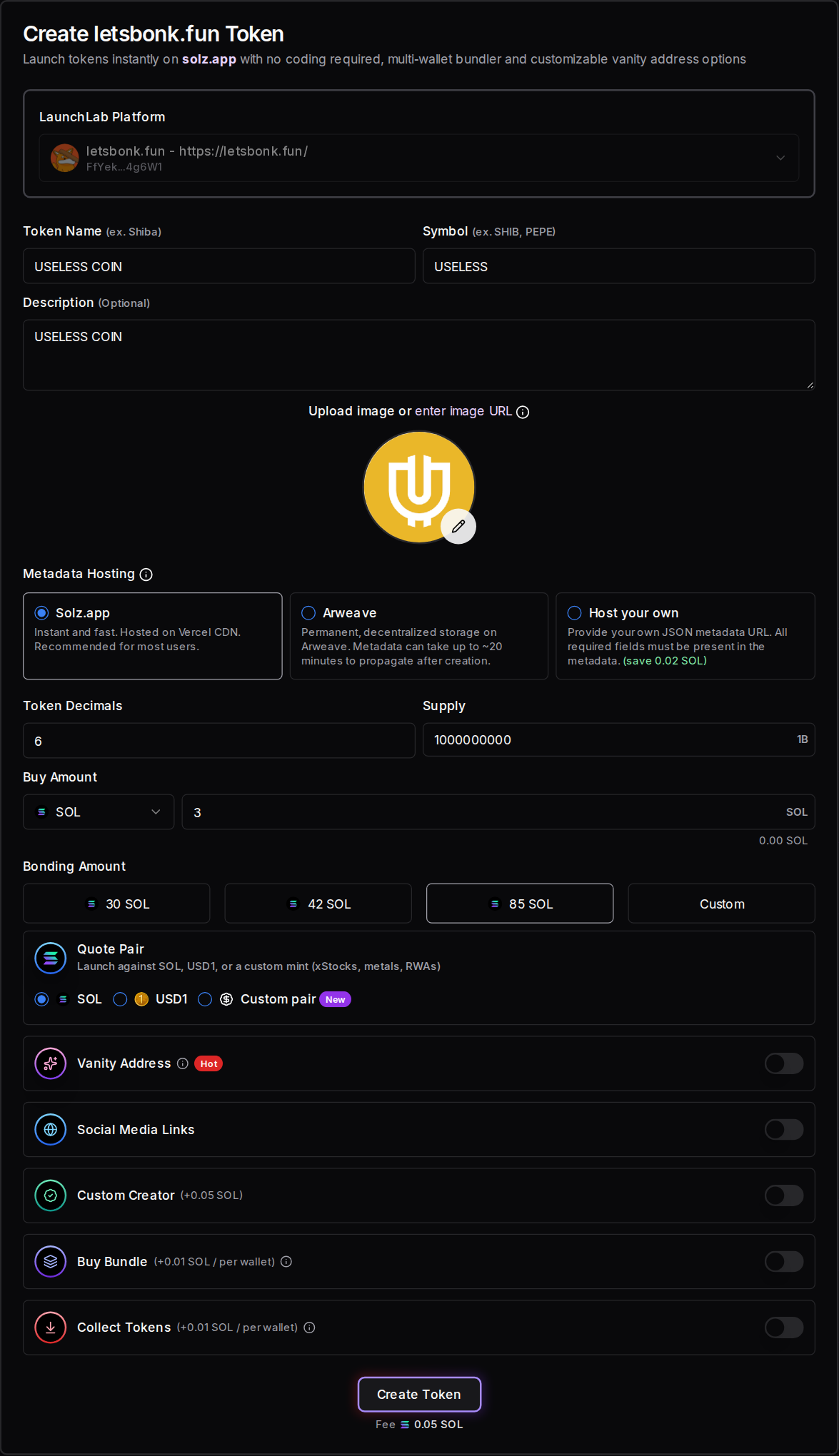
We read all of its curve trades from Solana, and they add up to the 85 SOL it raised.
| What happened on the curve | Real figure |
|---|---|
| First buy, in the launch transaction | 3 SOL for about 96.4 million tokens (9.64%) |
| Trades | 346 buys and 259 sells |
| Trading volume | About 634 SOL |
| Time to fill the curve | 131 seconds |
| Paid to letsbonk.fun's platform, at 1% | About 6.34 SOL |
| Paid to Raydium, at 0.25% | About 1.58 SOL |
Its Raydium CPMM pool opened 13 seconds after the last curve trade. letsbonk.fun charged 1% at the time, and its account now says 1.25%. A platform created on Solz can't change its settings like this, so choose them carefully. USELESS is an unusually strong launch, not a typical one, and this isn't a recommendation to buy it. A token with little trading pays its platform very little.
How much can a platform earn?
Your fee applies to the trading volume on your platform's tokens, so earnings depend entirely on how many people launch and trade there. A 1% fee on 1 million dollars of curve volume earns 10,000 dollars before Solz's claim fee. The fee is paid on buys and sells, and it stops when a token graduates.
| Curve volume on your platform | At 0.5% | At 1% | At 2% | At 5% |
|---|---|---|---|---|
| $100,000 | $500 | $1,000 | $2,000 | $5,000 |
| $1,000,000 | $5,000 | $10,000 | $20,000 | $50,000 |
| $10,000,000 | $50,000 | $100,000 | $200,000 | $500,000 |
These are before Solz's 10% claim fee. A higher fee earns more per trade, but traders and creators can compare launchpads, so it can also cost you volume.
What did Bonk.fun earn at its peak?
The best-known example is letsbonk.fun, now Bonk.fun, which charges a 1.25% platform fee on its LaunchLab platform. DefiLlama records about $33.4 million in fees in July 2025, its peak month, of which about $20.1 million was revenue.
- Over its whole life: DefiLlama shows about $78.6 million in fees to 2026-11-01, and $45.7 million of revenue.
- It doesn't last by itself: fees fell to about $174,000 in August 2026, then rose to about $8.4 million in September 2026.
- Most of it wasn't profit: DefiLlama says that 58% of fees went to BONK buybacks and related holder programs, and only 2% to marketing.
- It had advantages a new platform won't: Bonk.fun launched with the BONK community behind it, during a surge in memecoin trading.
Treat this as the top of what's been possible, not what to expect. Most platforms won't come close, and you could earn nothing.
How do I claim platform fees?
Open Claim Platform Fees, connect the wallet that's set to receive the fees, and select your platform. If it isn't listed, paste its Platform ID into the search box. Check the claimable amount, then click Claim Platform Fees and approve. SOL and USD1 fees are claimed separately.
Here's a real example, using letsbonk.fun's platform and checked on November 2, 2026. It shows 1.63 SOL and 1.12 USD1 claimable, and its claim wallet. The fee is 10% of the claimable amount, so a SOL claim of that size would pay about 0.16 SOL in fees and leave about 1.47 SOL.
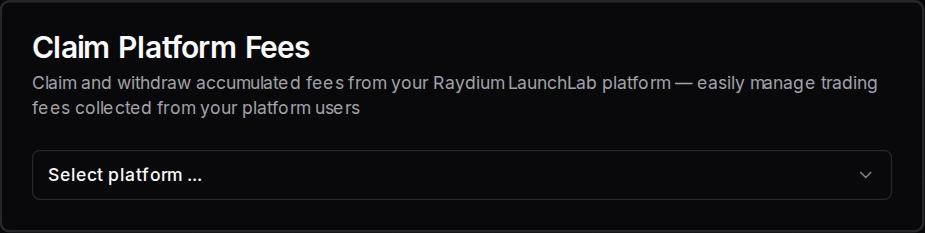
We clicked Claim Platform Fees with a wallet other than letsbonk.fun's claim wallet, so Solz stopped before anything was sent and showed the wrong wallet message below. These amounts change as trades happen.
| What you see | What it means | What to do |
|---|---|---|
| Platform fees SOL have been successfully claimed, or Platform fees USD1 have been successfully claimed | Your fees are on their way to you | Check your balance |
| A No Fees status | There's nothing to claim right now | Come back after more trades |
| Only the platform claim fee wallet can claim these fees. Connect, followed by the wallet address, and try again. | This wallet isn't the one set to receive the fees | Connect the wallet it names |
| Not enough balance, you need at least the amount shown (including gas + token account rent) | You can't cover the network costs | Add SOL and try again |
| Transaction timeout ! This might be due to you sending invalid transactions / congested network | It didn't confirm in time | Check your wallet history before trying again, because it may have gone through. If not, raise your priority fee |
How much does a platform cost?
Creating a LaunchLab platform costs about 0.16 SOL: the 0.15 SOL Solz fee, plus about 0.0085 SOL for the platform's account and network costs. Claiming platform fees costs 10% of the amount you claim, in SOL or USD1. Tokens launched on your platform pay their own launch costs.
| Item | Cost |
|---|---|
| Create a LaunchLab platform | 0.15 SOL, plus about 0.0085 SOL for the platform's account and network costs |
| Claim platform fees | 10% of the amount claimed, in SOL or USD1 |
FAQ
What's the difference between Platform Fee and Creator Fee?
Platform Fee goes to the wallet that runs the platform. Creator Fee goes to whoever launched the token on it. As a platform owner, you can give creators a reason to launch with you by setting a Creator Fee.
Do I need my own website to run a platform?
No. Solz gives you a direct link to a launch page for your platform. You'd only need your own site if you want a fully branded launchpad.
Does a Solz platform earn from tokens launched elsewhere?
No. It only earns from tokens launched under its own Platform ID.
Sources
Solz's fees and form options come from the app. letsbonk.fun's settings and USELESS COIN's trades were read from Solana. The rest comes from:
- Raydium LaunchLab platforms
- Raydium LaunchLab and CPMM fee reference
- Raydium Burn & Earn
- DefiLlama: BONK.fun Launchpad
Open the tool
Launch on Raydium LaunchLab with bundles and a vanity address
Launch on Raydium LaunchLab from Solz with a bonding curve, buy bundle and vanity address. Includes each option, all fees and what happens after the curve.
Liquidity pool vs Pump.fun vs LaunchLab launches
Compare launching with your own liquidity pool, on Pump.fun or on LaunchLab. See when to choose each, what happens after the curve, and the pros and cons.