
How to create a Token-2022 token with a transfer fee
How do I create a Solana token with a transfer fee?
Open the Solana Tax Token Creator on Solz.app, enter your token details, and turn on Tax Token Settings. Set the fee in basis points, the Max Fee, and who can withdraw or change the fees. Then click Create Token and sign. The service fee is 0.05 SOL, plus about 0.005 SOL in network costs.
Prerequisites
- A Solana wallet such as Phantom, Solflare or Backpack.
- At least about 0.07 SOL in that wallet.
- A token name, a symbol and a square image.
- Your fee plan: the rate, the cap, and which wallets will control the fees.
To practise first, switch to Devnet with the network selector at the bottom right of the app.
Steps to create your tax token
- Open the tax token creator and connect your wallet. Go to the Solana Tax Token Creator and connect your wallet.
- Enter the token details. Fill in Token Name, Symbol, Token Decimals, Supply and an image, as you would for a standard SPL token.
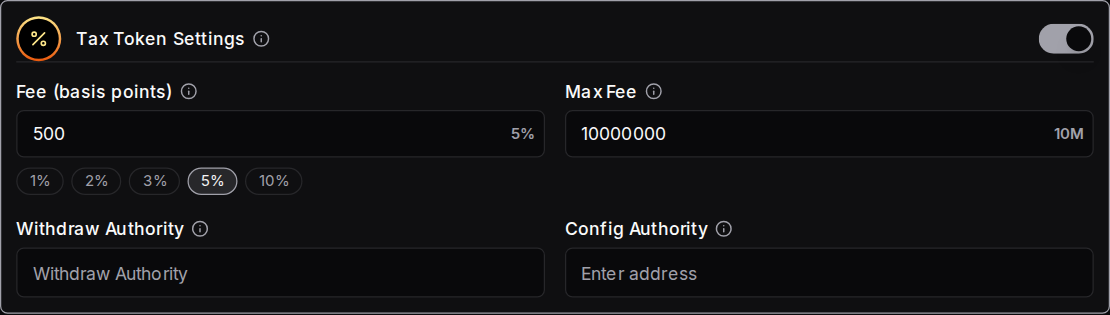
- Turn on Tax Token Settings. This switch is off by default. If you leave it off, your token has no transfer fee. Leave Interest Bearing, Default Account State, Permanent Delegate and Non Transferable off unless you need them, because Solz.app warns they may not work with Raydium or Meteora pools.
- Set the fee. Enter Fee (basis points) or pick a preset: 1%, 2%, 3%, 5% or 10%. The default is 500 basis points, which is 5%, and the most you can set is 10000, which is 100%.
- Set Max Fee. This caps the fee on any one transfer, in whole tokens. The default is 10,000,000 tokens.
- Check the authorities. Withdraw Authority can collect the fees, and Config Authority can change them. Both start as your wallet. If you leave one empty, nobody can ever do that job.
- Create the token. Check the cost shown on the button, click Create Token and approve the transaction in your wallet.
What should I see when a tax token succeeds or fails?
When it works, Solz.app says Successfully minted new Tax Token, and the token appears in My Tokens with its transfer fee in place. If your wallet can't cover the costs, a red message gives the SOL you need, and nothing is created. Later updates and claims have their own messages, listed below.
In the example above, the fee is 300 basis points, which is 3%, and Max Fee is 1,000,000,000 tokens, the same as Nullmask. Here's what happens to transfers of a token with those settings:
| Transfer | Withheld | Recipient can use |
|---|---|---|
| 1,000 tokens | 30 (3%) | 970 |
| 100,000,000 tokens | 3,000,000 (3%) | 97,000,000 |
| What you see | What it means | What to do |
|---|---|---|
| Successfully minted new Tax Token | Your token is created | Check it in My Tokens |
| Not enough balance, you need at least the amount shown (including gas + service fees) | You can't cover the fees | Add SOL and try again |
| The transfer fee configuration has been successfully updated | Your new fee is set, and takes effect after 2 epochs | Tell holders before it starts |
| You are not authorized to update transfer fee configuration (config authority != wallet address) | This wallet isn't the Config Authority | Connect the Config Authority wallet |
| Tax fee has been successfully claimed, or Tax fees have been successfully claimed | The withheld tokens are on their way to you | Check your token balance |
| You are not authorized to claim tax fee (withdraw authority != wallet address) | This wallet isn't the Withdraw Authority | Connect the Withdraw Authority wallet |
| Max 500 accounts per claim | You selected too many token accounts | Claim up to 500, then claim the rest |
| Associated Token Account for withdrawal does not exist, please click Create ATA first | This wallet has no account for the token yet | Click Create ATA, then claim |
| Transaction timeout ! This might be due to you sending invalid transactions / congested network | It didn't confirm in time | Check your wallet history before trying again, because it may have gone through. If not, raise your priority fee |
How does a transfer fee work?
Every transfer withholds a share of the tokens in the recipient's account, and the recipient can't touch that share. At 50 basis points, a transfer of 1,000 tokens withholds 5. Max Fee caps the amount however large the transfer is. Your Withdraw Authority can then claim what has been withheld.
Is there a maximum transfer fee?
Yes, there are two limits. The fee can go up to 10000 basis points, which is 100%, and Max Fee caps what any one transfer pays. Solz.app starts Max Fee at 10,000,000 tokens. Keep it above 0, because a Max Fee of 0 means nobody pays a fee, whatever the rate.
A cap only matters once the rate would charge more. At 5% with a Max Fee of 10,000,000 tokens, it starts at transfers above 200,000,000 tokens.
What do real tax tokens look like?
Three real tokens show how these settings differ. Nullmask and Loop charge 3%, and SolaDao charges 20%. Loop's fee can never change, because it has no Config Authority. SolaDao lowered its fee from 25% to 20%. All three trade on Raydium CPMM pools. This isn't a recommendation to buy any of them.
| Token | Fee | Max Fee | Can the fee change? | Transfer of 1,000 tokens |
|---|---|---|---|---|
| Nullmask (MASK) | 3% | 1,000,000,000 | Yes | 30 withheld, 970 received |
| Loop (LOOP) | 3% | 1,000,000,000 | No | 30 withheld, 970 received |
| SolaDao | 20% | No real limit | Yes | 200 withheld, 800 received |
We read these settings from Solana and simulated each transfer on mainnet, from the token's Raydium CPMM pool to a new account.
Which liquidity pools work with a tax token?
Raydium CPMM, Raydium CLMM, PancakeSwap and Meteora DAMM v2 pools work with tax tokens on Solz.app. Raydium AMM, PumpSwap and Meteora DLMM pools don't, and Pump.fun doesn't offer tax tokens. On LaunchLab, only StonkFun's reward mode has a transfer fee. Every swap and liquidity move is a transfer, so your fee applies to each one.
| Where | Tax tokens |
|---|---|
| Raydium CPMM | Yes |
| Meteora DAMM v2 | Yes |
| Raydium CLMM | Yes |
| PancakeSwap CLMM | Yes |
| Meteora DLMM | No |
| Raydium AMM | No |
| PumpSwap | No |
| Pump.fun launch | No |
| LaunchLab launch | Only in StonkFun's reward mode |
- Other token settings: Permanent Delegate, Default Account State and Non Transferable block a Raydium CPMM pool, and Solz.app names the setting. Recreate the token without it.
- Traders pay twice: a trade pays your transfer fee as well as the pool's fee.
- Adding liquidity: the fee applies to the tokens you add, and to the tokens you withdraw.
How do I manage a tax token on Solz.app?
Use Update Transfer Fee to change the rate, cap or authorities, and Claim Transfer Fees to collect what's been withheld. Token Snapshot lists each account's balance and withheld amount. To share fees with your holders, send them with Multi Token Sender. Each tool below starts by selecting your token.
| Job | Tool | Cost |
|---|---|---|
| Change the fee, cap or authorities | Update Transfer Fee | 0.065 SOL |
| Collect from token accounts | Claim Tax Accounts | 0.002 SOL per account |
| Collect from the mint | Claim Tax Mint | 0.02 SOL |
| List holders and withheld amounts | Token Snapshot | Free under 1,000 holders, up to 0.2 SOL |
| Send fees to holders | Multi Token Sender | 0.0005 SOL per wallet |
| Lock tokens until a date | Token Lock | From 0.002 SOL per lock |
Change the fee
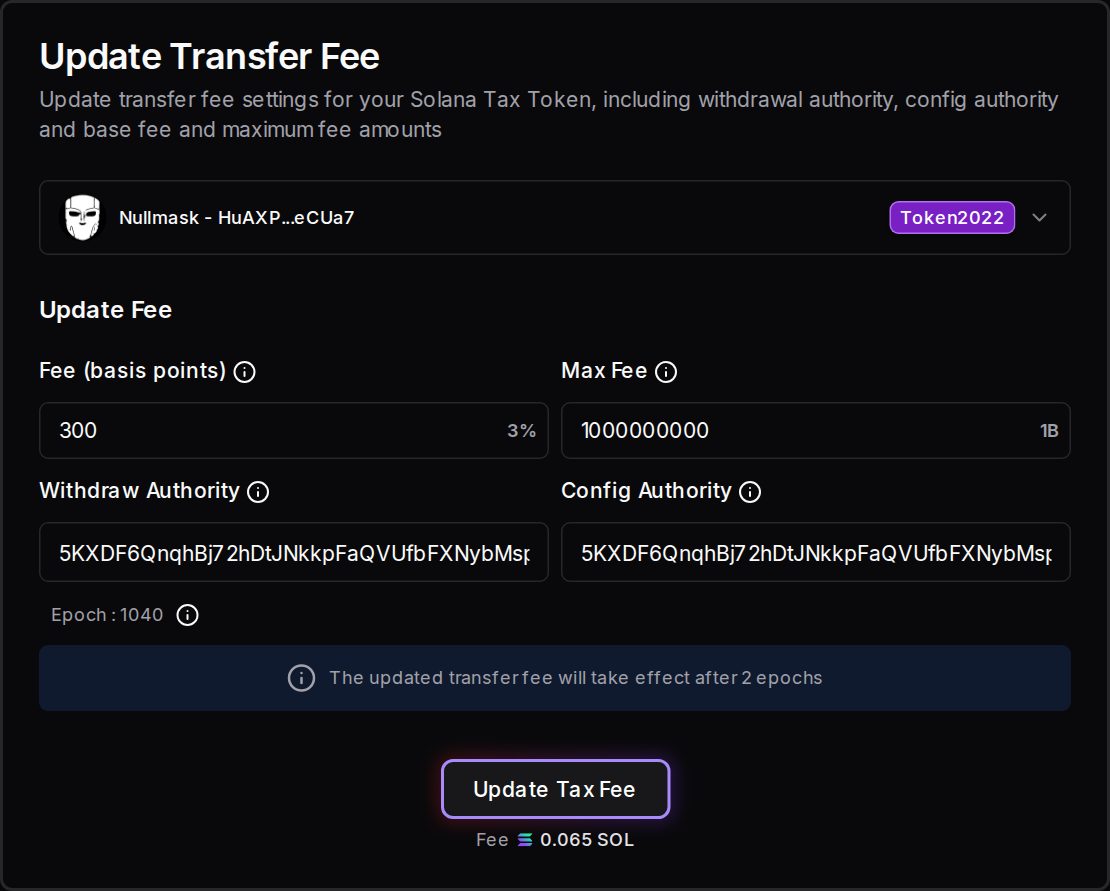
Here's Nullmask in Update Transfer Fee, showing its real settings. Enter a new fee or Max Fee, click Update Tax Fee and approve. The new fee starts after 2 epochs, so tell holders first. To lock the fee for good, as Loop has, clear Config Authority.
Collect the fees
Here's SolaDao in Claim Transfer Fees, where 1,437 token accounts hold about 5.36 million withheld SolaDao and the mint holds about 120,023. Connect the Withdraw Authority wallet, and click Create ATA if it shows. Then click Claim Tax Accounts and approve.
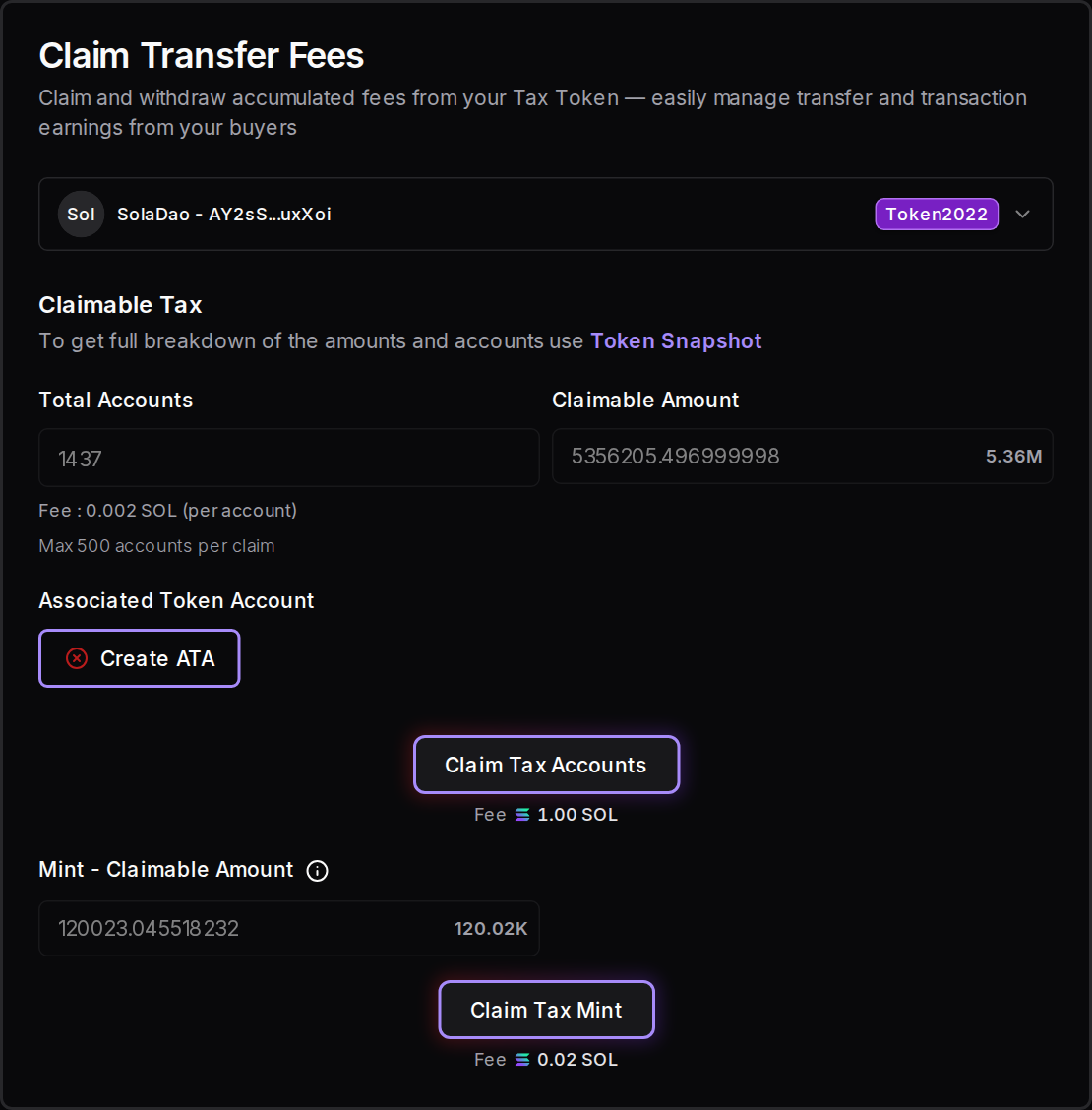
Each claim covers up to 500 accounts, so the button shows 1.00 SOL. Collecting all 1,437 would take 3 claims and cost about 2.87 SOL. Claim Tax Mint collects the fees left on the mint when holders burned tokens.
Take a snapshot
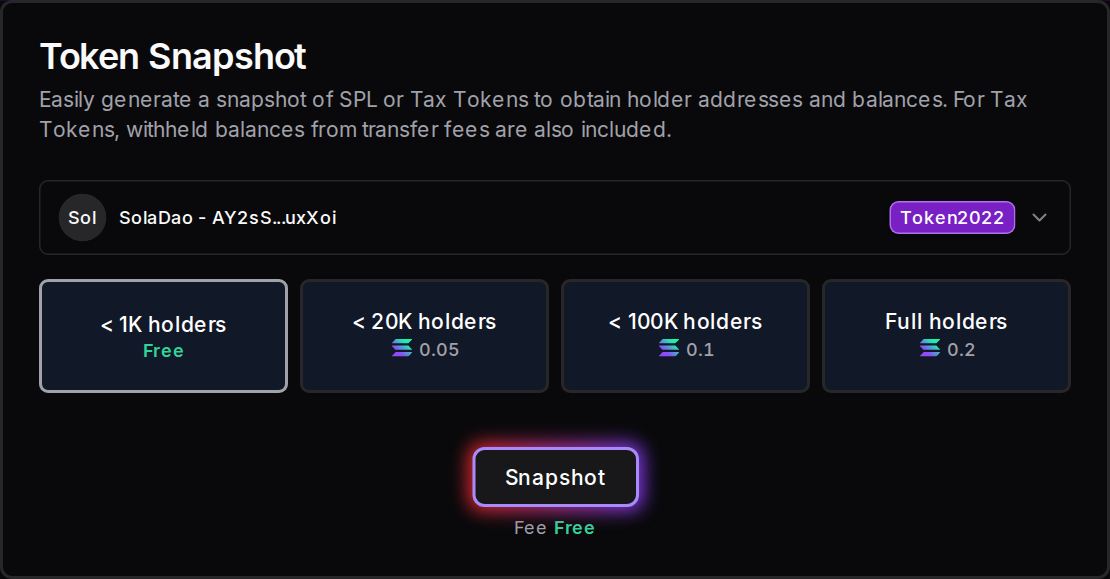
Select your token, pick the option that covers your holder count and click Snapshot. You'll get a CSV file with address, balance and withheld_balance columns, so you can see who holds what and which accounts still have fees to collect.
Share fees with holders
- Collect the fees with Claim Transfer Fees.
- Take a snapshot, then remove pool accounts and your own wallets from the file.
- Work out each holder's share in a spreadsheet, and save it as
address,amount. - Send it with Multi Token Sender, with Enable Compression off.
Your transfer fee applies to these sends too, and comes out of what each wallet receives. The form says so. At 5%, a holder sent 1,000 tokens receives 950, and the other 50 becomes claimable again. Collect Tokens works the same way.
Lock a tax token
Token Lock adds the fee on top of what you lock, and the fee is taken again when the tokens are released. At 1%, locking 100 tokens takes 101.01 from your wallet, and a claim or cancel returns 99. So you can't lock a full balance: MAX and the percent buttons stop at what your wallet can pay for, and a higher amount shows the limit.
How much does a Token-2022 transfer-fee token cost on Solz.app?
Creating a tax token costs the same 0.05 SOL service fee as a standard token, plus about 0.005 SOL in network costs. Later actions have their own fees: updating the transfer fee costs 0.065 SOL, and claiming costs 0.002 SOL per token account. The table below lists each cost, including the optional extras.
| Item | Cost |
|---|---|
| Service fee to create the token | 0.05 SOL |
| Network fees and rent | About 0.005 SOL |
| Custom Creator, which adds your own creator name and website | +0.05 SOL |
| Large image upload | +0.02 SOL |
| Host your own metadata | -0.02 SOL |
| Update the transfer fee | 0.065 SOL |
| Claim fees from token accounts | 0.002 SOL per account, up to 500 accounts per claim |
| Claim fees held on the mint | 0.02 SOL |
Is a Token-2022 token with no transfer fee cheaper?
Yes. Leave Tax Token Settings off and you get a normal Token-2022 token with no fee on transfers, at about 0.012 SOL less in on-chain costs than an SPL token. It skips the separate Metaplex metadata account and its 0.01 SOL fee. The Solz.app service fee is 0.05 SOL either way.
An SPL token keeps its name, symbol and image link in a separate account owned by the Metaplex program. A Token-2022 token keeps them inside its own mint account, which costs a bit more rent because it's larger, but there's no second account and no Metaplex fee.
We simulated each creation on Solana mainnet, using the same instructions as Solz.app, with a 13-letter name and a typical metadata link. Priority fees aren't included.
| On-chain cost | SPL token | Token-2022, no transfer fee | Token-2022, with transfer fee |
|---|---|---|---|
| Mint account rent | 0.00107 SOL | 0.00275 SOL | 0.00332 SOL |
| Your token account rent | 0.00149 SOL | 0.00151 SOL | 0.00157 SOL |
| Metaplex metadata rent | 0.00373 SOL | None | None |
| Metaplex fee | 0.01 SOL | None | None |
| Transaction fee | 0.00001 SOL | 0.00001 SOL | 0.00001 SOL |
| Total | 0.01630 SOL | 0.00427 SOL | 0.00490 SOL |
That's about 74% less in network costs. With the 0.05 SOL service fee included, the totals are about 0.066 SOL and 0.054 SOL, so the overall saving is closer to 18%. A description raises the Token-2022 cost slightly: 200 characters added about 0.0011 SOL in our test.
A saving of 0.012 SOL is small, so choose based on compatibility first:
- Pools: only some pools work with tax tokens.
- Other tools: SPL is the older and more widely supported standard. If you depend on a specific wallet, bot or listing site, check that it supports Token-2022 first.
- Adding a fee later: you can't. A transfer fee has to be set when the token is created, so decide before you launch.
FAQ
What is the difference between Token-2022 and a standard SPL token?
Token-2022 is Solana's newer token program. It can charge a fee at the protocol level on every transfer, which the standard Token program can't do.
Can I change the fee after launch?
Yes, if your wallet is still the Config Authority. Use Update Transfer Fee. The new fee takes effect after 2 epochs, and each Solana epoch lasts about 2 to 3 days.
What happens if I leave an authority empty?
Nobody will ever hold that authority. With no Withdraw Authority, nobody can withdraw the fees. With no Config Authority, nobody can change them.