
Launch on Pump.fun with bundles and a vanity address
How do I launch a token on Pump.fun with Solz.app?
Open Launch on Pump Fun on Solz.app, connect your wallet, and enter a name, symbol and image. Set your Buy Amount, then optionally add a vanity address and a Buy Bundle. Click Create Token and sign. The Solz.app service fee is 0.05 SOL, and your buy and any bundle cost extra.
Prerequisites
- A Solana wallet such as Phantom, Solflare or Backpack.
- At least about 0.075 SOL, plus your Buy Amount and 1%. Solz.app checks this before it builds the launch.
- A token name, a symbol and an image.
- For a bundle: wallets in Manage X Wallets, each holding more than its buy, to cover fees.
- For a vanity address: a private key from the Vanity Address Generator.
Steps to launch on Pump.fun
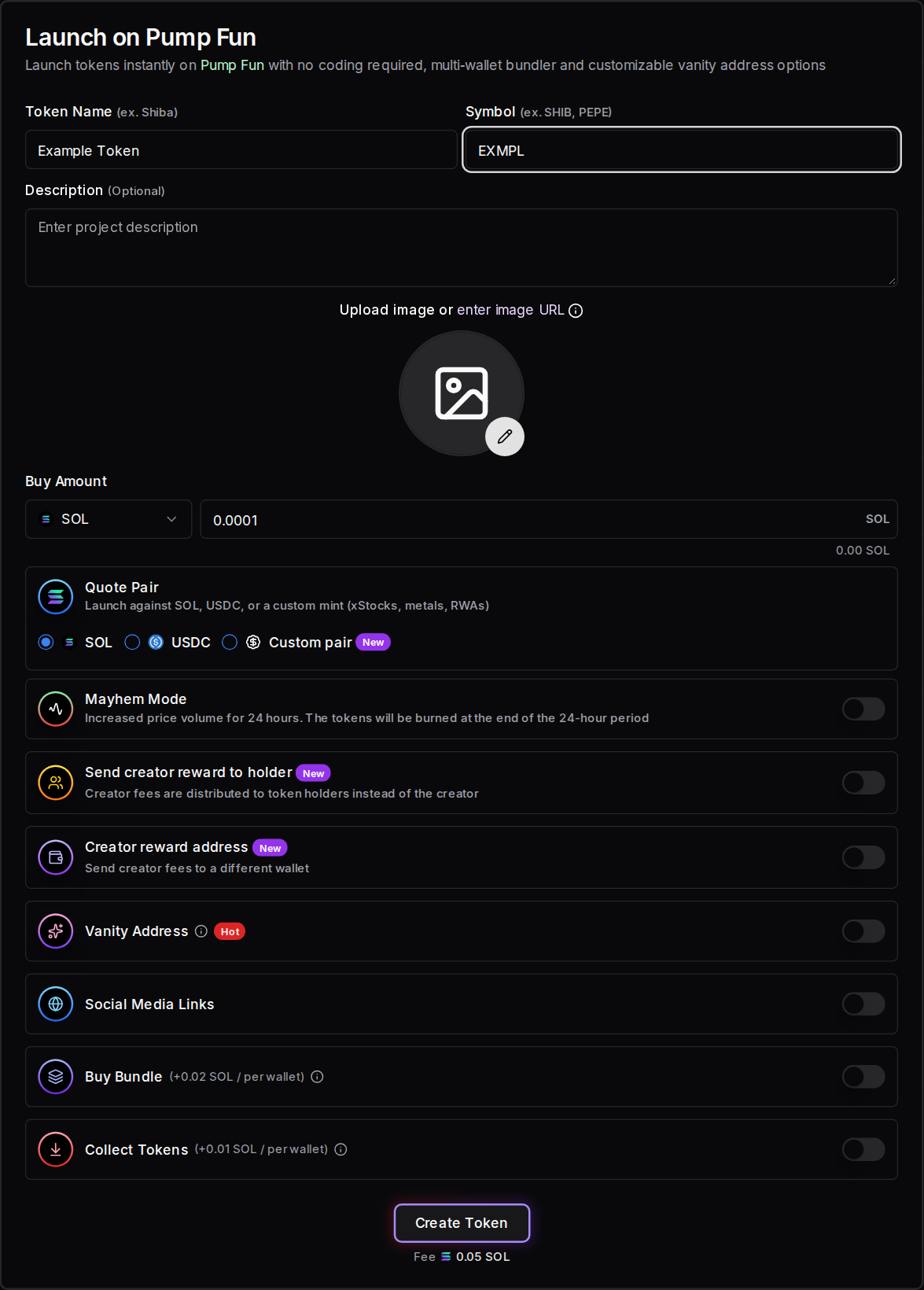
- Open the tool and connect your wallet. Go to Launch on Pump Fun and connect the wallet that will create the token.
- Enter the token details. Fill in Token Name, Symbol, an optional Description, an image and any Social Media Links. Pump.fun sets the supply and decimals, so those fields don't appear.
- Set Buy Amount and Quote Pair. Buy Amount is what your connected wallet buys in the launch. Choose SOL, USDC or a custom pair.
- Choose the optional settings. These are Mayhem Mode, Send creator reward to holder, and Creator reward address. Leave them off if you just want a standard launch.
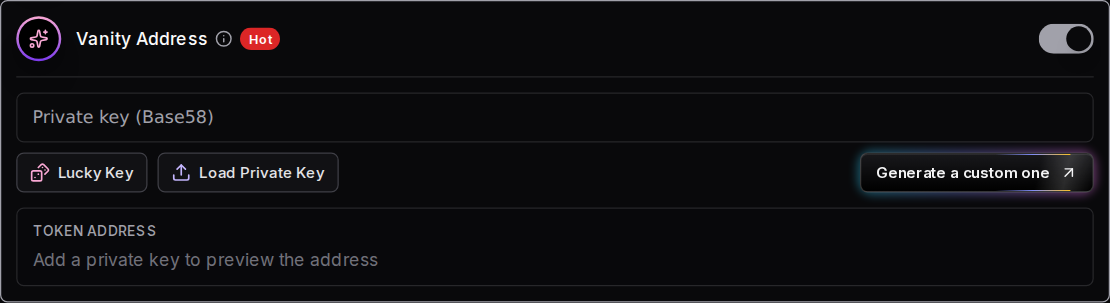
- Add a vanity address if you want one. Turn on Vanity Address, click Load Private Key and choose your key file. Lucky Key only fills in a random key, so it won't give you chosen letters. The preview shows the resulting token address.
- Add a Buy Bundle if you want one. Turn on Buy Bundle and enter a buy amount for each wallet. Check each wallet's Est. and the Jito tip, and turn on Collect Tokens if you want the tokens moved to one wallet afterwards.
- Launch the token. Check the total on the button, click Create Token (Create Token & Buy with a bundle on), and approve in your wallet.
Bundle wallets are visible on-chain. Tell your community what your team holds, and check the rules that apply to you. Nothing here is financial advice, and a launch can lose all of the money you put in.
What should I see when a launch succeeds or fails?
When a launch works, Solz.app says Successfully deployed to Pump.fun, and your new token appears in My Tokens. If your wallet is short, a red message gives the SOL you need, and nothing is sent. Other messages point to your buy amount, your bundle, the bonding curve limit or a busy network.
In the example above, you launch Peanut the Squirrel (Pnut) with a Buy Amount of 1 SOL and no bundle. Solz.app checks for about 1.085 SOL: about 0.075 SOL for fees and network costs, your 1 SOL buy, and 1% of it. A wallet with 2.5 SOL passes. A wallet with 0.5 SOL gets the red message instead.
| What you see | What it means | What to do |
|---|---|---|
| Successfully deployed to Pump.fun | Your token is live and your buy is included | Check it in My Tokens, then share it |
| Not enough balance, you need at least the amount shown (including gas + service fees) | You can't cover the fees and your buy | Add SOL, or lower your buy |
| Not enough USD1 balance to cover the buy amount, balance, followed by your balance | You chose a quote pair and don't hold enough of it. The symbol matches your pair | Add more of it, or lower your buy |
| Total buy amount exceeds bonding curve limit. Reduce buy amounts. | Your buy and bundle together are more than the curve can sell. The message gives both amounts | Lower the buy amounts |
| Error in buy amount of the wallets | A bundle wallet can't cover its buy and fees | Add SOL to that wallet, or lower its buy |
| Successfully collected tokens | Collect Tokens moved the bundle's tokens to your wallet | Check your token balance |
| Transaction timeout ! This might be due to you sending invalid transactions / congested network | It didn't confirm in time | Check your wallet history before trying again, because it may have gone through. If not, raise your priority fee |
| Your transaction expired before it was confirmed | It wasn't processed | Raise your priority fee and try again |
What are the launch options?
Only the name, symbol and image are required. Everything else changes who pays, who earns or how the launch runs. Some choices can't be undone, including where creator fees go on a holder rewards coin. Read each option below before you turn it on, because a launch can't be edited afterwards.
Name, symbol, description, image and socials
Token Name can be up to 32 characters, Symbol up to 10, and Description up to 700. Social Media Links are optional. Unlike other Solz.app tokens, Pump.fun launches have no metadata hosting choice.
Buy Amount
This is your connected wallet's own buy, made in the same launch so nobody can buy before you. It starts at 0.0001 SOL. A bigger buy gets you more of the supply at the lowest prices, but buyers can see it on-chain. The table under the bonding curve section shows what each amount buys.
Quote Pair
This is what traders pay with, and it can't be changed after launch.
- SOL is the standard choice, and the numbers in this guide are for SOL.
- USDC prices the curve in dollars. It starts from 4,292 virtual USDC and sells out at about 12,161 USDC.
- Custom pair launches against another supported mint, such as an xStock, metal or real-world asset token. Solz.app checks it against the mints Pump.fun supports. You need that token to make your buy.
Mayhem Mode
This is an experimental, opt-in Pump.fun mode. According to Pump.fun's documentation, an AI agent mints an extra 1 billion tokens, taking the supply to 2 billion. It then trades for the first 24 hours, and burns the tokens it hasn't sold when that time ends. The agent isn't guaranteed to trade every coin.
- It isn't available with some custom pairs, and Solz.app switches it off for them.
- It's reported to be excluded from BOOST, described below.
- Graduation can look very different. In 6 recent graduations we traced, the new pools received between about 0.09 and 6.9 SOL rather than 85 SOL, and the 3 coins we checked had the 2 billion supply of a Mayhem coin. That's a small sample, but don't assume a Mayhem coin graduates with deep liquidity.
Send creator reward to holder
This creates a holder rewards coin: the creator fee on every trade goes to the people holding the coin, and Pump.fun pays them directly, with nothing for them to claim. There's nothing for you to claim either. Pump.fun's docs say this choice is made at creation and a holder rewards coin can never go back to being a regular coin. You also can't use Creator reward address or fee sharing with it.
Creator reward address
This sends creator fees to a different wallet or Pump.fun username instead of the wallet launching the token. Use it if a team wallet should earn the fees. Check the address carefully, because that account is the one that can claim them. It can't be combined with Send creator reward to holder.
Vanity Address and Buy Bundle
These are covered in their own sections below. Vanity Address changes the token's address, and Buy Bundle adds more wallets to the launch.
Transaction speed
The speed button at the top of the app sets two things. The Priority Fee runs from Eco to Max and starts on Normal. The Jito tip is used for bundles, and a bundle needs at least 0.0001 SOL. If Solz.app says your transaction expired before it was confirmed, it wasn't processed, so raise these and try again. A Transaction timeout is different: check your wallet history first.
What you can't choose
Pump.fun fixes these, so the form doesn't offer them:
- Supply and decimals: 1 billion tokens with 6 decimals, or 2 billion with Mayhem Mode.
- Mint and freeze authority: these were already revoked on the graduated coins we checked, so there's nothing to revoke afterwards.
- Token standard: the launches we checked are Token-2022 mints.
- The curve: see the bonding curve section.
How does a buy bundle work?
A Buy Bundle buys from several X Wallets as part of your launch. With Jito bundle, the default, the buys go through Jito and land in the same Solana block as the launch, all or none. The first bundle holds up to 12 wallets, and later bundles up to 15. Your launching wallet pays 0.01 SOL per wallet.
- No bundle: this sends each wallet's buy as a separate transaction. That's harder to spot, but some buys can fail or land at different prices.
- Each wallet pays for its own buy, so give each one more SOL than it buys.
- Amounts and wallets: Max, Half, Fixed and Clear fill or empty the amounts. Add wallets and the bin on each row change your X Wallets without leaving the form.
- Total limit: your Buy Amount and all bundle buys together can't exceed what's left on the bonding curve. Solz.app shows an error if they do.
- Jito tip: a bundle needs a tip of at least 0.0001 SOL. Solz.app shows the current market rate next to it.
- Collect Tokens: this moves the tokens from the bundle wallets to one address after the launch, for +0.01 SOL per wallet.
- Keys: X Wallet keys stay in this browser only, so back them up in Manage X Wallets.
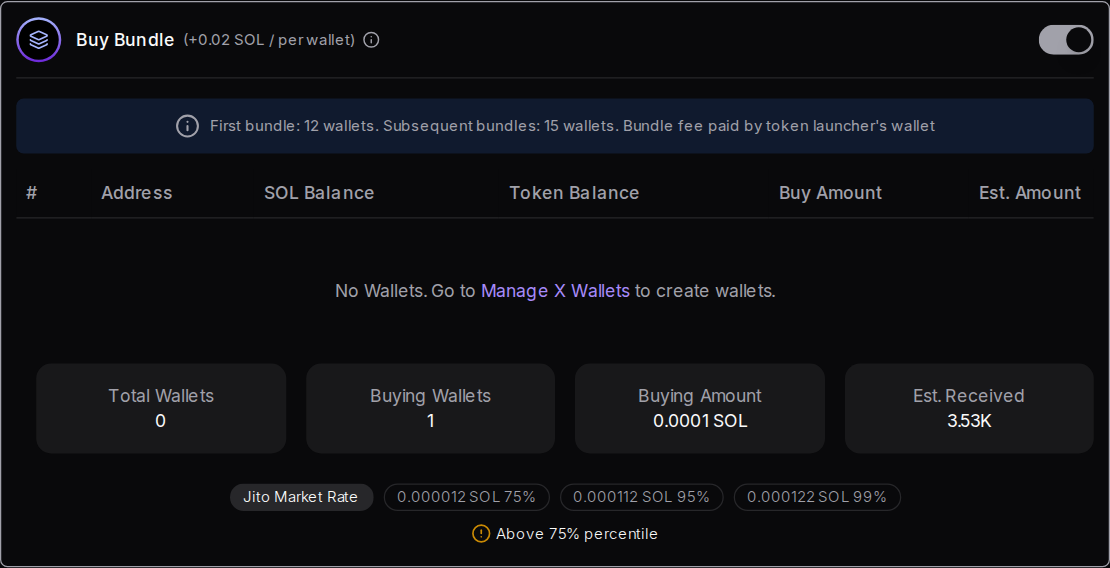
In this example, your 1 SOL buy and three bundle wallets buying 0.1 SOL each come to 1.3 SOL, for about 44 million tokens in total. The total on the button goes from 0.05 to 0.08 SOL.
How does a vanity address work?
A vanity address is a token address that starts or ends with letters you choose, which makes it easier to recognise. Generate its private key first, then load that key in the launch form. Matches of 1 or 2 letters are free and run in your browser, and longer matches run on a paid GPU service.
The vanity address guide lists the generator's fees. Loading the key into the launch form adds no fee, but each address can only be used once.
Treat the private key like any other secret, and never share it. Solana addresses can't contain the characters 0, O, I or l.
How does the Pump.fun bonding curve work?
The bonding curve sets the price automatically: each buy raises the price, and each sell lowers it. Every SOL-paired Pump.fun token starts with the same numbers, so you don't choose a bonding amount. Tokens sell from the curve until about 85 SOL has gone in, and then the token graduates to PumpSwap.
The curve uses a constant product formula, where virtual SOL × virtual tokens stays the same on each trade. These values were read from Pump.fun's on-chain config:
| Curve value | Amount |
|---|---|
| Total supply | 1,000,000,000 tokens (6 decimals), or 2 billion with Mayhem Mode |
| Sold on the curve | 793,100,000 tokens (79.31%) |
| Kept for the PumpSwap pool | 206,900,000 tokens (20.69%) |
| Starting virtual reserves | 30 SOL and 1,073,000,000 tokens |
| SOL needed to sell the curve out | About 85.01 SOL, before fees |
| Market cap at the start | About 28 SOL |
| Market cap at graduation | About 411 SOL |
The virtual 30 SOL only sets the starting price, and nobody can withdraw it. Because the price climbs as tokens sell, each extra SOL buys fewer tokens. If you're the first buyer on a new SOL-paired token, this is roughly what you'd get after the 1.25% trading fee:
| You spend | Tokens you get | Share of supply |
|---|---|---|
| 0.1 SOL | 3.5 million | 0.35% |
| 0.5 SOL | 17.4 million | 1.74% |
| 1 SOL | 34.2 million | 3.42% |
| 2 SOL | 66.3 million | 6.63% |
| 5 SOL | 151.7 million | 15.17% |
| 10 SOL | 265.8 million | 26.58% |
| 30 SOL | 533.2 million | 53.32% |
Bundle wallets buy in sequence, so each wallet pays a slightly higher price than the one before. That's why the form shows an estimated amount for each wallet.
A USDC pair works the same way, but starts from 4,292 virtual USDC and sells out at about 12,161 USDC. Custom pairs can differ, so check the estimate in the form.
What happens after the bonding curve?
When the last curve token sells, the curve closes and the token graduates. Its liquidity moves to a new PumpSwap pool, the pool's LP tokens are burned so nobody can withdraw that liquidity, and trading carries on there. It happens automatically, with no action or extra payment from you as the creator.
Here's the sequence for a standard SOL-paired coin:
- The curve completes. All 793.1 million curve tokens have sold, and about 85 SOL has gone in. From this point, every trade on the curve fails until the migration happens.
- The token migrates. It doesn't depend on you. The remaining 206.9 million tokens and the raised SOL go into a new PumpSwap pool. A 0.015 SOL migration fee pays for the accounts it creates.
- The LP tokens are burned. We confirmed this on-chain: the pool's LP tokens are minted and burned in the same transaction. So neither you nor anyone else can pull this liquidity out.
- BOOST runs, if it applies. See below.
- Trading continues on PumpSwap. Fees switch to PumpSwap's tiers, shown in the trading fees section. The token can then appear on aggregators and sites like Jupiter and DexScreener. Those sites decide how and when to list it.
What is BOOST?
KuCoin News reports that Pump.fun holds back about 20% of the funds for buys and burns in the 5 minutes after migration. Pump.fun's developer docs describe all raised SOL except the migration fee going into the pool. Check the pool on an explorer if the amount matters to you.
What changes for you as the creator?
- Your fees continue. You keep earning the creator share on PumpSwap, and early on it's higher than on the curve. Claim it from the Creator reward panel in the Solz.app sidebar.
- Fee sharing still works. You can set it up after graduation, but the split can only be set once, so check it before you save.
- You can't remove the launch liquidity. It's permanent, because the LP tokens are gone.
- The pool starts small. At around 85 SOL or less, even modest trades can move the price a lot.
- Bundle wallets hold ordinary tokens. They can still sell at any time, which affects your price. Solz.app has a bundled sell tool for them.
How often do tokens graduate?
Not often. The Block reported a graduation rate of 2.5% in the week before BOOST and a one-day peak of 6.7% after it, so most tokens never reach this stage. Plan on the basis that yours might not, and don't spend more on a launch than you can afford to lose.
How much does a Pump.fun launch cost on Solz.app?
The Solz.app service fee is 0.05 SOL, and Pump.fun's on-chain accounts cost about 0.006 SOL more. Your own buy comes on top, including its trading fee. A Buy Bundle adds 0.01 SOL per wallet, and Collect Tokens adds 0.01 SOL per wallet. The button shows the Solz.app fees before you sign.
| Item | Cost |
|---|---|
| Solz.app service fee | 0.05 SOL |
| Creating the token on-chain | About 0.006 SOL |
| Your Buy Amount | What you choose, plus the trading fee |
| Buy Bundle | +0.01 SOL per wallet |
| Collect Tokens | +0.01 SOL per wallet |
| Jito tip for a bundle | From 0.0001 SOL per bundle |
| Vanity address | See the generator fees above |
| Set up creator fee sharing | 0.05 SOL |
| Distribute shared creator fees | 0.02 SOL |
| Claim creator rewards on Solz.app | 5% of the amount claimed |
Solz.app's balance check allows 0.02 SOL for network costs and 0.005 SOL for the launch, so with default speed settings you need about 0.075 SOL plus your buy.
What are the Pump.fun trading fees?
Every trade on the bonding curve pays about 1.25%: 0.95% goes to Pump.fun and 0.30% goes to the creator. After graduation, PumpSwap fees depend on market cap and fall as a token grows, from 1.25% down to 0.30%. Pump.fun sets these fees on-chain, not Solz.app, and can change them.
So 100 SOL of trading on the curve pays about 1.25 SOL in fees, and 0.30 SOL of that goes to the creator. These PumpSwap rates are a selection of the 25 tiers on-chain:
| Market cap | To liquidity providers | To Pump.fun | To creator | Total |
|---|---|---|---|---|
| Under 420 SOL | 0.02% | 0.93% | 0.30% | 1.25% |
| 420 SOL | 0.20% | 0.05% | 0.95% | 1.20% |
| 1,470 SOL | 0.20% | 0.05% | 0.90% | 1.15% |
| 4,420 SOL | 0.20% | 0.05% | 0.75% | 1.00% |
| 9,820 SOL | 0.20% | 0.05% | 0.70% | 0.95% |
| 49,120 SOL | 0.20% | 0.05% | 0.30% | 0.55% |
| 98,240 SOL and above | 0.20% | 0.05% | 0.05% | 0.30% |
You can choose where the creator's share goes:
- By default, it goes to the creator wallet.
- Creator reward address sends it to a different wallet or Pump.fun username.
- Send creator reward to holder pays it to token holders instead.
- Creator Fee Share splits it between up to 10 wallets or GitHub users.
FAQ
Can I choose the bonding curve amount on Pump.fun?
No. Pump.fun uses the same curve for every SOL-paired token, so the form has no bonding amount field. Bonding Amount is a Raydium LaunchLab setting, with presets of 30, 42 or 85 SOL.
Can my token fail to graduate?
Yes, and most do. It stays on the bonding curve, where people can still trade it, and your creator fees continue. There's no deadline, and no liquidity pool appears until the curve sells out.
What's the difference between Jito bundle and No bundle?
Jito bundle sends the buys through Jito, so they land in the same block as the launch, all or none. No bundle sends each wallet's buy as a separate transaction, which is harder to spot, but some buys can fail or land at different prices.
Why does Solz.app say my buy exceeds the bonding curve limit?
Your Buy Amount and bundle buys add up to more than the curve can sell. Lower the amounts until the total fits.
Why can't I reuse my vanity address?
Each address can only be created once. If Solz.app says it has been used, generate a new one. The token address also can't be the same as your wallet address.
How do I claim my creator fees?
Open the Creator reward panel in the Solz.app sidebar with the creator wallet connected. For a token with fee sharing, use Distribute Fees.
Sources
Curve and fee values come from Pump.fun's on-chain config. Solz.app's fees come from the app. The rest comes from:
- Pump.fun public developer docs
- Pump.fun Mayhem Mode docs
- The Block on BOOST and graduation rates
- KuCoin News on BOOST