
Create your own LaunchLab platform and earn trading fees
How do I create my own LaunchLab platform?
Open Create LaunchLab Platform on Solz.app, enter a name, website and image, set your Platform Fee and Creator Fee, then check the review and sign. It costs about 0.155 SOL in total. You get a Platform ID, and Create token opens your platform's launch page to share. Every trade on those tokens' curves then pays your fee.
This is how you own a launchpad without writing a smart contract: Raydium's program handles the curves and pools, and your platform sets the fees and collects its share. It's the same system letsbonk.fun runs on, and its platform account is on Solana for anyone to read.
What do you own?
- Your name and branding on the platform, which supporting wallets and sites can show.
- Your fee rate on every curve trade of tokens launched under your platform.
- A share of post-graduation fees, through the LP tokens locked for your platform.
- A launch link that you can share or put on your own site.
- A page in LaunchLab Platforms, where creators can find your platform and its newest tokens.
Your platform isn't a website. Solz.app gives you a launch page and link, so if you want a full launchpad site, you'd build that separately and point it at your Platform ID. Treat your settings as final: a platform can't be edited after it's created. If you want a Meteora curve instead, create a Meteora launchpad.
Prerequisites
- A Solana wallet such as Phantom, Solflare or Backpack.
- About 0.155 SOL.
- A platform name, a website and an image.
Steps to create your platform
- Open the tool and connect your wallet. Go to Create LaunchLab Platform, under Raydium in the sidebar. This wallet receives the fees by default.
- Add your branding. Enter a Platform Name of 3 to 40 characters, a Website of 10 to 100 characters starting with https:// or http://, and an image.
- Set Trading Fee. Platform Fee starts at 100 basis points, which is 1%, and the most you can set is 5%. Creator Fee starts at 0%, and the most is 0.5%. The line under them shows what traders pay in total, such as Traders pay 1.25% per trade on the bonding curve: 1% to the platform, 0% to the token creator and 0.25% to Raydium.
- Set Lock / Burn Migration if you want to. This splits the pool's LP tokens at graduation between a share locked for your platform and a permanent burn. Enter both in basis points, and make them total 10,000. By default, 100% goes to your platform.
- Set Authority if you want to. This sends claimed fees and the lock NFT to wallets other than your own. Double-check the addresses: the form stops with Invalid Address if one isn't a wallet address.
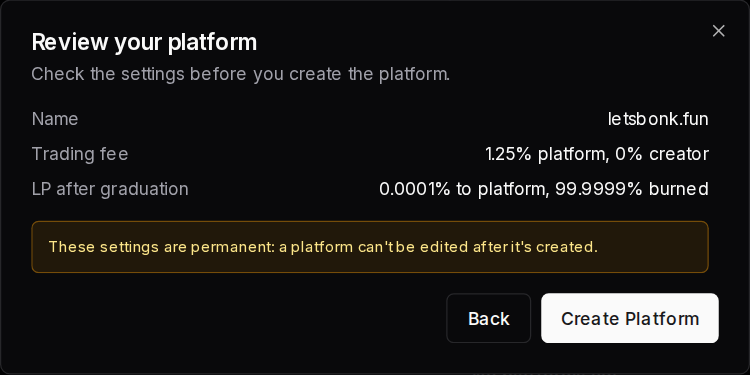
- Review your platform. Click Create Platform. A review shows the name, trading fee, LP split and the wallets for Claim Fee and Lock NFT, and warns that these settings are permanent. Click Back to change something.
- Create the platform. Click Create Platform in the review and approve in your wallet. It costs the 0.15 SOL fee, plus about 0.0055 SOL for the platform's account and network costs. Save the Platform ID Solz.app shows you.
- Send people to your launch page. Create token, in the same dialog, opens it. Tokens launched through it use your platform and pay your fees.
A real example: letsbonk.fun
letsbonk.fun, now Bonk.fun, is a real LaunchLab platform, so its settings show what each field does. We read them from its platform account and entered them in the form.
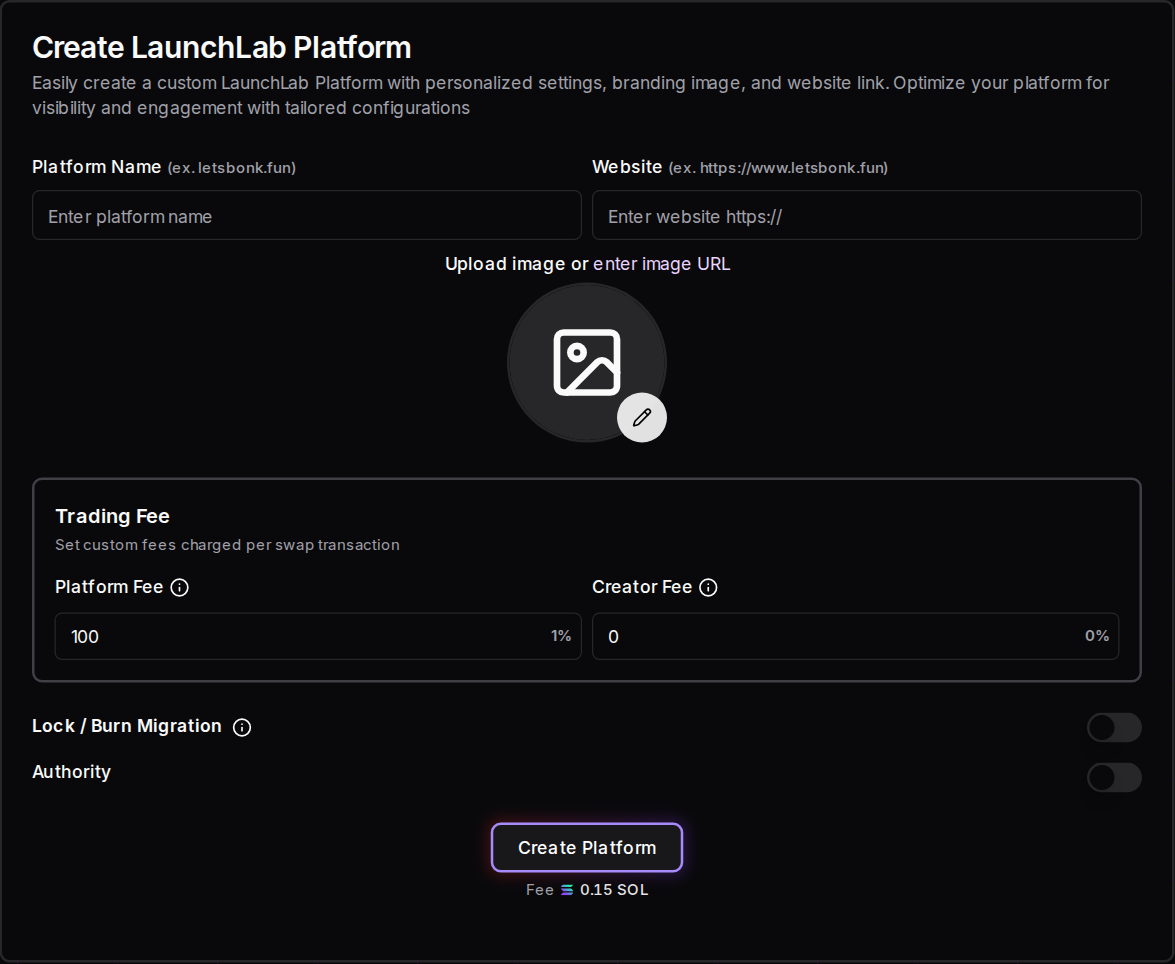
| Field | letsbonk.fun's setting | What it does |
|---|---|---|
| Platform Fee | 125 basis points, or 1.25% | Every curve trade pays this to the platform |
| Creator Fee | 0% | Token creators earn nothing from curve trades |
| Lock / Burn Migration | 0.0001% locked, 99.9999% burned | Nearly all of the pool's LP tokens are burned at graduation, which leaves almost nothing for the platform to claim from the pool |
| Claim Fee, under Authority | YvWXo...wuE3 | This wallet claims the platform's curve fees |
| Lock NFT, under Authority | 5jFLV...ZKQu | This wallet receives the locked share of the LP tokens |
Authority is off in the screenshot. With it off, your own wallet fills both of those roles. Clicking Create Platform with these settings opens this review:
What should you see after creating a platform?
When the transaction confirms, Solz.app says Successfully created custom platform, then shows a dialog with your full Platform ID. Copy the ID before you close the dialog. It has two buttons: Create token opens the launch page for your platform, and View platform list opens LaunchLab Platforms.
There, platforms you created in this browser come first, with an amber-to-pink border, even before any token launches on them. Each card has Create Token and Tokens buttons. To claim your platform's fees, use Claim Platform Fees.
| What you see | What it means | What to do |
|---|---|---|
| Successfully created custom platform, then The Platform ID has been successfully created | Your platform is on Solana and ready to use | Save the Platform ID, then click Create token or View platform list |
| Invalid Address, under Claim Fee or Lock NFT | A wallet address under Authority is mistyped | Paste the full wallet address |
| Wallet is not connected! | Solz.app has no wallet to sign with | Connect your wallet and click again |
| Image is required. | You haven't added an image | Upload one, or enter an image URL |
| Start with https:// or http://., or String must contain at least 10 character(s), under Website | The Website is empty, too short or missing its start | Enter the full address, starting with https:// |
| String must contain at least 3 character(s), or String must contain at most 40 character(s), under Platform Name | The name is too short or too long | Use 3 to 40 characters |
| Number must be less than or equal to 500, under Platform Fee | The fee is over 5% | Enter 500 or less |
| Number must be less than or equal to 50, under Creator Fee | The fee is over 0.5% | Enter 50 or less |
| The total should be 100% | Platform % and Burn % don't add up | Make them total 10,000 basis points |
| Your wallet's name, then couldn't sign and gave no reason | Your wallet refused without saying why | Check it's unlocked, up to date and on the right network, then try again |
| A warning in your wallet, or a failed transaction | You may not have enough SOL | Check that you hold about 0.155 SOL, then try again |
| Transaction timeout ! This might be due to you sending invalid transactions / congested network | It didn't confirm in time | Check your wallet history before trying again, because it may have gone through. If not, raise your priority fee |
How do you use your platform?
Share your launch link or Platform ID so people can launch on your platform. Anyone launching there uses their own wallet and pays the normal launch costs. Traders then pay your Platform Fee on every curve trade until the token graduates, and you claim it on Claim Platform Fees.
Here's each step, with letsbonk.fun's real platform as the example.
- Share your launch link. It's the page Create token opens:
https://www.solz.app/launchlab/create/followed by your Platform ID. letsbonk.fun's link opens a page titled Create letsbonk.fun Token, with the platform locked. Anyone can launch from it with their own wallet, and they pay the normal launch costs. - Or give people your Platform ID. On Launch on Raydium LaunchLab, anyone with a connected wallet can paste it into the LaunchLab Platform search box.
- Let creators find it. LaunchLab Platforms lists your platform, and its page links to your launch form.
- Earn on every curve trade. Each buy and sell pays your Platform Fee until the token graduates.
- Claim your curve fees. Use Claim Platform Fees with your claim wallet.
- Claim pool fees after graduation. If you kept a locked share of the LP tokens, your Lock NFT wallet receives a Fee Key. Claim its fees from that wallet on Raydium's Portfolio page, not on Solz.app. A 100% burn leaves no Fee Key.
Test your link before you share it. A wrong Platform ID still opens a launch page, but it's titled Launch on Raydium LaunchLab and isn't on your platform, so tokens launched there won't pay you.
What did a real token pay its platform?
USELESS COIN (USELESS) launched on letsbonk.fun's platform on May 10, 2025. Here are its real launch details, entered on that platform's launch link: 6 decimals, a supply of 1 billion, a 3 SOL first buy, an 85 SOL Bonding Amount and SOL as the quote pair. Solz.app checks for about 3.105 SOL: about 0.075 SOL for fees and network costs, the 3 SOL buy, and 1% of it.
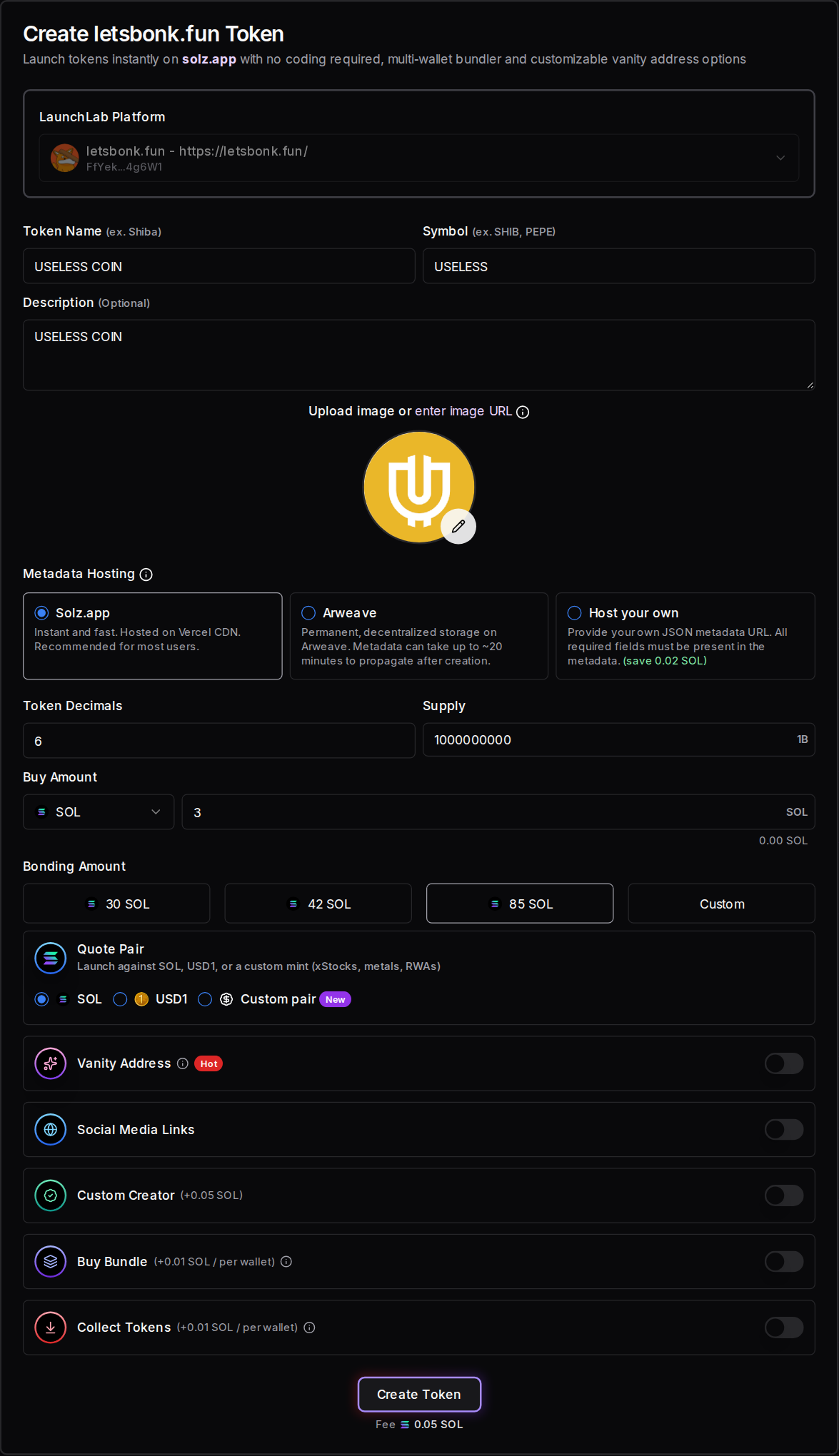
We read all of its curve trades from Solana, and they add up to the 85 SOL it raised.
| What happened on the curve | Real figure |
|---|---|
| First buy, in the launch transaction | 3 SOL for about 96.4 million tokens (9.64%) |
| Trades | 346 buys and 259 sells |
| Trading volume | About 634 SOL |
| Time to fill the curve | 131 seconds |
| Paid to letsbonk.fun's platform, at 1% | About 6.34 SOL |
| Paid to Raydium, at 0.25% | About 1.58 SOL |
Its Raydium CPMM pool opened 13 seconds after the last curve trade. letsbonk.fun charged 1% at the time, and its account now says 1.25%. A platform created on Solz.app can't change its settings like this, so choose them carefully. USELESS is an unusually strong launch, not a typical one, and this isn't a recommendation to buy it. A token with little trading pays its platform very little.
Where do creators find your platform?
LaunchLab Platforms, under Raydium in the sidebar, lists the platforms with the most recent launches. Platforms you created in this browser come first, with an amber-to-pink border, before any token launches on them, and so do platforms whose admin is your connected wallet. For everyone else, a platform created on Solz.app goes first right away, marked New on Solz.
Each card shows its graduation and total trading fee, with Create Token and Tokens buttons and a Share menu for X, Telegram or a copied link.
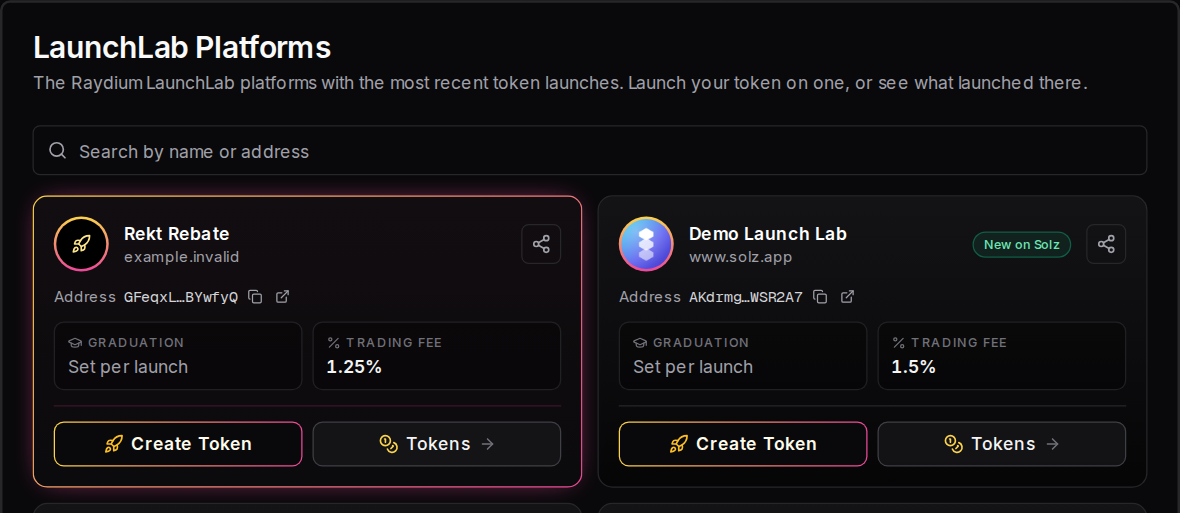
Graduation says Set per launch when each creator picks the quote token and the target, as on platforms created on Solz.app. The trading fee is the total traders pay on the curve: Demo Launch Lab's 1% Platform Fee, 0.25% Creator Fee and Raydium's 0.25% make 1.5%.
Each platform also has a page, such as letsbonk.fun's, with its settings and newest tokens. Each token shows its market cap and how far its curve has filled, with Bundle Buy and Bundle Sell buttons. Links to these pages show a preview card when you share them, and a link opened on the other network offers to switch.
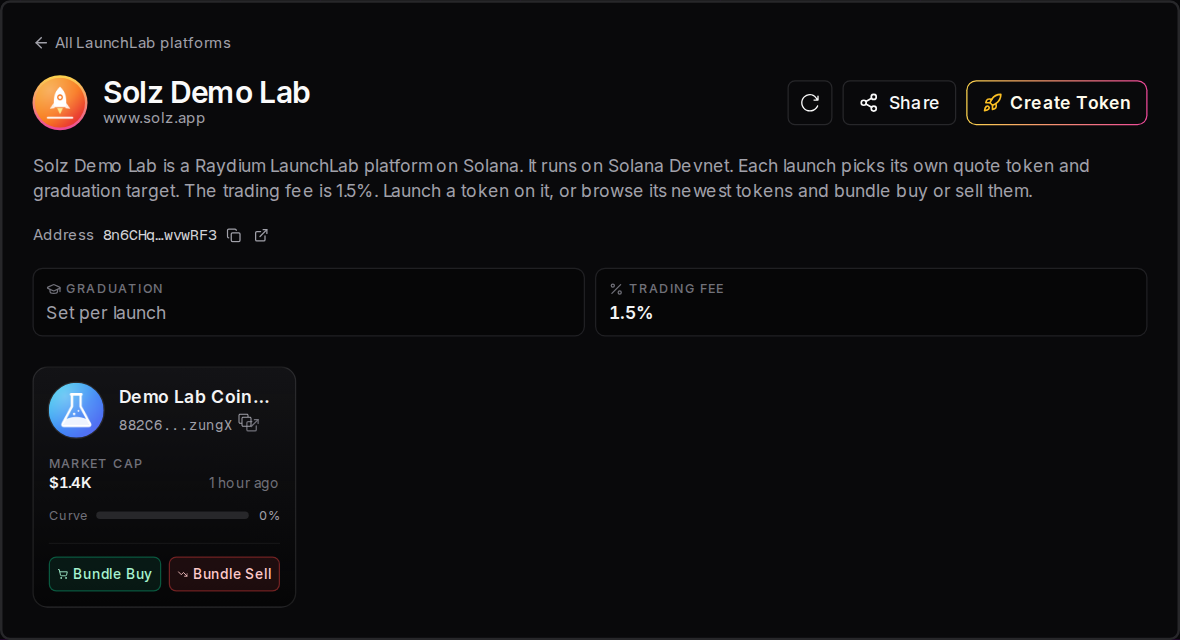
A real example on Devnet: Solz Demo Lab
We created Solz Demo Lab on Devnet with a 1% Platform Fee and a 0.25% Creator Fee. It cost 0.1555 SOL: the 0.15 SOL fee, 0.0054 SOL of rent for the platform's account and the network fee. Demo Lab Coin then launched on it with a 0.05 SOL buy, chosen by searching for the Platform ID in the launch form.
Another wallet bought and sold Demo Lab Coin 8 times for 0.1 SOL each. Claim Platform Fees then showed 0.01638 SOL. Claiming paid 0.001638 SOL to Solz.app, so about 0.0147 SOL reached the platform's wallet. As the token's creator, the same wallet also earned the 0.25% Creator Fee, which waits in Creator rewards.
How much can a platform earn?
Your fee applies to the trading volume on your platform's tokens, so earnings depend entirely on how many people launch and trade there. A 1% fee on 1 million dollars of curve volume earns 10,000 dollars before Solz.app's claim fee. The fee is paid on buys and sells, and it stops when a token graduates.
| Curve volume on your platform | At 0.5% | At 1% | At 2% | At 5% |
|---|---|---|---|---|
| $100,000 | $500 | $1,000 | $2,000 | $5,000 |
| $1,000,000 | $5,000 | $10,000 | $20,000 | $50,000 |
| $10,000,000 | $50,000 | $100,000 | $200,000 | $500,000 |
These are before Solz.app's 10% claim fee. A higher fee earns more per trade, but traders and creators can compare launchpads, so it can also cost you volume.
What did Bonk.fun earn at its peak?
The best-known example is letsbonk.fun, now Bonk.fun, which charges a 1.25% platform fee on its LaunchLab platform. DefiLlama records about $33.4 million in fees in July 2025, its peak month, of which about $20.1 million was revenue.
- Over its whole life: DefiLlama shows about $78.6 million in fees, and $45.7 million of revenue.
- It doesn't last by itself: fees fell to about $174,000 in August 2026, then rose to about $8.4 million in September 2026.
- Most of it wasn't profit: DefiLlama says that 58% of fees went to BONK buybacks and related holder programs, and only 2% to marketing.
- It had advantages a new platform won't: Bonk.fun launched with the BONK community behind it, during a surge in memecoin trading.
Treat this as the top of what's been possible, not what to expect. Most platforms won't come close, and you could earn nothing.
How do I claim platform fees?
Open Claim Platform Fees with the wallet that's set to receive the fees, and select your platform, or paste its Platform ID into the search box. The Claim all button shows what you receive after Solz.app's 10% fee. Click it and approve. SOL and USD1 are claimed separately, so your wallet asks twice when both have fees.
Above the button, Ready to claim shows the SOL and USD1 waiting, before the fee. When neither has any, the button reads Nothing to claim yet.
Here's a real example, using letsbonk.fun's platform. Ready to claim shows 31.9683 SOL and 5.14K USD1, and the button reads Claim all · 28.7715 SOL + 4.62K USD1. That's what its claim wallet would receive after the 10% fee, which here is about 3.2 SOL and 514 USD1. The claim wallet is shown below the box.
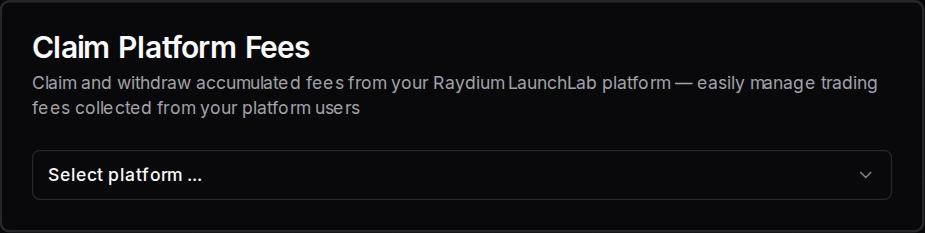
If you click Claim all with a wallet other than the claim wallet, Solz.app stops before anything is sent and shows the wrong wallet message below. These amounts change as trades happen.
| What you see | What it means | What to do |
|---|---|---|
| Platform fees SOL have been successfully claimed, or Platform fees USD1 have been successfully claimed | Your fees are on their way to you | Check your balance |
| Nothing to claim yet, on the button | There's nothing to claim right now | Come back after more trades |
| Only the platform claim fee wallet can claim these fees. Connect, followed by the wallet address, and try again. | This wallet isn't the one set to receive the fees | Connect the wallet it names |
| Not enough balance, you need at least the amount shown (including gas + token account rent) | You can't cover the network costs | Add SOL and try again |
| Transaction timeout ! This might be due to you sending invalid transactions / congested network | It didn't confirm in time | Check your wallet history before trying again, because it may have gone through. If not, raise your priority fee |
How much does a platform cost?
Creating a LaunchLab platform costs about 0.155 SOL: the 0.15 SOL Solz.app fee, plus about 0.0055 SOL for the platform's account and network costs. Claiming platform fees costs 10% of the amount you claim, in SOL or USD1. Tokens launched on your platform pay their own launch costs.
| Item | Cost |
|---|---|
| Create a LaunchLab platform | 0.15 SOL, plus about 0.0055 SOL for the platform's account and network costs |
| Claim platform fees | 10% of the amount claimed, in SOL or USD1 |
FAQ
What's the difference between Platform Fee and Creator Fee?
Platform Fee goes to the wallet that runs the platform. Creator Fee goes to whoever launched the token on it. As a platform owner, you can give creators a reason to launch with you by setting a Creator Fee.
Do I need my own website to run a platform?
No. Solz.app gives your platform a launch page, with a link you can share. You'd only need your own site if you want a fully branded launchpad.
Can one wallet create more than one platform?
Yes. Each platform gets its own account and Platform ID, so you can run several with different fees from the same wallet.
Does a Solz.app platform earn from tokens launched elsewhere?
No. It only earns from tokens launched under its own Platform ID.
Sources
Solz.app's fees and form options come from the app. letsbonk.fun's settings and USELESS COIN's trades were read from Solana. The rest comes from:
- Raydium LaunchLab platforms
- Raydium LaunchLab and CPMM fee reference
- Raydium Burn & Earn
- DefiLlama: BONK.fun Launchpad