
How to revoke mint, freeze and metadata authority
How do I revoke mint and freeze authority on a Solana token?
Open Revoke Mint Authority or Revoke Freeze Authority on Solz.app, connect the wallet that holds that authority, and select your token. Click Revoke Mint or Revoke Freeze and sign the transaction. Each revoke costs 0.04 SOL. It's permanent, so nobody can ever mint more tokens or freeze accounts again.
Prerequisites
- The wallet that currently holds the authority. Solz.app stops any other wallet with an error.
- The token's address, or the token in your wallet's token list.
- Enough SOL for the 0.04 SOL service fee and network costs.
- A firm decision, because revoking can't be undone. The next section helps you choose.
Should I revoke or keep each authority?
Revoke what you don't need. Keep mint authority only for planned new supply, freeze authority if you want to stop bad actors or must block accounts, and metadata authority while your details may change. Each one is separate, so you can mix them. Buyers check these, so say publicly why you kept any.
When should I keep mint authority?
Mint authority can create more of your token, which can dilute everyone else. Solz.app puts your full supply in your wallet at creation, so you don't need it to get your tokens.
| Keep it if | Revoke it if |
|---|---|
| New tokens back real deposits, as with USDC, or a program mints them, as with mSOL | You've created your full supply, and it should never grow |
| You have a planned, public release schedule | It's a memecoin or community token |
| You're still testing and may need more supply | You're about to add liquidity, and want to show buyers the supply is fixed |
While you keep it, add supply with Mint / Burn Token.
When should I keep freeze authority?
Freeze authority lets you stop a wallet from sending or selling your token. Keeping it means you can act against bad actors, such as a wallet holding stolen tokens, running a scam or abusing your token with bots. Once you revoke it, nobody can freeze anyone, so you lose that option for good.
| Keep it if | Revoke it if |
|---|---|
| You want to be able to stop bad actors, and you've told holders when you'd use it | Your token trades freely, and you don't plan to freeze anyone |
| You're issuing a regulated asset, such as a stablecoin, and must be able to block accounts | You want buyers to know their tokens can't be frozen |
The trade-off is trust. Whoever holds this authority could freeze any holder, and a frozen holder can't exit, so many buyers check for it before they trade. Keep it only if you have a real use for it.
How do I freeze a bad actor?
Use Freeze Accounts with the wallet that holds freeze authority. It costs 0.01 SOL per wallet, and you can enter up to 500 wallets at a time.
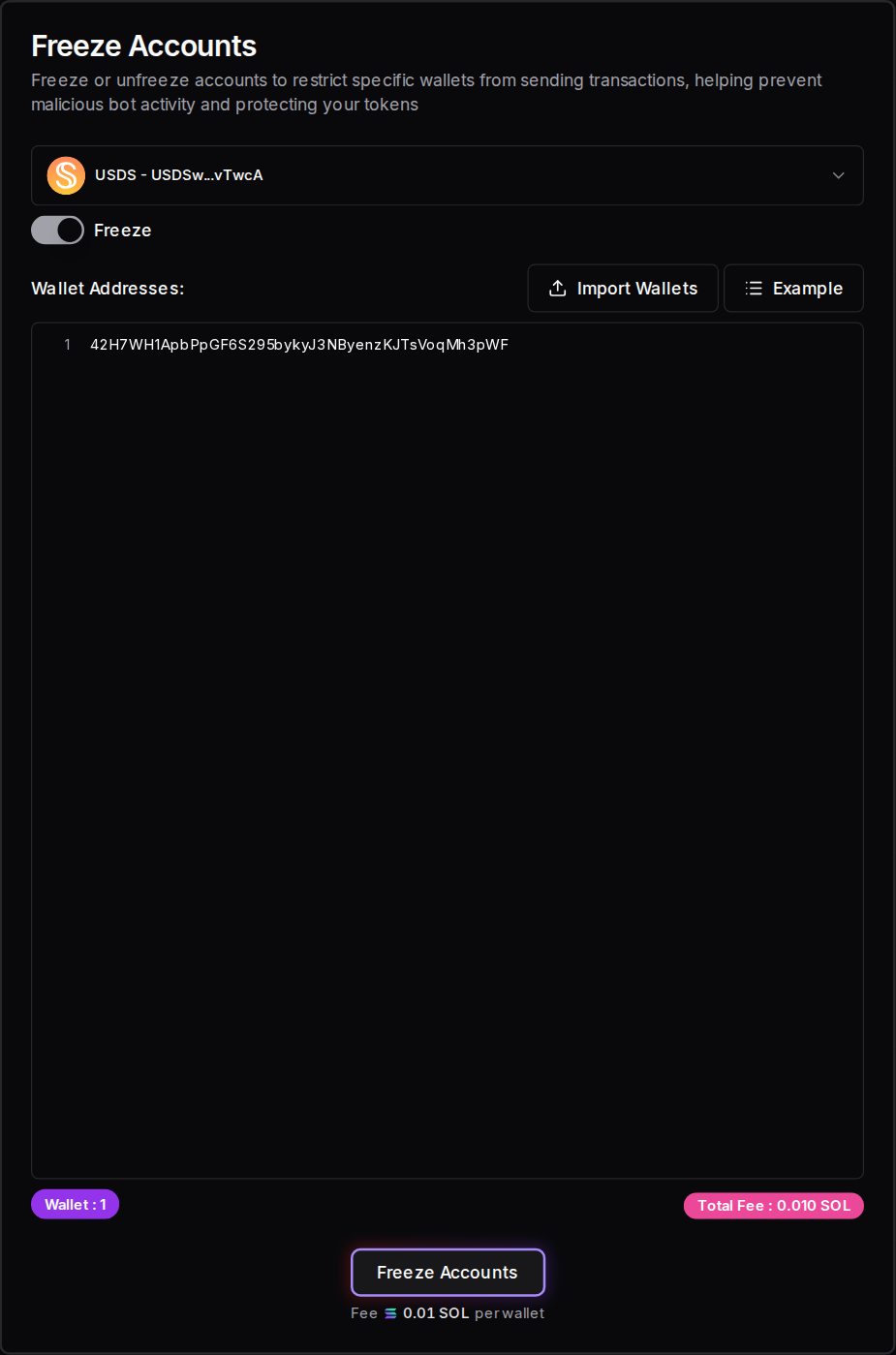
Say you hold a token's freeze authority, as the issuer of the stablecoin USDS does, and the wallet starting with 42H7W is holding 50,000 USDS stolen from your team:
- Select the token. Open Freeze Accounts, connect your wallet and select USDS.
- Leave the switch on Freeze. Turning it off changes the tool to Unfreeze.
- Enter the wallet. Paste the address under Wallet Addresses, or use Import Wallets for a list. Solz.app shows Wallet : 1 and Total Fee : 0.010 SOL.
- Freeze it. Click Freeze Accounts and approve in your wallet.
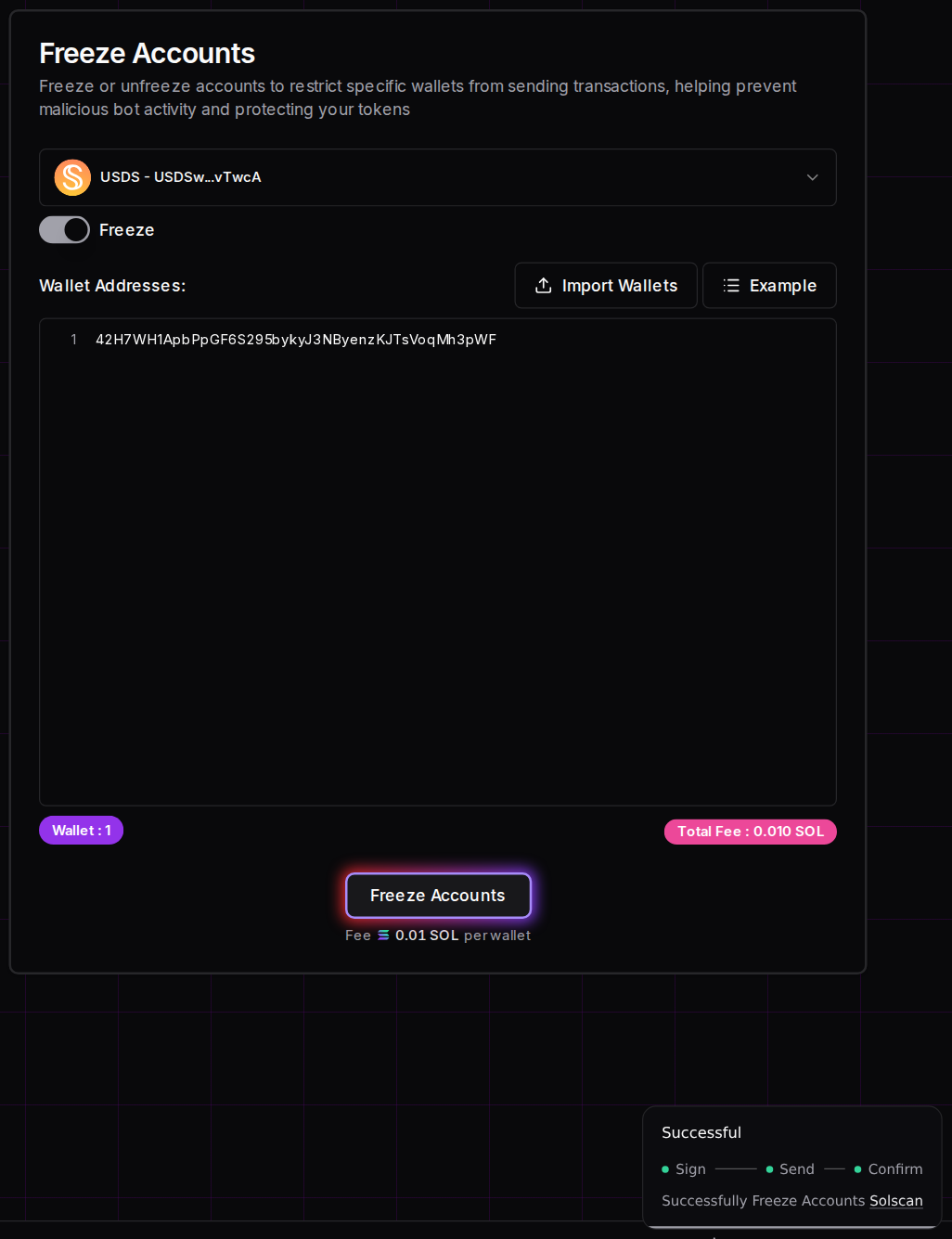
- Check the result. A card says Successfully Freeze Accounts, with a Solscan link for the transaction.
What can't a frozen wallet do?
A frozen wallet can't do anything with that token. It can't send it, swap it or sell it on any exchange, burn it, add it to a pool, or receive more of it. Every attempt fails, whichever app it uses, because Solana itself refuses it. This lasts until the freeze authority unfreezes it.
- It only affects that one token. The wallet in this example can still use its SOL, USDC and Bonk as normal.
- The tokens stay where they are. They still show in the wallet, and the supply doesn't change. Freezing doesn't take them or give them to you.
- It only covers that wallet. Tokens already moved to another wallet aren't frozen, so act quickly and freeze the new wallet too.
- It's public. Anyone can see the freeze on-chain, so explain it to your community.
Where does a frozen token show on Solz.app?
My Tokens and the SOL Incinerator both mark it with a blue Frozen label. If your own token account is frozen, this is where you'll see it. Here's the frozen wallet from the example above, seen in My Tokens:
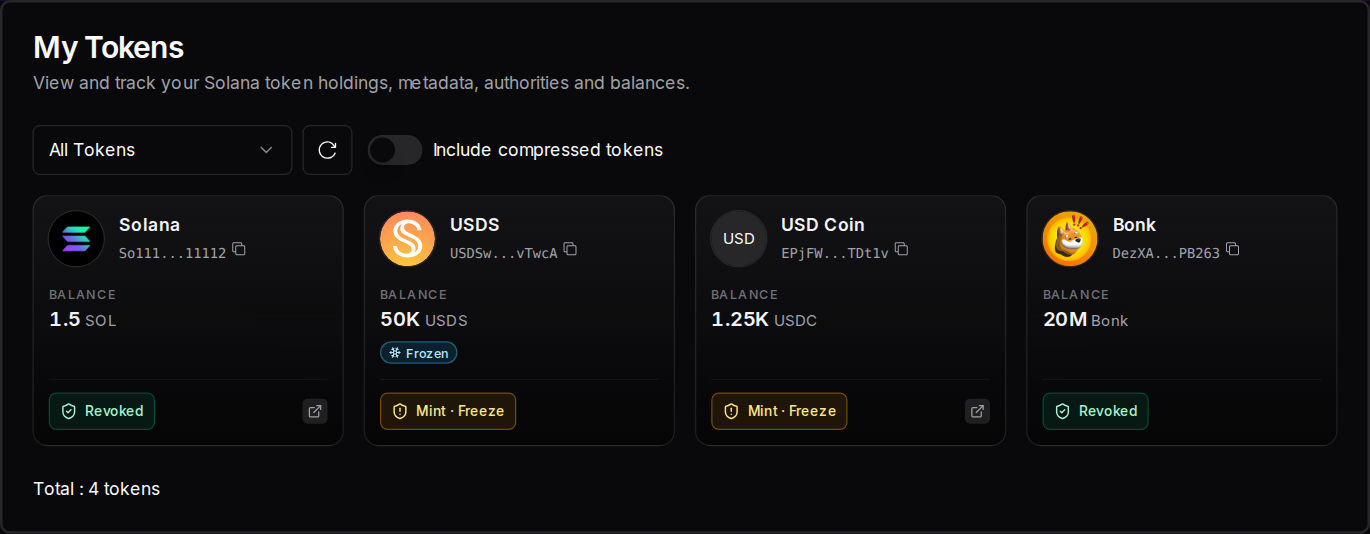
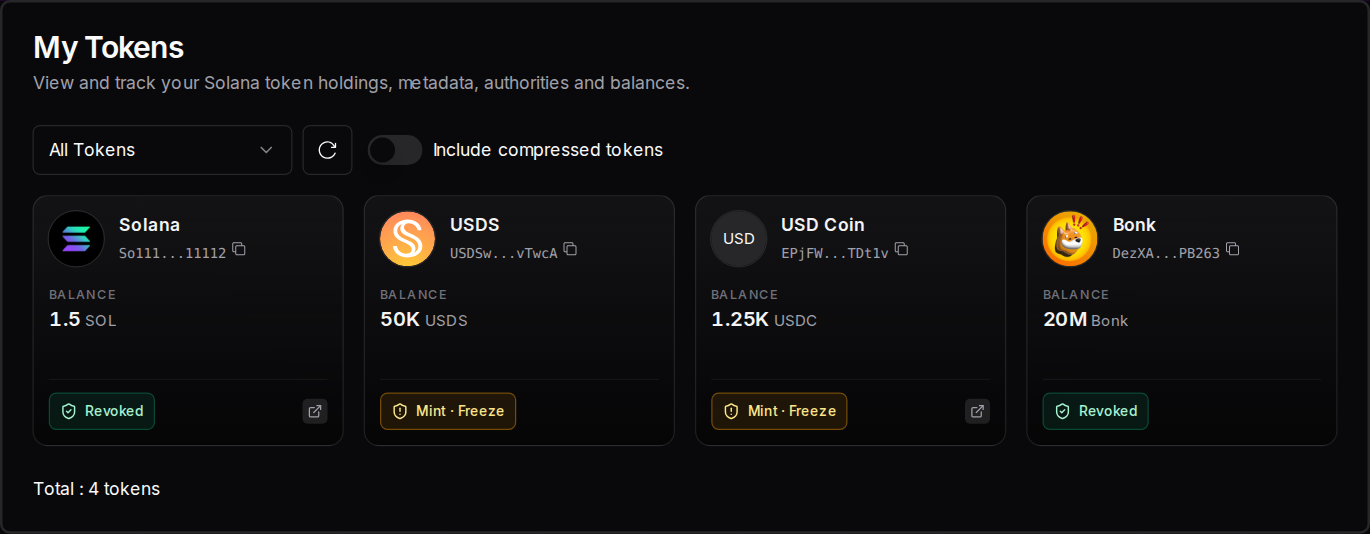
The status button tells you something different from the Frozen label. Frozen means this wallet's tokens are frozen now. Mint · Freeze means the token's freeze authority is still active, so it could freeze holders, as with USDC. Revoked means nobody can freeze it, as with Bonk.
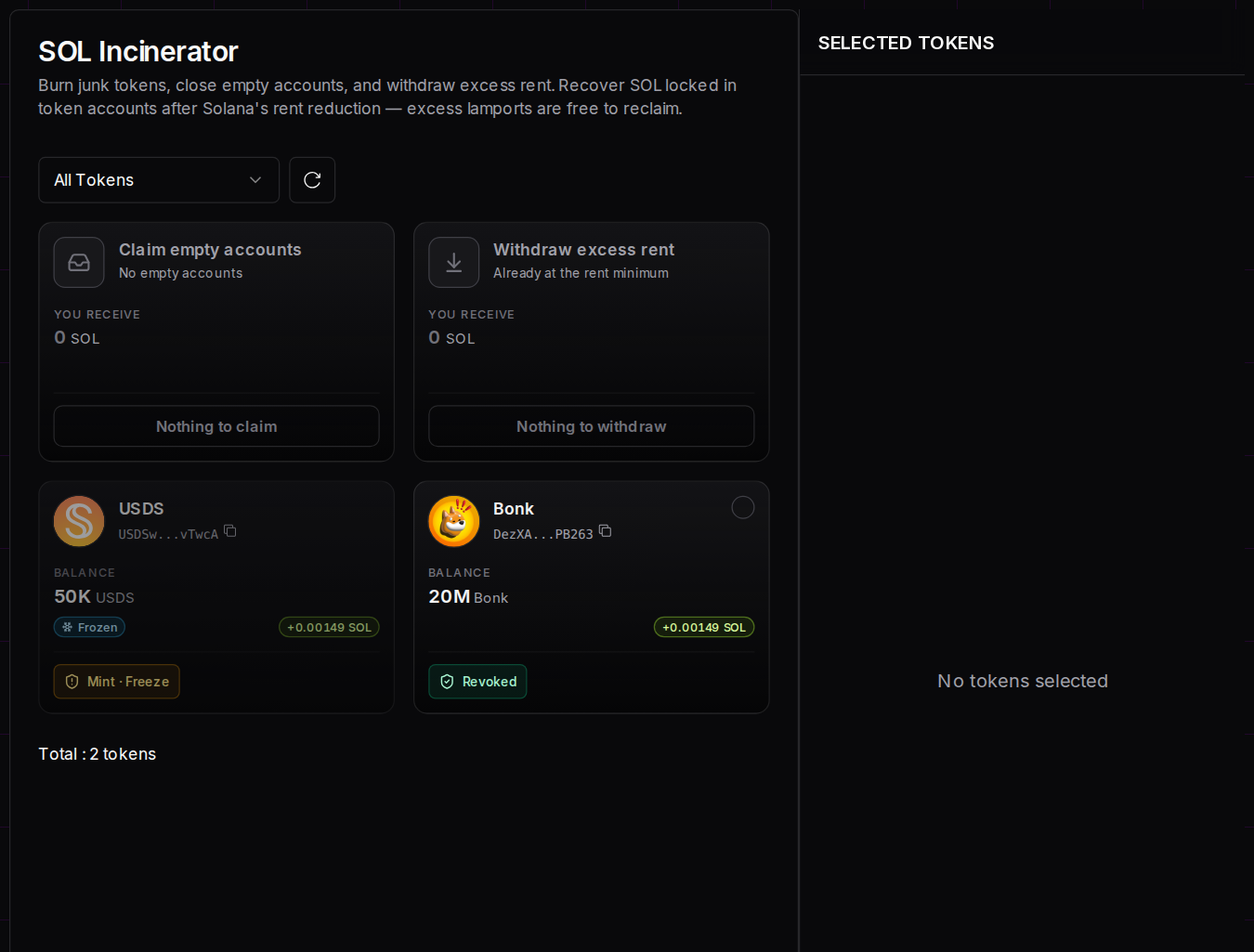
In the SOL Incinerator, a frozen token is greyed out and has no circle to select it, so you can't burn it or close its account. Its rent stays locked in the account, even though the card still shows the amount you'd get back. Claim empty accounts skips frozen accounts too.
| Where | While it's frozen | After it's unfrozen |
|---|---|---|
| Wallets and exchanges | Sending and swapping fail | They work again |
| My Tokens | Blue Frozen label | The label is gone |
| SOL Incinerator | Greyed out, and can't be selected | Can be selected again |
How do I unfreeze a wallet?
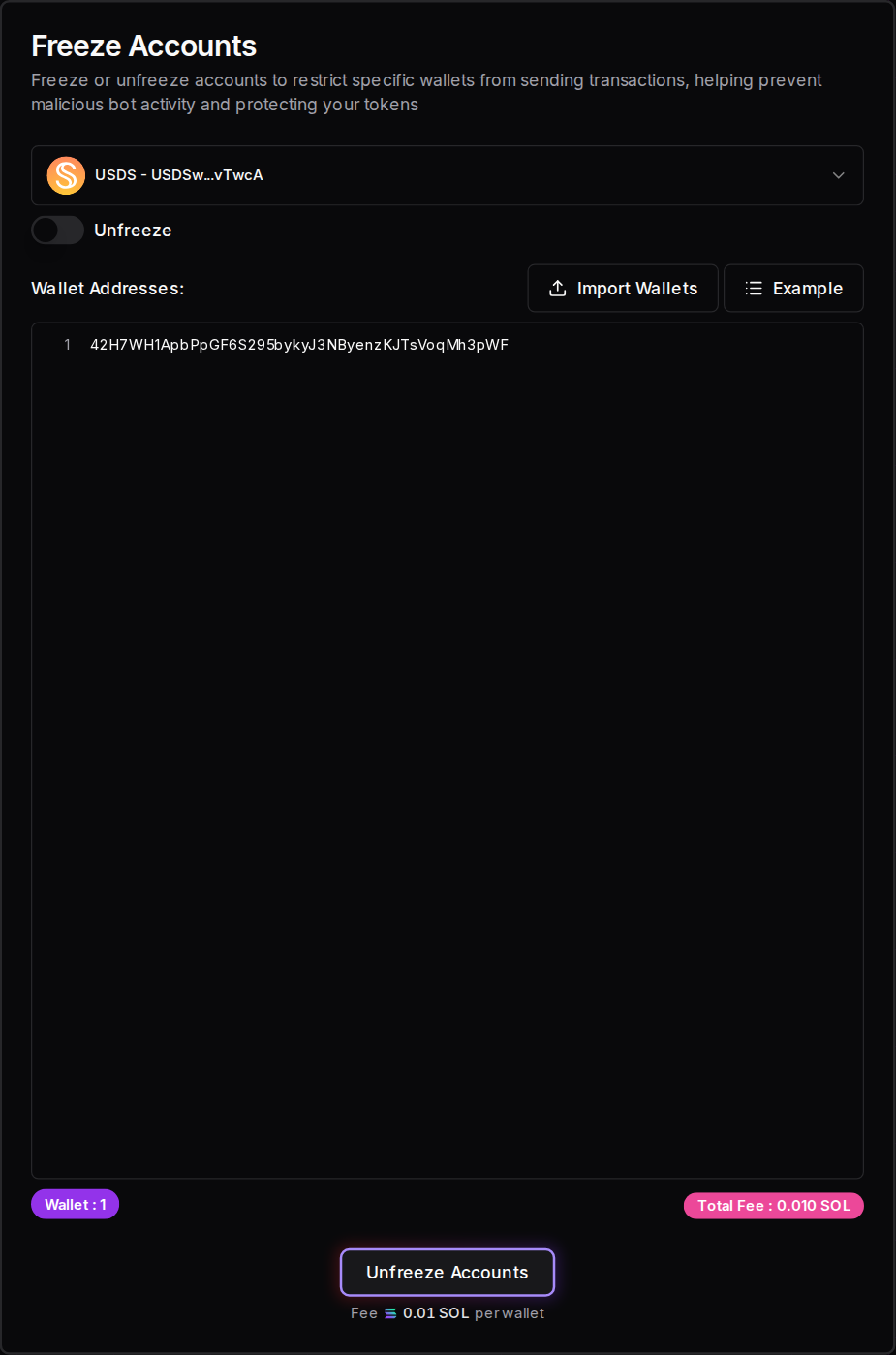
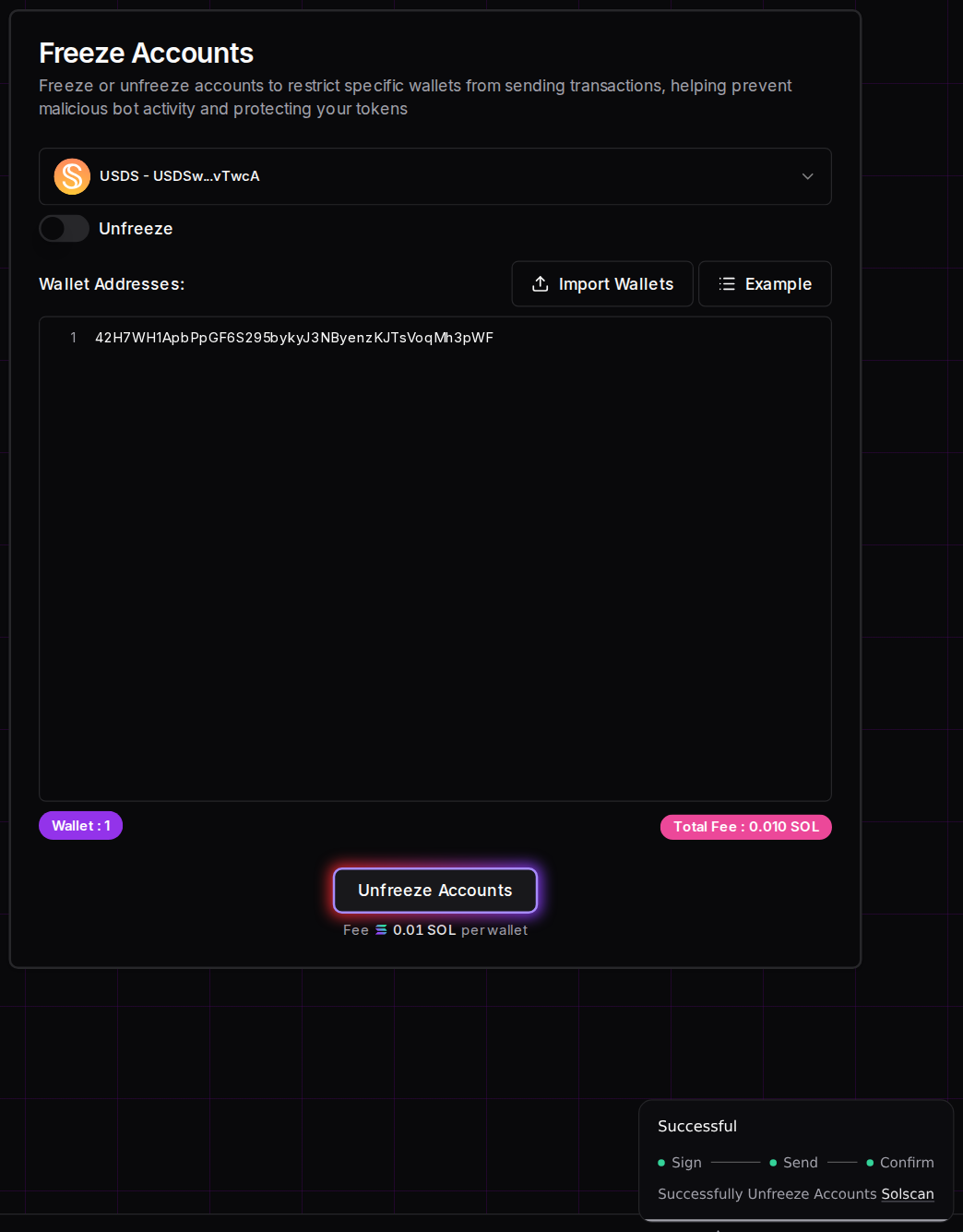
Unfreezing uses the same tool, wallet and fee. Only the wallet holding freeze authority can do it, and the frozen wallet can't unfreeze itself. Open Freeze Accounts, select the token, turn the switch off so it says Unfreeze, enter the wallet, click Unfreeze Accounts and approve. It costs 0.01 SOL per wallet.
A card says Successfully Unfreeze Accounts:
The wallet can use the token again straight away. In My Tokens, the Frozen label has gone, and 50K USDS is unchanged:
Unfreeze everyone you intend to before you revoke freeze authority. Revoking leaves nobody who can unfreeze a wallet, so any wallet still frozen stays frozen for good, and its tokens can't be moved again.
What if freezing fails?
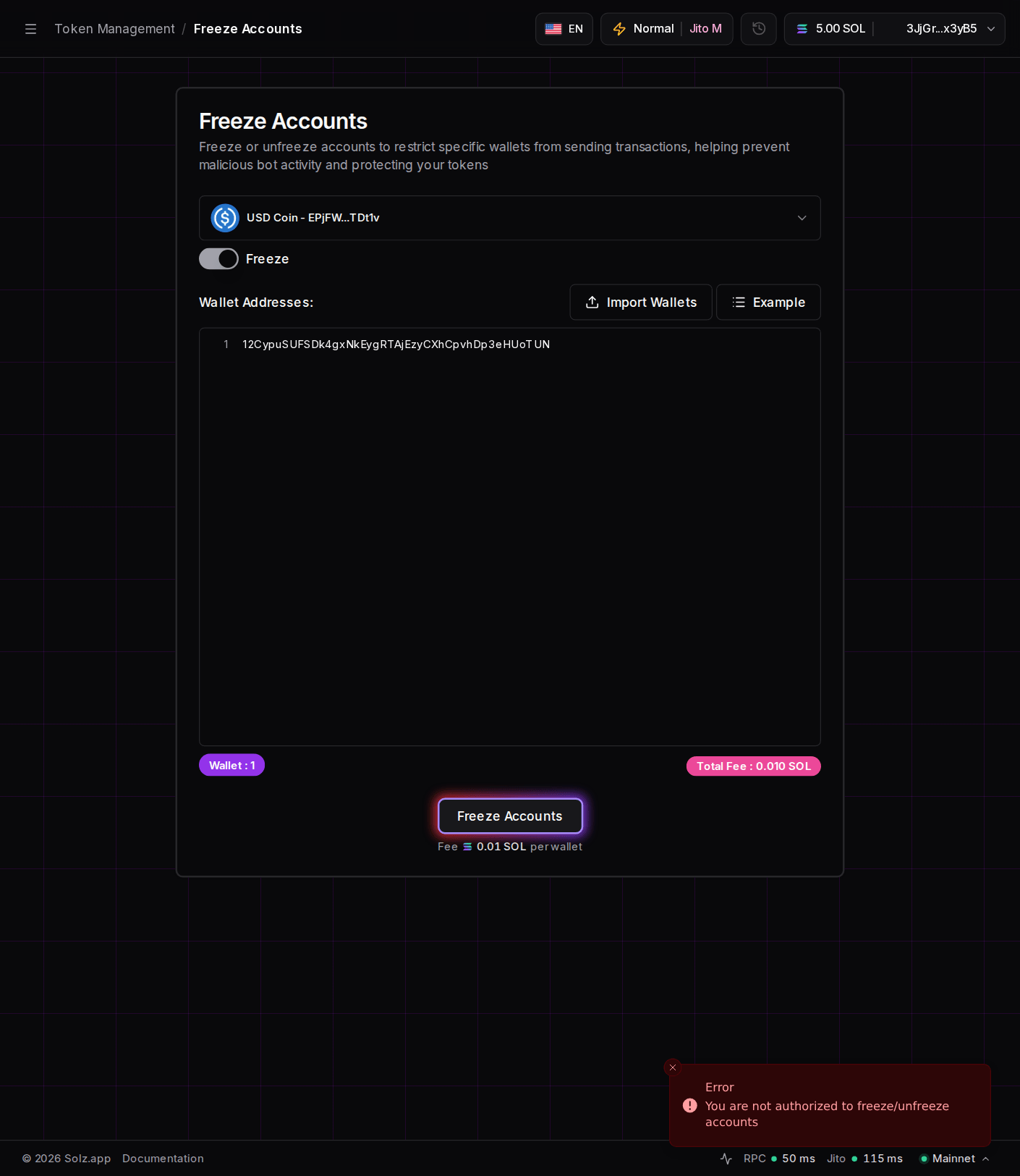
Solz.app checks your wallet before it asks you to sign. These are real tokens. USDC's freeze authority is active, but this wallet doesn't hold it:
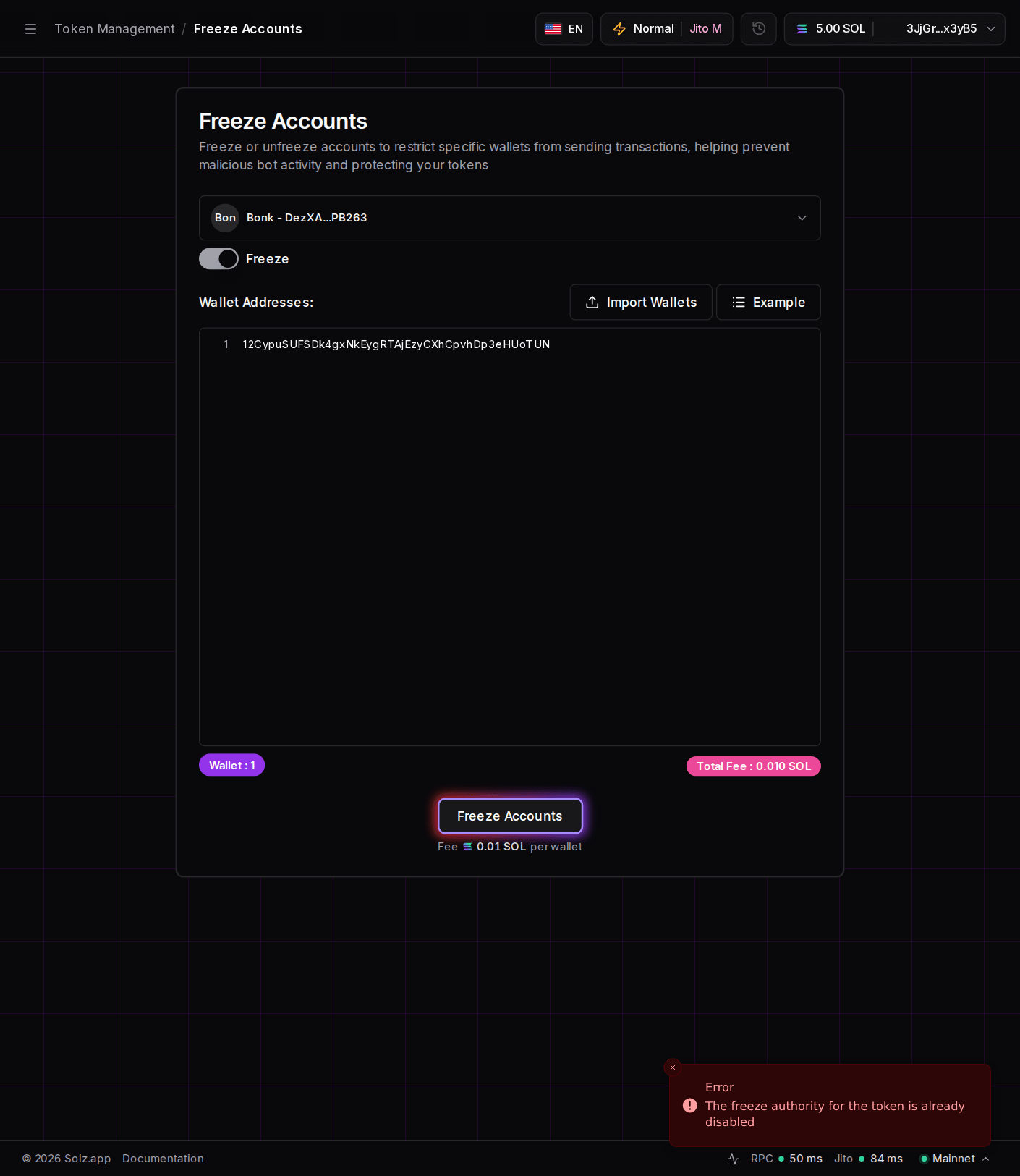
Bonk's freeze authority has been revoked, so nobody can freeze it:
| What you see | What it means | What to do |
|---|---|---|
| Successfully Freeze Accounts, or Successfully Unfreeze Accounts | The change went through | Tell your holders what you did and why |
| You are not authorized to freeze/unfreeze accounts | Your connected wallet doesn't hold freeze authority | Connect the wallet that does |
| The freeze authority for the token is already disabled | It's been revoked, so nobody can freeze or unfreeze this token | Nothing can change it. Warn your community about the wallet instead |
| Wallet addresses are not in a valid state to freeze, please change the recipients | None of these wallets can be changed, for example they're already frozen | Check the addresses, or switch to Unfreeze |
| 1 of 2 wallet addresses are not in a valid state to freeze, you may ignore this or change the recipients | One wallet can't be changed, and the rest can | Remove it, or carry on with the others |
When should I keep metadata authority?
Metadata update authority can change your token's name, symbol, image and links. It's separate from mint and freeze. Giving it up makes your metadata immutable, so nobody can change it again, including you. You can't fix a typo or a broken image link afterwards.
| Keep it if | Make it immutable if |
|---|---|
| You may rebrand, or change your logo or links | Your details are final, and you want buyers to know they can't change |
| You haven't added all your social links yet | It's a memecoin or community token with no planned changes |
| Your project's still developing, as with JUP and PYTH | You want the guarantee that WIF and TRUMP give |
While you keep it, change your details with Update Token Metadata for 0.04 SOL. To give it up, open Immutable Token, select your token, click Make Token Immutable and approve in your wallet. It costs 0.04 SOL, or nothing extra with the Immutable switch at creation.
| What you see | What it means | What to do |
|---|---|---|
| The token has been successfully updated to immutable | Your metadata is now locked for good | Check it in My Tokens |
| You are not authorized to update token metadata | Your connected wallet doesn't hold this authority | Connect the wallet that does |
| The metadata is already immutable, no metadata update is allowed | It's already locked, as with WIF | Nothing, it's done |
What do real tokens choose?
Real tokens mix these choices, depending on what they are. We checked these on-chain:
| Token | Mint authority | Freeze authority | Metadata |
|---|---|---|---|
| USDC | Active | Active | Can change |
| USDT | Active | Active | Can change |
| Marinade staked SOL (mSOL) | Active | Revoked | Can change |
| Jupiter (JUP) | Revoked | Revoked | Can change |
| Bonk | Revoked | Revoked | Can change |
| dogwifhat (WIF) | Revoked | Revoked | Immutable |
If you keep an authority, move it to a dedicated wallet with Transfer Authorities for 0.03 SOL per authority, so it isn't sitting in the wallet you use every day. For how these fit with supply and decimals, see the token creator guide.
Steps to revoke an authority
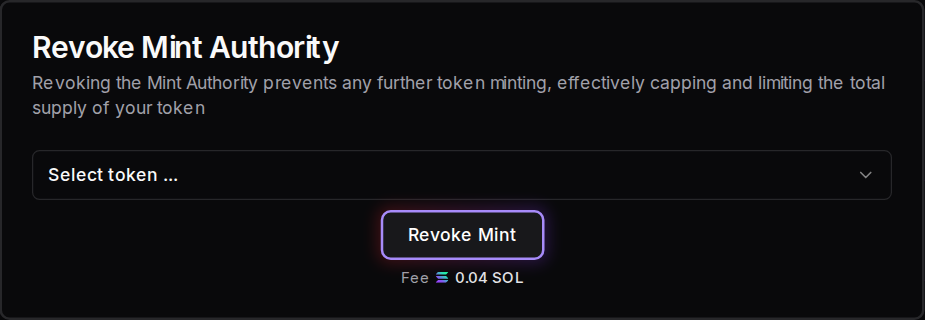
- Open the right tool. Go to Revoke Mint Authority to fix the supply, or Revoke Freeze Authority to give up freezing.
- Connect your wallet. Use the wallet that holds the authority you're revoking.
- Select your token. Solz.app checks that your wallet holds the authority and that it hasn't already been revoked.
- Revoke the authority. Check the cost on the button, click Revoke Mint or Revoke Freeze, and approve the transaction in your wallet.
- Check the result. A card says Successful, with a link to the transaction. Then open My Tokens to confirm the new status.
- Repeat if you need both. Mint and freeze are separate transactions with separate fees.
How do I check the status after revoking?
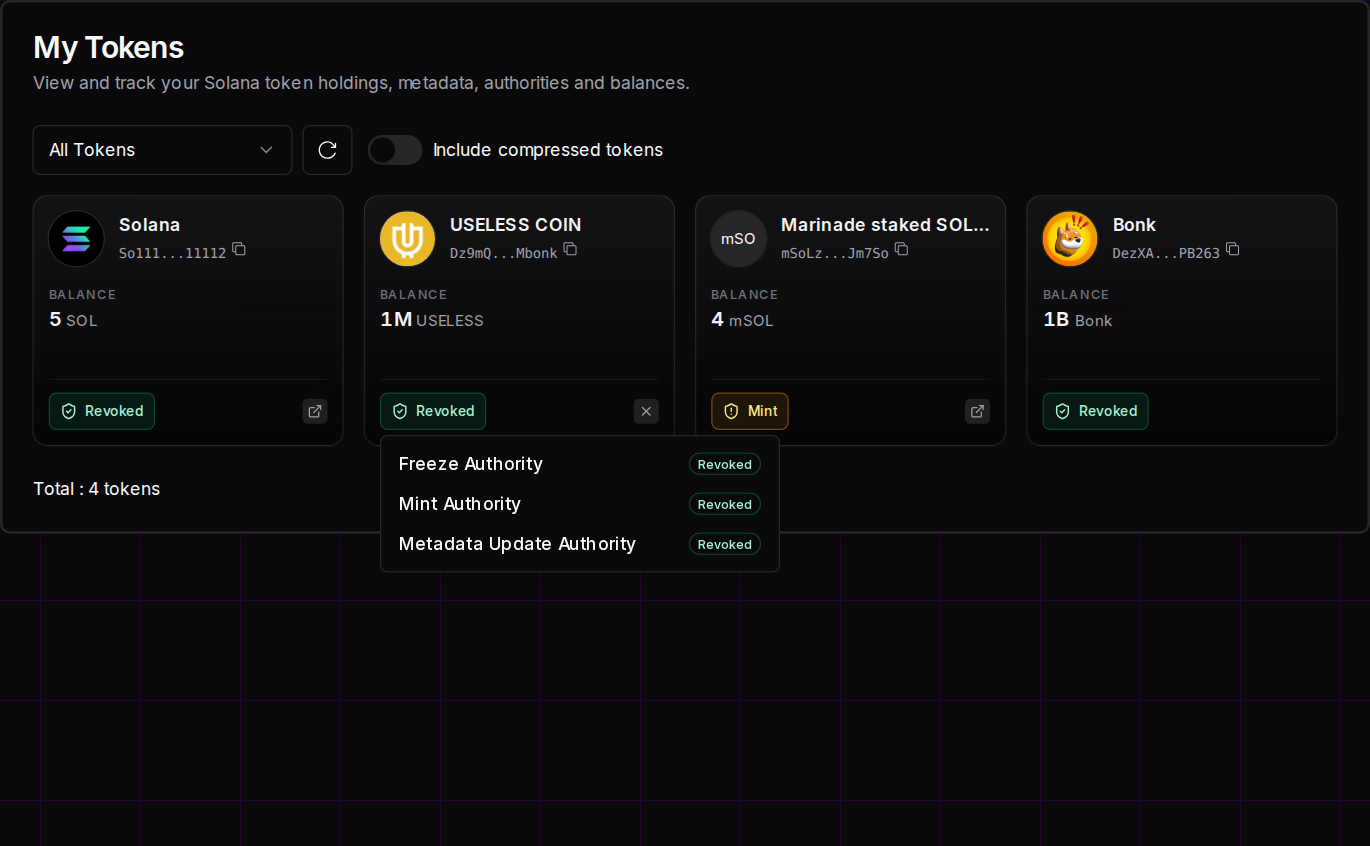
Connect your wallet, click the tokens tile under Your wallet in the sidebar, and find the status button on your token's card. It says Revoked once mint and freeze authority are both gone. Otherwise it names what's still active: Mint, Freeze, or Mint · Freeze. Click it to see each authority. If nothing has changed yet, click the refresh button.
| Status button | What it means | Real example |
|---|---|---|
| Revoked | Mint and freeze authority are both gone | Bonk |
| Mint | Mint authority is active, and freeze authority is gone | Marinade staked SOL (mSOL) |
| Freeze | Freeze authority is active, and mint authority is gone | |
| Mint · Freeze | Both are active |
The list under the button shows each authority as Active, with the wallet that holds it, or as Revoked. If your connected wallet holds an authority, a Revoke button next to it opens the right tool with your token already selected. Metadata Update Authority is listed too, but it's separate and doesn't affect the status button.
What should I see if a revoke succeeds or fails?
If it succeeds, a card says Successful, and My Tokens shows the new status. If it fails, a red Error message says why. The two most common failures happen before your wallet opens, so you sign nothing and pay nothing. A revoke that fails after you sign doesn't charge the service fee.
Example: a successful revoke
Say your wallet created USELESS COIN and still holds both authorities. Before revoking, its status button says Mint · Freeze, and both are Active:
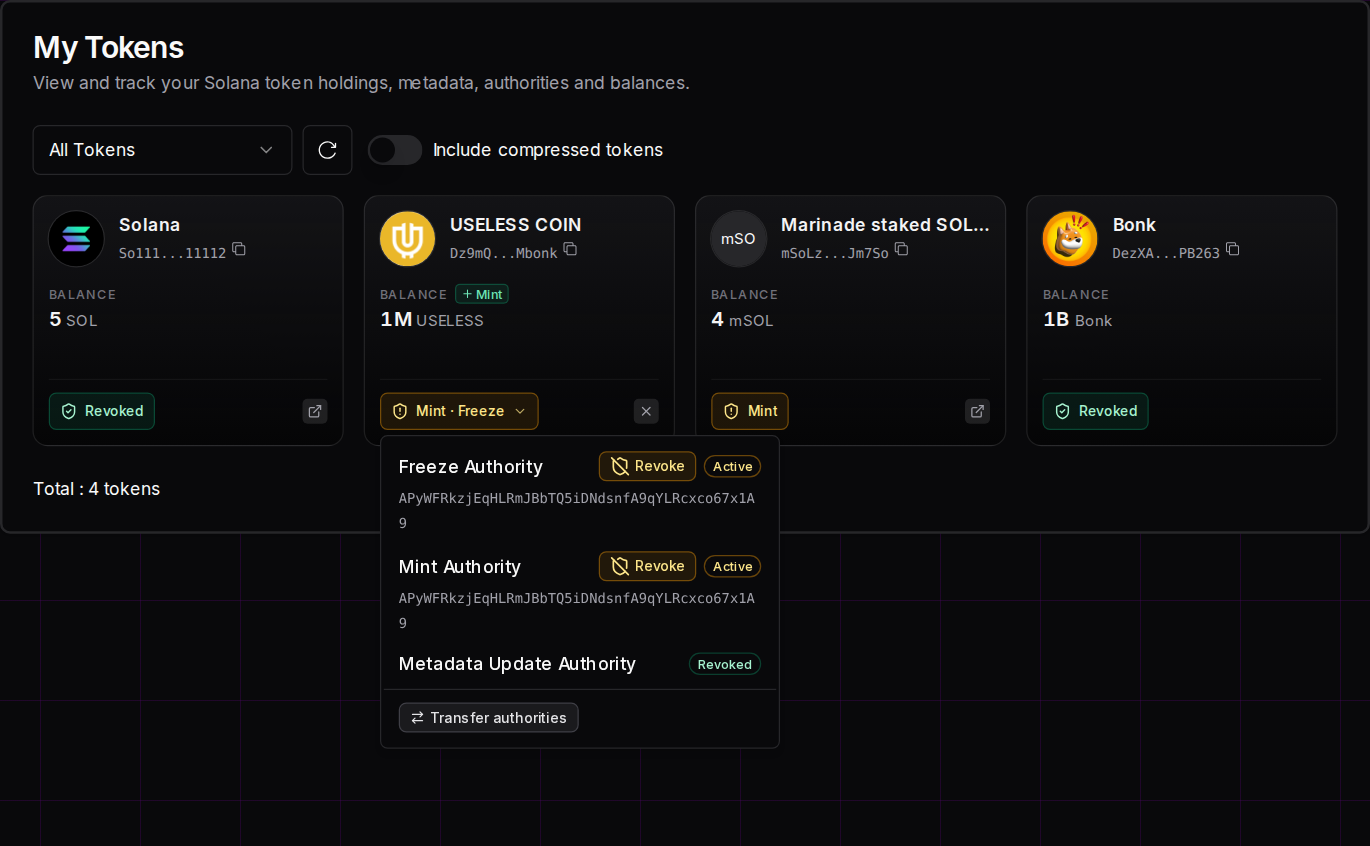
You click Revoke next to Mint Authority, check the 0.04 SOL fee, click Revoke Mint and approve in your wallet. A message then confirms it, with a link to the transaction:
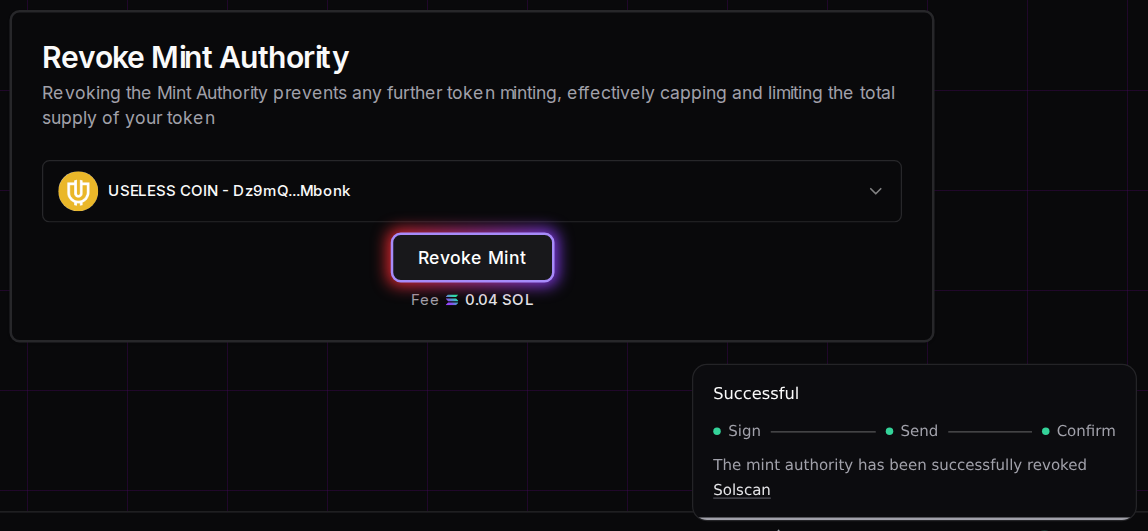
The status button now says Freeze. After you revoke freeze authority the same way, it says Revoked, and both show as Revoked in the list:
Example: a wallet that doesn't hold the authority
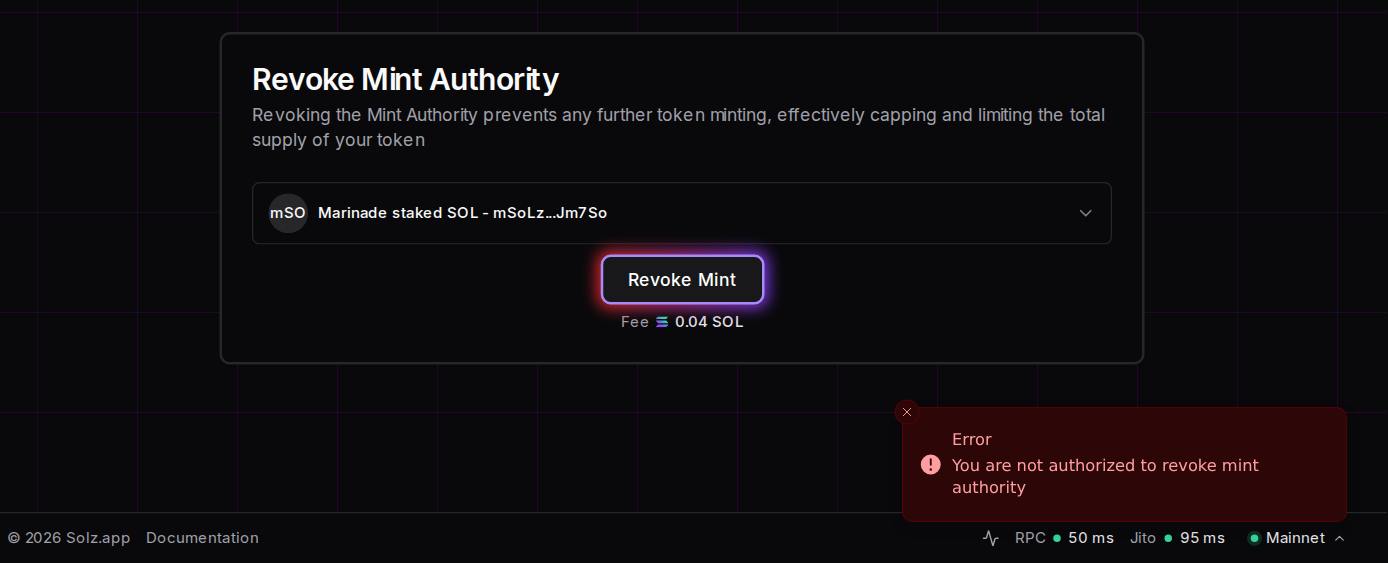
mSOL has an active mint authority, but your wallet doesn't hold it. Selecting mSOL and clicking Revoke Mint shows this error, and your wallet doesn't open:
Example: an authority that's already revoked
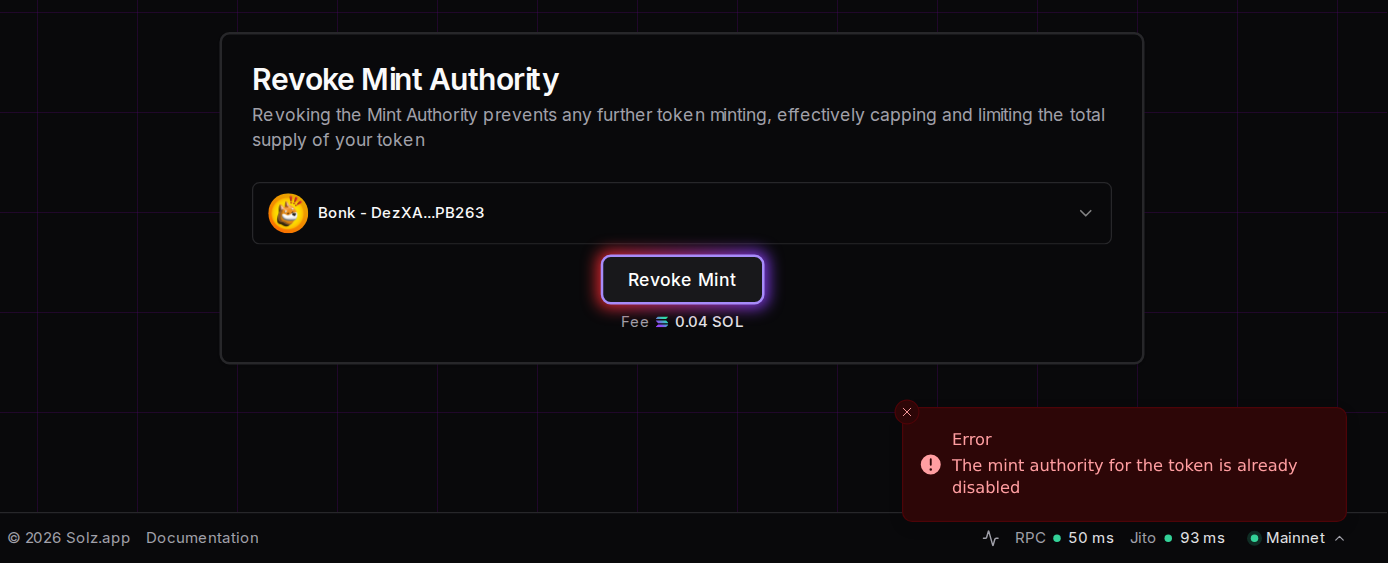
Bonk's mint authority has already been revoked. Selecting Bonk and clicking Revoke Mint shows this error, and your wallet doesn't open:
All the messages you might see
| What you see | What it means | What to do | Charged? |
|---|---|---|---|
| Successful: The mint authority has been successfully revoked, or the same for freeze authority | The revoke went through | Check My Tokens | 0.04 SOL, plus network costs |
| You are not authorized to revoke mint authority, or freeze authority | Your connected wallet doesn't hold it | Connect the wallet that does | No, your wallet doesn't open |
| The mint authority for the token is already disabled, or the freeze authority | It's already revoked | Nothing, it's done | No, your wallet doesn't open |
| An error after you decline in your wallet | You didn't approve the transaction | Try again when you're ready | No |
| Transaction timeout ! This might be due to you sending invalid transactions / congested network | The transaction didn't confirm in time | Check My Tokens first, because it may have gone through. If not, raise your priority fee and try again | Only if it went through |
What is the difference between mint and freeze authority?
Mint authority can create new tokens, so revoking it caps the total supply for good. Freeze authority can freeze holder accounts, which stops them moving the token, so revoking it removes that power. They're independent, so you can revoke one and keep the other. Buyers often check both before trading.
How much does it cost to revoke authority on Solz.app?
Revoking after creation costs 0.04 SOL per authority, so revoking both costs 0.08 SOL, plus network costs. It's cheaper to decide up front: the Revoke freeze and Revoke mint switches in the token creator add no extra fee. If a revoke transaction fails, its service fee isn't charged.
| Item | Cost |
|---|---|
| Revoke mint authority | 0.04 SOL |
| Revoke freeze authority | 0.04 SOL |
| Make metadata immutable | 0.04 SOL |
| Do any of these at token creation | No extra fee |
| Freeze or unfreeze a wallet | 0.01 SOL per wallet |
| Update token metadata | 0.04 SOL |
| Move an authority to another wallet | 0.03 SOL per authority |
| Network costs | Your priority fee setting and the base network fee |
FAQ
Can I undo a revoke?
No. A revoke sets the authority to nobody, and that can't be reversed. After revoking mint authority, the supply is fixed. After revoking freeze authority, nobody can freeze accounts.
Why does Solz.app say I'm not authorized?
Your connected wallet doesn't hold that authority. Switch to the wallet that does. If you've moved the authority to another wallet, use that one.
Why does Solz.app say the authority is already disabled?
It has already been revoked for this token, so there's nothing left to do and you won't be charged.
Does this work for Token-2022 tax tokens?
Yes. The tools work with both standard SPL tokens and Token-2022 tokens.
Does revoking mint or freeze make my metadata permanent too?
No. Metadata is controlled by a separate update authority. To lock it, use Immutable Token.
Can a frozen wallet still swap or sell the token?
No. A frozen wallet can't send, swap, sell or burn that token anywhere until the freeze authority unfreezes it. Its SOL and other tokens aren't affected.
Can I freeze a wallet after revoking freeze authority?
No. Once it's revoked, nobody can freeze or unfreeze any wallet for that token. If you might need to stop bad actors, keep it and use Freeze Accounts.
Can I still burn tokens after revoking mint authority?
Yes. Burning uses tokens from your own wallet, so it doesn't need the mint authority. Use Mint / Burn Token.
Open the tool
Open Revoke Mint Authority on Solz.app, Revoke Freeze Authority on Solz.app or Immutable Token on Solz.app