
How to get a Solana vanity address
What is a Solana vanity address?
A vanity address is a Solana address that starts or ends with letters you choose, such as one beginning with orca. It works exactly like any other address. The difference is that it's easier to recognise and remember. You can use one for a token or a wallet, and Solz.app generates them on hosted GPUs.
Prerequisites
- A Solana wallet to pay with, unless you're generating 1 or 2 letters, which is free.
- Your letters, up to 7 in total across the start and end of the address.
- A safe place to keep the private key, such as an encrypted password manager.
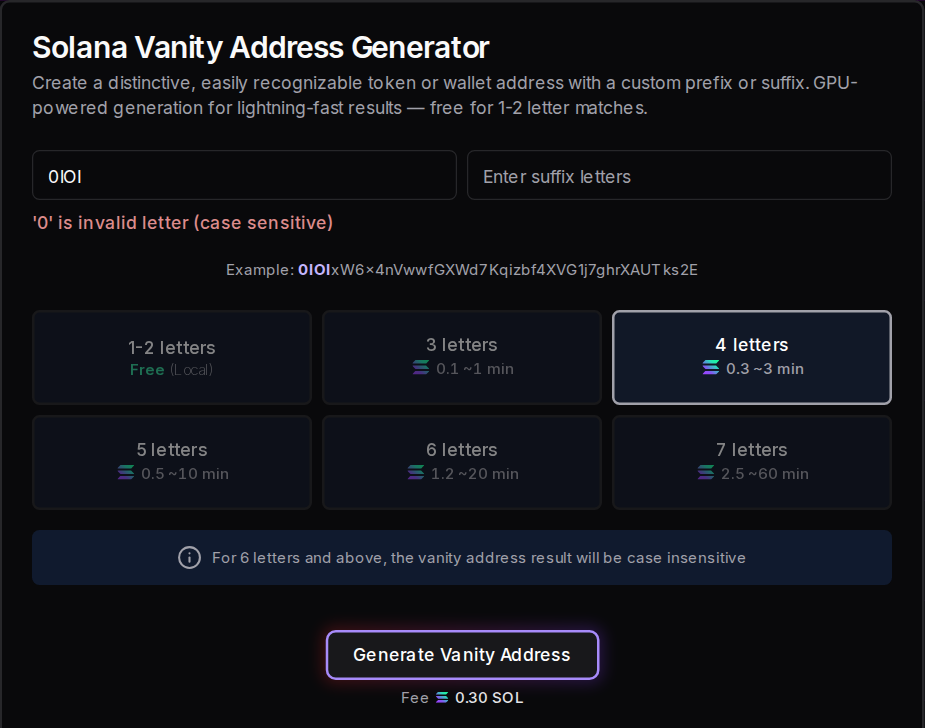
Solana addresses use base58, which has no 0, O, I or l, so a vanity address can't contain them.
Steps to generate a vanity address
- Open the generator and connect your wallet. Go to the Solana Vanity Address Generator.
- Enter your letters. Fill in the prefix, the suffix, or both. The form shows the fee and estimated time for that length.
- Choose case matching. From 6 letters up, results ignore upper and lower case unless you turn on Case sensitive match, which adds 50% to the fee.
- Generate the address. Click Generate Vanity Address and approve the payment if there is one. You can watch the search progress on the page.
- Download the private key straight away. Downloading also removes the copy saved for your wallet. Anyone with this key controls the address, so never share it.
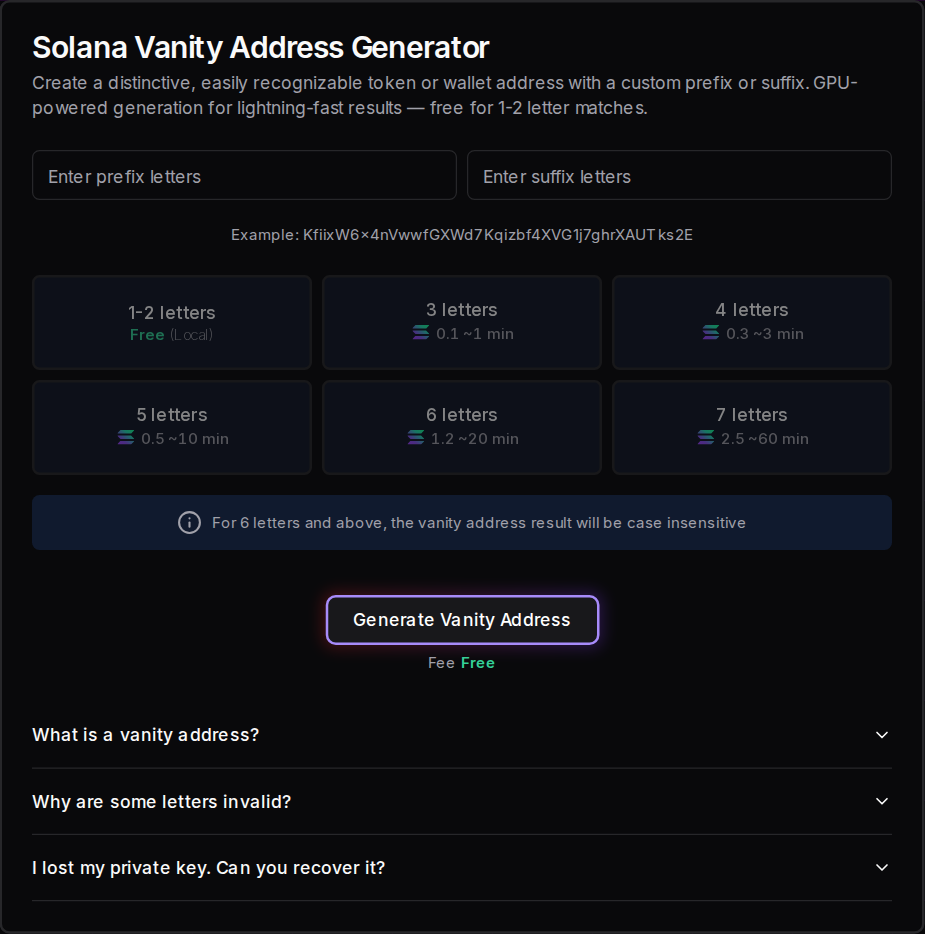
Here, orca is 4 letters, so the form selects that length and shows its 0.3 SOL fee and estimate of about 3 minutes.
What does generating a vanity address look like?
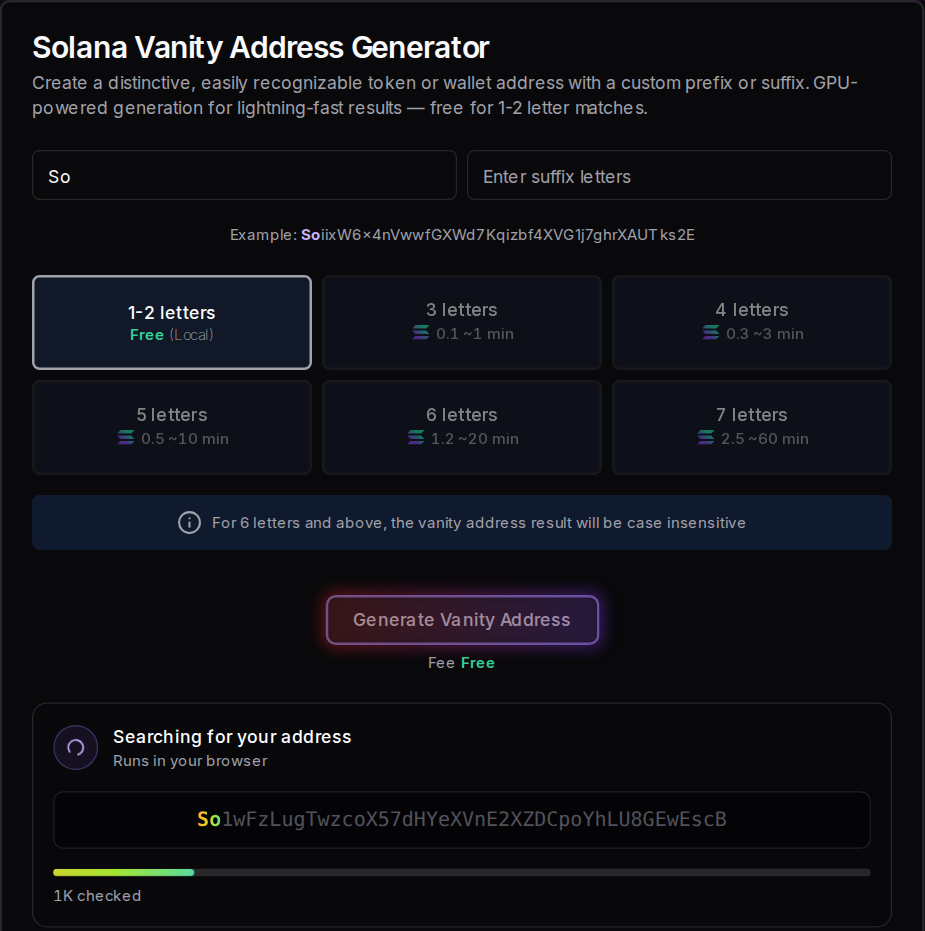
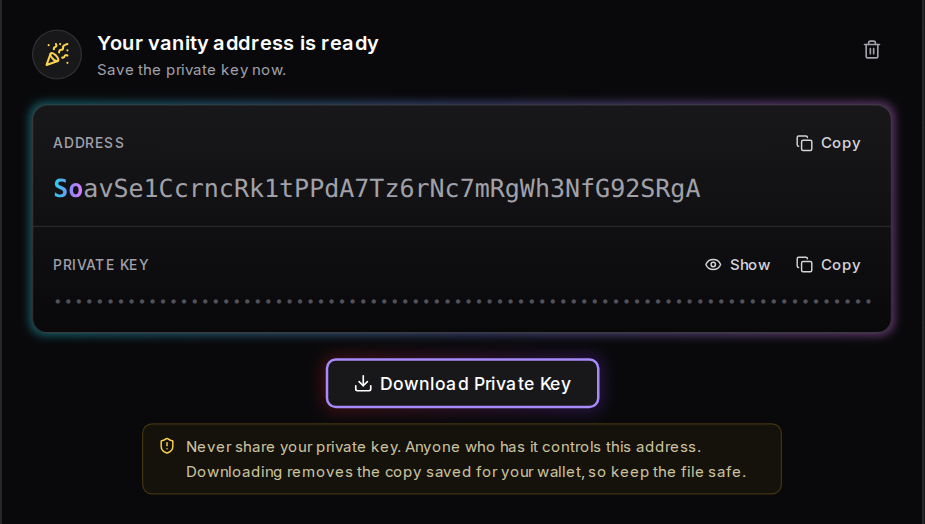
As an example, enter So as the prefix. That's 2 letters, so it's free and runs in your browser. A Searching for your address panel shows progress, and then your new address appears with its private key hidden. Download the key before you do anything else, then use the address.
1. The search runs. The panel shows how many keys have been checked. The address in it is only a preview of the format, not your result:
2. Your address is ready. This real result starts with So. The private key stays hidden unless you click Show:
3. Download the private key. You get a file named private-key- followed by your address.
For 3 letters or more, you approve the payment first. The panel then shows Initializing GPU, GPU ready and Starting the search before the same search and result. Generation can find more than one match, and if it does, you get a key for each.
Real tokens use addresses like this too. Orca's token starts with orca, and Drift's starts with DriFt. They aren't examples of tokens made with Solz.app.
How do I use a vanity address in the token creator?
Open the Solana Token Creator and fill in your token's details. Turn on Vanity Address, click Load Private Key and choose the file you downloaded. The Token address box then shows the address your token will get. Check it matches your vanity address, then create the token as usual. Loading the key adds no extra fee.
- Open the token creator and enter your token's name, symbol, supply and image.
- Turn on Vanity Address. If you don't have a key yet, Generate a custom one opens the generator.
- Click Load Private Key and choose your
private-key-file. The key stays hidden in the form. - Check Token address. It should show your full vanity address. If it still says Add a private key to preview the address, the key wasn't read, so load the file again.
- Create the token. Click the create button and approve in your wallet. Your token is created at that address, and the key has no further job.
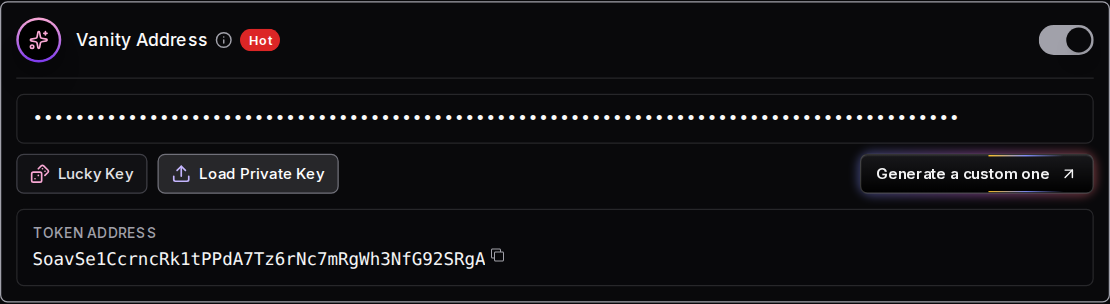
Lucky Key fills in a random key, so it doesn't give you letters you chose. The same steps work in launch forms that offer Vanity Address, such as Pump.fun.
What if something goes wrong?
Most problems show a message before anything is charged. An invalid letter shows under the prefix or suffix, and an address that's already been used stops the token creator before your wallet opens. If a paid search times out, retry with exactly the same letters, including upper and lower case, to avoid paying twice.
For example, 0, O, I and l can't appear in a Solana address, so entering 0lOI shows this message:
| What you see | What it means | What to do |
|---|---|---|
| '0' is invalid letter (case sensitive) | That letter can't be in a Solana address | Choose different letters |
| Prefix / Suffix is required | Both fields are empty | Enter at least one letter |
| Maximum vanity length is 7 characters | Your letters add up to more than 7 | Use fewer letters |
| Not enough balance, you need at least the amount shown | Your wallet can't cover the fee | Add SOL and try again |
| Timed out before a match was found | The search ended without a match | Retry with exactly the same letters, including upper and lower case, to avoid a duplicate charge |
| Generation may be stalled | The search has stopped updating | Refresh the page to check. If it didn't start, resubmit with exactly the same letters |
| The vanity address has been used, please create a new vanity address! | A token or account already exists at that address | Generate a new key. Each address can only be used once |
| The token mint address cannot be the same as the wallet address | You loaded the key of the wallet you're connected with | Connect a different wallet, or generate a new key |
The search and result screenshots are from a real free generation in the app, and the form images are the live form.
Why would I want a vanity address?
There are three main reasons: branding, a known address you can promote before launch, and a recognisable wallet. A token address appears everywhere from explorers to trading screens, so a memorable one helps people spot the real token. It doesn't make a token safer or more valuable, and it's no substitute for checking the full address.
- Branding. An address that starts with your project's name looks deliberate and is easier to recognise among look-alikes.
- Marketing before launch. Normally a token's address only exists once it's created. With a vanity key you know the address in advance, so you can publish it ahead of launch.
- A recognisable wallet. A team or treasury wallet with a familiar start or end is easier to spot on-chain.
Scammers can generate similar-looking addresses too, so tell your community to check the whole address, not just the first and last letters.
Can I market a vanity address before launch?
Yes. Generate the key first, then share the address publicly before your token exists. Nobody can create a token at that address without the private key, so keep it secret until launch. When you're ready, load the key in the token creator or launch form. Each address can only be used once.
- Generate and save the key. Download it and keep it out of chats, screenshots and shared documents.
- Promote the address. Share it wherever you're building interest, and be clear the token isn't live yet.
- Load the key at launch. Turn on Vanity Address in the token creator or Pump.fun launch form, and use Load Private Key. Check the preview matches the address you promoted.
- Launch. Once the token exists, that address is used, and the key has no further job.
If the key leaks before launch, someone else could create a token at your address. If you suspect that's happened, generate a new one and tell your community.
Can I use a vanity address as a wallet?
Yes. A vanity address is a normal Solana keypair, so you can import the private key into a wallet that supports private key import, such as Phantom or Solflare. Keys of 3 letters or more are generated on Solz.app's GPU servers rather than your device, so don't use one for long-term savings.
A wallet's safety depends on nobody else ever having seen its key. That makes the choice different from a token address, whose key has no further job after launch:
- For everyday or team wallets with small balances: a generated key is convenient. Move funds out if anything looks wrong.
- For long-term savings: use a hardware wallet, or a key generated offline on your own device.
- For 1 or 2 letters: Solz.app generates the key in your browser, not on a server.
How does Solz.app generate vanity addresses?
There's no shortcut to a vanity address. The generator creates random keys and checks each one until the letters match, so each extra letter multiplies the work by about 58. Solz.app runs this on hosted GPUs, so you don't need your own hardware or any setup, and 1 or 2 letters run free in your browser.
These are the form's estimates, and the real time can vary because the search is down to chance:
| Letters | Estimated time |
|---|---|
| 1 to 2 | Runs in your browser |
| 3 | About 1 minute |
| 4 | About 3 minutes |
| 5 | About 10 minutes |
| 6 | About 20 minutes, or 40 if case sensitive |
| 7 | About 60 minutes, or 120 if case sensitive |
The page shows the live speed and the number of keys checked while it runs.
How much does a vanity address cost on Solz.app?
Matches of 1 or 2 letters are free. After that, the fee starts at 0.1 SOL for 3 letters and rises to 2.5 SOL for 7. From 6 letters, Case sensitive match adds 50%. Loading the key when you create a token adds no further vanity fee, and the form shows the fee before you pay.
| Item | Cost |
|---|---|
| 1 to 2 letters | Free |
| 3 letters | 0.1 SOL |
| 4 letters | 0.3 SOL |
| 5 letters | 0.5 SOL |
| 6 letters | 1.2 SOL, or 1.8 SOL if case sensitive |
| 7 letters | 2.5 SOL, or 3.75 SOL if case sensitive |
| Loading the key into a token launch | No extra fee |
FAQ
Can Solz.app recover a lost private key?
No. Save the key as soon as it's generated, and keep your connection stable until you've downloaded it.
What happens if the search times out?
Solz.app tells you to retry with exactly the same letters, including upper and lower case, so that you aren't charged twice.
Does a vanity address make my token more trustworthy?
No. It only changes how the address looks. Buyers still need to check the liquidity, the authorities and who holds the supply.
Can I reuse a vanity address for another token?
No. Each address can only be created once. If Solz.app says it has been used, generate a new one.
Can I use one with any launch on Solz.app?
Yes, except on Bags, where an address always ends in BAGS. You can load one in the SPL and Tax token creators, and when launching on Pump.fun, LaunchLab, BonkFun or StonkFun.