
How to send Solana tokens to many wallets with Multi Token Sender
How do I send tokens to many wallets on Solana?
Open Multi Token Sender on Solz.app, select your token, and paste up to 10,000 wallet addresses, with the same amount or different amounts. Turn on Enable Compression to avoid paying rent for each recipient's token account. Check the summary, click Send and approve each batch. The Solz.app fee is 0.0005 SOL per wallet.
Multi Token Sender puts the tokens straight into each wallet, and you pay for every transfer. To let holders claim their share instead, see Should I send tokens or let holders claim them?
Prerequisites
- A Solana wallet holding the tokens you want to send.
- Enough SOL for the fees. The calculations below show what to expect.
- Your recipients' wallet addresses, in a list or CSV file. To reach another token's holders, get them from Token Snapshot.
Steps to send with Multi Token Sender
- Open the tool and connect your wallet. Go to Multi Token Sender.
- Select the token. You can send SOL, SPL tokens or tax tokens. A tax token's fee comes out of what each wallet receives, and the form says so: at 1%, sending 100 delivers 99. An address that isn't a token, such as a wallet or a program, is refused.
- Add the wallets. Paste one address per line. To give each wallet its own amount, use
address,amounton each line, and Solz.app switches to Different Amount for you. You can also upload a CSV file with Import Wallets, use Import X Wallets, or click Send tokens to these holders after a Token Snapshot. Solz.app flags invalid and duplicate addresses. - Choose the amount. With Same Amount, enter one amount for every wallet, or click Max to share your balance between them.
- Decide on compression. Turn on Enable Compression to skip token account rent. The first time you compress a token, Solz.app asks you to approve a one-time setup, and the summary adds its 0.05 SOL fee.
- Check the token accounts if you aren't compressing. Solz.app checks for you and shows how many wallets need a new associated token account (ATA). The accounts are created in the same transactions as the transfers, however long your list is.
- Set your transaction speed. Choose a priority fee at the top of the app. The section below explains when to raise it.
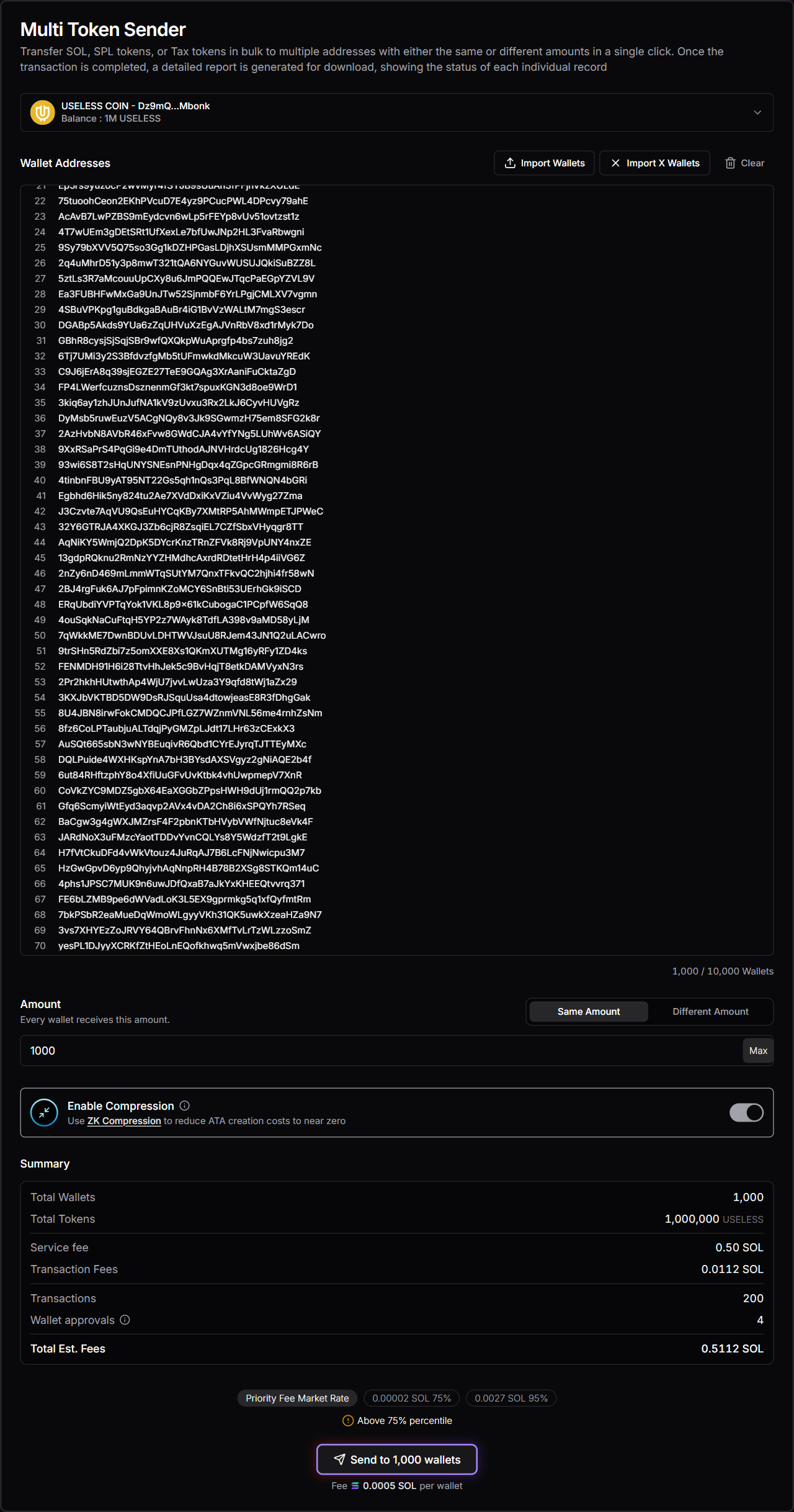
- Review and send. The summary lists the Service fee, ATA Fees, Transaction Fees and Total Est. Fees. It also shows Transactions and Wallet approvals when a send needs more than one approval. Click Send to, followed by your wallet count, and approve each batch in your wallet. Keep the tab open and in view until it finishes. The list clears after a send, so you don't pay the same wallets twice.
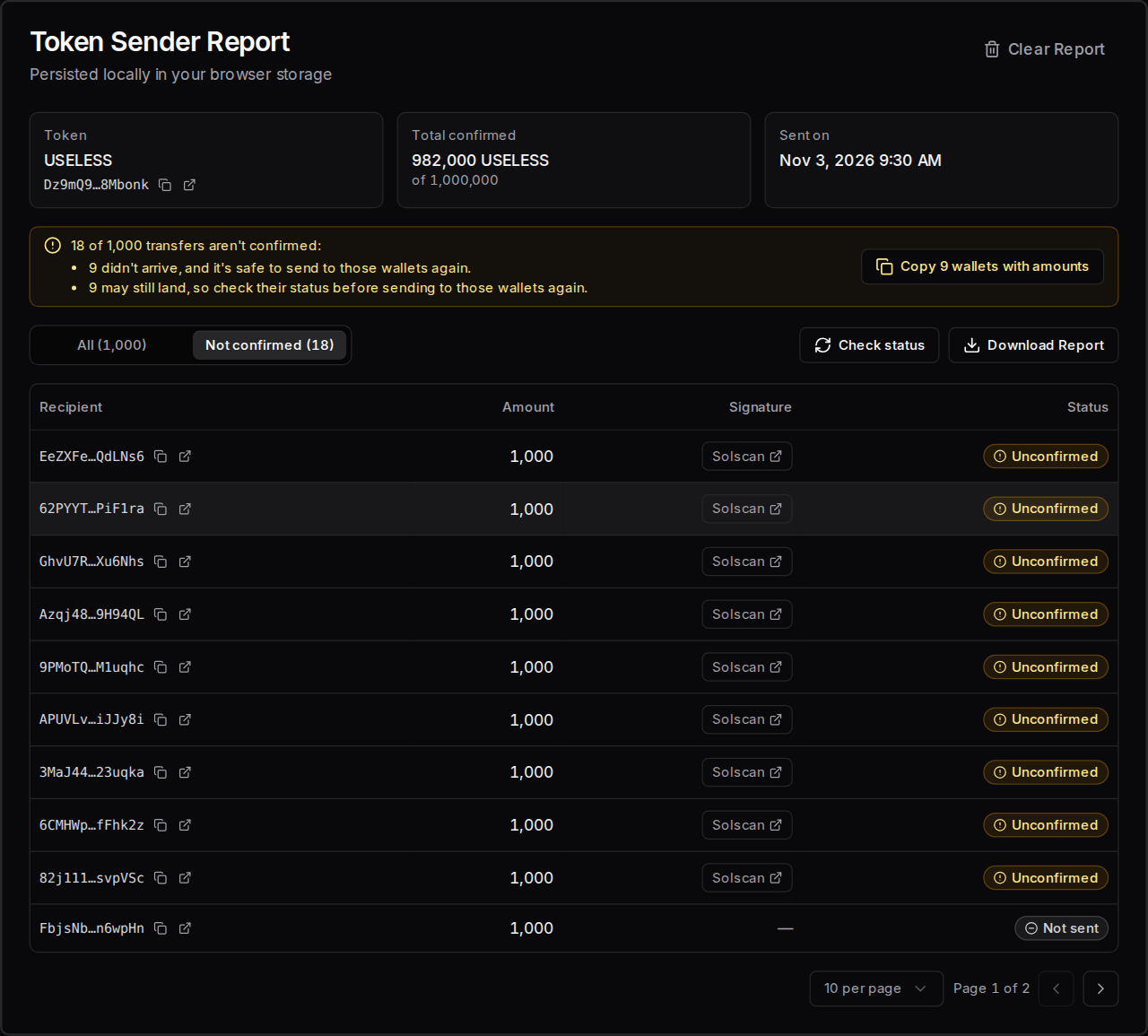
- Check the report. Token Sender Report shows the total confirmed, then each recipient, amount, signature and status. If a transfer isn't confirmed, click Check status before you send to that wallet again, because it may still land. Click Download Report to keep a copy, because the report is only saved in this browser and a new send can replace it.
Tokens that arrive without warning can look like scams, and some wallets hide them. Say publicly what you're sending and why, and never ask recipients to visit a link to claim tokens they've already received.
With Enable Compression on, the ATA fees go away. A token's first compressed send adds a one-time 0.05 SOL setup, which this token doesn't need:
After the send, the report shows what landed. This one is filtered to the wallets that aren't confirmed yet:
How does Solz.app send to thousands of wallets?
Solz.app splits your list into transactions, and groups them into batches. Your wallet signs up to 50 transactions per approval, then asks again. A large send can need many approvals, so Solz.app tells you how many before you start. Keep the tab open and in view until it finishes, because browsers slow hidden tabs.
These are the limits at 10,000 wallets:
| Send type | Wallets per transaction | Transactions | Wallet approvals |
|---|---|---|---|
| SOL, or SPL tokens to existing accounts | 18 | 556 | 12 |
| Token-2022 to existing accounts | 17 | 589 | 12 |
| New token accounts, SPL or Token-2022 | 9 | 1,112 | 23 |
| Compressed | 5 | 2,000 | 40 |
If you use an X Wallet, it asks once for the whole send.
Solz.app tests the first transaction before your wallet opens, and retries wallets that didn't receive tokens up to 3 times, raising the priority fee each time. A retry can ask you to approve again. If you click Stop, anything already sent stays sent. Stay on the page until the send finishes, because going to another page ends it after the current batch. The report is saved as each batch goes through, so it survives a reload or a closed tab.
| What you see | What it means | What to do |
|---|---|---|
| Successfully sent tokens to, followed by the wallet count | The send finished | Check the report |
| Nothing was sent, because a test of the first transaction failed | The token can't be sent, and the message gives the reason | Fix the reason, then send again |
| You declined in your wallet, so the send stopped | You rejected an approval | Send the rest from the report |
| Send stopped because most of a batch failed | Solz.app stopped so it wouldn't cost more fees | Read the reason, then send the rest from the report |
| Send stopped because nothing landed after 3 tries | The network may be congested | Raise the priority fee and send the rest from the report |
| Send stopped because the RPC is rate limiting requests | Solz.app's connection to Solana is getting too many requests | Wait a few minutes, then send the rest from the report |
| Send stopped because the RPC isn't answering | Solz.app's connection to Solana is down, and some transfers may still land | Use Check status in the report before sending again |
| Send stopped because your wallet couldn't sign | Your wallet failed to sign | Read the reason, then send the rest from the report |
Solz.app also warns you before you:
- Send to wallets the last report shows as paid or possibly paid.
- Replace a report that still has unconfirmed transfers.
- Start a second send in another tab of the same browser. This doesn't cover a second browser or device.
Amounts the token's decimals can't hold are refused.
Should I send tokens or let holders claim them?
Send with Multi Token Sender when you have a few hundred wallets or fewer, or when recipients shouldn't have to do anything. For thousands of wallets, Solz Airdrop locks the tokens once for a flat 1 SOL and lets each wallet claim its share, paying about 0.0008 SOL each in fees and rent.
| Multi Token Sender | Solz Airdrop | |
|---|---|---|
| How tokens arrive | Sent into each wallet | Each holder claims on the airdrop's page |
| You pay | 0.0005 SOL per wallet, plus about 0.0015 SOL for each new token account | 1 SOL per airdrop, however many wallets |
| Recipients pay | Nothing | About 0.0008 SOL in fees and rent to claim, or about 0.0023 SOL with a new token account |
| Most wallets | 10,000 per send | 1.5 million per airdrop |
| Who's included | Your list, or a Token Snapshot | A snapshot that leaves out pools, vaults and your wallet, or your list |
| Splits | Same amount, or your own amounts | Proportional, tiered, exact amounts or the same for everyone |
| Tokens nobody collects | Already sent | Come back to you after the claim window |
| Devnet, for testing | Yes | Yes |
For 1,000 wallets with no account for the token, a send costs about 1.99 SOL, or about 0.57 SOL compressed, against 1 SOL for a claimable airdrop. Below about 500 wallets, or about 1,800 compressed, sending costs less. Solz Airdrop has a guide for a list of wallets and one for a token's holders. The airdrop guide compares every size.
How do I send tokens to another token's holders?
Use Token Snapshot to get a token's holders, cleaned up and sorted biggest first, then click Send tokens to these holders to open Multi Token Sender with their addresses. Snapshots up to 1,000 holders are free, and larger ones cost 0.05 to 0.2 SOL. This is how you reward your own community, or reach a partner token's holders.
- Open the tool and connect your wallet. Go to Token Snapshot.
- Select the token whose holders you want. A free preview shows about how many holders it has, how much the top 10 hold, how many pools and locks are in the top 20, the token type, and the top holders, with pools, curves, locks and the burn address labelled.
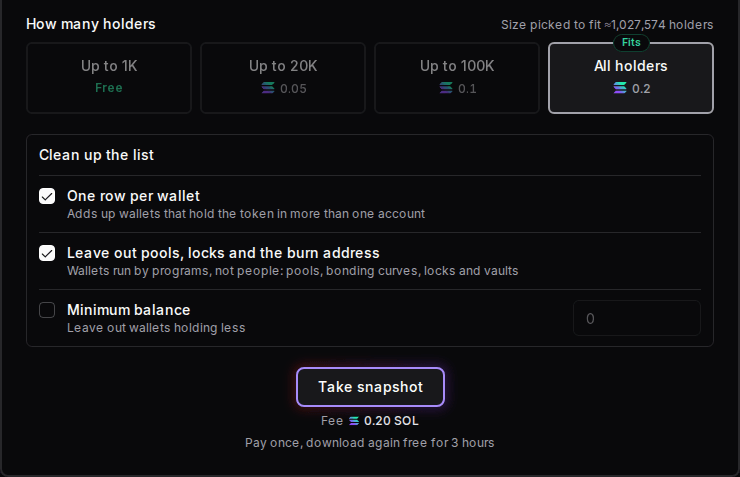
- Check the size. Under How many holders, Solz.app picks the size that fits the token, marked Fits: Up to 1K, Up to 20K, Up to 100K or All holders. The fee shows below the button.
- Clean up the list. One row per wallet adds up wallets that hold the token in more than one account. Leave out pools, locks and the burn address drops wallets run by programs. Both start on. Minimum balance leaves out wallets holding less than the amount you enter.
- Take the snapshot. Click Take snapshot. For a paid size, approve the payment, then sign a free message that proves the payment is yours. You can download it again free for 3 hours.
- Keep the tab open while it downloads. It shows how many holders it has read and the time left. If it stops, click Continue download, which doesn't charge again, or Save what's done to keep a partial file.
- Send it. The result shows Holders, Top 10 hold and Left out, and Withheld fees for a tax token. Click Send tokens to these holders to open Multi Token Sender with the addresses on Same Amount, or Copy addresses. Download again saves the CSV file again.
Here's a snapshot of Bonk. The preview counts about 1,027,574 holders, the top 10 hold 40.6% not counting pools and locks, and one pool or lock is in the top 20:
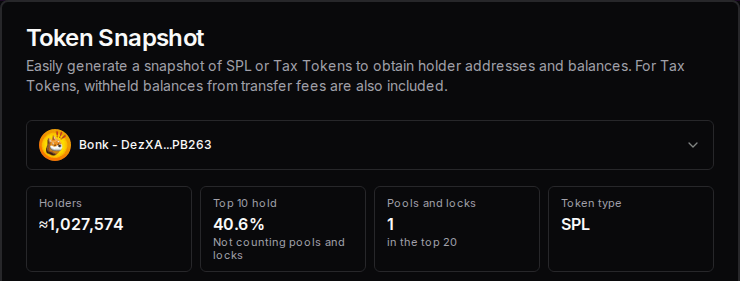
For that many holders, it picks All holders for 0.2 SOL, with both clean-up options on:
| Holders | Snapshot fee |
|---|---|
| Up to 1,000 | Free |
| Up to 20,000 | 0.05 SOL |
| Up to 100,000 | 0.1 SOL |
| All holders, up to 2 million token accounts | 0.2 SOL |
The CSV file has address,balance,label columns, sorted from the biggest balance down, and tax tokens add a withheld_balance column. The label names a pool, bonding curve, lock, staking wallet or the burn address, or just says Program, so you can see why a row is there. Staking wallets stay in the list even with Leave out pools, locks and the burn address on.
Set the amounts before you send. Send tokens to these holders gives every wallet the same amount. To reward holders in proportion to their balance, work out each amount in a spreadsheet and paste it into Multi Token Sender as address,amount, or upload the CSV file to Solz Airdrop as balances, and it splits a total proportionally or by tiers for you. One send takes up to 10,000 wallets, so split a longer list into parts.
A snapshot is a picture of one moment, and holders can change right after it.
What should I see during a snapshot?
Say a token has about 15,000 holders. Solz.app picks Up to 20K for 0.05 SOL. You click Take snapshot, approve the payment and sign the message. It says Verifying the payment, then Successfully paid for Token Snapshot, and counts up, such as Downloading 6,000 of ≈15,000 holders, about 1 min left. At the end, it saves the CSV file and shows the result. These numbers are an example.
| What you see | What it means | What to do |
|---|---|---|
| Saved, followed by the holder count and the file name | The snapshot finished and the file is saved | Check the result, then send |
| This size stops at a holder count. Pick a bigger size to get everyone. | The token has more holders than this size | Choose a bigger size and take it again |
| Download stopped after a holder count | The download stopped partway, and what it read is saved in a partial file | Click Continue download, which doesn't charge again |
| Your payment hasn't confirmed yet | Solz.app hasn't seen your payment on chain yet | Click Take snapshot again in a minute. You won't be charged twice |
| Your wallet can't sign messages, which a paid snapshot needs | A paid snapshot needs a signed message to prove the payment is yours | Use another wallet |
| Token Sender takes up to 10,000 wallets | The list is too long for one send | Split the CSV file into smaller parts |
| Top holders aren't available for this token | The free preview couldn't load its top holders | You can still take the snapshot |
| Invalid Token Address | That address isn't a token | Copy the token's address again |
Can Solz.app snapshot very large tokens?
Yes. All holders goes up to 2 million token accounts for 0.2 SOL, and it keeps reading until it reaches the end of the list or that limit. That goes further than SlerfTools: in our tests with Jupiter (JUP), its exports stopped at 100,000 rows and its loading stopped at about 501,000 token accounts at most. Keep the tab open while it runs. If it stops, Continue download picks up where it left off without charging again. See the full comparison with SlerfTools.
What is token compression?
Compression records a recipient's balance using ZK Compression instead of creating a regular token account. A regular account costs about 0.0015 SOL in rent, while a compressed one costs about 0.000005 SOL. That makes compression a good fit for sending to many new wallets, where most recipients have never held your token and would otherwise need a new account.
The technology comes from Light Protocol, and the tokens are the same tokens. Recipients can hold them in compressed form, or turn them into regular tokens whenever they like.
- Best for: sending to wallets that don't hold your token yet.
- Less useful for: recipients who already have an account for the token, because no rent is needed for them anyway.
- Not for tax tokens: Light's list of supported Token-2022 extensions doesn't include transfer fees, so send tax tokens the standard way.
- Not needed for SOL: sending SOL doesn't need a token account.
Light Protocol says Phantom and Backpack support compressed tokens. Other wallets may not show them until they're decompressed.
How do recipients decompress their tokens?
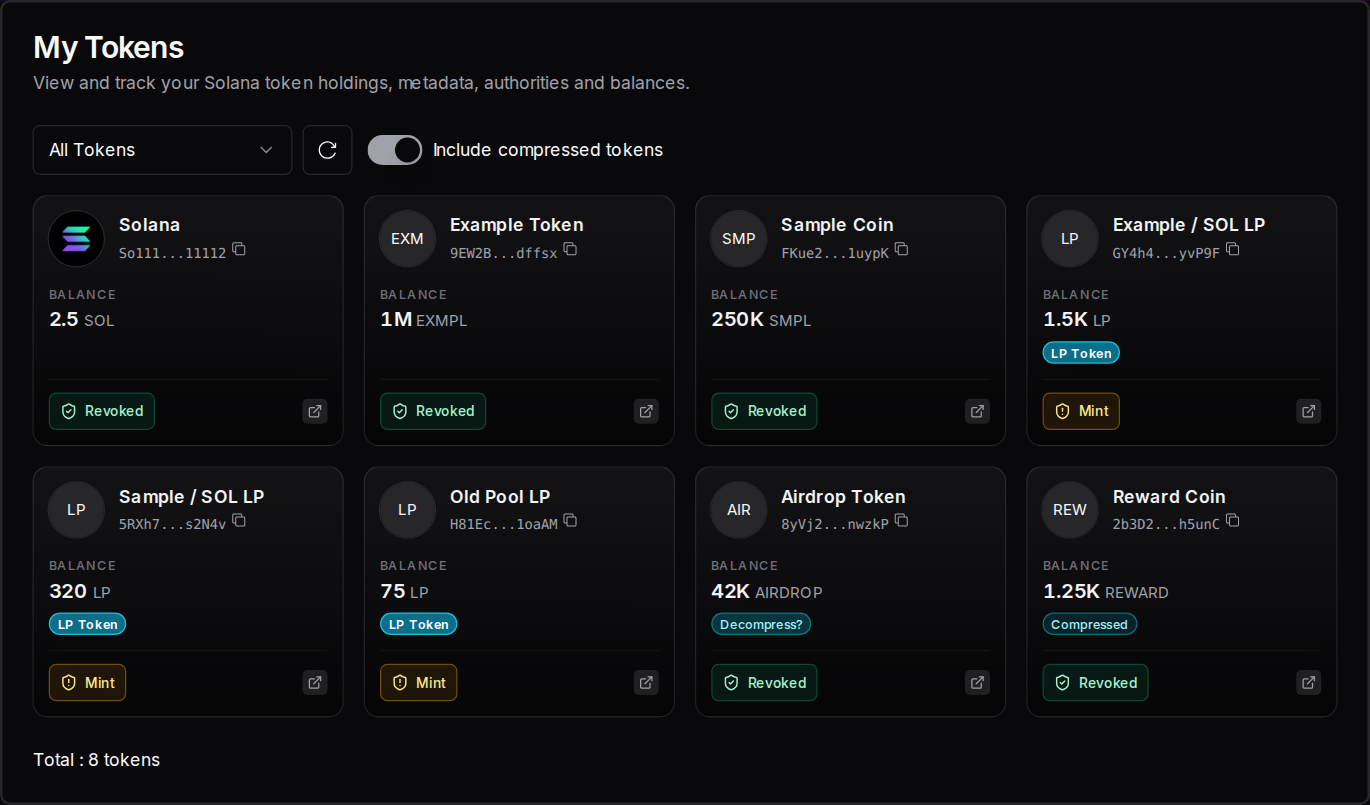
Recipients open My Tokens on Solz.app, connect their wallet and turn on Include compressed tokens. Then they click Decompress on the token and approve the transaction, which turns it into a regular token in their wallet. They can do this at any time, and they may need to before a wallet shows the token.
- Open My Tokens. Connect the wallet that received the tokens, then click the tokens tile under Your wallet in the sidebar, or go to My Tokens.
- Show compressed tokens. Turn on Include compressed tokens.
- Decompress. Compressed tokens have a Compressed label. Hover over it so it changes to Decompress?, click it, and approve in your wallet.
- Repeat if needed. Each decompress handles up to 20 compressed balances of that token, the largest first, so someone who received many compressed transfers may need to do this more than once.
When you announce a compressed send, include these steps or a link to this guide, so recipients know where to find their tokens.
How do priority fees help if transactions fail?
A priority fee is an extra bid that encourages validators to process your transaction when Solana is busy. If transactions fail or expire during a large send, raising it improves your chances. Solz.app offers Eco, Normal, Fast, Turbo and Max, and starts on Normal. Each step costs more per transaction, so large sends add up quickly.
If some transactions fail, try these in order:
- Check the report. See which recipients didn't get a confirmed status.
- Raise the priority fee. Use the speed button at the top of the app. A transaction that expired was never processed, so it's safe to try again.
- Resend only to the wallets that didn't receive it. In the report, click Copy wallets with amounts and paste the list back in. It only includes wallets that failed or weren't sent, Solz.app switches to Different Amount for you, and the send continues the same report. Check the status of unconfirmed transfers first, because they may still land.
- Try a smaller batch, or wait. Fewer wallets and a quieter time on the network both help.
Solz.app charges its per-wallet fee inside each transaction, so a failed transaction charges none and wallets that weren't reached don't pay it. Network fees still add up on a big run, so it's better to choose a suitable speed before you start. Solz.app shows the current Priority Fee Market Rate above the Send button.
| Speed | Priority fee per standard transaction | Priority fee per compressed transaction | Network fees for 100,000 wallets, standard | Network fees for 100,000 wallets, compressed |
|---|---|---|---|---|
| Eco | 0.0000033 SOL | 0.0000051 SOL | 0.09 SOL | 0.20 SOL |
| Normal | 0.0000334 SOL | 0.000051 SOL | 0.43 SOL | 1.12 SOL |
| Fast | 0.000334 SOL | 0.00051 SOL | 3.77 SOL | 10.30 SOL |
| Turbo | 0.00167 SOL | 0.00255 SOL | 18.61 SOL | 51.10 SOL |
| Max | 0.01002 SOL | 0.0153 SOL | 111.39 SOL | 306.10 SOL |
Priority fees are charged on the compute each transaction requests. These figures are for full transactions: 334,000 units for a standard one with 9 new accounts, and 510,000 for a compressed one with 5 wallets. The network fee columns also include Solana's 0.000005 SOL base fee per transaction.
How much does a large send cost?
Compression saves about 74% when recipients have no token account: sending to 5,000 wallets costs about 2.63 SOL compressed, against 9.96 SOL standard. The saving comes from skipping token account rent. The 0.0005 SOL per-wallet Solz.app fee applies either way, and you also need the tokens you're sending.
These are calculated from the fees and batch sizes in Solz.app's code at the Normal speed, not from live sends of this size. They assume no failed transactions or resends. Network conditions and the speed you choose will change the network fees.
Standard send, when no recipient has a token account:
| Recipients | Solz.app fee | Token account rent | Transactions | Wallet approvals | Network fees | Total |
|---|---|---|---|---|---|---|
| 5,000 | 2.50 SOL | 7.44 SOL | 556 | 12 | 0.02 SOL | 9.96 SOL |
| 10,000 | 5.00 SOL | 14.88 SOL | 1,112 | 23 | 0.04 SOL | 19.93 SOL |
| 50,000 | 25.00 SOL | 74.42 SOL | 5,560 | 115 | 0.21 SOL | 99.64 SOL |
| 100,000 | 50.00 SOL | 148.84 SOL | 11,120 | 230 | 0.43 SOL | 199.27 SOL |
Compressed send:
| Recipients | Solz.app fee | Compression setup | Compressed accounts | Transactions | Wallet approvals | Network fees | Total |
|---|---|---|---|---|---|---|---|
| 5,000 | 2.50 SOL | 0.05 SOL | 0.03 SOL | 1,000 | 20 | 0.06 SOL | 2.63 SOL |
| 10,000 | 5.00 SOL | 0.05 SOL | 0.05 SOL | 2,000 | 40 | 0.11 SOL | 5.21 SOL |
| 50,000 | 25.00 SOL | 0.05 SOL | 0.25 SOL | 10,000 | 200 | 0.56 SOL | 25.86 SOL |
| 100,000 | 50.00 SOL | 0.05 SOL | 0.50 SOL | 20,000 | 400 | 1.12 SOL | 51.67 SOL |
How they compare:
| Recipients | Standard, nobody has an account | Standard, half have one | Compressed | Saved against nobody having one |
|---|---|---|---|---|
| 5,000 | 9.96 SOL | 6.23 SOL | 2.63 SOL | 7.33 SOL (74%) |
| 10,000 | 19.93 SOL | 12.47 SOL | 5.21 SOL | 14.72 SOL (74%) |
| 50,000 | 99.64 SOL | 62.34 SOL | 25.86 SOL | 73.78 SOL (74%) |
| 100,000 | 199.27 SOL | 124.68 SOL | 51.67 SOL | 147.60 SOL (74%) |
A few things to plan for:
- Rent: these use Solana's current rent of about 0.00149 SOL for a token account, or about 0.00151 to 0.00157 SOL for Token-2022. The form reads the rent from the chain, so its summary shows the current figure for your token.
- Sends: one send takes up to 10,000 wallets, so 5,000 recipients is 1 send and 100,000 is 10. Solz.app splits each send into batches, and your wallet signs up to 50 transactions per approval.
- SOL to keep in your wallet: Solz.app checks for a quarter more network fees than the estimate, plus a 0.0012 SOL buffer, so the balance it asks for can be above Total Est. Fees.
- Compressed transactions are bigger on fees. Each holds up to 5 wallets and requests more compute, while a standard one holds up to 9 with new accounts or 18 with existing ones. As the table above shows, network fees for compressed sends grow faster at high speeds. At Turbo, compression still saves a lot, but at Max a compressed send to 100,000 wallets costs more than a standard one: about 356.65 SOL against 310.23 SOL.
- The other costs: to reach another token's holders, add the snapshot fee of up to 0.2 SOL. The compression setup is only paid once per token.
How much do Multi Token Sender and Token Snapshot cost?
Multi Token Sender costs 0.0005 SOL per wallet, whichever way you send. A standard send also pays about 0.0015 SOL of rent for each new token account, and the first compressed send of a token costs 0.05 SOL to set up. Token Snapshot is free under 1,000 holders, and network fees are extra.
| Item | Cost |
|---|---|
| Multi Token Sender | 0.0005 SOL per wallet |
| New token account (standard send) | About 0.0015 SOL per wallet |
| Compression setup | 0.05 SOL, once per token |
| Compressed account | About 0.000005 SOL per wallet |
| Token Snapshot | Free to 0.2 SOL, by holder count |
| Solana base fee | 0.000005 SOL per transaction |
| Priority fee | Depends on your speed setting |
FAQ
What's the maximum number of wallets I can send to?
One send takes up to 10,000 wallets, and blank lines don't count. For more, split your list into several sends.
Should I always use compression?
No. It helps most when recipients don't already have an account for your token. If most of them do, a standard send has no rent to save, and it costs less in network fees.
Can I send different amounts to each wallet?
Yes. Switch to Different Amount and enter address,amount on each line, or upload a CSV file in that format.
Can I send SOL with Multi Token Sender?
Yes. Select SOL as the token. There's no token account to create, so there's no rent to pay.
What does ATA mean?
It stands for Associated Token Account: the regular account a wallet uses to hold a particular token. Each wallet needs one per token, unless it holds the token in compressed form.
Why don't recipients see their compressed tokens?
Some wallets don't show compressed tokens. Recipients can always see them in My Tokens by turning on Include compressed tokens, and can decompress them there.
Do I need Token Snapshot to send tokens?
No. It's only for when you want another token's holders. You can use any list of wallets you have.
Can holders claim tokens instead of me sending them?
Yes, with Solz Airdrop. You lock the tokens once for a flat 1 SOL, and each wallet claims its share and pays for its own claim, about 0.0008 SOL in fees and rent. See the guides for a list of wallets and a token's holders.
Sources
Solz.app's fees, batch sizes and form options come from the app. The rest comes from:
- Light Protocol: compressed tokens overview
- Light Protocol: Token-2022 with compression
- Light Protocol: wallet support