
How to create a Raydium liquidity pool
How do I create a Raydium liquidity pool for my token?
Open Create Liquidity Pool on Solz.app, choose Raydium CPMM, and pick your token and a quote token such as SOL. Set the launch price and your deposit, pick a fee tier, click Create Liquidity Pool and sign. It costs about 0.25 SOL, plus your liquidity.
Prerequisites
- A Solana wallet that holds the token you want to pair.
- The token amount and the quote amount you plan to add.
- At least about 0.27 SOL on top of any SOL you're adding. Solz.app checks this before it builds the transaction.
- For a Raydium AMM pool only: an OpenBook market ID. CPMM doesn't need one.
Steps to create your pool
- Open the tool and connect your wallet. Go to Create Liquidity Pool and connect the wallet that holds your token.
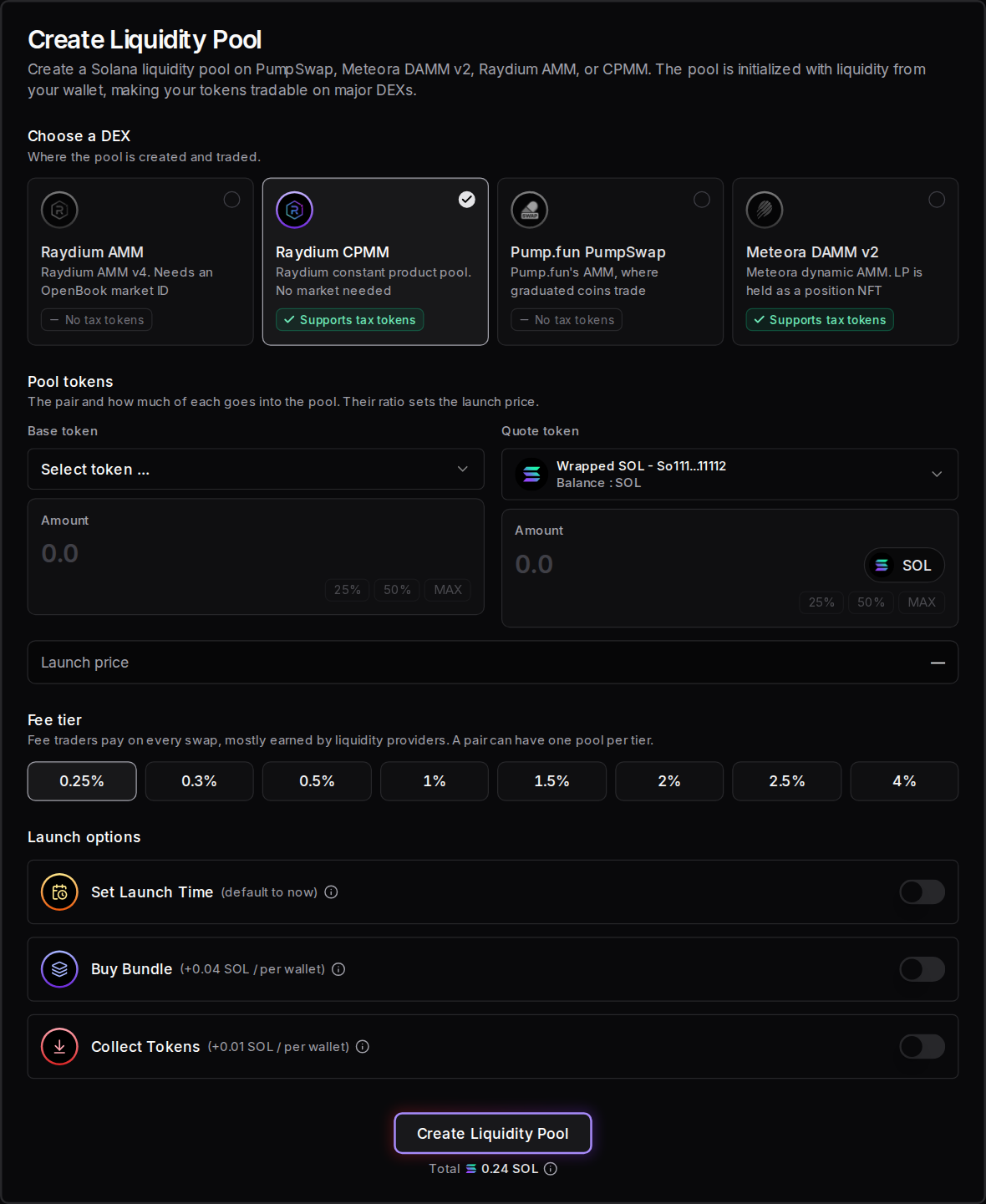
- Choose a DEX. On Standard pools, pick Raydium CPMM, the default. It needs no market and supports tax tokens. The comparison below explains when Raydium AMM might suit you instead, and standard vs concentrated pools covers the other kind.
- Choose the pool tokens. Select your token as the Base token and the token to pair it with as the Quote token. SOL, USDC, USDT, USD1 and PYUSD are listed first.
- Set the price and deposit. Enter both amounts and the price follows. Or set a Launch price, or click Use market price, and each amount fills in the other. Check the price carefully.
- Pick a fee tier. This is what traders pay on every swap, and it can't be changed later. Fee tiers are explained below. A pair can have one CPMM pool per tier, and Solz.app marks tiers that already have a pool, with a link to add to it instead.
- Set launch options if you need them. Set Launch Time opens trading at a chosen time instead of right away. Buy Bundle lets several wallets buy at launch: up to 3 seconds after it on CPMM, or in the same block on Raydium AMM. You can't use the two together.
- Create the pool. Check Review and the total under the button, click Create Liquidity Pool and approve in your wallet. The pool then appears in My Liquidity Pools.
What should I see when a pool succeeds or fails?
When it works, Solz.app says CPMM Pool has been successfully created, and the pool appears in My Liquidity Pools. If you're short of SOL or your token, a red message tells you what you need before anything is sent. Other messages point to the token pair or your bundle.
In the example above, a wallet holding 1,000,000 USELESS and 15 SOL clicks Use market price, which fills in 0.00135533 SOL, and enters 5,000 USELESS. Solz.app fills in 6.77665 SOL. USELESS already has pools at 0.25%, 1% and 4%, so this one uses 0.3%. The total of about 0.25 SOL is the 0.06 SOL Solz.app fee, the 0.15 SOL Raydium fee and estimated network rent.
| What you see | What it means | What to do |
|---|---|---|
| CPMM Pool has been successfully created, or Standard AMM Pool has been successfully created | Your pool is live | Find it in My Liquidity Pools, then decide whether to burn or lock your liquidity pool tokens |
| Not enough balance, you need at least the amount shown, required for gas fees. Try to reduce Quote Amount or top up SOL balance. | Your SOL can't cover both the pool's SOL and the costs. With 10 SOL going in, 10.1 SOL wouldn't be enough | Lower the SOL amount, or add SOL |
| Not enough balance of USELESS, you have, followed by your balance | You entered more of the token than you hold | Lower the amount |
| This pair already has a pool at 0.25%. Add to it instead. | That tier is taken | Follow the link to add to it, or pick another tier |
| You don't own the token pair, followed by the token address | This wallet doesn't hold that token | Connect the wallet that holds it |
| Error in buy amount of the wallets | A Buy Bundle wallet's amount isn't valid | Check the amount for each wallet |
| Invalid OpenBook Market ID / AMM ID | The market ID for a Raydium AMM pool isn't valid | Copy the ID again, or use CPMM, which doesn't need one |
| Transaction timeout ! This might be due to you sending invalid transactions / congested network | It didn't confirm in time | Check your wallet history before trying again, because it may have gone through. If not, raise your priority fee |
What is the difference between Raydium CPMM and AMM?
Both price tokens with the same constant product formula, so trading works the same way. The differences are around the pool. CPMM is Raydium's newer design, with a choice of fee tiers, tax token support and no OpenBook market. AMM v4 is the 2021 original, with one fixed 0.25% fee and standard SPL tokens only.
| Raydium CPMM | Raydium AMM (v4) | |
|---|---|---|
| Launched | June 2024 | February 2021 |
| Raydium's guidance | Recommended default | "Discouraged but accepted" |
| Pricing | Constant product (x × y = k) | Constant product (x × y = k) |
| Trading fee | 8 tiers on Solz.app, 0.25% to 4% | 0.25% only |
| Liquidity providers' share of the fee | 84% | 88% |
| Token-2022 and tax tokens | Supported | Not supported |
| OpenBook market ID on Solz.app | Not needed | Required |
| Cost on Solz.app before liquidity | About 0.25 SOL | At least about 0.63 SOL, including the market |
| Buy Bundle on Solz.app | Delayed, up to 3 seconds after launch | Same block: 4 wallets, then 5 per bundle |
| Raydium's own site | Creates these pools | No longer offers creating them |
At the same 0.25% fee, liquidity providers earn slightly more on AMM v4: 0.22% of each trade against 0.21% on CPMM.
Why does Solz.app default to CPMM?
CPMM is cheaper to create and works with more tokens, and it's what Raydium itself recommends for new pools. It needs no OpenBook market, accepts tax tokens, and lets you choose a fee tier. AMM v4 mainly makes sense if you specifically want same-block bundles, which CPMM can't offer on Solz.app.
- Lower cost: an AMM pool on Solz.app needs an OpenBook market first. That adds a 0.09 SOL service fee and at least 0.29 SOL of market costs.
- The market no longer does anything for trading: Raydium removed OpenBook from AMM v4 in July 2026, so swaps only use the pool. Solz.app's form still asks for a market ID.
- Tax tokens work: a Token-2022 token can't go in an AMM v4 pool.
- Fee choice: you can price the pool for your token instead of accepting 0.25%.
- Future support: Raydium describes AMM v4 as getting bug fixes only, with new features going elsewhere.
Choose AMM v4 if you want a same-block Buy Bundle, or if your pair already has a deep AMM v4 pool you'd rather not split liquidity from. Existing AMM v4 pools aren't going away: Raydium says AMM v4 isn't deprecated, and many are still active.
How do Raydium trading fee tiers work?
A fee tier is the percentage traders pay on every swap in your pool. You choose it once, when you create a CPMM pool, and it can't be changed later. On Raydium's current settings, liquidity providers receive 84% of that fee, and the other 16% funds RAY buybacks and Raydium's treasury. Solz.app takes none of it.
Here's how each tier on Solz.app splits a 1,000 USDC trade:
| Fee tier | Trader pays | Liquidity providers (84%) |
|---|---|---|
| 0.25% | 2.50 USDC | 2.10 USDC |
| 0.3% | 3.00 USDC | 2.52 USDC |
| 0.5% | 5.00 USDC | 4.20 USDC |
| 1% | 10.00 USDC | 8.40 USDC |
| 1.5% | 15.00 USDC | 12.60 USDC |
| 2% | 20.00 USDC | 16.80 USDC |
| 2.5% | 25.00 USDC | 21.00 USDC |
| 4% | 40.00 USDC | 33.60 USDC |
The rates come from Raydium's live pool configs.
What is the fee used for?
- Paying liquidity providers. This is the reward for putting tokens in the pool, and for the risk of the price moving against them. Their share stays in the pool, so each LP token gradually becomes worth more. They collect it when they withdraw, not as separate payments.
- Funding Raydium. The rest buys RAY and goes to Raydium's treasury.
As the pool creator, you only earn from the fee through the LP tokens you hold. If you burn your LP tokens, you can no longer withdraw that liquidity, so you give up its share of the fees too.
CPMM also has an optional creator fee, charged on top of the tier and set to 0.05% on the tiers Solz.app shows. Pools created on Solz.app leave it off, so traders pay only the tier and there's no creator fee to claim.
Which tier should you choose?
A higher tier earns more per trade, but it can put traders off. Raydium's guidance is 0.25% for major volatile pairs and 1% for memecoins and other low-liquidity pairs. It also warns that a pair with plenty of trading can earn more at 0.25% than at 1%, because the higher fee can reduce volume.
- Traders compare net prices. A high fee makes your pool a worse deal than a cheaper pool for the same pair.
- More pools split your liquidity. A pair can have one pool per tier, so changing your mind means a new pool, and liquidity spread across two pools moves the price more per trade.
- Tax tokens pay twice. A Token-2022 transfer fee is separate from the pool's fee, so traders pay both.
How much does it cost to create a Raydium pool on Solz.app?
Creating a Raydium pool costs a 0.06 SOL Solz.app service fee and a 0.15 SOL Raydium fee. With estimated network rent, the total under the button is about 0.25 SOL. You also need your liquidity, and Solz.app checks that you hold 0.06 SOL for token accounts. Buy Bundle and Collect Tokens cost extra per wallet.
| Item | Cost |
|---|---|
| Service fee | 0.06 SOL |
| Raydium CPMM or AMM fee | 0.15 SOL |
| Estimated network rent, included in the total | About 0.04 SOL |
| Token account allowance in the balance check | 0.06 SOL |
| OpenBook market, Raydium AMM only | 0.09 SOL service fee, plus 0.29 SOL or more in market costs |
| Your liquidity | The amounts you enter |
| Buy Bundle (optional) | +0.01 SOL per wallet |
| Collect Tokens (optional, with Buy Bundle) | +0.01 SOL per wallet |
FAQ
Can I change the fee tier after creating the pool?
No. The tier is set when the pool is created. To use a different tier, you'd create another pool for the pair on that tier and move your liquidity to it.
Do I need an OpenBook market for CPMM?
No. Only Raydium AMM pools ask for a market ID on Solz.app.
Can I create a pool somewhere other than Raydium?
Yes. The same tool creates PumpSwap and Meteora DAMM v2 pools, for about 0.07 and 0.08 SOL, with no Raydium fee. It also creates concentrated pools on Raydium CLMM, PancakeSwap and Meteora DLMM.
Why does Solz.app say I don't own the token pair?
Your connected wallet needs to hold the tokens you're adding. Switch to the wallet that holds them, or check that you selected the right token.
When will my token show up on other sites?
Once liquidity is live, your token can appear on Jupiter, Raydium, Photon, DexScreener and similar platforms. Those sites decide when and how to list it.
What should I do with my LP tokens?
They're how you withdraw your liquidity later, so keep them safe. To withdraw, use Remove Liquidity for 0.06 SOL. To show buyers that the liquidity can't be pulled, you can burn them for good, or lock them until a date with Token Lock.
Sources
Solz.app's fees and form options come from the app. The rest comes from Raydium: